Flameshot: [ Release Testing ] Release .rpm, .deb, .AppImage for testing!
:tada: I'm very happy to publish this news!
Release .rpm, .deb, .AppImage package for testing!
The download link (files stored for 14 days from now):
- fedora 25: https://transfer.sh/BRI9g/flameshot_0.5.0-x86_64.rpm
- fedora 26: https://transfer.sh/Y2zFt/flameshot_0.5.0-x86_64.rpm
- ubuntu 16.04 LTS: https://transfer.sh/5i6pq/flameshot_0.5.0-x86_64.deb
- ubuntu 17.04: https://transfer.sh/zpZEq/flameshot_0.5.0-x86_64.deb
- ubuntu 17.10: https://transfer.sh/10uhZ4/flameshot_0.5.0-x86_64.deb
- debian 8: https://transfer.sh/nmKIx/flameshot_0.5.0-x86_64.deb
- debian 9: https://transfer.sh/c0UTi/flameshot_0.5.0-x86_64.deb
- AppImage: https://transfer.sh/5CCBh/flameshot_x86_64_0.5.0.AppImage
Windows portable port (NOTICE official release with support for Windows is 0.6.0. Can try this Windows portable at your own risk, but currently please do not try to report any issues about Windows):
- Windows x64: https://transfer.sh/nUPvE/flameshot_win_X64_portable_0.5.0.zip
- Windows x86: https://transfer.sh/euVaH/flameshot_win_x86_portable_0.5.0.zip
(under Windows: using msvc compiler.)
build details:
https://travis-ci.org/ZetaoYang/flameshot/builds/328444596
https://ci.appveyor.com/project/ZetaoYang/flameshot/build/job/13o15j8yywjsfu3v
https://ci.appveyor.com/project/ZetaoYang/flameshot/build/job/i70ukfnx9qb27w1b
If the link above fails, use the alternate link:
fedora 25: https://drop.me/omVJwv~~fedora 26: https://drop.me/aq3WwY~~ubuntu 16.04 LTS: https://drop.me/M0xAvW~~ubuntu 17.04: https://drop.me/BxpnwV~~ubuntu 17.10: https://drop.me/Mv7Gw9~~debian 8: https://drop.me/BrxGwg~~debian 9: https://drop.me/ByWAwJ~~AppImage: https://drop.me/o293yD
~~(NOTICE official release with support for Windows is 0.6.0. Can try this Windows portable at your own risk, but currently please do not try to report any issues about Windows):Windows x64: https://drop.me/oj2Jw7~~Windows x86: https://drop.me/MYmdWj~~
Welcome to test, discuss here.
(When discussing, be sure to explain your system and desktop environment.)
 ZetaoYang
All 43 comments
The windows version is still in development and requires some work to be complete. Most things work but keep in mind the official release with support for Windows is 0.6.0.
 lupoDharkael
on 13 Jan 2018
lupoDharkael
on 13 Jan 2018
@lupoDharkael Yes, I know. And I wish you can add travis build status badge to README.md
ZetaoYang
on 13 Jan 2018
I know you are aware of the situation, but people could try to download the portable version and try to report issues as they don't know it.
lupoDharkael
on 13 Jan 2018
Getting on netrunner-desktop-1703-64bit.iso:
live@live-pc:~$ Downloads/flameshot_x86_64_0.5.0.AppImage
QXcbConnection: XCB error: 9 (BadDrawable), sequence: 267, resource id: 77594629, major code: 55 (CreateGC), minor code: 0
QXcbConnection: XCB error: 9 (BadDrawable), sequence: 268, resource id: 77594629, major code: 130 (Unknown), minor code: 3
Why could that be? Attaching the output of qdbus org.kde.KWin /KWin supportInformation in case it helps.
 probonopd
on 14 Jan 2018
probonopd
on 14 Jan 2018
Ubuntu 17.10:
- "Launch Flameshot" got no UI? no icon tray? (still start a process)
- "Configure Flameshot" looks like working (except for tray icon)
Working perfectly if I use "Take graphical screenshot"
Any way to use the printscreen button?
 scoony
on 14 Jan 2018
scoony
on 14 Jan 2018
I agree with Scoony that "Launch Flameshot" shortcut is misleading and useless - "Take Graphical Screenshot" starts the service as well. The .deb file works flawlessly with Ubuntu 17.10 and Xorg. Thank you!
 uuencode
on 14 Jan 2018
uuencode
on 14 Jan 2018
Debian Buster.
Like @scoony said, _Launch Flameshot_ does nothing (at least, nothing seems to happen, no UI, no tray icon)),
_Take Graphical Screenshot_ works though.
 4goodapp
on 14 Jan 2018
4goodapp
on 14 Jan 2018
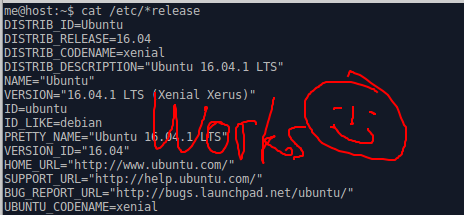
AppImage works here:
probonopd
on 15 Jan 2018
When one starts the AppImage, could it directly do the screenshot rather than waiting in the notification area as an icon that could easily be overlooked?
probonopd
on 15 Jan 2018
Don't forget to run sudo make uninstall if you've installed it before with sudo make install.
 thomas-mc-work
on 16 Jan 2018
thomas-mc-work
on 16 Jan 2018
Works on Ubuntu 16.04!
The deb package indicates that no dependencies are required. Is that really true?
$ ldd /usr/bin/flameshot
linux-vdso.so.1 =>  (0x00007fff14664000)
libQt5Widgets.so.5 => /usr/lib/x86_64-linux-gnu/libQt5Widgets.so.5 (0x00007f22dd97e000)
libQt5Gui.so.5 => /usr/lib/x86_64-linux-gnu/libQt5Gui.so.5 (0x00007f22dd436000)
libQt5DBus.so.5 => /usr/lib/x86_64-linux-gnu/libQt5DBus.so.5 (0x00007f22de185000)
libQt5Network.so.5 => /usr/lib/x86_64-linux-gnu/libQt5Network.so.5 (0x00007f22dd2dc000)
libQt5Core.so.5 => /usr/lib/x86_64-linux-gnu/libQt5Core.so.5 (0x00007f22dce06000)
libstdc++.so.6 => /usr/lib/x86_64-linux-gnu/libstdc++.so.6 (0x00007f22dca84000)
libm.so.6 => /lib/x86_64-linux-gnu/libm.so.6 (0x00007f22dc77b000)
libgcc_s.so.1 => /lib/x86_64-linux-gnu/libgcc_s.so.1 (0x00007f22dc565000)
libc.so.6 => /lib/x86_64-linux-gnu/libc.so.6 (0x00007f22dc19b000)
libpthread.so.0 => /lib/x86_64-linux-gnu/libpthread.so.0 (0x00007f22dbf7e000)
libgobject-2.0.so.0 => /usr/lib/x86_64-linux-gnu/libgobject-2.0.so.0 (0x00007f22dbd2b000)
libglib-2.0.so.0 => /lib/x86_64-linux-gnu/libglib-2.0.so.0 (0x00007f22dba1a000)
libX11.so.6 => /usr/lib/x86_64-linux-gnu/libX11.so.6 (0x00007f22db6e0000)
libpng12.so.0 => /lib/x86_64-linux-gnu/libpng12.so.0 (0x00007f22db4bb000)
libharfbuzz.so.0 => /usr/lib/x86_64-linux-gnu/libharfbuzz.so.0 (0x00007f22db25d000)
libz.so.1 => /lib/x86_64-linux-gnu/libz.so.1 (0x00007f22db043000)
libGL.so.1 => /usr/lib/x86_64-linux-gnu/mesa/libGL.so.1 (0x00007f22dadd0000)
libdbus-1.so.3 => /lib/x86_64-linux-gnu/libdbus-1.so.3 (0x00007f22dab84000)
libproxy.so.1 => /usr/lib/x86_64-linux-gnu/libproxy.so.1 (0x00007f22da963000)
libicui18n.so.55 => /usr/lib/x86_64-linux-gnu/libicui18n.so.55 (0x00007f22da501000)
libicuuc.so.55 => /usr/lib/x86_64-linux-gnu/libicuuc.so.55 (0x00007f22da16d000)
libpcre16.so.3 => /usr/lib/x86_64-linux-gnu/libpcre16.so.3 (0x00007f22d9f07000)
libdl.so.2 => /lib/x86_64-linux-gnu/libdl.so.2 (0x00007f22d9d03000)
librt.so.1 => /lib/x86_64-linux-gnu/librt.so.1 (0x00007f22d9afb000)
/lib64/ld-linux-x86-64.so.2 (0x00007f22de00b000)
libffi.so.6 => /usr/lib/x86_64-linux-gnu/libffi.so.6 (0x00007f22d98f3000)
libpcre.so.3 => /lib/x86_64-linux-gnu/libpcre.so.3 (0x00007f22d9683000)
libxcb.so.1 => /usr/lib/x86_64-linux-gnu/libxcb.so.1 (0x00007f22d9461000)
libfreetype.so.6 => /usr/lib/x86_64-linux-gnu/libfreetype.so.6 (0x00007f22d91b7000)
libgraphite2.so.3 => /usr/lib/x86_64-linux-gnu/libgraphite2.so.3 (0x00007f22d8f91000)
libexpat.so.1 => /lib/x86_64-linux-gnu/libexpat.so.1 (0x00007f22d8d68000)
libxcb-dri3.so.0 => /usr/lib/x86_64-linux-gnu/libxcb-dri3.so.0 (0x00007f22d8b65000)
libxcb-present.so.0 => /usr/lib/x86_64-linux-gnu/libxcb-present.so.0 (0x00007f22d8962000)
libxcb-sync.so.1 => /usr/lib/x86_64-linux-gnu/libxcb-sync.so.1 (0x00007f22d875b000)
libxshmfence.so.1 => /usr/lib/x86_64-linux-gnu/libxshmfence.so.1 (0x00007f22d8558000)
libglapi.so.0 => /usr/lib/x86_64-linux-gnu/libglapi.so.0 (0x00007f22d8328000)
libXext.so.6 => /usr/lib/x86_64-linux-gnu/libXext.so.6 (0x00007f22d8116000)
libXdamage.so.1 => /usr/lib/x86_64-linux-gnu/libXdamage.so.1 (0x00007f22d7f13000)
libXfixes.so.3 => /usr/lib/x86_64-linux-gnu/libXfixes.so.3 (0x00007f22d7d0d000)
libX11-xcb.so.1 => /usr/lib/x86_64-linux-gnu/libX11-xcb.so.1 (0x00007f22d7b0b000)
libxcb-glx.so.0 => /usr/lib/x86_64-linux-gnu/libxcb-glx.so.0 (0x00007f22d78f2000)
libxcb-dri2.so.0 => /usr/lib/x86_64-linux-gnu/libxcb-dri2.so.0 (0x00007f22d76ed000)
libXxf86vm.so.1 => /usr/lib/x86_64-linux-gnu/libXxf86vm.so.1 (0x00007f22d74e7000)
libdrm.so.2 => /usr/lib/x86_64-linux-gnu/libdrm.so.2 (0x00007f22d72d6000)
libsystemd.so.0 => /lib/x86_64-linux-gnu/libsystemd.so.0 (0x00007f22de0f2000)
libicudata.so.55 => /usr/lib/x86_64-linux-gnu/libicudata.so.55 (0x00007f22d581f000)
libXau.so.6 => /usr/lib/x86_64-linux-gnu/libXau.so.6 (0x00007f22d561b000)
libXdmcp.so.6 => /usr/lib/x86_64-linux-gnu/libXdmcp.so.6 (0x00007f22d5415000)
libselinux.so.1 => /lib/x86_64-linux-gnu/libselinux.so.1 (0x00007f22d51f3000)
liblzma.so.5 => /lib/x86_64-linux-gnu/liblzma.so.5 (0x00007f22d4fd1000)
libgcrypt.so.20 => /lib/x86_64-linux-gnu/libgcrypt.so.20 (0x00007f22d4cf0000)
libgpg-error.so.0 => /lib/x86_64-linux-gnu/libgpg-error.so.0 (0x00007f22d4adc000)
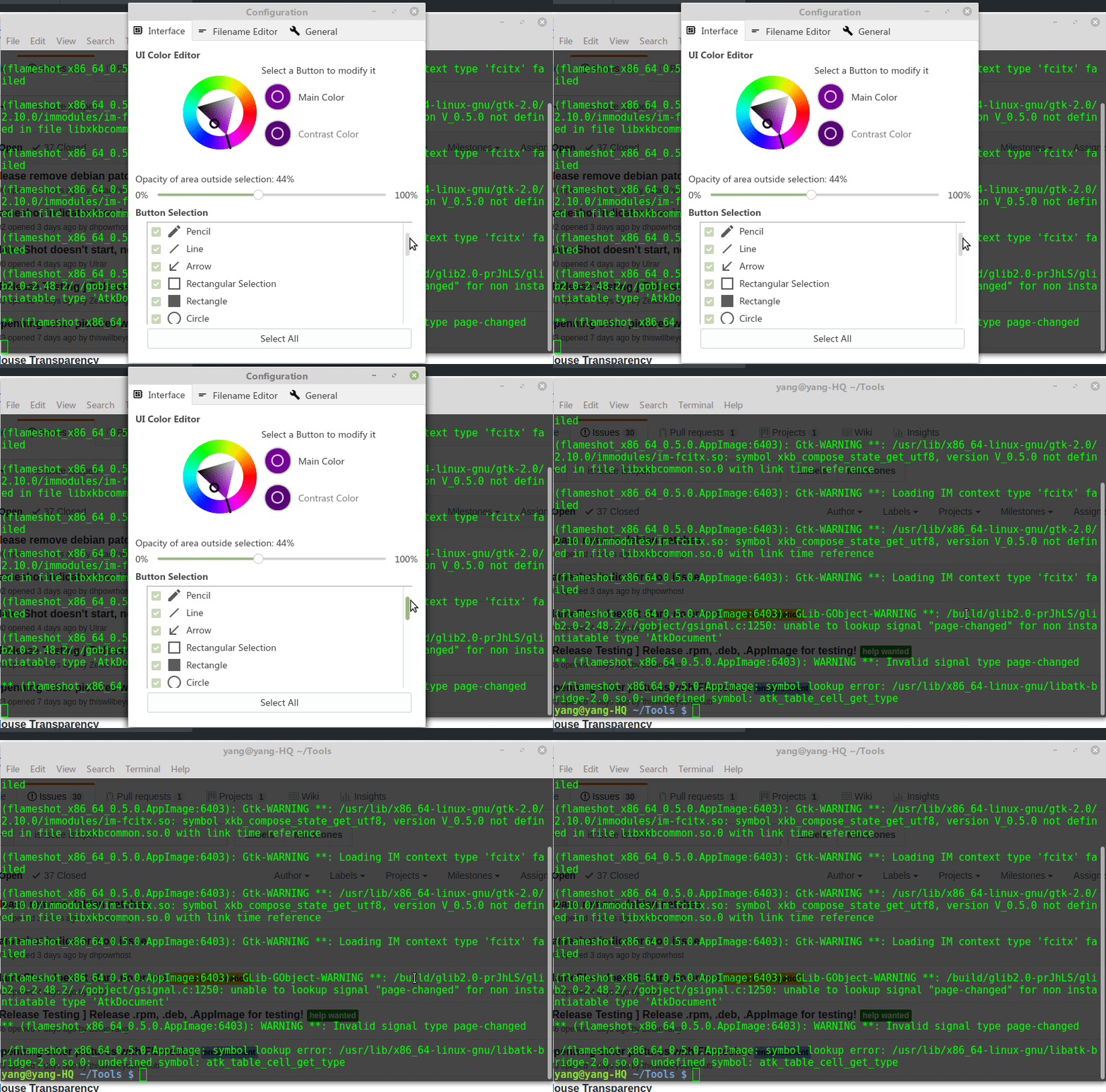
In my physical machine Linux mint 18.3 (Cinnamon), running AppImage went wrong and it suddenly crashed when I dragged the drop-down bar in the setup interface. But in Virtual Box Linux mint 18.3 (Cinnamon), it works normally. I don't know what causes it.
./flameshot_x86_64_0.5.0.AppImage

(flameshot_x86_64_0.5.0.AppImage:6403): Gtk-WARNING **: /usr/lib/x86_64-linux-gnu/gtk-2.0/2.10.0/immodules/im-fcitx.so: symbol xkb_compose_state_get_utf8, version V_0.5.0 not defined in file libxkbcommon.so.0 with link time reference

(flameshot_x86_64_0.5.0.AppImage:6403): Gtk-WARNING **: Loading IM context type 'fcitx' failed

(flameshot_x86_64_0.5.0.AppImage:6403): Gtk-WARNING **: /usr/lib/x86_64-linux-gnu/gtk-2.0/2.10.0/immodules/im-fcitx.so: symbol xkb_compose_state_get_utf8, version V_0.5.0 not defined in file libxkbcommon.so.0 with link time reference

(flameshot_x86_64_0.5.0.AppImage:6403): Gtk-WARNING **: Loading IM context type 'fcitx' failed

(flameshot_x86_64_0.5.0.AppImage:6403): Gtk-WARNING **: /usr/lib/x86_64-linux-gnu/gtk-2.0/2.10.0/immodules/im-fcitx.so: symbol xkb_compose_state_get_utf8, version V_0.5.0 not defined in file libxkbcommon.so.0 with link time reference

(flameshot_x86_64_0.5.0.AppImage:6403): Gtk-WARNING **: Loading IM context type 'fcitx' failed

(flameshot_x86_64_0.5.0.AppImage:6403): GLib-GObject-WARNING **: /build/glib2.0-prJhLS/glib2.0-2.48.2/./gobject/gsignal.c:1250: unable to lookup signal "page-changed" for non instantiatable type 'AtkDocument'

** (flameshot_x86_64_0.5.0.AppImage:6403): WARNING **: Invalid signal type page-changed

./flameshot_x86_64_0.5.0.AppImage: symbol lookup error: /usr/lib/x86_64-linux-gnu/libatk-bridge-2.0.so.0: undefined symbol: atk_table_cell_get_type
ZetaoYang
on 20 Jan 2018
@probonopd Wait for the global shortcut key on it.
ZetaoYang
on 20 Jan 2018
@lupoDharkael @scoony @uuencode @4goodapp I do not think flameshot needs three .desktop files, just keep one, launch flameshot. Because in the near future, flameshot will support global shortcuts/hotkeys.
ZetaoYang
on 20 Jan 2018
The libatk-bridge-2.0.so.0 issue is possibly something caused by the GTK platform plugin. Can you delete, from the AppDir, usr/plugins/platformplugins, and retry?
probonopd
on 20 Jan 2018
@probonopd Yes, you're right.
Just delete libatk-1.0.so.0 in ./squashfs-root/lib.
And now, it run normally. Thank you.
ATK is an approachable toolkit of functions, and it offers shortcut key services that facilitate the use of computers by physically handicapped people.
ZetaoYang
on 20 Jan 2018
@ZetaoYang I don't know if I will be adding global shortcuts on x11 because users could migrate to Wayland in the future and say "where is the global shortcut configuration?" (wayland doesn't allow to listen for global key events). The tendency is to move towards Wayland and desktops provide a simple way to configure shortcuts, the project just needs tutorials and a clear user manual.
A few months ago the project used to have just one .desktop but a few users asked for a desktop file to just start the process as some desktop environment allow the use them instead of a command to defined what programs to launch at startup.
The config desktop file is required as you can disable the trayicon in configuration, some users don't use the terminal so the desktop file is the only intuitive way they have to open the configuration window.
lupoDharkael
on 20 Jan 2018
@lupoDharkael Wayland integration into the major Desktop Environments is far from mature. The hotkey does not work under Wayland, but user can let desktop environment handle the registration of shortcuts/hotkeys.
Just use your desktop evironment to bind some shortcuts/hotkeys to flameshot gui or flameshot config.
ZetaoYang
on 21 Jan 2018
Any chance for Ubuntu 14.04?
 yermulnik
on 21 Jan 2018
yermulnik
on 21 Jan 2018
Any chance for Ubuntu 14.04?
The AppImage should work on Ubuntu 14.04. Did you test it?
probonopd
on 22 Jan 2018
@probonopd just tried. It outputs text to console, but does nothing when ran with gui arg. Generally it does nothing at all except outputting help messages to console. E.g.:
$> /tmp/yz/flameshot_x86_64_0.5.0.AppImage full
you have to set a valid flag:

Usage: /tmp/yz/flameshot_x86_64_0.5.0.AppImage full [full-options]

Options:
  -p, --path <path>           Path where the capture will be saved
  -c, --clipboard             Save the capture to the clipboard
  -d, --delay <milliseconds>  Delay time in milliseconds
  -r, --raw                   Print raw PNG capture
  -h, --help                  Displays this help
$> /tmp/yz/flameshot_x86_64_0.5.0.AppImage gui
$>
It doesn't do a screenshot directly, but shows an icon in the icon bar. At least it does that for me...
probonopd
on 22 Jan 2018
But it does not for me unfortunately =( Thanks anyway =)
yermulnik
on 22 Jan 2018
@yermulnik You have to run flameshot_x86_64_0.5.0.AppImage first before you can use these flags.
For instance,
./flameshot_x86_64_0.5.0.AppImage &; (Must ensure that flameshot has been running.)./flameshot_x86_64_0.5.0.AppImage guior./flameshot_x86_64_0.5.0.AppImage full -c.
Then enjoy!
ZetaoYang
on 23 Jan 2018
Wow, this time it worked! Thanks to all of who helped =)
yermulnik
on 23 Jan 2018
Though the icon in systray doesn't show up most of the time when I run AppImage =( Everything else work just fine =)
yermulnik
on 23 Jan 2018
Again, I would prefer that when one starts the application it would directly do the screenshot rather than waiting in the notification area...
probonopd
on 23 Jan 2018
I'd prefer both: systray and direct call. But not the thing when user have to start the app and then call it once again to make a job.
yermulnik
on 23 Jan 2018
@probonopd I found the root of that problem.It is caused by ./squashfs-root/usr/lib/libxkbcommon.so.0 and ./squashfs-root/usr/lib/libatk-1.0.so.0. The workaround is to delete them.
But If there is a dependency problem, users themselves need to install libxkbcommon.
Debian/Ubuntu: sudo apt-get install libxkbcommon0
Fedora: dnf install libxkbcommon
openSUSE: zypper install libxkbcommon0
ZetaoYang
on 24 Jan 2018
Awesome! all features worked well.
Please add "Add text feature"
 thanhnha1103
on 25 Jan 2018
thanhnha1103
on 25 Jan 2018
But If there is a dependency problem, users themselves need to install libxkbcommon.
That is not how an AppImage is supposed to work...
probonopd
on 25 Jan 2018
chmod a+x ./flameshot_x86_64_0.5.0.AppImage
./flameshot_x86_64_0.5.0.AppImage
./flameshot_x86_64_0.5.0.AppImage gui
Works on Solus Budge. No icon in the notification try but able to use the tool well. Have to open two terminals one to run the first two commands and then a second to run the gui
 CHBMB
on 25 Jan 2018
CHBMB
on 25 Jan 2018
Hi. I got a Not Found when trying to DL the Ubuntu 16.04 LTS.
Can someone provide me another link ? :)
 4sStylZ
on 30 Jan 2018
4sStylZ
on 30 Jan 2018
@4sStylZ ubuntu 16.04 LTS: https://drop.me/M0xAvW
ZetaoYang
on 31 Jan 2018
Ubuntu 14.04
Day 1 : the appimage 0.5 works fine !
Day 2 : But the appimage don't work, nothing was change in the system. When I run ./flameshot_x86_64_0.5.0.AppImage gui, it's happen nothing, exit immediately, no return, no error in terminal.
 Philippe734
on 8 Feb 2018
Philippe734
on 8 Feb 2018
@Philippe734 I've got similar situation: it does work, but the icon in notification area doesn't appear most of the time.
yermulnik
on 8 Feb 2018
Thank you very much @ZetaoYang
4sStylZ
on 8 Feb 2018
Before asking questions, be sure to explain your system and desktop environment .
- View system information: run
cat /etc/issue.

- View desktop environment information: run
echo $XDG_CURRENT_DESKTOP.

@Philippe734
For screenshot tools, I prefer to graphically interact than command line interface.
- Please ensure that flameshot has been running. And then you can run
./flameshot_x86_64_0.5.0.AppImage gui.
@yermulnik
Ubuntu 14.04 canceled the system tray whitelist mechanism, resulting in the use of traditional system tray technology program can not display the tray icon.
workaround:
- For Ubuntu 14.04~17.10, can install
indicator-systemtray-unity(Only Unity desktop environment)
sudo apt-add-repository ppa:fixnix/indicator-systemtray-unity
sudo apt-get update
sudo apt-get install indicator-systemtray-unity
Once installed, log out and log in and Indicator Systemtray Unity should start automatically.
Settings
To change the mode position: press the middle mouse button on the indicator.
The horizontal position can be changed: scrolling the mouse over the indicator.
Settings can be changed in gsettings:/net/launchpad/indicator/systemtray (use dconf-editor).
more details: http://www.webupd8.org/2015/05/on-demand-system-tray-for-ubuntu.html
 ZetaoYang
on 9 Feb 2018
ZetaoYang
on 9 Feb 2018
@ZetaoYang thank you for detailed explanation. the thing is that sometimes icon does appear, but most of the time it does not.
Ubuntu 14.04 canceled the system tray whitelist mechanism, resulting in the use of traditional system tray technology program can not display the tray icon.
Any other workaround on flameshot side available? I'm not kind of switching to Unity just because one single app (a wonderful app I wish to use!) doesn't show up in notification area (I've got about 15 other apps running and showing up in notification area correctly).
yermulnik
on 9 Feb 2018
For Ubuntu 14.04, you're right ZetaoYang, we need to run the appimage before the gui. Sorry. The AppImage 0.5 works fine with 14.04. So with command line the trick is :
- Run in a terminal:
./flameshot_x86_64_0.5.0.AppImage - Run in other terminal:
./flameshot_x86_64_0.5.0.AppImage gui
Philippe734
on 12 Feb 2018
Can this be scripted in the form of a custom AppRun script so that one needs no terminal to use it?
probonopd
on 12 Feb 2018
For Ubuntu 14.04 Unity, the AppImage tray icon does not display properly. Even if indicator-systemtray-unity is installed, clicking the icon will not take a direct screenshot, only the right-click menu will be displayed.
For Ubuntu 16.04 Unity, similar to the above situation.
For Ubuntu 17.10 Gnome, the AppImage tray icon does not display.
For Linux Mint 18.3 Cinnamon: it works fine.
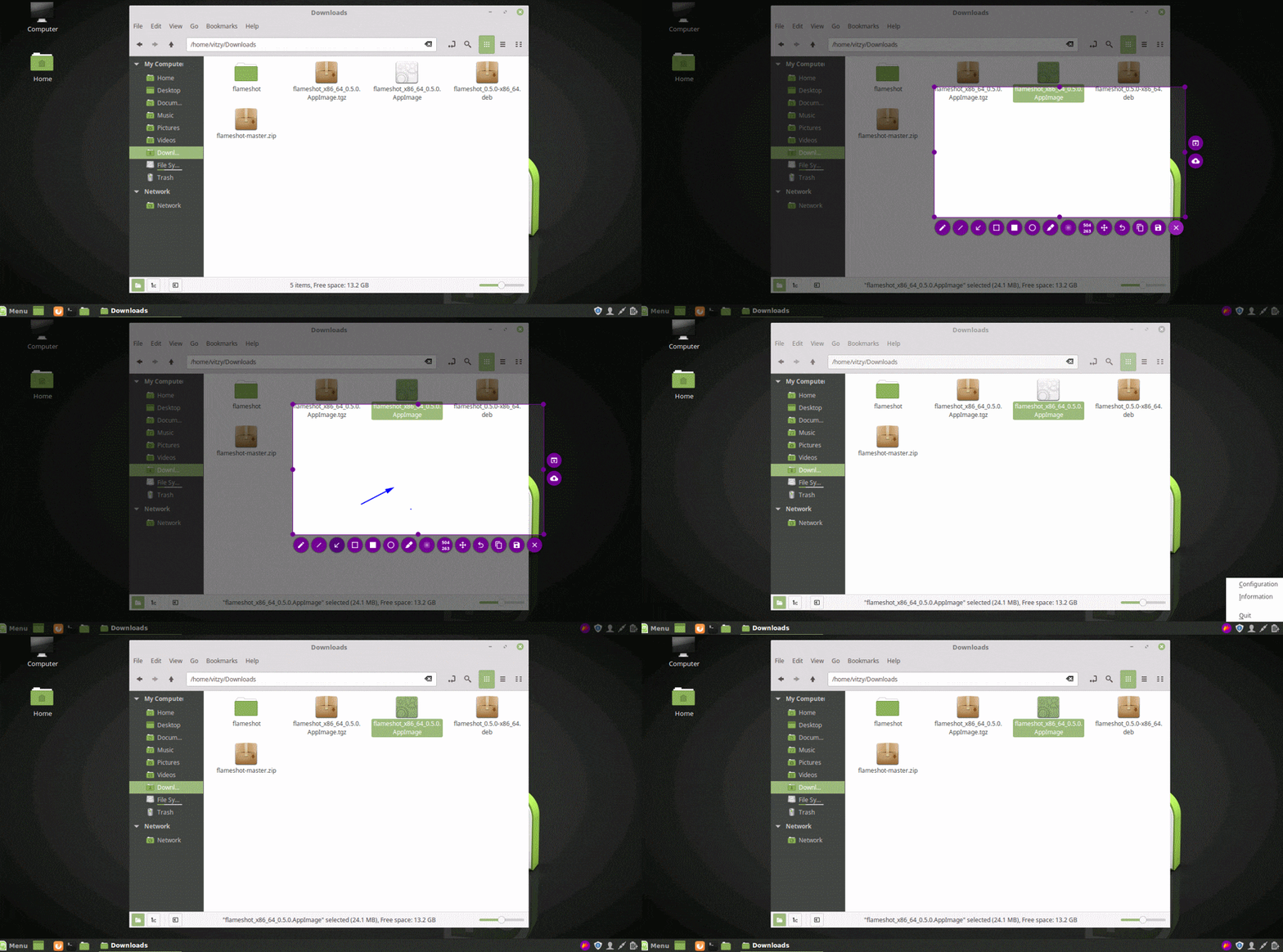
@probonopd I think users can start flameshot using their own scripts outside AppImage. Even can bind desktop shortcuts.
I would suggest that the author add a screenshot submenu item in the flameshot right-click menu.
ZetaoYang
on 13 Feb 2018
lupoDharkael
on 24 Feb 2018
Related issues
 thiswillbeyourgithub
·
3Comments
thiswillbeyourgithub
·
3Comments
 mrinvisible0
·
4Comments
mrinvisible0
·
4Comments
 abba23
·
3Comments
abba23
·
3Comments
 sephore
·
3Comments
sephore
·
3Comments
 xahon
·
3Comments
xahon
·
3Comments