Fl_chart: Is there a way to see the first and last spot values without the need for a touch interactivity?
I try to achieve the following:
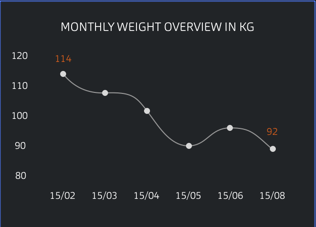
As you can see, the first and last spot need to show the values without the need for a touch interactivity.
Currently, all I have is this:

Is this already possible?
 S1nPur1ty
All 4 comments
Yes, it is possible,
you should show tooltip items by default, and set the background color transparent,
check this sample:
Sample 5

 imaNNeoFighT
on 12 May 2020
imaNNeoFighT
on 12 May 2020
Yes, it is possible,
you should show tooltip items by default, and set the background color transparent,
check this sample:Sample 5
@imaNNeoFighT
Honestly great work, but I noticed that when I enable the LineTouchData, the tooltip text dissapears. And when I disable it, I can't focus on the spots and see the values from it. This is what I have:
 enabled: false,
        getTouchedSpotIndicator:
            (LineChartBarData barData, List<int> spotIndexes) {
          return spotIndexes.map((index) {
            return TouchedSpotIndicatorData(
              FlLine(color: Colors.transparent, strokeWidth: 0),
              FlDotData(
                show: true,
              ),
            );
          }).toList();
        },
Is there something that I overlooked? Please let me know how I can solve this.
S1nPur1ty
on 17 May 2020
@imaNNeoFighT
I have managed to fix the issue with the touchCallback:
bool hideSpotText = false;
...
touchCallback: (LineTouchResponse touchResponse) {
          if (touchResponse.touchInput is FlPanStart ||
              touchResponse.touchInput is FlPanMoveUpdate ||
              touchResponse.touchInput is FlLongPressStart ||
              touchResponse.touchInput is FlLongPressMoveUpdate) {
            hideSpotText = true;
          } else {
            hideSpotText = false;
          }

          setState(() {});
        },
        enabled: hideSpotText,
However, is it ok if I use setState every time when a touch interaction occurs? I mean, will it affect the performance of phones in a bad way or is it ok to leave it like this? Please let me know.
S1nPur1ty
on 17 May 2020
It is okay
imaNNeoFighT
on 18 May 2020
Related issues
 MobileMon
·
4Comments
MobileMon
·
4Comments
 Mohdx
·
4Comments
Mohdx
·
4Comments
 wukongssl
·
3Comments
wukongssl
·
3Comments
 joaorpalma
·
3Comments
joaorpalma
·
3Comments
 jamesblasco
·
4Comments
jamesblasco
·
4Comments
Most helpful comment
It is okay