Fl_chart: Line Chart: change color gradient based on flspot.y value
Hi,
fist of all, this is an awesome repo, I am truly impressed by it and also by flutter.
I am really sorry if this is a duplicated issue, I have searched for a solution here but I was not fortunate enough to find what I was looking for. If it is a duplicate though, please kindly point me to the answer that I have missed.
I am wondering whether it is possible to adjust the color gradient based on the Y values that are used as Input for the graph.
Right now, I am implementing a line chart visualizing the occupancy of a library over time.
I would like to color the line and below line area based on how full the library is.
(eg. library is below 50% full -> green, above 50% -> yellow, above 70% -> red).
The picture uploaded with #274 has managed to implement it for the line.

I want to add the gradient below the line as well.
This is where I am right now:
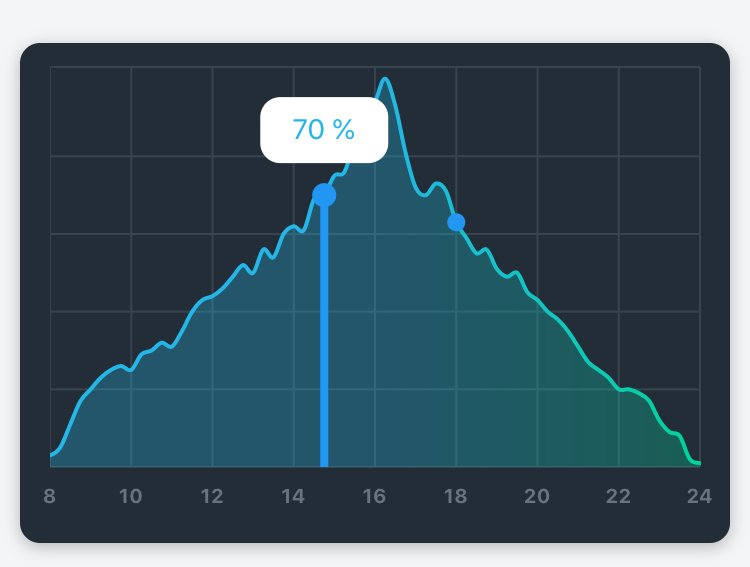
Ideally, I would imagine being able to define Y-values at which the gradient changes and respective colors.
Is this possible or would you consider making this possible?
 vionc
vionc
All 7 comments
Hi,
It's my pleasure to hear you like this library,
In the LineChartBarData, we have 4 fields that they are related to drawing the gradient,
colors, colorStops, gradientFrom, gradientTo.
You can set
gradientFrom = Offset(0.5, 0) // topCenter
gradientTo = Offset(0.5, 1) // bottomCenter
to have a top to down gradient, and you can play with colorStops to handle gradient color stops,
we are using gradient.linear() under the hood.
Let me know if it makes sense.
 imaNNeoFighT
on 3 Apr 2020
imaNNeoFighT
on 3 Apr 2020
Thank you for your quick response!
I still don't quite understand how to do it though. Using colorStops I have to provide colorStops[i] as a List, where i is a number from 0.0 to 1.0 that specifies where color[i] begins in the gradient.
But this is a relative measurement, right?
It treats the whole area of the gradient as going from 0 to 1.
But what I am trying to achieve is to only change the color if the line of the graph crosses a certain threshold. If the line of the graph does not climb above 40% for instance, I do not want to change the color at all.
Also, the gradient should stay left to right, so gradientFrom and gradientTo should stay on their defaults:
gradientFrom = Offset(0, 0),
gradientTo = Offset(1, 0)
Maybe it is helpful if I post my code with sample data:
````
import 'package:fl_chart/fl_chart.dart';
import 'package:flutter/material.dart';
class MyLineChart extends StatefulWidget {
@override
_MyLineChartState createState() => _MyLineChartState();
}
class _MyLineChartState extends State
List
const Color(0xff42f563),
const Color(0xfff5e942),
const Color(0xfff54242),
];
@override
Widget build(BuildContext context) {
return Container(
child: Padding(
padding: const EdgeInsets.only(right: 12.0, left: 12.0, top: 12.0, bottom: 12.0),
child: LineChart(
mainData(),
),
),
);
}
LineChartData mainData() {
return LineChartData(
gridData: FlGridData(
show: true,
drawVerticalLine: true,
horizontalInterval: 20.0,
getDrawingHorizontalLine: (value) {
return const FlLine(
color: Color(0xff37434d),
strokeWidth: 1,
);
},
verticalInterval: 2.0,
getDrawingVerticalLine: (value) {
return const FlLine(
color: Color(0xff37434d),
strokeWidth: 1,
);
},
),
titlesData: FlTitlesData(
show: false,
bottomTitles: SideTitles(
showTitles: true,
reservedSize: 22,
textStyle:
TextStyle(color: const Color(0xff68737d), fontWeight: FontWeight.bold, fontSize: 16),
getTitles: (value) {
return '';
},
margin: 8,
),
leftTitles: SideTitles(
showTitles: true,
textStyle: TextStyle(
color: const Color(0xff67727d),
fontWeight: FontWeight.bold,
fontSize: 15,
),
getTitles: (value) {
return '';
},
reservedSize: 28,
margin: 12,
),
),
borderData:
FlBorderData(show: true, border: Border.all(color: const Color(0xff37434d), width: 1)),
minX: 8,
maxX: 24,
minY: 0,
maxY: 100,
lineBarsData: [
LineChartBarData(
spots: const [
FlSpot(8, 3), //(8,3) is supposed to represent 8:00h and the library is 3% full
FlSpot(8.25, 5), //starting out green left to right gradient
FlSpot(8.50, 11),
FlSpot(8.75, 17),
FlSpot(9, 20),
FlSpot(9.25, 23),
FlSpot(9.5, 25),
FlSpot(9.75, 26),
FlSpot(10, 25),
FlSpot(10.25, 29),
FlSpot(10.5, 30),
FlSpot(10.75, 32),
FlSpot(11, 31),
FlSpot(11.25, 35),
FlSpot(11.5, 40),
FlSpot(11.75, 43),
FlSpot(12, 44),
FlSpot(12.25, 46),
FlSpot(12.5, 49),
FlSpot(12.75, 52), // percentage goes above 50%, change in gradient to yellow
FlSpot(13, 50),
FlSpot(13.25, 56),
FlSpot(13.5, 54),
FlSpot(13.75, 60),
FlSpot(14, 62),
FlSpot(14.25, 61),
FlSpot(14.5, 69),
FlSpot(14.75, 70), // percentage goes above 70%, change in gradient to red
FlSpot(15, 75),
FlSpot(15.25, 76),
FlSpot(15.5, 84),
FlSpot(15.75, 90),
FlSpot(16, 94),
FlSpot(16.25, 100),
FlSpot(16.5, 93),
FlSpot(16.75, 81),
FlSpot(17, 72),
FlSpot(17.25, 70),
FlSpot(17.5, 73),
FlSpot(17.75, 71),
FlSpot(18, 63), //percentage goes under 70% again, change in gradient back to yellow
FlSpot(18.25, 59),
FlSpot(18.5, 55),
FlSpot(18.75, 56),
FlSpot(19, 51),
FlSpot(19.25, 49),
FlSpot(19.5, 50),
FlSpot(19.75, 45), //percentage goes under 50% again, change in gradient back to green
FlSpot(20, 43),
FlSpot(20.25, 40),
FlSpot(20.5, 38),
FlSpot(20.75, 35),
FlSpot(21, 31),
FlSpot(21.25, 27),
FlSpot(21.5, 25),
FlSpot(21.75, 23),
FlSpot(22, 20),
FlSpot(22.25, 20),
FlSpot(22.5, 19),
FlSpot(22.75, 17),
FlSpot(23, 12),
FlSpot(23.25, 9),
FlSpot(23.5, 8),
FlSpot(23.75, 2),
FlSpot(24, 1),
],
isCurved: true,
colors: gradientColors,
//TODO: Color gradient depending on the percentage level
//colorStops: is relative?
barWidth: 2,
isStrokeCapRound: true,
belowBarData: BarAreaData(
show: true,
colors: gradientColors.map((color) => color.withOpacity(0.3)).toList(),
),
),
],
lineTouchData: LineTouchData(
enabled: false,
),
);
}
}
````
Or am I missing something here?
vionc
on 4 Apr 2020
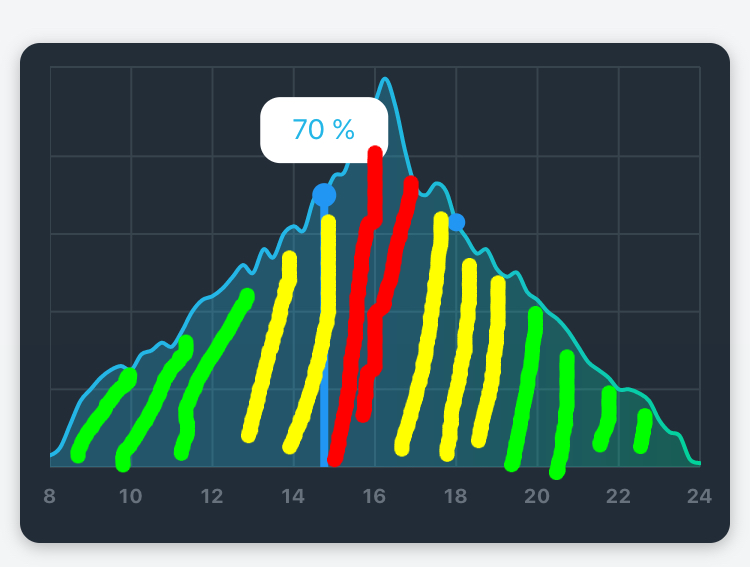
So this is basically what I mean, sorry for my crappy sketch
vionc
on 4 Apr 2020
I think you just need to use these colors order:
colors: [green, yellow, red, yellow, green]
yes but then I would have that gradient regardless how high the graph line goes. I would want it to react to the graph height.
vionc
on 4 Apr 2020
Got it :)
That's impossible at the moment
imaNNeoFighT
on 4 Apr 2020
Oh okay :)
Then I will just not use a gradient. Thank you! :)
vionc
on 4 Apr 2020
Related issues
 jitenders859
·
5Comments
jitenders859
·
5Comments
 MobileMon
·
4Comments
MobileMon
·
4Comments
 mahmoudparandeh
·
6Comments
mahmoudparandeh
·
6Comments
 mukhammad-akilov
·
4Comments
mukhammad-akilov
·
4Comments
 joaorpalma
·
3Comments
joaorpalma
·
3Comments
Most helpful comment
Got it :)
That's impossible at the moment