Fl_chart: Add option to provide size to chart
Currently, the chart sizes to 70% of the width and there is no control over the chart size. On wrapping the chart inside and ConstrainedBox with relatively smaller constraints, the chart clips itself instead of making itself fit in the given size by reducing the size.
Suggested Fix: Add an optional parameter to provide a size to each chart.
 thecodepapaya
All 8 comments
You can wrap the chart in a Container(width:___, height:___) and it should work fine.
 shamilovtim
on 22 Jan 2020
shamilovtim
on 22 Jan 2020
Tried it. Didn't work. The result was similar to wrapping the chart in a ConstrainedBox or a SizedBox. The chart is always clipped.
Take a look the screenshot below. The chart gets clipped instead of shrinking to fit inside the box.

thecodepapaya
on 22 Jan 2020
I can confirm that the chart is resizable so whatever bug you're experiencing is unique to your particular application
shamilovtim
on 22 Jan 2020
I just created a new app and used this bare minimum code
import 'package:fl_chart/fl_chart.dart';
import 'package:flutter/material.dart';

void main() => runApp(MyApp());

class MyApp extends StatelessWidget {
  @override
  Widget build(BuildContext context) {
    return MaterialApp(
      title: 'Flutter Demo',
      theme: ThemeData(
        primarySwatch: Colors.blue,
      ),
      home: MyHomePage(title: 'Flutter Demo Home Page'),
    );
  }
}

class MyHomePage extends StatefulWidget {
  MyHomePage({Key key, this.title}) : super(key: key);

  final String title;

  @override
  _MyHomePageState createState() => _MyHomePageState();
}

class _MyHomePageState extends State<MyHomePage> {
  int _counter = 0;

  void _incrementCounter() {
    setState(() {
      _counter++;
    });
  }

  @override
  Widget build(BuildContext context) {
    return Scaffold(
      appBar: AppBar(
        title: Text(widget.title),
      ),
      body: Center(
        child: Container(
          height: 200,
          width: 200,
          child: PieChart(
            PieChartData(
              // centerSpaceRadius: 40,
              borderData: FlBorderData(
                show: true,
              ),
              sections: [
                PieChartSectionData(value: 43.0),
                PieChartSectionData(value: 43.0)
              ],
            ),
          ),
          // Text(
          //   'You have pushed the button this many times:',
          // ),
          // Text(
          //   '$_counter',
          //   style: Theme.of(context).textTheme.display1,
          // ),
        ),
      ),
      floatingActionButton: FloatingActionButton(
        onPressed: _incrementCounter,
        tooltip: 'Increment',
        child: Icon(Icons.add),
      ),
    );
  }
}
The result is like this ...
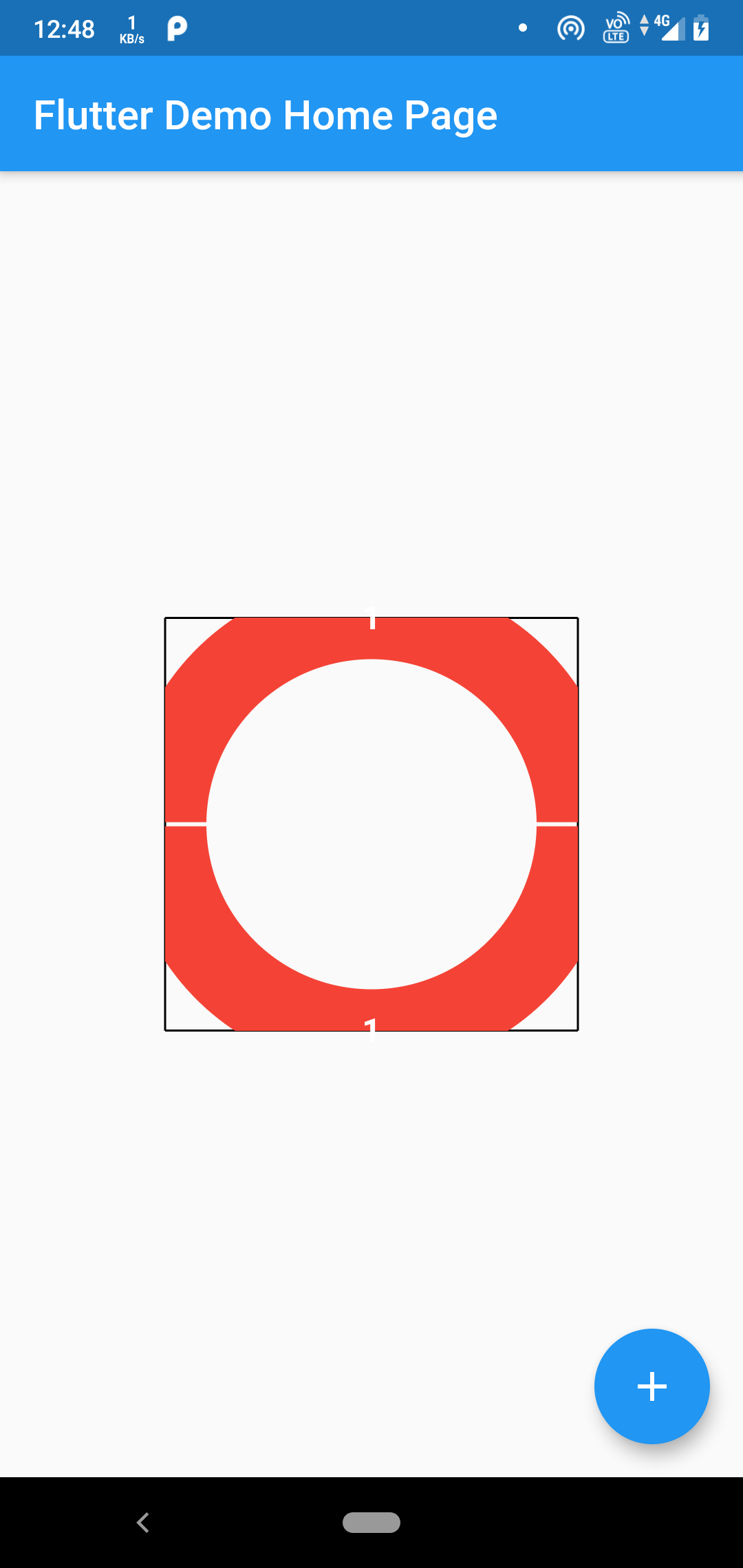
I'm still getting a cropped pie chart. I can, however, reduce the centerSpaceRadius to 40 and it fits back in again. But this is not a viable solution. I intend to achieve a pie chart which has a large radius(or smaller thickness of the pie chart data) but is still small in size to fit inside a small SizedBox.
But however, I can't find any option to control the thickness of the pie chart.
This is the kind of pie chart I'm intending to create

thecodepapaya
on 22 Jan 2020
Oh sorry about that, this problem might be unique to the pie chart. I was referring to the line chart, which I have experience with.
shamilovtim
on 22 Jan 2020
Any possible fix for the line chart? It works fine for mobile but not for web
 suparna1210
on 27 Jan 2020
suparna1210
on 27 Jan 2020
Fixed in 0.8.1, thanks for reporting.
 imaNNeoFighT
on 8 Feb 2020
imaNNeoFighT
on 8 Feb 2020
Hi is there any way to provide pie chart size?
Like setting up the inner and outer radius of pie chart cause the size is not adjusted to containers area... We can set the inner radius bt outer radius remains the same.
 kingdj
on 17 May 2020
kingdj
on 17 May 2020
Related issues
 joaorpalma
·
3Comments
joaorpalma
·
3Comments
 jitenders859
·
5Comments
jitenders859
·
5Comments
 mahmoudparandeh
·
6Comments
mahmoudparandeh
·
6Comments
 jamesblasco
·
4Comments
jamesblasco
·
4Comments
 wukongssl
·
3Comments
wukongssl
·
3Comments
Most helpful comment
You can wrap the chart in a
Container(width:___, height:___)and it should work fine.