Fisher: Unable to install extensions
I'm constantlt getting this error while installing packages plugins. Happening for all packages

What could be the reason ?
 someshkoli
All 26 comments
Maybe the host is unavailable? Are you behind a firewall? Maybe curl is acting out. Do you have a .curlrc file? What's your operating system? Do you have a reason to believe you could be using an old version of tar or one that doesn't support any of these flags: -x -z, -f or -C?
The only reason this could happen is if we fail here:
https://github.com/jorgebucaran/fisher/blob/ae423be7256d5797efcd79007935da96e2b7379d/fisher.fish#L93-L98
 jorgebucaran
on 9 Dec 2020
jorgebucaran
on 9 Dec 2020
Hey @jorgebucaran, thanks for quick update. I checked the link and the tar was downloadable. Im running on arch linux Linux kasper 5.4.77-1-lts #1 SMP Tue, 10 Nov 2020 22:42:03 +0000 x86_64 GNU/Linux. and yes my tar does have above flags.
And about .curlrc, what should be the contents of that file ? I dont have rc for that
here's the link and its fully functional imo,
someshkoli
on 9 Dec 2020
How did you install Fisher? Please note that I only support the installation method described in the README. If that's how you installed Fisher, please use fisher update to get the latest changes and try again.
Where did you start having this problem? Have you ever been able to install anything with Fisher at all?
jorgebucaran
on 9 Dec 2020
I installed it from AUR and regarding tar command then all of the flags are operational.
Also fisher update gives the following:

someshkoli
on 9 Dec 2020
@someshkoli Ah, you're using an older version of Fisher. I know because that's an old bug. Please upgrade to the latest Fisher and let me know if you still encounter this issue. Remove the AUR package and use:
curl -sL https://git.io/fisher | source && fisher install jorgebucaran/fisher

someshkoli
on 9 Dec 2020
@someshkoli You're still not using the latest Fisher. I know because "fisher: invalid plugin name..." should be "fisher: Invalid plugin name..." instead ("invalid" is capitalized).
See, it's right here:
https://github.com/jorgebucaran/fisher/blob/ae423be7256d5797efcd79007935da96e2b7379d/fisher.fish#L96
jorgebucaran
on 9 Dec 2020
How to clean previous versions completely ? :)
someshkoli
on 9 Dec 2020
Yes, I think that might be the issue here. To remove Fisher: fisher remove jorgebucaran/fisher usually does it. But if you installed Fisher via pacman (which I don't support), you'll need to refer to your user manual. I don't know, how about pacman -Rns fisher?
jorgebucaran
on 9 Dec 2020
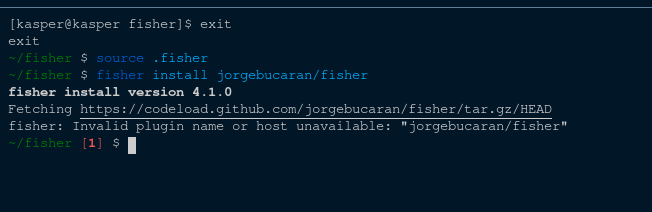
I removed everything and installed via above method, Now even the version number is correct yet its giving me same error
someshkoli
on 9 Dec 2020
@someshkoli Could you try again? I made some changes.
jorgebucaran
on 9 Dec 2020
still not working :) maybe its something specific for my system
someshkoli
on 9 Dec 2020
@someshkoli It could be. Try running this?
set --local temp (mktemp -d)
set --local url https://codeload.github.com/jorgebucaran/fisher/tar.gz/HEAD
curl --silent --write-out "" $url | tar --extract --gzip --directory $temp
ls $temp
i get:
Warning: Binary output can mess up your terminal. Use "--output -" to tell
Warning: curl to output it to your terminal anyway, or consider "--output
Warning: <FILE>" to save to a file.
after removing --silent.
This works:
meena@beastix ~> curl --output - --write-out "" https://codeload.github.com/jorgebucaran/fisher/tar.gz/HEAD | tar --extract --gzip --directory $temp -f -
  % Total    % Received % Xferd  Average Speed   Time    Time     Time  Current
                                 Dload  Upload   Total   Spent    Left  Speed
100  5567  100  5567    0     0  22447      0 --:--:-- --:--:-- --:--:-- 22447
meena@beastix ~> ls -l /tmp/tmp.MW0chCId/
total 9
drwxr-xr-x  4 meena  wheel  7 Dec  9 18:17 fisher-HEAD/
meena@beastix ~>
(and now we can add back the --silent ;)
This is on FreeBSD, btw
 igalic
on 10 Dec 2020
igalic
on 10 Dec 2020
Does that mean --silent doesn't work on FreeBSD? @igalic
jorgebucaran
on 10 Dec 2020
it does work, but i had to remove it to see what's failing
igalic
on 10 Dec 2020
Warning: Binary output can mess up your terminal. Use "--output -" to tell
That's why we pipe it to tar. We shouldn't need to specify the --output flag unless we wanted to pipe the output to the terminal, which we never do.
Do you have a .curlrc file adding a new line to the output? We shouldn't need to use --write-out "".
Why do we need to use --output -? It's not needed on macOS or Linux. Is this a FreeBSD thing?
Why do we need to add -f - to tar? Is this also a FreeBSD thing?
And do you know how to set up a FreeBSD box free so I can test this?
jorgebucaran
on 10 Dec 2020
it seems the only thing necessary we need is -f -, otherwise, FreeBSD tries to read from a Tape device :D
meena@beastix ~> curl --silent https://codeload.github.com/jorgebucaran/fisher/tar.gz/HEAD | tar --extract --gzip --directory $temp -f -
meena@beastix ~> rm -rf /tmp/tmp.MW0chCId/fisher-HEAD/
meena@beastix ~> curl --silent https://codeload.github.com/jorgebucaran/fisher/tar.gz/HEAD | tar --extract --gzip --directory $temp
tar: Error opening archive: Failed to open '/dev/sa0'
meena@beastix ~ [23|1]>
re,
And do you know how to set up a FreeBSD box free so I can test this?
https://www.freebsd.org/where.html → https://download.freebsd.org/ftp/releases/VM-IMAGES/12.2-RELEASE/amd64/Latest/
see https://download.freebsd.org/ftp/releases/VM-IMAGES/README.txt for which image to get
if you wanna integrate FreeBSD into fisher's CI, Cirrus CI offers FreeBSD support: https://cirrus-ci.org/guide/FreeBSD/
igalic
on 10 Dec 2020
I think we're good now @igalic @someshkoli. Please try one more time! 🙏
jorgebucaran
on 10 Dec 2020
works! (for me ;)
igalic
on 10 Dec 2020
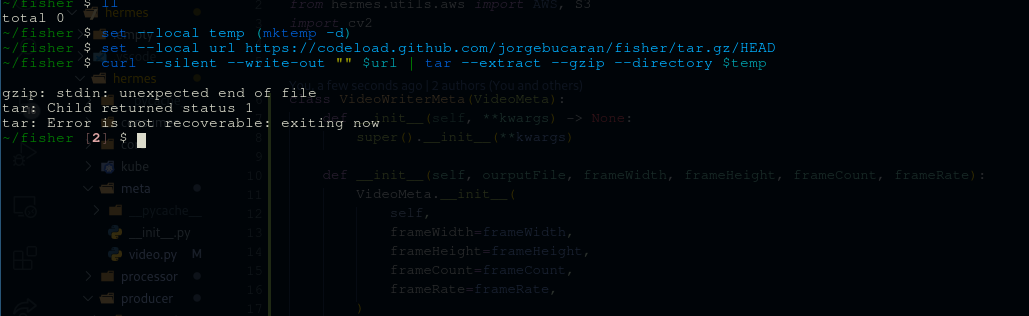
@someshkoli It could be. Try running this?
set --local temp (mktemp -d)
set --local url https://codeload.github.com/jorgebucaran/fisher/tar.gz/HEAD
curl --silent --write-out "" $url | tar --extract --gzip --directory $temp
ls $temp
Still not working :"") some gzip error
someshkoli
on 10 Dec 2020
Still not working :"") some gzip error
can you remove --silent so we can better see what's going on?
also, if possibly, please paste the output, instead of attaching an image. we're dealing entirely with text, turning that into an image makes it 100% less accessible
igalic
on 10 Dec 2020
@someshkoli Answer this:
- OS name and version
- Fish version
- curl version
- tar version
jorgebucaran
on 10 Dec 2020
OS:
LSB Version: 1.4
Distributor ID: Arch
Description: Arch Linux
Release: rolling
Codename: n/a
Fish: fish, version 3.1.2
CURL: curl 7.71.1
tar: tar (GNU tar) 1.32
XD
someshkoli
on 10 Dec 2020
Got this error fixed with @jorgebucaran 's help <3.
My conda env was somehow messing with my normal env and curl was unable to fetch CA certs
someshkoli
on 10 Dec 2020
Related issues
 fkjogu
·
3Comments
fkjogu
·
3Comments
 hemedani
·
8Comments
hemedani
·
8Comments
 keyolk
·
9Comments
keyolk
·
9Comments
 michaelperrygoodman
·
10Comments
michaelperrygoodman
·
10Comments
 ghost
·
3Comments
ghost
·
3Comments