Fish-shell: Unicode support broken (was This ⸻ unicode ⸻ character ⸻ makes ⸻ weird ⸻ things ⸻ happen)

Steps to reproduce:
- Copy that unicode character
- Type "test" (or anything for that matter)
- Paste repeatedly
What happens: Some sort of exponential growth? Pressing ^C doesn't get rid of it.
Expected results: Not that.
I've tested this in every terminal emulator I have, and it shows up in all of them (even xterm). No other shell has this problem.
 iirelu
All 85 comments
This seems similar to #2199, no?
 faho
on 4 Jan 2016
faho
on 4 Jan 2016
Yes, and I think also #750.
 zanchey
on 4 Jan 2016
zanchey
on 4 Jan 2016
I don't experience the same thing, but instead the color of the dash gets all weird, guess it is due to the overlapping. I don't see any repetition of other characters.
I am using termite on arch linux.
 terlar
on 4 Jan 2016
terlar
on 4 Jan 2016
This failure mode is when fish's idea of where the cursor is gets out of sync with where it actually is. This can come about if fish thinks a character is single width but it's actually double width, or vice versa.
My font doesn't seem to have this character :(
 ridiculousfish
on 6 Jan 2016
ridiculousfish
on 6 Jan 2016
There are two things you can do to contain the effect of the disparity between wcwidth and the actual terminal: 1) turn off autowrap whenever the editor is in control (echo '\033[?7l' to turn off, '\033[?7h' to turn on) and insert returns explicitly; 2) always re-render whole lines, from left to right, when the buffer changes. This way the line number is always correct and you minimize your dependency on the column number.
I hope the advice is useful. :)
 xiaq
on 25 Jan 2016
xiaq
on 25 Jan 2016
@xiaq Hi, I didn't know you are back.
@terlar, what font are you using? @ridiculousfish and I too actually doesn't have that character.
 pickfire
on 26 Jan 2016
pickfire
on 26 Jan 2016
@pickfire You can find it in Symbola and Duolos SIL.
 jakwings
on 26 Jan 2016
jakwings
on 26 Jan 2016
@jakwings I didn't know that those two fonts isn't in my package manager. Trying to install it manually.
pickfire
on 26 Jan 2016
Yes, I think this glyph comes from the symbola package. Not sure which one it fallbacks to. But I know I have symbola to cover these kind of things.
terlar
on 26 Jan 2016
I can't reproduce the problem using iTerm2 on OS X without a font installed that supports that character. So I see the single width undefined char glyph. Is it possible a recent change (such as the one I made to support the C locale better) has "fixed" this? Can anyone reproduce this problem using a fish built from git head? If so can you provide better directions for reproducing the problem than was in the original comment?
 krader1961
on 25 Mar 2016
krader1961
on 25 Mar 2016
After installing Symbola (from http://www.fonts2u.com/symbola.font) I can reproduce this. It's pretty clear that fish is using the wrong char width. From https://en.wikipedia.org/wiki/Dash:
Less common are the two-em dash (⸺) and three-em dash (⸻), both added to Unicode with version 6.1 as U+2E3A and U+2E3B.
So our fish_wcwidth() implementation is out of date.
P.S., It isn't just that character which renders weirdly. The Symbola font is ugly --- at least as handled by OS X Terminal.app. The inter-char spacing is just awful; even for plain ASCII chars.
krader1961
on 19 Jun 2016
It shouldn't be necessary to actually select Symbola as your font. Just install it and it will be used for odds and ends (like ⸻) with a regular terminal font selected.
For me this font+character does the same thing as the double-width emojis in the just-closed #750 -- just a bigger difference in width with this example.
 floam
on 19 Jun 2016
floam
on 19 Jun 2016
FWIW, fish_wcwidth() returns 1 and the OS X El Capitan (10.11.6) wcwidth() returns -1.
For me this font+character does the same thing as the double-width emojis in the just-closed #750
That's weird because on my system that emoji renders as a single-width char in both Terminal.app (where I explicitly made Symbola the primary font) and iTerm2 using Consolas. However, in both of those multiple instances of that char overlap each other. So it's pretty clear it should be treated as double-width but fish and my terminals are treating it as single-width.
krader1961
on 19 Jun 2016
Right, and for me the same thing happens with this character - both fish and my terminal seem to render it as width-is-1 (leaving the glyph overhanging a few characters to the right). I'm not sure it's something fish could fix (at least here) - beyond the fact that it should probably just not allow it, like zsh or like it gets filtered out when using mosh to ssh into a remote fish instance.
floam
on 19 Jun 2016
I'm not sure it's something fish could fix...
Clearly it's impossible for fish to know whether the fonts and terminal will treat this as a character with a width of one or two. The question is whether the Unicode standard mandates either width or is silent. If the former we should ensure we conform to the standard. If the latter then my recommendation is to treat it as single width as we currently do. I'm leery of filtering such characters because that means we have to distinguish their presence in interactive commands versus scripts.
krader1961
on 19 Jun 2016
BTW, the latest relevant standard that defines how chars should be treated can be found here:
ftp://www.unicode.org/Public/UCD/latest/ucd/EastAsianWidth.txt
It says that the two chars in question have a width property of "Na" which means "narrow" (i.e., single cell when displayed). See the section "5.11.1 Enumerated and Binary Properties" in
http://www.unicode.org/reports/tr44/
for what the symbols "N", "Na", "A", etc. mean.
So simply updating our fish_wcwidth() implementation to the latest Unicode standard would not fix this issue. Nonetheless, I recommend modifying our implementation to dynamically construct its width table from that file at build time. We could then layer any customizations on top of it we felt were necessary.
I think there needs to be a discussion whether fish should continue to have its own implementation of wcwidth(). Unicode is now a mature standard that still has warts. Is it really the best use of our time to track updates to that standard rather than relying on the maintainers of the platforms we run on to do so?
krader1961
on 23 Jul 2016
From e7273e1d81e1ef7c615:
// Big hack to use our versions of wcswidth where we know them to be broken, which is
// EVERYWHERE (https://github.com/fish-shell/fish-shell/issues/2199)
#ifndef HAVE_BROKEN_WCWIDTH
#define HAVE_BROKEN_WCWIDTH 1
#endif
The problem was (is?) that the maintainers of the platforms we run on weren't tracking updates to the standard either!
zanchey
on 25 Jul 2016
On Linux, it looks like glibc is pretty good? Or at least not bad (latest)?
floam
on 25 Jul 2016
The problem was (is?) that the maintainers of the platforms we run on weren't tracking updates to the standard either!
True, but the Gnu library and distro maintainers have more incentive to do so than we do. Simply because changes they make to the core locale subsystem affect a lot of programs. Any changes we make only affect fish and make fish behave differently than every other program on the system. If we are going to continue maintaining our own implementation then it should be semi-automated in the manner I outlined above.
krader1961
on 25 Jul 2016
This also happened to me when I accidentally pasted a tab character.
 adriaanzon
on 10 Jan 2017
adriaanzon
on 10 Jan 2017
@krader1961 @floam I don't think this is glibc issue, I tested this on void linux (musl), same thing happens. The 3-em dash seems to merge with other character.
I have also tested this with dash and bash, seems all of them have this problem too.
pickfire
on 11 Jan 2017
This happened to me after an upgrade from Fedora 24 to 25.
I had this character in my prompt and didn't have any problem before the upgrade
 sebastiencs
on 30 Mar 2017
sebastiencs
on 30 Mar 2017
I don't know anything about fish or Unicode and I've maybe written ten lines of C++ in my life but I just compiled with HAVE_BROKEN_WCWIDTH 0 and my Ubuntu 17.04/Terminator/symbola has been handling emoji great.
🤷
 iameli
on 13 Jul 2017
iameli
on 13 Jul 2017
I've got the same problem as @sebastiencs . Arch linux, and the problem appeared between 2.5.0 and 2.6.0.
 jaredwindover
on 26 Sep 2017
jaredwindover
on 26 Sep 2017
I changed to a different character, and realized that my terminal seems to be displaying the original character as double width (I thought I had spaces around it). This may be a problem with urxvt.
jaredwindover
on 26 Sep 2017
EastAsianWidth.txt suggests that the double width for the high-voltage-sign (26A1) is correct. This header file seems to be a good alternative to wcwidth. Maybe worth a look.
jaredwindover
on 26 Sep 2017
@jaredwindover are you sure the problem is the fish upgrade? i tested with fish 2.5.0 and got the same problem. Perhaps it is due to the glibc 2.25 -> 2.26 update?
 bennofs
on 29 Sep 2017
bennofs
on 29 Sep 2017
@bennofs That's totally plausbile. fish 2.5 vs 2.6 could be a red herring. I just looked at my pacman log and assumed based on the timing. The glibc update fits the timing as well.
jaredwindover
on 29 Sep 2017
From #archlinux:
16:16 <bennofs> Tom^: unfortunately, i haven't exactly measured it
16:16 <Tom^> bennofs: 2.26 did bring in unicode 9,10 which changed the wcwidth on tons of unicode chars that were in the past reporting as width 1 but were in fact 2. and it seems fish has some ugly hack around that.
16:16 <Tom^> so it is very possible glibc broke it by in fact fixing it.
so I think it is the glibc update.
bennofs
on 29 Sep 2017
Having the same issue again and again xD Would be cool to merge it.
 pgolebiowski
on 7 Dec 2017
pgolebiowski
on 7 Dec 2017
Same issue here. Can't remember fish not being able to handle emojis before, how can I install a working version?
 albinekb
on 19 Feb 2018
albinekb
on 19 Feb 2018
5282d3e7110f40fc9cb51f4ae952f65000bbf0ae rationalizes a lot of how fish measures characters including emoji. In particular U+2E3B should be properly measured as width 1 (though it overdraws into other characters). Please comment / reopen if you still see this - thanks!
ridiculousfish
on 26 Feb 2018
I can confirm that:
– Using stable or master release of fish, emoji spacing is broken
– Using master release with this edit works great, as suggested up there.
 ariasuni
on 12 Mar 2018
ariasuni
on 12 Mar 2018
@ariasuni what is your terminal emulator and OS? Does set -g fish_emoji_width 1 (or 2) fix it?
ridiculousfish
on 21 Mar 2018
Changing fish_emoji_width does not seem to change anything (Konsole on Arch Linux).
ariasuni
on 21 Mar 2018
Just wanted to say as soon as that commit landed 24 days ago I installed the master fish on my Arch (with Konsole) and added set -g fish_emoji_width 2 to my config.fish and it has worked great since without any emoji issues.
 YaLTeR
on 22 Mar 2018
YaLTeR
on 22 Mar 2018
Most emoji work fine for me with master, fish_emoji_width 2 and Konsole. But I found ☺️ which seems to not handled correctly. And also all others that have skin color or gender as a "second attribute" (see https://unicode.org/reports/tr51/#Emoji_ZWJ_Sequences) don't get handled correctly.
 z3ntu
on 22 Mar 2018
z3ntu
on 22 Mar 2018
I tested several emojis, both with or without ZWJ, on Konsole and Kitty. It works better with system wcwidth, except for a Konsole bug.
@z3ntu what problem did you encounter? Displaying color and interpreting ZWJ sequences is not fish job but terminal emulator’s.
ariasuni
on 22 Mar 2018
Displaying color and interpreting ZWJ sequences is not fish job but terminal emulator’s.
Not quite. Fish does a bunch of cursor movement (for suggestions, the right prompt and such), and for that it needs to know the width, and it needs to agree with the terminal on it.
faho
on 24 Mar 2018
Using fish 2.6.0, changing the fish_emoji_width doesn't seem to make a difference. The problems I have are small but still annoying. Is there a plan how to properly fix this?
 spacekookie
on 23 Apr 2018
spacekookie
on 23 Apr 2018
I have fish version 2.7.1-808-g9444c65e
with set -g fish_emoji_width 2 in my fish.config
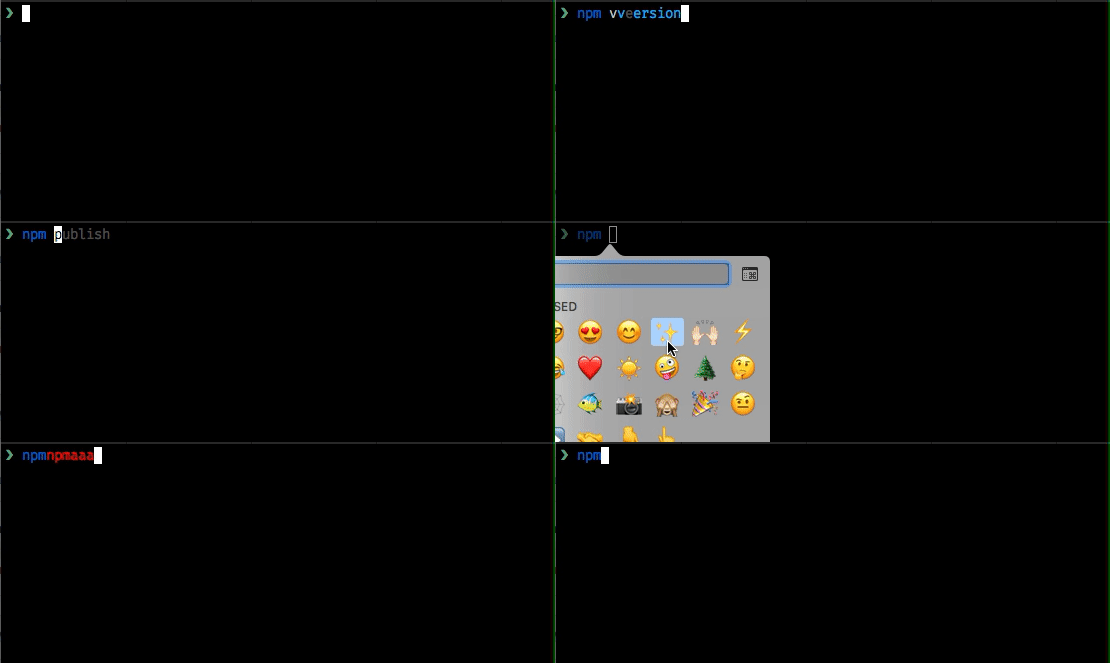
Still seeing issues like this
albinekb
on 23 Apr 2018
Using fish 2.6.0, changing the fish_emoji_width doesn't seem to make a difference
@spacekookie: Not too surprising, 2.6.0 does not have fish_emoji_width.
@albinekb: Please try building fish with --disable-internal-wcwidth (if using autotools, -DINTERNAL_WCWIDTH=OFF if using cmake) and try again.
faho
on 23 Apr 2018
@faho Ah woops! I thought it was added then; I'll go do that then! Thanks.
spacekookie
on 23 Apr 2018
I'm building with brew, do you know how to pass that option to cmake in brew? 🤔
https://github.com/Homebrew/homebrew-core/blob/master/Formula/fish.rb#L31
I don't know ruby, looks like it should be passing all extra args to cmake?
Edit: nevermind, after rebuilding, i got version 2.7.1-1096-ga9e9af5c, and now emojis work like expected, got some other issues with my prompt but I assume thats becuase it's using deprecated stuff
fatal: ambiguous argument '^/dev/null': unknown revision or path not in the working tree.
Use '--' to separate paths from revisions, like this:
'git <command> [<revision>...] -- [<file>...]'
fatal: Refusing to point HEAD outside of refs/
head: ^/dev/null: No such file or directory
@faho Unfortunately that (and setting fish_emoji_width) didn't change anything for me :disappointed:
spacekookie
on 23 Apr 2018
@spacekookie: Which fish version did you build? Which terminal on which OS (including version) are you using?
faho
on 23 Apr 2018
Fish version: fish, version 2.7.1-1096-ga9e9af5c
Os: Fedora 27 Workstation
Terminal:
Tilix version: 1.7.5
VTE version: 0.50
GTK Version: 3.22.26
Oh, and also which character is causing the problem?
Can you try with another terminal?
faho
on 23 Apr 2018
I use emoji in my prompts to differentiate between machines.
My current one is :point_right:. The problem occurs with other characters (for example my servers are: :bullettrain_front:, :house: and :cookie:) and the issue occurs just the same with gnome terminal and Terminator (same backend though). I also tried konsole (KDE Terminal) where the problem is actually a lot worse...
spacekookie
on 23 Apr 2018
My current one is point_right.
So that's 👉 - U+1F449 ("WHITE RIGHT POINTING BACKHAND INDEX")
Just to be clear: You _have_ built fish with cmake -DINTERNAL_WIDTH=OFF or ./configure --disable-internal-wcwidth? That fixes it for me, though my system is a teensy bit more up-to-date (tilix is 1.7.7 instead of 1.7.5, gtk3 is 3.22.30, vte is 0.52.1).
faho
on 23 Apr 2018
@faho I don't know what to tell you, I wish it was fixed :disappointed:
I built the master branch of fish-shell via cmake (because fuck autotools) and the -DINTERNAL_WIDTH=OFF flag. I installed fish to /usr/local/bin and set fish_emoji_width to 2.
The errors I get are more subtle then what is displayed here in the repo but there is some definite corruption, especially when trying to use tab-completion. Also, I had to essentially disable my right prompt because it would always overflow my cursor onto the next line.
Now, if you're telling me that's a different bug then maybe that is so. But it's still a bug caused by emoji with fish which I wish could be fixed. I hope this helps :crossed_fingers:
spacekookie
on 24 Apr 2018
@spacekookie:
and the -DINTERNAL_WIDTH=OFF flag.
Sorry, I apparently made a mistake.
It's -DINTERNAL_WCWIDTH=OFF. It refers to the "wcwidth" function.
Please double-check!
and set fish_emoji_width to 2
(Without internal wcwidth, that variable won't have any effect - it's a different solution to the same problem)
faho
on 26 Apr 2018
@faho Ah, yea. I made a mistake when writing my reply because I copied the flag from your comment. But in actuality I compiled it with the correct setting. If you provide a flag that doesn't exist cmake throws an error!
I just tried to capture the issues I'm getting on a screen-recorder but Wayland is preventing this. When I'm not at work I will re-login with Xorg and record what's going on.
But yea, I'm still having issues, using the newest fish master branch, using the right flag... :disappointed:
I'll edit this comment with a link to a video later.
spacekookie
on 2 May 2018
If you provide a flag that doesn't exist cmake throws an error!
Mine doesn't - instead it prints a warning: "Manually-specified variables were not used by the project".
Anyway, I have now managed to reproduce this with my GNOME Terminal. With the offending character U+2588 (█ - "FULL BLOCK"), this happens:

The "solution" is to go into GNOME Terminal's settings and setting the width for ambiguous/unknown-width characters to "narrow" in the "Compatibility" tab (I don't know what it's actually called in english because I can't get it to start in anything but german).
Which is quite annoying, because glibc's wcwidth just says it has a width of 1, as does our copy (those correspond to INTERNAL_WCWIDTH=OFF/ON, respectively)! So GNOME Terminal uses its own system that differs from it, which is impossible for us to figure out.
faho
on 3 May 2018
I've seen a few solutions to the problem and I've tried some of them... what's the definitive solution?
I use Ubuntu 18.04, GNOME Terminal, with fish 2.7.1... Whenever an emoji appears in the prompt, it gets put on the next line (and the beginning of each new line has an "m" for some reason)
It seems like a solution was found but I'm finding it hard to get a step-by-step procedure for this... anyone have anything like that?
 deanveloper
on 1 Jun 2018
deanveloper
on 1 Jun 2018
I've seen a few solutions to the problem and I've tried some of them... what's the definitive solution?
@deanveloper: There's no silver bullet. Fundamentally, what needs to happen is that your terminal and fish agree on the width of characters.
We have two approaches to make that more likely, neither of which is available in fish 2.7.1 - they'll be included in 3.0.
The first is @ridiculousfish's $fish_emoji_width. The idea there is that there are some characters that have "ambiguous" width, so they could be interpreted as having a width of 1 or 2, and some terminals (like GNOME Terminal) have a setting to change that. So you set $fish_emoji_width to 1 or 2 and your terminal to the same thing.
The other approach is my -DINTERNAL_WCWIDTH=OFF compile option. The idea there is that the terminal will most likely just use your system's "wcwidth()" function to determine character width, so fish should just use the same copy. This mostly helps with systems that have a wcwidth that returns different results than what fish ships with. If you use this, you need to set GNOME Terminal to see ambiguous characters as "narrow" (i.e. width of 1), but then it should work pretty much flawlessly.
As you can see, neither of the two approaches is bullet-proof, and they are currently mutually exclusive (they could be reconciled, though).
If you are using an up-to-date linux distribution with glibc >= 2.26 (which I believe Ubuntu 18.04 is), you probably want -DINTERNAL_WCWIDTH=OFF, which the Ubuntu packager should probably also pick once 3.0 is released, which would make it "just work" for Ubuntu specifically.
If you are building for a system that is supposed to be used via ssh or similar, and that system uses a standard C library that is different from the system your sshing _from_ - either because the server is RHEL 5 with an old and crusty tested glibc, or because it's Void or Alpine with Musl - you want -DINTERNAL_WCWIDTH=ON. That would cause issues if you also ran a desktop with a terminal emulator on those systems locally, but there's nothing we can do there.
Also if your terminal emulator is _wrong_ on some character width - we've had an example where one displayed a zero-width space with a width of 1 - there's nothing we can do. Which is more annoying, because the _font_ can also influence the width - the typical case is when it displays a replacement glyph with a different width from the actual char, or when it's not monospace.
faho
on 3 Jun 2018
I've switched to a different Terminal and testing it now on Arch Linux, I still get some isues and I'm wondering if the compilation flag is being considered or if I'm doing something else wrong. I would really like to figure this out.
The terminal emulator is kitty which has a use_system_wcwidth option which I enabled. When using a different shell (like bash) emoji support work flawlessly.
I cloned the fish-shell master branch and built it with
mkdir build ; cd build/
cmake -DINTERNAL_WCWIDTH=OFF ..
make
sudo make install
Which means my current fish version is: fish, version 2.7.1-1269-gf025607c. Yet, when I paste an emoji into, I get some weird issues. Here is a small screen recording of what it looks like. Note that the only thing I'm pressing here is the space bar! When using bash I'm purposefully inserting new emoji

spacekookie
on 23 Jun 2018
@spacekookie thanks for making that gif. It looks like the red heart is unicode U+2764 followed by a variation selector U+FE0F. fish doesn't make any effort to handle these sort of composed character sequences yet. What you're encountering is probably a different issue; I'll take a look.
ridiculousfish
on 24 Jun 2018
@spacekookie can you confirm what this C program outputs for you?
This is a "variation selector" which ought to have wcwidth -1 (non-printable), but It looks like the system wcwidth on my Mac reports 1 which is clearly wrong. It should be -1 (or 0).
I think we'll have to teach fish_wcwidth about variation selectors.
ridiculousfish
on 24 Jun 2018
Please give it a try in 5692adbdf60af63d32a371e31be0553e2f9f690e. I expect -DINTERNAL_WCWIDTH=OFF will actually introduce this since I hypothesize your wcwidth is busted.
Note bash isn't affected because it doesn't measure characters. That dodges this class of issue, but prevents it from supporting UIs like proper right prompts, etc.
ridiculousfish
on 24 Jun 2018
@ridiculousfish Thanks for getting back to me. I ran that C program and it output:
 ❤ (rayya) ~/P/clones> ./w
en_GB.UTF-8 0
Also, I tried compiling and installing the latest master branch of fish and it didn't make a difference :disappointed: (the output of the program you sent me also doesn't change)
spacekookie
on 24 Jun 2018
I'll see if I can reproduce.
ridiculousfish
on 24 Jun 2018
Something that confuses me is that I do include a unicode character in my prompt, just not the proper emoji one. But I don't know what the difference is. ❤ is listed as U+2764, but on the same page it also lists ":heart:" as the same character, the one that is causing the weird issues in the gif :thinking:
spacekookie
on 24 Jun 2018
❤️ is U+2764 followed by the "emoji variation selector" U+FE0F. I think the variation selector is the one whose width is being misreported.
ridiculousfish
on 24 Jun 2018
I haven't been able to figure out how to get color emoji working in terminal under Arch. How did you do this? Edit: never mind, I've got it working and can reproduce
ridiculousfish
on 25 Jun 2018
ridiculousfish
on 25 Jun 2018
Ok, finally got to the bottom of this. The problem is that when U+2764 is followed by the emoji variation selector, its width increases from 1 to 2. This is not something that wcwidth can express, and not something that fish anticipated. This is basically unfixable and I expect other command line tools like vim will have issues with this character sequence.
The best thing I can think to do is be less aggressive in screen.cpp about assuming the old contents; that is make heavier use of \r to jump to the beginning of the line, so that fish becomes more resilient to this class of problem.
ridiculousfish
on 25 Jun 2018
Isn't that why wcwidth of U+FE0F should be 0 or -1 then? Is this a bug in the glibc implementation of wcwidth or a problem with the standard itself?
Any workaround on fish's behalf to make these issues less problematic would however be very much appreciated. And thank you for getting to the bottom of this :heart:
spacekookie
on 25 Jun 2018
I'd like to add that this wasn't a problem in earlier versions of fish, maybe something else changed? 🤔
albinekb
on 25 Jun 2018
I've been digging into this problem and reading the various issues and PRs about the issue with emoji widths in Fish shell. But I'm still at a loss for how to tell fish shell to use my system width. Any help?
 jsatk
on 4 Jul 2018
jsatk
on 4 Jul 2018
But I'm still at a loss for how to tell fish shell to use my system width.
@jsatk: This isn't completely done or anything, there's still a bunch of work needed.
What you currently want is to either wait for 3.0, which will include some work, or to install fish from git master.
That leaves you with two choices:
Either you build it with "-DINCLUDED_WCWIDTH=OFF" (if you use cmake, "--without-included-wcwidth" if using autotools), which will use your system wcwidth
You leave it on (the default), which will already give you a better wcwidth than 2.7 ships with, and allow you to use $fish_emoji_width to select if some characters that were "narrow" in unicode 8 but "wide" in unicode 9 should be thought of as narrow or wide.
Personally, I favor using the system wcwidth unless you are running fish on a server and connecting via ssh, in which case the displaying system will have a newer wcwidth than the one running fish.
However, there are issues with ambiguous width characters, and with the aforementioned FE0F (which is quite a hard problem!) which we haven't fully solved.
faho
on 4 Jul 2018
Thanks @faho. I think I'll just live with the very minor annoyance of emoji widths being weird and with for Fish 3.0. I am on macOS and would prefer to just keep my fish up-to-date with homebrew. Thanks for shepherding this work.
jsatk
on 6 Jul 2018
@spacekookie emoji widths seem to be working pretty well on fish master (which includes a new wcwidth per #5081) with kitty terminal. You'll want to set emoji width to 2:
`set -g fish_emoji_width 2`
Please give it a try and report back! Really appreciate your patience with this.
ridiculousfish
on 10 Jul 2018
I got emojis to work with fish, version 2.7.1-1337-g09541e95 by unchecking Use Unicode version 9 widths in iTerm2.app settings:

albinekb
on 14 Aug 2018
I'm confident this has been addressed via the fish_emoji_width variable. Closing.
ridiculousfish
on 19 Aug 2018
@ridiculousfish so always when setting up fish we need to remember to set the variable to get emojis to work? Doesn't seem very "user friendly"..
albinekb
on 20 Aug 2018
so always when setting up fish we need to remember to set the variable to get emojis to work?
Maybe. That's the point of the variable existing - some terminals/systems need it set to 2 and some to 1. In particular, you'll have to set it to 2 if your terminal is using the Unicode 9 widths, and to 1 otherwise - which means even with e.g. iTerm2, it depends on that option you talked about! Which means we can't do terminal detection via $TERM and friends like we do for e.g. cursor shape or truecolor support.
Doesn't seem very "user friendly"..
Unfortunately, there's nothing fantastic we _can_ do, simply because there is no way for us to communicate with the terminal to figure out what width it uses. The variable is very much an admission of that fact.
It might be better to swap the default around - currently if you don't set that variable, we're using the pre-9 widths. Maybe it might be better to use the post-9 ones, or maybe we should wait another year or so until operating systems have caught up?
faho
on 20 Aug 2018
Yeah these variables are super-lame, but there's no other option. The best we can hope for is excellent defaults (can still improve here) and fallback configurability.
I would guess the variable has the correct default sense today but could easily be wrong. Importantly though it only affects emoji that are in Unicode 8 or earlier (surprisingly few!). Emoji introduced in Unicode 9+ are always assumed to render per Unicode 9 widths.
ridiculousfish
on 21 Aug 2018
The best idea I can come up with would be to have an interactive function where the user is presented with a unicode character displayed with the two different settings and can select which one looks best, that would then automatically set and persisted as the fish_emoji_width. Would that be possible?
terlar
on 21 Aug 2018
That sounds like a good enhancement - would you or anyone else be interested in producing something?
zanchey
on 21 Aug 2018
I would guess the variable has the correct default sense today but could easily be wrong.
So, glibc got updated in 2.26, which was released on 2017-08-02, so about a year ago. For Ubuntu, that means everything after 17.10 does Unicode 9.
Notably, that leaves Ubuntu 16.04 (which is still supported and the current basis for WSL) and current Debian Stable out. I suspect other distributions to work the same, and I don't know how this works on macOS.
So that's basically a worst-case answer. Large parts of our user base are using older distributions, especially on servers, so I can't be sure that switching defaults will make it work for more users.
Alternatively we could do version-detection of the C library, but that might be too confusing given that there's often _two_ knobs to deal with (the terminal's and ours) and keep in sync.
The best idea I can come up with would be to have an interactive function where the user is presented with a unicode character displayed with the two different settings and can select which one looks best
When is this shown? Does the user explicitly execute it? Is it a first-launch "wizard"?
Still, this might be the best idea we've seen so far. Just a simple
❤
aa

Is the heart as wide as 1 or 2 "a"?
(with the heart symbol being the last \U escape I used - no idea if that's affected by this)
faho
on 21 Aug 2018
When is this shown? Does the user explicitly execute it? Is it a first-launch "wizard"?
Maybe show it the first couple of times under the Welcome to fish, the friendly interactive shell message and after it was executed / displayed 10 times(?), hide it?
z3ntu
on 21 Aug 2018
To be sure, emoji width is not up to the C library, but instead the terminal. (I wouldn't be surprised if it were font dependent too.)
I really like the idea of a "compatibility quiz" function! We could use it to detect support for 256 colors, 24-bit color, settable titles, and emoji widths.
ridiculousfish
on 26 Aug 2018
Here's another idea for a quiz function:
👉👉👉👉                            1   2
Please select the following answer: ^
With width = 1 the ^ points at "2" and with width = 2 it points at "1".


YaLTeR
on 26 Aug 2018
Instead of quizzing the user, I think we could quiz the terminal by using an escape to get the cursor position before and after printing a spooky character.
floam
on 18 Dec 2018
Related issues
 joshuaconner
·
98Comments
zanchey
·
59Comments
joshuaconner
·
98Comments
zanchey
·
59Comments
 lilyball
·
110Comments
lilyball
·
110Comments
 dag
·
58Comments
xiaq
·
54Comments
dag
·
58Comments
xiaq
·
54Comments
Most helpful comment
5282d3e7110f40fc9cb51f4ae952f65000bbf0ae rationalizes a lot of how fish measures characters including emoji. In particular U+2E3B should be properly measured as width 1 (though it overdraws into other characters). Please comment / reopen if you still see this - thanks!