Fish-shell: Cygwin: Unable to rename file from '~/.config/fish/fishd.tmp.7ZwM5R' to '~/.config/fish/fishd.mypc.x86_64': Permission denied
- I am using Cygwin on a Citrix Virtual Disk.
- When fish starts, the error shows up.
- No issue when starting bash or zsh.
 Neo-Wang
All 51 comments
Do you have permission to write to fishd.mypc.x86_64?
 faho
on 9 Dec 2015
faho
on 9 Dec 2015
For the other shells, like bash zsh, they are fine. And I do have the write access of this Citrix Virtual Disk.
Neo-Wang
on 10 Dec 2015
I take it you still get a usable fish shell? What happens if you
cd ~/.config/fish
echo test > test.tmp
mv test.tmp test.mypc.x86_64
Does the behavior of the above sequence of commands differ based on whether the current shell is fish or bash? Basically I'm trying to determine whether the problem is something specific to the fish C++ code or affects any programs performing the equivalent operations.
 krader1961
on 10 Dec 2015
krader1961
on 10 Dec 2015
See the following screen shot please.

Neo-Wang
on 11 Dec 2015
The output of getfacl ~/.config/fish might be useful, too.
 zanchey
on 11 Dec 2015
zanchey
on 11 Dec 2015
Okay, as @zanchey suggests, this appears to be an ACL problem. I would review http://www.cygwin.com/cygwin-ug-net/ntsec.html then compare the output of the getfacl command for the fish binary, the Cygwin supplied mv binary, and the /home/a478208/.config/fish directory. It may be necessary to resort to native MS Windows tools, rather than Cygwin tools like getfacl, to identify the source of the problem. it's also pretty clear from what you've posted that fish isn't even able to create the temp file. Looking at the code it appears that a bunch of failures related to setting up universal env vars don't get reported unless you have already done set -x fish_universal_log 1 or equivalent before starting fish. So you might try setting that env var to see if additional errors are reported that might shed additional light on the nature of the problem.
krader1961
on 11 Dec 2015
One important thing is that I am using Cygwin on a Citrix Virtual Disk, not a physical hard drive. If on physical hard drive, this never happens.
See my log below

Neo-Wang
on 11 Dec 2015
@Neo-Wang, that suggests to me the mount-point of the filesystem is a factor. What happens if you replace my original sequence of commands with
echo test > /home/a478208/.config/fish/test.tmp
mv /home/a478208/.config/fish/test.tmp /home/a478208/.config/fish/test.mypc.x86_64
from both a non-fish and fish shell? Note that I might be wasting your time since I have no knowledge of how MS Windows behaves, let alone in a Cygwin environment. Nonetheless, I think there is value in performing careful experiments. I'll also point out that bash and zsh don't try to create and rename config files when they begin running so the comparison of fish to those shells in that regard is not relevant.
krader1961
on 11 Dec 2015
The virtual disk appears to the host operating system as an NTFS filesystem, right? That should be fine.
zanchey
on 17 Dec 2015
No new information in seven months. Too, the environment the problem was observed in is esoteric and it is unlikely anyone other than the O.P. is going to be able to provide the necessary information. Since they haven't done so I'm closing this.
krader1961
on 5 Aug 2016
I have the same issue on Windows Subsystem for Linux (WSL) (aka Bash on Windows). I tried to move my ~/.config/fish folder from lxss WSL filesystem to the regular NTFS Dropbox folder just like I've done for most other config files so that I can easily change them from within the native Windows environment.
Fish DOES have full access to that folder and your tests with echo ... and mv ... above are performed as expected (new file is created and moved).
However, fish doesn't seem to be able to write the ~/.config/fish/fishd.tmp.Iq1KsQ to ~/.config/fish/fishd.1c6f65c73ec4 with the same Operation not permitted error. I've tried to symlink this fishd.1c6f65c73ec4 file in Dropbox back to lxss (symlink created within WSL environment), but noticed that on login fish "converts" this file from a symlink to a regular one.
By the way, I'm able to edit this file when it's symlinked by e.g. vim from inside the WSL shell.
I searched for a way to set a different path for just that file so that it wouldn't mess with the rest of configs set my me (it's not really a user config file since I'm not supposed to edit it), but from
https://github.com/fish-shell/fish-shell/issues/862#issuecomment-19138822 I understand it's not possible.
 eugenesvk
on 4 Nov 2016
eugenesvk
on 4 Nov 2016
Sooo.... this looks weird. The error message comes from env_universal_t::move_new_vars_file_into_place (in env_universal_common.cpp), which calls wrename, which is our wcstring wrapper around rename(1). The rename fails with EPERM.
From some cursory googling, it appears that there's something weird going on here with locking/unlinking and stuff on windows. In particular, it appears that anti-virus programs can sometimes lock a file so unlinking will not remove the directory entry. See e.g. https://github.com/Medium/phantomjs/issues/19#issuecomment-13995448.
@eugenesvk: Do you have an anti-virus program? Can you test this after disabling it?
faho
on 5 Nov 2016
Thank you for looking into this.
Yes, I do have Bitdefender Antivirus 2017, but even after disabling firewall, on-access scanning and active threat control nothing changed :( - fish still couldn't write to a file if it was moved to a Win file system and linux-symlinked to its original place.
Maybe it'd be worth to just change a setting to move this file out of user folder like the history file previously? This way it could just stay on the Linux file system and I could easily sync&edit my settings in a Windows folder
eugenesvk
on 6 Nov 2016
Maybe it'd be worth to just change a setting to move this file out of user folder like the history file previously?
No, because it really is a configuration file; albeit one you shouldn't edit by hand but rather via the set command.
I use Dropbox to keep my "dot" files in sync between my systems; which includes the _~/.config/fish_ directory. And I'm not seeing any problems. But I'm only doing that on real UNIX systems. On my Windows WSL virtual machine I use rsync to keep things in sync since I don't use it often enough to be bothered to setup Dropbox there (same for most of my other VMs).
It's unclear from your earlier comments if this problem occurs if you do not put _~/.config/fish_ in the Dropbox folder inside your WSL instance. If the answer is "no" that's probably an important clue.
krader1961
on 6 Nov 2016
@eugenesvk: What happens if you do the experiment I asked @Neo-Wang to perform in this comment? With and without your _~/.config/fish_ being controlled by Dropbox? Obviously just change the path to a non-Dropbox directory to test that scenario. Basically what I'm wondering is if the problem is due to doing the rename using an absolute path.
krader1961
on 6 Nov 2016
if you do the experiment I asked
Don't understand what you mean, I mentioned in my first comment that this test worked fine
"and your tests with echo ... and mv ... above are performed as expected (new file is created and moved)"
Maybe I'm missing something in what you're asking for, but I've moved fish config folder again to several locations
- symlinked to another path within WSL
- symlinked to a Dropbox path outside WSL
- symlinked to a non-Dropbox path outside WSL)
and the only issue is with the fishd file, all other tests are just fine - fish can read/create/write/move etc. files everywhere, inside and outside WSL. Only when the need arises to write to this config file the issue arises - does fish do some weird too-unixy stuff for this simple file operation that's not yet implemented in Win-Linux interoperability (like there are some issues with sockets creation outside of WSL, they don't work) :)?
eugenesvk
on 8 Nov 2016
I have this issue too in cygwin. One cause of this issue seems to be that if ~/.config/fish is in a Windows NTFS junction point (~symlink). I changed the home directory to a directory that does not include a junction point and the problem doesn't occur in cygwin when I enter fish from bash.
The echo and mv commands you provided work fine in cygwin when executed from fish even when the home directory is in a junction point. Therefore, the problem seems to be within fish and how it processes .config/fish when in a junction point.
In WSL, fish works fine. Again, the home directory is not in a junction point.
Edit: as a follow up, the "unable to rename file" error also occurs if the home directory is a network drive (no junction points). I can successfully manually rename a temp file in ~/.config/fish using the mv command. This seems to confirm that it is a fish issue not cygwin.
 Praful
on 9 Nov 2016
Praful
on 9 Nov 2016
@eugenesvk, you wrote
and the only issue is with the fishd file, all other tests are just fine - fish can read/create/write/move etc.
What do you mean by "fish can..."? Because if you're using commands like mv to prove that fish can move files then you have not proven anything of the sort. Commands mv are external to fish and not provided by the fish project. Too, the question is not whether fish can read or write files. The question is why the rename() system call used by fish to move the temporary fishd file name to its permanent name is failing.
@Praful: Thanks for the information but what you wrote is slightly confusing. I haven't heard the term "junction point" before. Do you know if that is the same thing as a UNIX "mount point" or is it something different? When you say you "can successfully manually rename a temp file in ~/.config/fish using the mv command" it is no clear what arguments you gave to the mv command and what your PWD was. Please try this with your _~/.config/fish_ in a NTFS junction point or network drive:
cd ~
echo hello > ~/.config/fish/test.tmp
mv ~/.config/fish/test.tmp ~/.config/fish/test
That should approximate what fish is doing.
krader1961
on 16 Nov 2016
A junction point is a Windows-specific term, but it's similar to a symbolic link - see Wikipedia.
zanchey
on 16 Nov 2016
Ugh! Last time I checked (a decade ago) a MS Windows symbolic link is very different from a UNIX symbolic link in terms of its semantics. And I can certainly see how that difference in behavior might cause problems. Especially if we're somehow using the realpath in one part of the code and not another with respect to handling the fishd file. Which would be a bug IMHO. But somehow I don't think that's what is happening.
@zanchey: I haven't used MS Windows on a daily basis in a very long time so am disinclined to try and reproduce by making _~/.config/fish_ a junction point since I have no idea how to do so. Can you test that scenario? This issue is now almost a year old. If we don't make progress soon I'm inclined to close it.
krader1961
on 16 Nov 2016
@krader1961 Here are the instructions to reproduce from a Windows Command Prompt:
d:
cd \
mkdir temp
c:
cd \
mklink /J fishhome d:\temp
set home=c:\fishhome
cygwin.bat
fish
Lots of permission errors appear after typing fish:
Unable to rename file from '/cygdrive/c/fishhome/.config/fish/fishd.tmp.Af2Bfv' to '/cygdrive/c/fishhome/.config/fish/fishd.PENCORPD0749.x86_64': Permission denied
Unable to rename file from '/cygdrive/c/fishhome/.config/fish/fishd.tmp.jEI4hQ' to '/cygdrive/c/fishhome/.config/fish/fishd.PENCORPD0749.x86_64': Permission denied
However, your commands run fine and the file is renamed:
cd ~
echo hello > ~/.config/fish/test.tmp
mv ~/.config/fish/test.tmp ~/.config/fish/test
If before running cygwin.bat, I run
set home=d:\temp
then
cygwin.bat
fish
all is well. In other words fish works if you directly use the destination of the directory junction (d:\temp) as your home directory instead of the directory junction (c:\fishhome).
You'll see above that the mklink /J command creates a directory junction, which is a sort of symbolic link although technically Windows creates its version of a directory symbolic link using mklink /D.
If instead of a directory junction, I create a directory symbolic link:
mklink /D fishhome2 d:\temp
set home=c:\fishhome2
the same permission errors occur on startup. The mv command you provided works fine.
For a network drive eg
set home=h:\temp
fish generates the following errors when started:
Unable to rename file from '/cygdrive/h/temp/.config/fish/fishd.tmp.QW21jj' to '/cygdrive/h/temp/.config/fish/fishd.PENCORPD0749.x86_64': Device or resource busy
Unable to rename file from '/cygdrive/h/temp/.config/fish/fishd.tmp.syNTJ5' to '/cygdrive/h/temp/.config/fish/fishd.PENCORPD0749.x86_64': Device or resource busy
but the mv test you provided (creating temp file then renaming it) works.
In summary, with cygwin:
| Home folder | Result |
| --- | --- |
| Directory junction created using mklink /J | fish produces permission errors on startup |
| Directory symbolic link created using mklink /D | fish produces permission errors on startup |
| Network drive | fish produces device or resource busy errors on startup |
| Normal directory | fish works fine |
Please let me know if you require further information.
Praful
Praful
on 16 Nov 2016
@andrex-e-schulman: Any insight here? The thing that is failing is a rename() call, and I don't get how that could be the case. I mean maybe the network drive thing, but I don't really understand "junctions".
faho
on 16 Nov 2016
@Praful: Thank you for that detailed comment. I was able to reproduce the problem using a single drive. I ran cmd.exe and typed:
cd \cygwin64
mklink /J fishshell tmp
I then opened a Cygwin window and ran
HOME=/fishshell
cd $HOME
mkdir -p .config/fish
fish
Doing the echo/mv test works in both the original bash and fish shells. So either the mv command is doing something to deal with the junction or fish is doing something different than we think.
In fact, if I add a simple rename("/fishshell/.config/fish/test.tmp", "/fishshell/.config/fish/test"); near the top of the main() function (but after the init functions) it succeeds and the file is renamed. Which implies that the code that renames the uvar file is doing something other than that. Off to do more spelunking.
krader1961
on 17 Nov 2016
Have I mentioned that I hate MS Windows? :smile:
The rename is failing because fish has an open file descriptor on the file being renamed. I knew that Windows won't let you delete (unlink) a file that is open but why is it illegal to rename a file you have open but only if the path involves a "junction"? MS Windows is so fracking weird.
The code path in question immediately closes the file descriptor after the rename. So the question is whether there is any risk in doing the close first. @ridiculousfish?
krader1961
on 17 Nov 2016
Aha! The real problem is that the target path already exists and we have an open file descriptor on it as well. The rename obviously requires that it be deleted but the open fd is keeping that from happening. Still, I don't understand why this isn't a problem if a junction isn't involved.
krader1961
on 17 Nov 2016
@krader1961
the question is not whether fish can read or write files
Yep, you're correct, I misinterpreted the test. Hope you can find out why the rename() call is failing in juctions
eugenesvk
on 1 Dec 2016
Just to add to the pile - I have exactly the same issues running fish on my setup:
Vagrant & VirtualBox
VMs: Ubuntu 16.04, Debian 7, Debian 8
Host: Windows 7
I DO NOT have this issues if I mount Host system drive via NFS share ( available as a plugin for vagrant) - but it's limited to one mount per VM, and I need that mount point to point directly at my Ruby app folder on the host.
I do mount my c:DropboxSettings folder (which contains .ssh, .config, .git_config , etc ) using regular built-in VirtualBox mounting / shared folder system - and that's when I run into the issue.
I don't have any issues like that with any other shells - bash, zsh, etc ( just tried them out of curiosity, I do love my fish! )
 konung
on 2 Feb 2017
konung
on 2 Feb 2017
Update. Just out of curiosity I updated my vagrant installation to the latest, and now I'm able to mount multiple nfs shares. The problem went away!! hip-hip hooray for NFS. I'm not sure if this is possible with other setups - but I highly recommendt to try it out. (NFS share that is)
konung
on 2 Feb 2017
I have the same thing with whole $HOME dir being a windows junction to an folder inside OneDrive-managed directory. bash and zsh work, but fish throws a lot of:
→ fish
<E> fish: Unable to rename file from '/home/marcin/.config/fish/fishd.tmp.cFWIyw' to '/home/marcin/.config/fish/fishd.BENEK.x86_64': Permission denied
<E> fish: Unable to rename file from '/home/marcin/.config/fish/fishd.tmp.jsGDJQ' to '/home/marcin/.config/fish/fishd.BENEK.x86_64': Permission denied
... and so on...
fish version is 2.7.0, on Windows 10 Home x64.
 mkielar
on 30 Dec 2017
mkielar
on 30 Dec 2017
Any updates on this?
 teucer
on 3 Sep 2018
teucer
on 3 Sep 2018
@teucer: No. This is really one of those things that requires a cygwin expert, and so far nobody has stepped up.
faho
on 3 Sep 2018
I'm the Cygwin maintainer of fish, so I'm the obvious person to try to solve this, but unfortunately I don't have any big ideas about what's causing it. My best suggestion is to report the error to the Cygwin list ([email protected]), with all of the available detail above that rename() is failing when ~/.config/fish is on certain file sytems. The Cygwin DLL developers are active on that list, and if anyone can solve it they can.
 andrew-schulman
on 3 Sep 2018
andrew-schulman
on 3 Sep 2018
As pointed above it seems that it is a fish issue, given that bash and zsh work flawlessly. Not sure how cygwin community would solve it...
teucer
on 3 Sep 2018
As pointed above it seems that it is a fish issue,
That's not quite how this works. The reason that "bash and zsh work flawlessly" is that they don't have universal variables, so they don't write to a file in the same way that fish does.
As an example, imagine cygwin's terminal crashed if you used color sequences. Fish would trigger that, but e.g. dash wouldn't, because it does not use colors by default (at least I'm reasonably sure of that). Would that also be a "fish issue"?
That doesn't mean that it's not fish's fault, just that it remains to be determined.
faho
on 3 Sep 2018
What would it take to determine the source? Happy to help...
teucer
on 3 Sep 2018
@teucer it might be a permissions problem. What happens if you try to manually create a file (e.g. via touch) at the path that fish reports? Are the permissions of /home/marcin/.config/fish/ set so that you can create files in there?
 ridiculousfish
on 4 Sep 2018
ridiculousfish
on 4 Sep 2018
I have done the test (as described above) and they work
teucer
on 4 Sep 2018
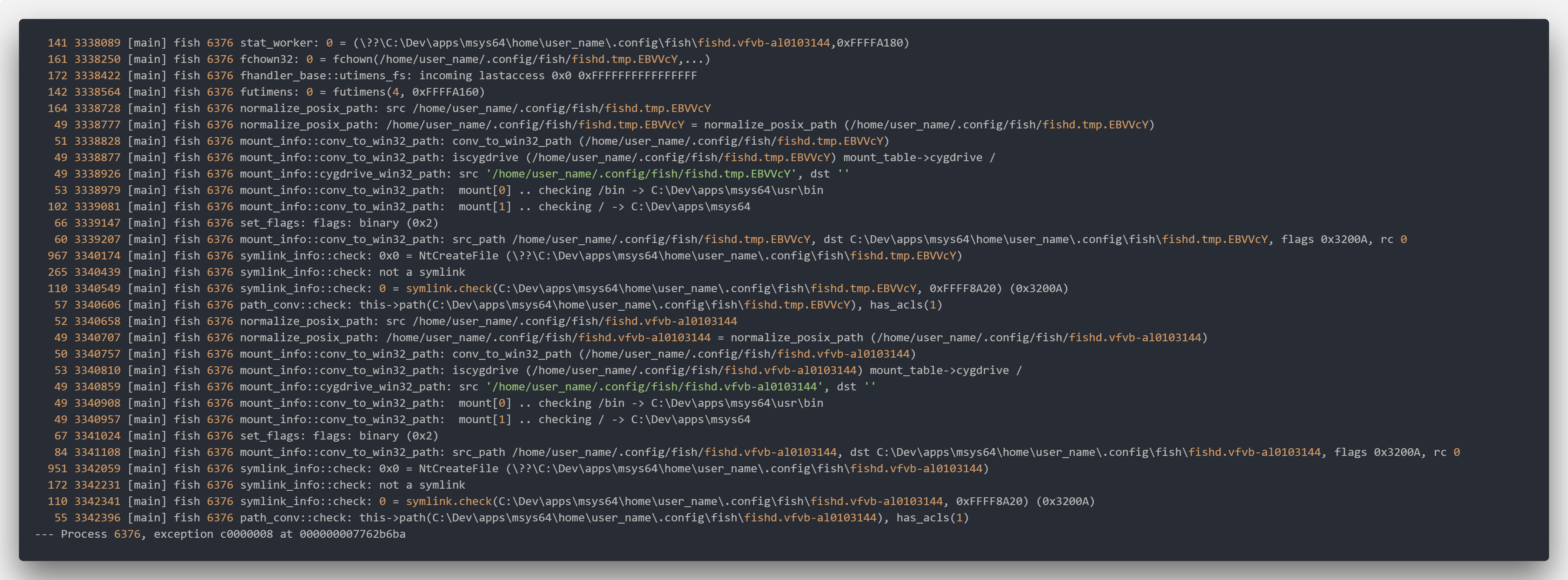
@teucer Try running strace /usr/bin/fish, and look for a failing system call near where the error happens. Once you have that, you can report it to the Cygwin list to see if they can help.
Note, strace makes a lot of output. You may want to run strace -o logfile /usr/bin/fish or strace /usr/bin/fish >logfile 2>&1.
andrew-schulman
on 4 Sep 2018
 teucer
on 7 Sep 2018
teucer
on 7 Sep 2018
- Is that all of the strace output? I don't see the failing call to
renameor anything else. - Please post the output as text, either here or on say pastebin.com, not as an image. Text is easier to work with.
- I don't know if it matters that you're using MSYS2. I'm not familiar with MSYS2, but it might since MSYS2 is apparently some combination of Cygwin and MinGW with packaging tools. I think if you want help from the Cygwin devs to solve this, you'll have to reproduce the problem in a Cygwin-only environment, so they can reproduce it too. Sorry.
@Praful, @mkielar, @konung, can any of you reproduce this in Cygwin, not MSYS2?
andrew-schulman
on 7 Sep 2018
it a very loooong chain of such errors...
21484 3241115 [main] fish 7892 __set_errno: int rename2(const char, const char, unsigned int):2684 setting errno 14
--- Process 7892, exception c0000008 at 000000007762b6ba
teucer
on 7 Sep 2018
@andrew-schulman Yes, I'm able to reproduce it. So, just to make some context regarding my configuration. I have my cygwin home directory created as a junction to a folder on another disk, which is managed by OneDrive. This is how this looks from cmd.exe side:
c:\tools\cygwin\home>dir
 Volume in drive C is SYSTEM
 Volume Serial Number is 1AD1-BCDF

 Directory of c:\tools\cygwin\home

14.04.2018  00:53    <DIR>          .
14.04.2018  00:53    <DIR>          ..
11.11.2017  23:45    <JUNCTION>     marcin [d:\OneDrive\tools\CYGWIN_HOME]
               0 File(s)              0 bytes
               3 Dir(s)  77 744 492 544 bytes free
Now the output of strace fish > log 2>&1:
The zipped file can be downloaded from here: http://s000.tinyupload.com/index.php?file_id=09852752977194690660 (unfortunately, even the truncated version was too big for pastebin). And I think the most important part is this:
   64  381028 [main] fish 2084 mount_info::conv_to_win32_path: conv_to_win32_path (/home/marcin/.config/fish)
   64  381092 [main] fish 2084 mount_info::cygdrive_win32_path: src '/home/marcin/.config/fish', dst ''
   73  381165 [main] fish 2084 set_flags: flags: binary (0x2)
  119  381284 [main] fish 2084 mount_info::conv_to_win32_path: src_path /home/marcin/.config/fish, dst C:\tools\cygwin\home\marcin\.config\fish, flags 0x3000A, rc 0
  248  381532 [main] fish 2084 symlink_info::check: 0x0 = NtCreateFile (\??\C:\tools\cygwin\home\marcin\.config\fish)
  135  381667 [main] fish 2084 symlink_info::check: not a symlink
  100  381767 [main] fish 2084 symlink_info::check: 0 = symlink.check(C:\tools\cygwin\home\marcin\.config\fish, 0xFFFF9150) (0x3000A)
   55  381822 [main] fish 2084 path_conv::check: this->path(C:\tools\cygwin\home\marcin\.config\fish\BENEK), has_acls(1)
  111  381933 [main] fish 2084 __set_errno: int rename2(const char*, const char*, unsigned int):2135 setting errno 2
  147  382080 [main] fish 2084 rename2: -1 = rename(/home/marcin/.config/fish/BENEK, /home/marcin/.config/fish/fishd.BENEK.x86_64), errno 2
The not a symlink result on a folder that is a junction at some higher level, followed by a failed rename. This happens several times in the log, and at some point the only thing that gets logged is a hundreds of megabytes long series of:
--- Process 2084, exception c0000008 at 00007FFD1B52DC9A
  496 1533745 [main] fish 2084 __set_errno: int rename2(const char*, const char*, unsigned int):2589 setting errno 14
I remember having the same issue with Dropbox before I switched to OneDrive. The reason is most definitely the Windows Junction, but why it only fails for fish - no clue.
mkielar
on 7 Sep 2018
Thanks, I think this is what the Cygwin developers need. So I request that one of you, @mkielar or someone else, who has this problem, send a report like the above to [email protected]. I'll watch the thread but I don't think it makes sense for me to report it, because I don't have the problem so I can't explain or test.
Be sure to mention that the problem only happens on Cygwin, not other platforms; only with fish, not other shells; and apparently only at junction points.
andrew-schulman
on 7 Sep 2018
I posted to Cygwin forum as suggested.
The thread is here: https://cygwin.com/ml/cygwin/2018-09/msg00136.html, I crosslinked it to this thread.
Let's see what they say...
mkielar
on 7 Sep 2018
There is a way to work around this.
Execute cygwin from outside the junction point. Execute fish. Exit.
Execute fish again inside the junction point.
In WSL, this issue doesn't occur.
 crocket
on 4 Nov 2018
crocket
on 4 Nov 2018
How do I just hide this message?
I have some reason that I have to set my $HOME in a network drive, and I found I can use most of feature of fish, except it keep showing this error message.
And this message is too annoy! How do I hide this message?
 HuJK
on 28 May 2019
HuJK
on 28 May 2019
The advice from the Cygwin list seems to be "don't do that", unfortunately.
You could put your fish configuration somewhere else?
zanchey
on 14 Jun 2019
fishd was removed in fish 2.2.0 (released July 12, 2015), see https://fishshell.com/release_notes.html.
Seems very likely this bug is obsolete.
 mhansen
on 11 Mar 2020
mhansen
on 11 Mar 2020
The fishd name was carried on despite the component being removed, though now moved to fish_variables.
zanchey
on 11 Mar 2020
Okay, sorry, I'm closing this since it doesn't seem to be actionable on our side.
The cygwin developer's reaction was "don't do that", so I'm going to have to ask people to not do that, whatever "that" is.
If someone figures out a useful thing we could do we can do it, of course, but as it stands I don't see anything.
faho
on 27 Sep 2020
Thanks @crocket!
Explicitly:
open cygwin (or git sdk)
export HOME=/c/users/yourname
fish
exit
exit
Copy files from C:\Users\yourname\.config\fish
to H:\.config\fish (replace H: by the mapped network drive you chose as HOME)
restart cygwin (or git sdk)
→ HOME will be H: again
→ fish will no longer yield errors
 ronnac
on 3 Dec 2020
ronnac
on 3 Dec 2020
Related issues
 joshuaconner
·
98Comments
krader1961
·
67Comments
joshuaconner
·
98Comments
krader1961
·
67Comments
 thegreyshadow
·
49Comments
zanchey
·
59Comments
thegreyshadow
·
49Comments
zanchey
·
59Comments
 dag
·
92Comments
dag
·
92Comments
Most helpful comment
@teucer Try running
strace /usr/bin/fish, and look for a failing system call near where the error happens. Once you have that, you can report it to the Cygwin list to see if they can help.Note, strace makes a lot of output. You may want to run
strace -o logfile /usr/bin/fishorstrace /usr/bin/fish >logfile 2>&1.