Fish-shell: Add zsh-like reverse-isearch
While I love most things about fish, I had to switch back to zsh because C-r in zsh (or even bash) is more efficient than fish's reverse-search functionality.
In zsh you can type-to-complete substring-matches in history. With fish, you can cycle to see what in your history matches your substring, but you can't easily modify your substring while searching to narrow down the match.
For example if I type "git re" and go up a few times, I may find that I'm only finding a bunch of "git reset"-ish commands, but I know I want a command like "git rebase", so in zsh or bash I would just type a "b" to narrow that down. But in fish I have to restart my search with C-c and try again with "git reb". Otherwise I'm just adding a "b" to the end of whatever the last match was, which isn't what I meant to do.
This may appear trivial, but I rely heavily on C-r for all my commands (which is one reason I like fish, because it predicted that correctly about me), but I rely on it for substring-matches, not just prefix-string matches like fish does with auto-suggestions.
I'm proposing that in addition to the existing reverse-search feature, a zsh-like C-r be implemented as well.
 ghost
ghost
All 106 comments
I'm interested in suggestions for what the UI ought to be. Currently typing a character during history search just appends it, which seems not very useful, so we have an opportunity to do something better.
 ridiculousfish
on 1 Mar 2013
ridiculousfish
on 1 Mar 2013
I'm imagining it working exactly like zsh. And since there is no C-r right now in fish, it could even have the same key-binding, and be considered a new feature, instead of a change of existing functionality.
ghost
on 1 Mar 2013
C-r is awfully undiscoverable, though; typing during the history search altering the search term makes more sense to me. You can push the right arrow key if you want to append to something.
 zanchey
on 2 Mar 2013
zanchey
on 2 Mar 2013
Then how about a mix of fish's C-p/up and zsh's C-r? You could just type something and go up and down in history (with either C-p/C-n or up/down, but the UI would be just like zsh's, where you see the search term on the second line (which is really where your cursor is) but the matches show up on the first line with the matched part underlined (or whatever custom font the user chooses for highlighting matches; currently the default red-background is unreadable). I've attached two screenshots to explain better. But ultimately what I'm suggesting is that the functionality work just like zsh, but it be triggered simply by going up/down through history after/while typing.


ghost
on 2 Mar 2013
As a slight addendum to my UI proposal, instead of being exactly like zsh's UI, the match and the currently-typed-string can be switched, so that what you're typing stays on your current line, but the suggested match appears on the line below.
ghost
on 4 Mar 2013
Just wanted to chime in, I recently switched to fish and am really missing this.
 Tinche
on 20 Apr 2013
Tinche
on 20 Apr 2013
This feature would be a great addition to fish.
 b-rodrigues
on 17 May 2013
b-rodrigues
on 17 May 2013
How about make it behave mostly like the current behavior rather than like CTRL-R, but don't move the cursor and only "exit" search mode with CTRL-F and friends?
git re CTRL-P git re[s]et b git reb[a]se CTRL-F git rebase
 dag
on 18 May 2013
dag
on 18 May 2013
This would really be a great addition to fish. Recently started using it and only thing I miss at the moment (apart from setting inline environment variables)
 suvash
on 1 Aug 2013
suvash
on 1 Aug 2013
Just wanted to chip in and say that C-r is a pattern I frequently use(d).
 jbergstroem
on 23 Aug 2013
jbergstroem
on 23 Aug 2013
:+1:
C-r from bash. I looked at fish extensively yesterday. Lack of C-r, something I use not just with the shell, but MANY CLI (mysql, REPL's etc) is problematic. I'm glad I found https://github.com/sjl/z-fish which made things a lot better for me, but I would really like to just see a regular C-r implementation. They work the same across the board.
For bash, I've also remapped C-f to do a forward search by adding "\C-f": forward-search-history to .inputrc. That's also useful for bash.
 danielb2
on 29 Aug 2013
danielb2
on 29 Aug 2013
Two problems we should avoid with bash and zsh style reverse history search are the undiscoverable key combination, and the "weird modal state" it puts you in. By that I mean that pressing ctrl-R drops the user into this confusing modal state that changes your prompt, changes what certain keys do, and doesn't provide an obvious way out.
Here's one UI proposal:
- Today, when pressing Up, the history match is shown with the cursor positioned at the end of the line. Instead, position it at the end of the search match (the highlighted text). Pressing up again will reposition the cursor to the end of the next match.
- If you do text input or deletion anywhere within the highlighted text (including at the end), it will adjust the search to the next match. If there is no next match, it will show you only the text you've inputted.
This might produce a weird "jumping around" effect as you type. I'm not sure how common or bad that would be in practice.
ridiculousfish
on 31 Aug 2013
Even though the interface to i-reverse-search may be confusing it is orthodox and a very standard model. There are two ways you make successful design: by convention or by intuition. I'd say i-reverse-search present in both bash and zsh is convention based on having coming across it on a large number of CLI's.
So if the choice is to go against convention, then it should be intuitive. I'm not sure what was described is intuitive enough to challenge convention.
That's my take on it anyway.
danielb2
on 1 Sep 2013
@ridiculousfish :+1: that sounds quite similar and idiomatic fish as well.
suvash
on 1 Sep 2013
@ridiculousfish :+1: its great. its similar to up/down without text to search in history.
to avoid weird "jumping around" it can be an option just switch it to similar to i-reverse-serch UI:
$> myS

 now with up/down it goes to and highlight and marked the matches
 but cursor stays at end of search text and i can edit it
      |             ___
$> myS  --> /myPath/mySoftware

  when i select it then it becomes
$> /myPath/mySoftware

  great would be if i can see the previous and next matches right around
  and see which i can select with how many up/downs
  while i hit up and down i see the next matching lines from the history

           /mySubproject
           /myPath/mySearch
$> myS --> /myPath/mySoftware
           /myPath/myStatus
           /myPath/myTestPath/mySecond


  or display the indedx so i see the line counts better

        +2 /mySubproject
        +1 /myPath/mySearch
$> myS --> /myPath/mySoftware
        -1 /myPath/myStatus
        -2 /myPath/myTestPath/mySecond

there should be a setting for the range how many lines above / below i can see
 muescha
on 21 Sep 2013
muescha
on 21 Sep 2013
I'm using fish for a few days now and lack of ctrl-r (or equivalent) is the only show stopper for me.
 gjedeer
on 31 Oct 2013
gjedeer
on 31 Oct 2013
Just to add a "me-too", I stopped using fish because of lack of ctrl-r. Fantastic shell in almost every other respect.
 umbrae
on 31 Oct 2013
umbrae
on 31 Oct 2013
me too. this is what made me stop using it eventually.
danielb2
on 31 Oct 2013
@gjedeer @umbrae @danielb2 What is it you like about ctrl-r, that isn't served by the up-arrow history search?
ridiculousfish
on 31 Oct 2013
I think there's a number of things, but the sad, true part is probably just _habit_. :\ It's true that the key combo is not discoverable, but once you've discovered it, it's an awfully hard habit to break. Up arrow history search works fine, but as it is now once you hit the up arrow you can no longer modify your search query. Maybe what you've described above improves on that.
If you'll let me be a dumb user and just say "habit" for now though, I think that's the truest answer.
umbrae
on 31 Oct 2013
@ridiculousfish Nothing, really. I had no idea it exists. I searched for "history search" and such in the documentation and haven't found it. Maybe you should create a FAQ question - "what about ctrl-r?" :)
gjedeer
on 31 Oct 2013
I guess it was ignorance on my part. I think the only thing I don't like about it is that I have to use the arrow keys to page through the results. ctrl-r is more accessible. Can I remap ctrl-r to do that?
danielb2
on 31 Oct 2013
You could write bind \cr history-search-backward, which will make control-r do the same thing as up-arrow. However the interface is still a little different: in zsh you type ctrl-r and then the search term, while in fish you type the search term and then up-arrow to find it.
ridiculousfish
on 31 Oct 2013
While it's a vast improvement over not having anything at all, I'll maintain my earlier position in that there's value in the convention that reverse-search has since it's uniform over so many programs. It's a common readline deal. Tools such as rlwrap do it this way too.
danielb2
on 31 Oct 2013
In the meantime, I've gotten quite used to using up-arrow for the history search. Consider my comment from 7 months ago revoked.
If we can get a nice solution that would allow modifying the search term, great, if not, c'est la vie.
Tinche
on 2 Nov 2013
I think the many people saying that this is mostly a matter of habit are right; the fish reverse search is not intrisically less intuitive or less powerful that the bash equivalent. I do think that the choice of the up arrow as the only shortcut for accessing it may make it less accessible though. Not in the sense of discoverability, but with regard to speed of access. As mentioned above, it is a simple matter to bind it to something like ^R as well, but as pointed out by @ridiculousfish, the functionality is not exactly the same, and so this might be confusing. Having another keybinding closer to the home row by default might immediately make this feature more useful.
 jonhoo
on 1 Dec 2013
jonhoo
on 1 Dec 2013
Would love to see this in fish. It's the one and only feature I miss from other shells.
I've taken @ridiculousfish's advice and remapped ctrl-r to the up arrow's functionality, but it's definitely not the same. I've gotten very used to seeing history results as I type, and love zsh's implementation which underlines the matched token in the result. Implementing this in fish could also be an opportunity to improve on the canonical implementation with a bit of fuzzy searching as well.
A drawback of remapping ctrl-r to up arrow is that it skips the most recent search result, since the most recent is the one fish autosuggests and expects right arrow (or ctrl-f) to complete – that is, if you're starting your search with the command name as opposed to a substring. Having to keep all this in mind is apparently more mental strain than I can handle on daily basis ;)
So big :+1: to see this in fish. I doubt I would end up being very successful, but @ridiculousfish I wonder if you could mention a starting point for someone like me who wouldn't mind giving the implementation a shot?
 brentd
on 2 Dec 2013
brentd
on 2 Dec 2013
@brentd: The starting point would be reader.cpp where most of keys are implemented.
 xfix
on 2 Dec 2013
xfix
on 2 Dec 2013
I thought fish's autosuggestion as one step further than other shell's interactive search. It was more discoverable and helpful. But we are so missing about C-r's search keyword editing feature.
I'm think about stack like input status history.
- Up, C-p : push current input status(string) then start backword-search.
- C-c : forget current input status then pop last input status.
$ open Down<C-p>
$ (look around with couple of C-p then realize there is so many search results)
$ <C-c>
$ open Down (restore last input status before backword-search)
$ open Downloads/pdf<C-p> (type something more, look again)
$ open Downloads/pdf/this-is-not-what-I-want.pdf (oh, stupid, it was .txt file not pdf)
$ <C-c>
$ open Downloads/pdf
$ open Downloads/txt<C-p> (edit, search again)
$ open Downloads/txt/fish-explained.txt(OK, found it)<Enter>
If you need clean prompt, hit C-c twice.
One more thing popped up in my head. If you know g- key in vim, that's it. vim call this 'undo branch' or 'undo tree'. Maybe other editors has this feature too. It is basically branch changing in git like source control tools.
In previous example, we reached 'open Downloads/pdf' at some moment then dropped it. But if we need those previous moments again, we should edit again.
If we saved previous abandoned state history, we can go back through our editing history. And some key could be binded for this history look around feature.
According to previous example, we have three input history.
- open Down
- open Downloads/pdf
- open Downloads/txt
- (current)
It could be quite helpful if we can 'backword-input-state-search'. You can think this as template for some frequently used command pattern.
 dontdieych
on 1 Feb 2014
dontdieych
on 1 Feb 2014
I just switched to fish after almost 25 years with bash. I'm also an emacs user. So C-r to search backwards is a very strong habit. I can live with using a different keystroke to do the search, or I can re-map C-r as suggested above.
But the big difference is that C-r search is incremental. You see the results as you type. You can fix a typo, you can explore the history, you can make the search more specific - and the results are shown to you in real time. The fish model is like search in vi (and other editors) where you first type in your search string, then you run the search. If you miss or you hit something you don't want, you have to start the search again. It feels (to me, anyway) old fashioned and clunky, it requires me to remember things too precisely, to not type something incorrect, etc.
Fish is great, and I'll probably stick with it. C-r is the only thing I miss so far, but I miss it keenly.
 terrycojones
on 11 Mar 2014
terrycojones
on 11 Mar 2014
Good luck terry! I couldn't do it. I'm still hoping they'll come around because fish is very cool
danielb2
on 12 Mar 2014
I totally feel with you @terrycojones. Read much of the fish docs, but the missing ctrl-r like feature is a k.o. criteria :(
 noqqe
on 21 Mar 2014
noqqe
on 21 Mar 2014
I like fish but also really miss this feature so I developed a temporary replacement, this might be of interest to some of you: re-search
 jbonjean
on 4 Jun 2014
jbonjean
on 4 Jun 2014
@jbonjean thanks! I'll check it :+1:
danielb2
on 4 Jun 2014
@jbonjean works well. thanks a lot :)
danielb2
on 4 Jun 2014
I agree with @terrycojones I'd like to use fish shell, but I can't give up incremental search.
 eterps
on 19 Nov 2014
eterps
on 19 Nov 2014
@eterps hey! Try out the re-search code from @jbonjean mentioned above. It works well.
terrycojones
on 19 Nov 2014
+1
Maybe implement what @jbonjean did, works pretty well.
 numkem
on 15 Apr 2015
numkem
on 15 Apr 2015
Add me to the "me-too" list as well. Thank you for the hardwork!
 simar7
on 19 Apr 2015
simar7
on 19 Apr 2015
@jbonjean really cool solution!!! thank you very much.
 jinchizhong
on 8 Jun 2015
jinchizhong
on 8 Jun 2015
For anyone interested, FZF as an amazing implementation of this feature for fish:
https://github.com/junegunn/fzf#key-bindings-for-command-line

Which, IMO is a great alternative for the people worried about the "weird modal state" and as the huge advantage of the fuzzy search.
 davidmh
on 5 Aug 2015
davidmh
on 5 Aug 2015
What about using a completion state for history search? We already have a great UI for it, a very nice search, and up/down arrow control.
 derekstavis
on 10 Nov 2015
derekstavis
on 10 Nov 2015
To me the main virtue of bash C-r style search vs fish history search is that having an explicit search mode makes the search more fluid. With C-r the search suggestion is updated each time I type another character, whereas with fish I have to constantly toggle the up and down arrows to see what the next completion is.
 jfindlay
on 16 Dec 2015
jfindlay
on 16 Dec 2015
Bash's C-r, C-s and C-o are very helpful, much better than fish's simple up/down (or C-p/C-n) arrow search.
C-r does reverse-search, C-s forward, and edit the search anytime
C-p/C-n or Up/Down to the previous or next command in history (stop searching)
C-o to execute the current command, then get the next command in history
These are my most used bash shortcuts. And thank @jbonjean, good work!
 jakwings
on 17 Dec 2015
jakwings
on 17 Dec 2015
Hi, any update on this one ?
 mfilotto
on 25 Jan 2016
mfilotto
on 25 Jan 2016
@mfilotto: No.
 faho
on 25 Jan 2016
faho
on 25 Jan 2016
@mfilotto, no one is assigned to it.
 pickfire
on 25 Jan 2016
pickfire
on 25 Jan 2016
My 2 cents is that, the current ctrl+p/n setup is just great. As a long time zsh user I didn't feel at all held back by ctrl+p/n. That said:
ctrl+o (then ctrl+j) is definitely marvelous to have and I use it in both bash and zsh. I would love to see ctrl+o implemented.
 nakaomote
on 27 Jan 2016
nakaomote
on 27 Jan 2016
Up-down arrow keys are fine, just please add live editing and all will be fine with this feature.
 obfuscated
on 5 Apr 2016
obfuscated
on 5 Apr 2016
@davidmh's suggestion is an excellent alternative to not having the native feel of the crtl+r. And so far I actually like it better. Getting to see more results makes the searching/lookup even more intuitive as I don't have to use my memory for those cases where the lookup text is very dynamic.
 NeMO84
on 19 May 2016
NeMO84
on 19 May 2016
At the risk of adding a "me, too", the lack of Ctrl-R is my only major complaint about Fish. I can live with the lack of Posix shell compliance, the lack of "!!" and "!$", and the need to remember to type ; and instead of &&. But Ctrl-R is a deal-breaker for me. While the arguments against it all have a certain measure of validity (lack of discoverability, the confusing modal nature of Ctrl-R, etc.), I find that they aren't compelling arguments for me, primarily for one reason: _Many_ other tools that I use (such as the Scala REPL, IPython, irb/pry, the R REPL, and Emacs, to name a few) support readline-like key bindings, including Ctrl-R. Ctrl-R is wired into my muscle memory at this point. Even though the arguments against Ctrl-R might be compelling, those _other_ tools I use aren't going to change to the Fish way of doing things, and my fingers and brain prefer consistency. For my money, Ctrl-R support in Fish would be a huge win. YMMV.
 bmc
on 26 Jun 2016
bmc
on 26 Jun 2016
[Several "+1" comments have been removed. Keep in mind this issue is open and these somewhat pollute discussion of the issue. If you don't have a substantive or particularly helpful response, adding a :thumbsup: reaction to the issue is a good way to vote. —The Management]
faho
on 26 Jun 2016
What is it you like about ctrl-r, that isn't served by the up-arrow history search?
One thing: You get search results as you type each character. With Fish, you have to type a complete query before pushing up. So you might waste characters when a shorter query would have worked, or you might not type a large enough query, and trying to add more characters to the query accepts the proposed completion and appends the character.
 andrewrk
on 22 Jul 2016
andrewrk
on 22 Jul 2016
@ridiculousfish, @jzanchey, answering the advantage question: with Fish's prefix search /mnt/kubuntu/\@/opt/google/chrome/google-chrome --enable-native-gpu-memory-buffers can only be found by the name of root dir, but neither it's a single command from the dir, nor it is comfortable to recall, was it /media, /mnt, or perhaps even /opt, or anything else. _Reverse-search_ allows to type any characters from the memory to find the command.
A bad example? Okay, what about vim history: I recently installed Archlinux, and editing around configs a lot. So, I can't just type in Fish vim /, and scroll up to a filename, it'd be faster to type a path manually. However, instead I _reverse-search_ part of the filename _(having a lot less false positives)_, quickly getting the command at hands.
It have nothing to do with "muscle memory". Fish is amazing, and if, for whatever reason, it has another keybinding, I could sacrifice the habit. But its absence forced me to search for zsh Fish-like configs; and only its fail forced me to read the comments, and to discover jbonjean made a workaround.
I do use r-search, probably, every third command. I think, you do understand now, why people says it's a showstopper.
 Hi-Angel
on 14 Aug 2016
Hi-Angel
on 14 Aug 2016
With C-r in bash you can also hit backspace to remove a character from the current search prefix, and the interactive search continues.
I miss C-r so much :-(
While we're on the subject of things we miss, does fish have an alternate for [abc] (i.e., match any single a, b, or c char), or for ? I also miss being able to do a C-l in the middle of a search in order to clear the screen. I can do it in fish, but that stops the search.
Sorry if this sounds like whining. Fish is fantastic, and it shows a TON of innovative thinking - it's really impressive. Maybe everyone has a few things they really miss from other shells. C-r certainly seems to be one.
terrycojones
on 15 Aug 2016
I think fish should pretty much steal everything that fzf does and make it part of fish. In the meantime, having both installed works fine.
andrewrk
on 23 Nov 2016
After trying out Fish, this is actually the only functionality that really makes me not switch to Fish. So hopefully this will be really considered as an included feature out of the box.
I would even go so far to say that the i-search feature should be extending Fish completion to be the second step in completing the user command if Fish does not show a HIT. So even pressing C-r would be redundant.
 iampuma
on 28 Feb 2017
iampuma
on 28 Feb 2017
I commented a week or two ago but it seems to be gone. I said that I tried fish several times only to go back to zsh because of reverse search not being full text like zsh. I'm reaffirming what many many others have said on their own. It's not just a :+1:.
 dysinger
on 1 Mar 2017
dysinger
on 1 Mar 2017
@dysinger What do you mean by "full text?"
ridiculousfish
on 3 Mar 2017
I press CTRL-R and I type any word and zsh pulls up matches from my history. Fish requires that I type the beginning of the line. An example in screenshots:


dysinger
on 3 Mar 2017
Fish requires that I type the beginning of the line.
Not true unless I've misunderstood you. Type some text that appears anywhere in a previous command then press [up-arrow] or [ctrl-P]. It even honors whitespace.
 krader1961
on 3 Mar 2017
krader1961
on 3 Mar 2017
@krader1961 while you are correct that you can search for text that appears anywhere in the line, the ergonomics are inferior to those of true reverse i-search functionality. For example, let's say your history contains echo foo taz and you want to change it to echo bar taz. In zsh, you can type CTRL-R foo then you will have the cursor placed before the word foo. This placement is critical. Then you can just delete the foo and replace with bar. Unless I'm missing something, in fish, you type foo then [ctrl-P], but then your cursor is at the end of the line, which means you still need to navigate all the way back to foo in order to replace it. This imposes a disproportionate tax on keystrokes required. With the zsh way, the number of keystrokes required is constant as a function of line length; with fish it is not.
This may seem like nitpicking, but for me it's actually critical. I've been trying out fish for about 6 months and I love everything else about it. I'm reluctant to switch back to zsh, but unless there's a more efficient way to edit command lines, I'll probably have to, since for me efficiency trumps everything else.
 jordansamuels
on 3 Apr 2017
jordansamuels
on 3 Apr 2017
@jordansamuels thank you for your thoughtful writeup. Be assured it's not at all nit-picky. Thank you also to everyone who thumbs-uped this, that's valuable feedback too.
If fish positioned the cursor at the relevant token, would that address your concerns? That seems like a completely reasonable change to me.
Also zsh-newbie question - in your example, what keystrokes do you use to 1. exit from history search mode, and 2. delete the foo text? I would expect it would be simpler to position the cursor at the end of the match instead of the beginning, because then a ctrl-w can delete the token; what am I missing?
ridiculousfish
on 10 Apr 2017
@ridiculousfish I would say yes, if fish positioned the cursor at the relevant token, it would address enough of my concerns that I'd consider fish a big win at this point. I can't speak for the other people on this thread though. And of course, I'll probably notice other differences at some point; but my best guess is that this is "good enough".
As for your questions: 1. to exit from history search mode, I use ctrl-G or esc-esc (which seems to be needed in some setups). 2. To delete the foo text, I use meta-d (or esc, d) which is delete-word. These are standard emacs key bindings and also used by the zsh line editor zle. Also note that any navigation command such as ctrl-f/ctrl-b for forward/backward will also exit from the search mode.
As for positioning at end of match instead of beginning, in theory you may be correct; but in practice, the muscle memory of all the zsh users comes from emacs, which has positioned the cursor at the beginning of the isearch term since time immemorial. So not just for myself, but I'm guessing for many of the other prospective converts from zsh, placing at beginning is superior (but again, I can't speak directly for them, only for me).
Thanks,
Jordan
jordansamuels
on 10 Apr 2017
Just to add a +1 to Jordan's comments. Any navigation or meta command
stops the search. Cursor at start of matched token. I also use M-d to
delete the word. I'm not coming from zsh, but from bash and have also been
using emacs for some decades :-) Thanks for still considering this
change. I miss C-r every day but I still stick with fish, which has a crazy
amount of innovation in something as old as the shell. And, seeing as
there are so many of us missing this so much, you'd think we might have
"fixed" it ourselves by now...
On Mon, Apr 10, 2017 at 2:09 PM, jordansamuels notifications@github.com
wrote:
@ridiculousfish https://github.com/ridiculousfish I would say yes, if
fish positioned the cursor at the relevant token, it would address enough
of my concerns that I'd consider fish a big win at this point. I can't
speak for the other people on this thread though. And of course, I'll
probably notice other differences at some point; but my best guess is that
this is "good enough".As for your questions: 1. to exit from history search mode, I use ctrl-G
or esc-esc (which seems to be needed in some setups). 2. To delete the foo
text, I use meta-d (or esc, d) which is delete-word. These are standard
emacs key bindings and also used by the zsh line editor zle
http://zsh.sourceforge.net/Doc/Release/Zsh-Line-Editor.html. Also note
that any navigation command such as ctrl-f/ctrl-b for forward/backward will
also exit from the search mode.As for positioning at end of match instead of beginning, in theory you may
be correct; but in practice, the muscle memory of all the zsh users comes
from emacs, which has positioned the cursor at the beginning of the
isearch term since time immemorial. So not just for myself, but I'm
guessing for many of the other prospective converts from zsh, placing at
beginning is superior (but again, I can't speak directly for them, only for
me).Thanks,
Jordan—
You are receiving this because you were mentioned.
Reply to this email directly, view it on GitHub
https://github.com/fish-shell/fish-shell/issues/602#issuecomment-292944303,
or mute the thread
https://github.com/notifications/unsubscribe-auth/AAIHcgKRBzV8-9qeHDDELx1hx88Azsx2ks5ruioTgaJpZM4AdzvH
.
terrycojones
on 10 Apr 2017
@ridiculousfish any movement on this? I might be inclined to help code it if necessary.
jordansamuels
on 16 May 2017
@jordansamuels: I'm not aware of any. And if someone is working on anything, they should comment in the corresponding issue.
So feel free to give it a try!
faho
on 17 May 2017
@dysinger @Hi-Angel Just to clarify a potentially confusing point: the faint, gray text you see following your current input (-f /usr/bin/fish ... in your screenshot @dysinger) is a prefix-only "autosuggestion", completely distinct from the full-line search available with the up/down arrow keys. The up/down arrow keys will indeed match, e.g., test to a previous command echo "this is a test", even though the autosuggestion shown is usually different (autosuggestions are accepted with different shortcuts -- see that prior link).
That said, I too highly recommend the fish-compatible fzf for its command history search (which shows as many incrementally-matched results as will fit in the terminal window).
 braham-snyder
on 28 May 2017
braham-snyder
on 28 May 2017
No news since May, so I'm upping this.
It's not just that ctrl + r is superior to the fish history.
It's also that when you move between a lot of machines, some have bash, some have zsh, and some have fish. Obviously the muscle memory kicks in, and you end up very frustrated.
 sametmax
on 8 Nov 2017
sametmax
on 8 Nov 2017
/me migrated to zsh long ago, no regrets. It does require setting up, but otherwise is of almost the same level as fish (some trivia was missing, but can remember what, something unimportant though). Lack of reverse-search is not the only problem, fish also has some bash-incompatibilty causing occasional code from StackOverflow to fail. zsh is way more tolerating in that regard.
Hi-Angel
on 8 Nov 2017
In the meantime I've worked around this pretty well with.
function reverse_history_search
  history | fzf --no-sort | read -l command
  if test $command
    commandline -rb $command
  end
end
bind \cr reverse_history_search
P.S. Anyone know why test -n $command did not work as I expected it to?
 giodamelio
on 16 Nov 2017
giodamelio
on 16 Nov 2017
I installed fzf today to try it out. It automatically added a keybinding for C-r without any need for writing a custom fish function, effectively working around the lacking C-r support in fish.
 AlbertVeli
on 27 Dec 2017
AlbertVeli
on 27 Dec 2017
Interestingly enough, I want the fish functionality in zsh. 😂
 NightMachinary
on 29 May 2018
NightMachinary
on 29 May 2018
Interestingly enough, I want the fish functionality in zsh. 😂
@NightMachinary which one? I haven't used fish for a long time, but AFAIR oh-my-zsh + fuzzy-completion gets very close to it (some trivia was different).
Hi-Angel
on 29 May 2018
Cycle between completions with typed prefix. Zsh actually had it, but it is
buggy and didn’t work on my system. I found a workaround though and now I’m
happy ^_^
On Tue, May 29, 2018 at 11:31 AM Hi-Angel notifications@github.com wrote:
Interestingly enough, I want the fish functionality in zsh. 😂
@NightMachinary https://github.com/NightMachinary which one? I haven't
used fish for a long time, but AFAIR oh-my-zsh + fuzzy-completion
https://superuser.com/a/815317/304864#does-a-fuzzy-matching-mode-exist-for-the-zsh-shell
gets very close to it (some trivia was different).—
You are receiving this because you were mentioned.
Reply to this email directly, view it on GitHub
https://github.com/fish-shell/fish-shell/issues/602#issuecomment-392672947,
or mute the thread
https://github.com/notifications/unsubscribe-auth/Aii--lGrFpDiZhYzHEgck6CFuCn3FiThks5t3PI2gaJpZM4AdzvH
.
NightMachinary
on 29 May 2018
Discovered fish just last week after 15 years of bash and a) immediately loved it for the most part b) immediately hated that there was no ctrl-r partial searching. This made me land into this bug and discover fzf (debian/ubuntu users: there is no official package yet, but it's trivial to build following the instructions in github: https://github.com/junegunn/fzf )
As said above, hoping that all the functionality of fzf will be incorporated into fish to make the fish shell experience seamless. Without this functionality, fish is not a true complete modern shell solution, it's missing part of one leg
 arigit
on 1 Sep 2018
arigit
on 1 Sep 2018
https://wiki.archlinux.org/index.php/Fzf
https://github.com/junegunn/fzf/blob/master/shell/key-bindings.fish
For fish, keybindings are in:
/usr/share/fish/functions/fzf_key_bindings.fish
fish will source this by default but the bindings have to be enabled manually:
~/.config/fish/functions/fish_user_key_bindings.fish
function fish_user_key_bindings
    fzf_key_bindings
end
 mangege
on 26 Sep 2018
mangege
on 26 Sep 2018
I concur, I just _attempted_ the switch but the lack of Ctrl + R support is killing me. From a user experience perspective, the shell promises sensible defaults but does not support a default that seems sensible when arriving from bash. That's nonsensical.
I want to love fish.
Help computer.
 suprafly
on 15 Oct 2018
suprafly
on 15 Oct 2018
fzf is awesome...the problem is that besides installing fish on every machine (which is a bullet you bite when you make fish your devops shell)...now you have to get linuxbrew/install from source fzf to get a fuzzy command history which really should be there in any 'just works' shell like fish in 2018....so at least release a fish-fzf built in package please :-)...I don't ask for much ;)
 eskhool
on 16 Oct 2018
eskhool
on 16 Oct 2018
Work around,
Install fzf to give you the recursive search
Install the fish package manager, fisherman
Then install the fish fzf plugin for fisherman to get the keybindings working in fish
But I still like @eskhool 's recommendation most of all.
suprafly
on 16 Oct 2018
Just wanted to add to the discussion that I also really love this zsh key binding:
% vi ~/.zshrc
bck-i-search: vi*zsh_
and using ^ for ”command starts with“ (regex-like):
% bash
bck-i-search: ^ba_
 myrdd
on 1 Nov 2018
myrdd
on 1 Nov 2018
I don't use zsh, but I do use other readline programs, like pry or psql. A bit of consistency would be nice.
 fdr
on 14 Dec 2018
fdr
on 14 Dec 2018
I think we should do something here for 3.1.
ridiculousfish
on 15 Dec 2018
A little bit annoying, but, it's ok then. As the autosuggestion is a cool feature, type part of history_command you remember, do up/down arrow to see that's the command you want. It's enough!
 maestrofx
on 29 Jan 2019
maestrofx
on 29 Jan 2019
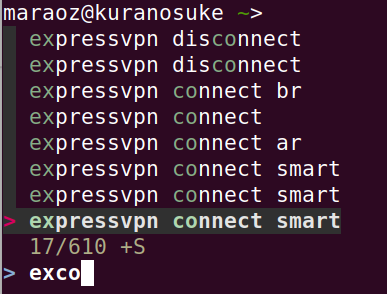
For anyone arriving here in ~Feb/2019, the best solution is still installing fzf as far as i can tell.
Hope I saved you 30' of research/reading.
:heart:
 maraoz
on 14 Feb 2019
maraoz
on 14 Feb 2019
@maraoz Unfortunately, fzf is not a replacement for the incremental search. It searches in a weird way, I spend much more time finding the right command in fzf compared to the search in bash/zsh. Fzf tends to put incorrect results first for some reason. Also, it feels weird, and you don't see what was on the screen before you called fzf.
All things considered, it's not a solution, and actually for me fzf is even more annoying than no search at all. I'll have to switch back to bash/zsh until fish finally implements this feature...
 emorozov
on 8 Mar 2019
emorozov
on 8 Mar 2019
I use this solution I've found on the net:
function reverse_history_search
  history | fzf --no-sort | read -l command
  if test $command
    commandline -rb $command
  end
end

function fish_user_key_bindings
  bind \cr reverse_history_search
end
Maybe I have to tweak it, but in it's current form it is highly annoying because it's nowhere as convenient as traditional bash/zsh search. I've tried to get used to fish autocompletion for more than 6 months, but it is still a huge pain point for me. I'm far less efficient with it than I was in bash/zsh.
emorozov
on 8 Mar 2019
All things considered, it's not a solution, and actually for me
fzfis even more annoying than no search at all. I'll have to switch back to bash/zsh until fish finally implements this feature...
So you can try https://github.com/jbonjean/re-search instead.
danielb2
on 8 Mar 2019
@emorozov the other thing you can do with fzf is prefix your search with ' to get to an exact-match similar to what you're used to.
danielb2
on 8 Mar 2019
@emorozov the other thing to tweak is to use this: https://github.com/junegunn/fzf/blob/master/shell/key-bindings.fish
and if you like the exact search by default, you can modify the file:
     if [ $FZF_TMUX -eq 1 ]
       if set -q FZF_TMUX_HEIGHT
-        echo "fzf-tmux -d$FZF_TMUX_HEIGHT"
+        echo "fzf-tmux --exact -d$FZF_TMUX_HEIGHT"
       else
-        echo "fzf-tmux -d40%"
+        echo "fzf-tmux --exact -d40%"
       end
     else
-      echo "fzf"
+      echo "fzf --exact"
     end
   end
Regarding the fzf integrations, does anybody have a solution to make Ctrl-Cabort the command instead of having it linger in read -l command?
 dgutov
on 10 Mar 2019
dgutov
on 10 Mar 2019
@dgutov ctrl+c works fine for me.
danielb2
on 10 Mar 2019
Please disregard. My problem was that fzf (0.17.1) hides the most recent prompt after Ctrl-C when used with the flag --height.
dgutov
on 10 Mar 2019
There was a bit of a guffaw here about someone leaving a rude comment and subsequently deleting it.
I removed everything pertaining to it, and I invite all involved to leave it at that.
faho
on 10 Nov 2019
Fish is great and it's almost near damn perfect but lack of ctrl-r reverse search functionality made me go back to bash and zsh since it's a feature I use very frequently.
I see this issue was opened in 2013 and it's already 2020; doesn't seem like fish authors will add this feature anytime soon 🙁
 miguelmota
on 3 Jan 2020
miguelmota
on 3 Jan 2020
That was my big issue with fish too, until I've discovered that it kinda has the same, although discovery is terrible…
Other shells:
ctrl+r- type…
ctrl+rto iterate
Fish:
- type…
arrow upuntil found
 meeDamian
on 3 Jan 2020
meeDamian
on 3 Jan 2020
@meeDamian very interesting; will take some getting used to, although using arrow keys is a big dislike to me.
miguelmota
on 3 Jan 2020
Using up arrow doesn't result in the same behavior you have in bash. Once you hit up arrow, the entry of search text is finished. I.e., you have to know in advance exactly what to search for, and exactly how much of it to type, before you hit up arrow. Once you hit up arrow you can no longer type additional characters to make the search more specific or hit backspace to remove characters from the search string. It's very awkward, and not at like the flexibility you have with control-r search to keep on adjusting the search text until you find what you want. I've used fish for years now, and miss control-r every day. I should make better use of fzf.
Another thing (different topic) I find awkward with fish is if you hit TAB while you're in the middle of text, it doesn't complete on the text before where your cursor is. It seems to consider the full text string for completion and moves your cursor to the end of the full text. This would presumably be relatively simple to fix. E.g., if my cursor is on the w in helloworld and I have a file called hello.py in the directory, I would like the TAB to expand the hello before my cursor to hello.py but instead I end up with the helloworld text unchanged and the cursor at the end of the line. That's doubly unhelpful, as it doesn't do the completion AND it moves my cursor away from where I'm trying to edit.
Anyway, no complaints from me! This is all free software, no one has paid a cent, no one is entitled to anything. And it's open source, as had been pointed out. Instead we owe thanks - fish is remarkably innovative in many ways.
terrycojones
on 3 Jan 2020
@terrycojones
I should make better use of fzf.
Both fzf and skim ship with a fish binding including control-r to search history - call fzf_key_bindings.
E.g., if my cursor is on the w in helloworld and I have a file called hello.py in the directory, I would like the TAB to expand the hello before my cursor to hello.py but instead I end up with the helloworld text unchanged and the cursor at the end of the line. That's doubly unhelpful, as it doesn't do the completion AND it moves my cursor away from where I'm trying to edit.
The cursor movement on failed completion will be fixed in 3.1.0. Your example doesn't work because fish tries to complete the entire token - that's unlikely to change, just add a space.
@miguelmota
using arrow keys is a big dislike to me.
use control-p / control-n / control-f / control-b
 krobelus
on 3 Jan 2020
krobelus
on 3 Jan 2020
@krobelus - thanks for the reply Johannes. Maybe the TAB completion could fall back to trying with an inserted space if the current behavior fails to find a completion? E.g., in my example the helloworld completion fails, so fish tries with hello (the text before my cursor). Or maybe there could be a setting to allow either behavior. TAB for completion (at least to my mind) means "complete the text I've just typed" (i.e., what's to the left of my cursor), not the text that's "ahead" of what I'm now trying to enter. I think completions based on text to the left is arguably more likely to be where the user wants the completion to occur - otherwise why would they have moved the cursor back to that precise location?
BTW, I recently wrote a little (toy?) shell in Python. See https://github.com/terrycojones/daudin in case you're interested. I still use fish, though :-)
terrycojones
on 3 Jan 2020
Maybe the TAB completion could fall back to trying with an inserted space if the current behavior fails to find a completion?
I think we can do something here long-term, let's track this in #6687.
Once you hit up arrow you can no longer type additional characters to make the search more specific
Yeah, that can be slightly inconvenient. This will be fixed by #6686, which is a big step towards incremental search. If anyone wants to try the new behavior and give feedback on whether it works as expected, now is a good time :)
krobelus
on 1 Mar 2020
@krobelus you are making fish 3.2.0 look very tasty, keep up the good work.
 Thovthe
on 24 Mar 2020
Thovthe
on 24 Mar 2020
This one did the job!
 ahmeed83
on 18 Apr 2020
ahmeed83
on 18 Apr 2020
Will the "new" incremental search feature also support wildcards, and will it be possible to switch search direction? Like with ZSH's history-incremental-pattern-search-backward and history-incremental-pattern-search-forward functions?
Funny that I started trying Fish yesterday, and this is the feature I need, and it's been controversial since 2013. Also sad.
 jdz
on 24 Apr 2020
jdz
on 24 Apr 2020
Interesting to see how the Fish team is staying focus on its philosophy. That's the second topic where I meet it, after the one on bang.
While I understand the point of discoverability, I don't see how using C-p as a alternative of C-r is any better.
On the same level C-f to complete the current line with the suggestion is not more discoverable, you have to read the documentation. I had to check, and it seems that in the defaults, right arrow do the same completion. But it's so less convenient to my habits that I almost forgot it and had to check to see if it works that way. My point is, for many user the right arrow is more discoverable, and that's fine for them. The existence of C-f doesn't hurt this kind of user profile. On the other hand, those who prefer something less distant from base position on the keyboard will be better served with C-f and can forget about the right arrow binding.
Now, sure there are surely way to work around with custom plugins and so on, but given that the C-r is so common in other CLI (not only shells), I don't find especially friendly to have to configure external tools to obtain this basic expectation. Those who don't know C-r wouldn't be hurt by it's existence as a default, and those who are already accustomed with such a feature in CLI would be better served with its default support.
All that said, I must say I appreciate the team philosophy and hope this comment doesn't feel to harsh. Thanks for this wonderful tool.
 psychoslave
on 17 May 2020
psychoslave
on 17 May 2020
Okay, I've locked this issue as it's going in circles. Please direct your constructive comments regarding the implementation towards #6686 instead
faho
on 21 May 2020
Related issues
zanchey
·
59Comments
 henrikbjorn
·
58Comments
henrikbjorn
·
58Comments
 lilyball
·
110Comments
dag
·
58Comments
lilyball
·
110Comments
dag
·
58Comments
 thegreyshadow
·
49Comments
thegreyshadow
·
49Comments
Most helpful comment
I think we should do something here for 3.1.