Firejail: [Question not a bug] About Firefox under firejail
Hi dear. It is not a bug.
My default command to run my Firefox on my Fedora 32 is "firefox %u"
I like to run firefox under firejail & to obtain more security I like to run it with "-no-remote"
I tried the following:
$ firejail firefox %u -no-remote
& I got an error: Firefox opened with blank screen within it following error message "file %u not found"
I think it is just that my way to write command was wrong due to wrong place of "%u" ...
Kindly, just to dictate the command here in correct way ...
Thanks.
 Nokia808
All 8 comments
%u is a thing special to .desktop files and has no meaning in bash, therefore it is forwarded to firefox, where it has too no meaning.
Use
$ firejail firerfox --no-remote
or if you executed firecfg
$ firefox --no-remote
 rusty-snake
on 6 Jun 2020
rusty-snake
on 6 Jun 2020
@rusty-snake
Thank you for replay.
But I need to edit Firefox entry from within my Cinnamon applications menu editor. In this case how I should write the command? Kindly, see the following screenshot:
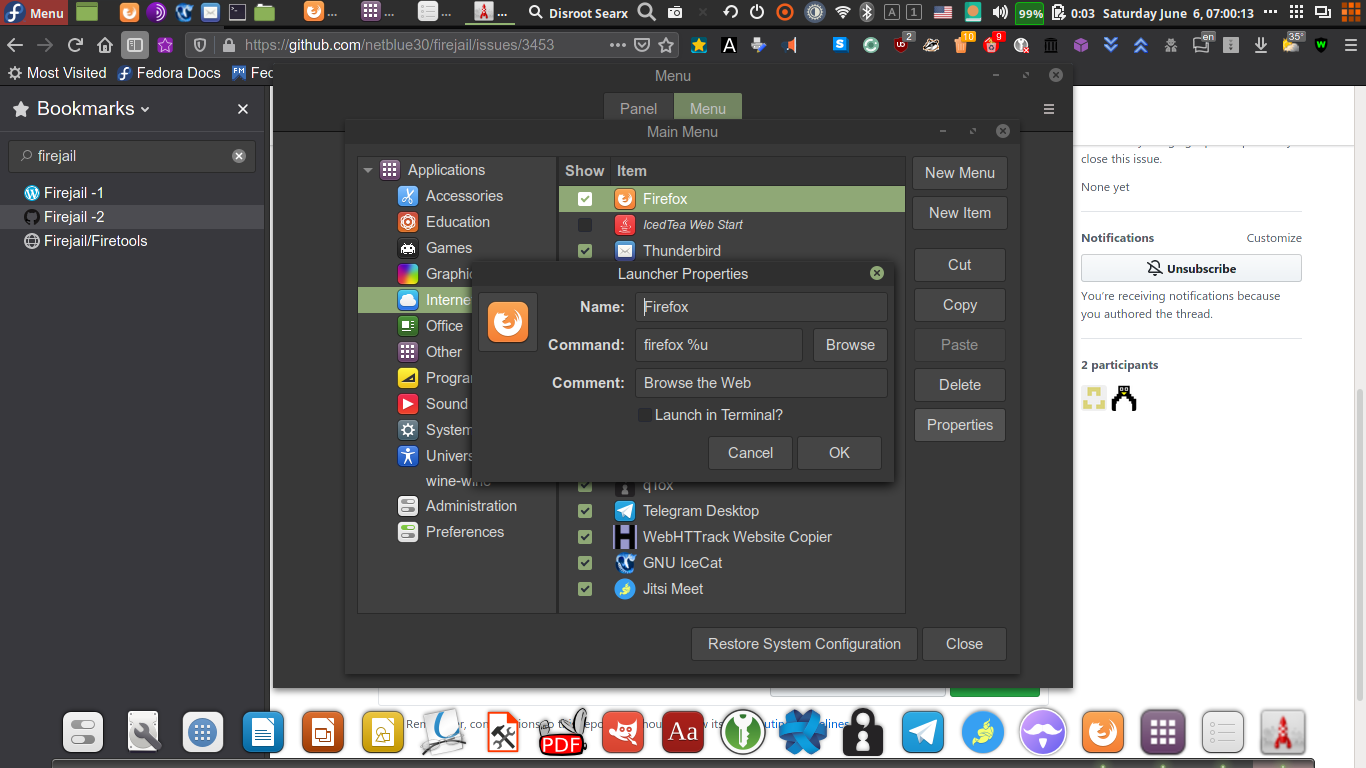
Nokia808
on 6 Jun 2020
If you executed firecfg:
firefox --no-remote %u
otherwise
firejail firefox --no-remote %u
%x in desktop files is usually the last part of the Exec key.
rusty-snake
on 6 Jun 2020
It is clear now. I will close this issue.
But only further question - though not on topic - I have an AppImage program (jitsi-meet-x86_64.AppImage) which is based on chromium. I like to use same approach (from within application menu where I'm already created for it an entry manually). All what I have is just to start command by "firejail". It has no %u. But do I have to use -no-remote command to get additional security or -no-remote only for browsers ?
By the way: -no-remote or --no-remote ? In your blog you used -no-remote while here you using --no-remote
Nokia808
on 6 Jun 2020
Hi, I see where you could be a bit confused. The --no-remote parameter is Firefox-specific, it does not offer any additional firejail security. You can see all the parameters it supports if you run 'firefox --help'. Basically when you start firefox with --no-remote (or -no-remote, I believe it supports both formats), each time you try to open a hyperlink from another application, a _new_ firefox instance will be started, which might not be what you want. So I suggest you try it and if you don't like it you can remove the --no-remote option. Doing so will not affect the security offered by firejail.
I think the above also answers your jitsi-meet question. If a program doesn't have %u in its .desktop file that means it does not accept specific start parameters (like a URL for a web browser).
So if you executed firecfg
jitsi-meet-desktop
otherwise
firejail --appimage jitsi-meet-desktop
 glitsj16
on 6 Jun 2020
glitsj16
on 6 Jun 2020
@glitsj16
1) Dear I made mistake in name of jitsi package. It's full name is:
jitsi-meet-x86_64.AppImage
I will correct it in previous post.
So, it will be: firejail --appimage jitsi-meet-x86_64.AppImage
2) regarding Firefox & --no-remote , if I'm NOT USING "firecfg" & only use "firejail firefox %u" from within applications menu then how it will be safe it I will open Firefox from other application like click on a link within chat message? In the last scenario click link within chat application should it leading to open new Firefox instance in the default non-firejail because firecfg not run ?
I understood from post in blog - please correct to me - that "--no-remote" (or "-no-remote") is designated to overcome the last behaviour ....
Nokia808
on 6 Jun 2020
So, it will be: firejail --appimage jitsi-meet-x86_64.AppImage
Yes, maybe you need in addition to specific the profile:
firejail --profile=jitsi-meet-desktop --appimage jitsi-meet-x86_64.AppImage
if I'm NOT USING "firecfg" & only use "firejail firefox %u" from within applications menu then how it will be safe it I will open Firefox from other application like click on a link within chat message? In the last scenario click link within chat application should it leading to open new Firefox instance in the default non-firejail because firecfg not run ?
GUI-Programs usually also use the .desktop file. If firefox is started w/o --no-remote the link will be opened in the running firefox.
rusty-snake
on 6 Jun 2020
@rusty-snake
No it is very clear now. If not using "--no-remote" (only "firejail firefox %u") then any external referral to Firefox will opened within safe runing Firefox WHICH IS ALREADY SUNDBOX. But if "--no-remote" is used (firejail firefox -no-remote %u) then any external referral for Firefox will lead to open NEW Firefox instance WHICH ALSO SANDBOX. So, using/nonusing "--no-remote" will not change level of security offered by firejail to Firefox .....
Nokia808
on 6 Jun 2020
Related issues
 polyzen
·
4Comments
polyzen
·
4Comments
 ericschdt
·
3Comments
ericschdt
·
3Comments
 reinerh
·
3Comments
reinerh
·
3Comments
 HulaHoopWhonix
·
4Comments
HulaHoopWhonix
·
4Comments
 Vincent43
·
3Comments
Vincent43
·
3Comments
Most helpful comment
Hi, I see where you could be a bit confused. The --no-remote parameter is Firefox-specific, it does not offer any additional firejail security. You can see all the parameters it supports if you run 'firefox --help'. Basically when you start firefox with --no-remote (or -no-remote, I believe it supports both formats), each time you try to open a hyperlink from another application, a _new_ firefox instance will be started, which might not be what you want. So I suggest you try it and if you don't like it you can remove the --no-remote option. Doing so will not affect the security offered by firejail.
I think the above also answers your jitsi-meet question. If a program doesn't have %u in its .desktop file that means it does not accept specific start parameters (like a URL for a web browser).
So if you executed firecfg
jitsi-meet-desktop
otherwise
firejail --appimage jitsi-meet-desktop