Firebaseui-web: Cannot read property 'name' of undefined
"firebase": "^5.11.1"
"firebaseui": "^3.6.1"
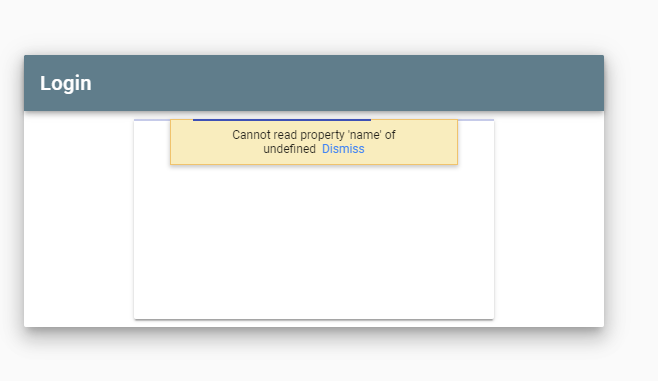
Using firebaseui in a vue app it is redirecting and signing in and authenticating correctly. But then an error of "Cannot read property 'name' of undefined" appears in the little yellow box with a dismiss button..
First of all, is there any way to get extra information about this?
Second, it seems like it's all part of the firebase process which happens all together with none of my code involved. What could be causing this issue?
 Troto
Troto
All 9 comments
@Troto You can check the web console to see the error. But if the error happens in the SDK, since the code is obfuscated, you might not be able to get a lot of useful information. Can you provide the use case that triggers this error so we can help you? Besides, the version of firebase and firebaseUI you are using is out-dated. I suggest you to update to the latest version. Thanks.
 wti806
on 24 Jun 2019
wti806
on 24 Jun 2019
Sorry for the big delay @wti806 but nothing was showing up in the console. I took a big break from working on it but upon coming back today I updated both firebase and firebaseui to latest major versions ([email protected], [email protected]). Now I'm having a separate issue where the firebaseui is undefined. The code below is in a login vue component. I have called firebase.initializeapp elsewhere.
```
```
I'm getting an error when trying to create the new AuthUI saying that firebaseui is undefined. If I stop the debugger on that line and mouse over firebaseui it's defined but the foo variable is undefined so it seems there is some sort of initialisation delay. This has only started since I updated to latest, what am I doing wrong here?
Troto
on 23 Jul 2019
Update your firebaseui import to:
import * as firebaseui from 'firebaseui';
 bojeil-google
on 23 Jul 2019
bojeil-google
on 23 Jul 2019
Thank you!
Well I can now confirm the same thing is still happening. No error in console but the same problem as the picture in OP.
Troto
on 23 Jul 2019
Actually it might be related to signInSuccessWithAuthResult. I just realised that redirectUrl is undefined and I try use it in the method so it may be that the error is just showing up in a weird way.
Troto
on 23 Jul 2019
OK I tried changing that code and it seems that was probably the cause. My feedback then would be that the way errors are propagated is not very helpful. It seems to be swallowed or break something else within signInSuccessWithAuthResult. But thanks for your quick reply @bojeil-google. Can I ask how redirectUrl is populated? How do you need to trigger this flow in the web version to have a redirectUrl?
Troto
on 23 Jul 2019
Information on how to import firebaseui is available in the repo README.
https://github.com/firebase/firebaseui-web#option-2-npm-module
As well as information on the redirectUrl.
https://github.com/firebase/firebaseui-web#signinsuccesswithauthresultauthresult-redirecturl
bojeil-google
on 23 Jul 2019
Hi @bojeil-google
I only just got back around to this. I've been reading this
"If no signInSuccessUrl parameter was given in the URL (See: Overwriting the sign-in success URL) then the default signInSuccessUrl in config is used."
Sorry if I'm being thick but I can't figure out where the URL comes into it. I have a vue page navigated to by the vue router with a 'firebaseui-auth-container' element in and the widget starts up in that. Like so:
let ui = firebaseui.auth.AuthUI.getInstance();
if (!ui) {
    ui = new firebaseui.auth.AuthUI(firebase.auth());
}
ui.start("#firebaseui-auth-container", uiConfig);
At no point do I feed it a URL so where would I put a new signInSuccessUrl value?
Troto
on 20 Aug 2019
I'm encountering the same issue as @Troto. Any suggestions?
 codeStryke
on 27 Aug 2019
codeStryke
on 27 Aug 2019
Related issues
 jalajc
·
4Comments
jalajc
·
4Comments
 jin-chong
·
5Comments
jin-chong
·
5Comments
 ronyjacobson
·
4Comments
ronyjacobson
·
4Comments
 MichaelFromin
·
5Comments
MichaelFromin
·
5Comments
 mahsa2
·
4Comments
mahsa2
·
4Comments
Most helpful comment
Update your firebaseui import to: