Firebaseui-web: feat: Microsoft and Yahoo sign in
Is your feature request related to a problem? Please describe.
Firebase Auth client SDKs make it possible to sign in as a Firebase user from federated identity providers, including Google, Facebook, and Twitter. The Firebase Auth team is always looking for opportunities to improve the auth experience for developers and users. We know that more sign-in options mean more opportunities to create the best app experience. That's why we are pleased to announce that you can now sign in to Firebase Auth using Microsoft and Yahoo!
Describe the solution you'd like
Signing in to Firebase with a given identity provider requires garnering a credential from that provider. This often involves including the provider's SDK and implementing the provider's sign-in methods before passing the credentials to Firebase Auth. For some providers, this can be particularly difficult on a native client, especially ones which do not support their own native SDKs. In order to remove the headache of implementing sign-in flows for these identity providers, we now offer generic OAuth2 provider sign-in.
Additional context
https://firebase.googleblog.com/2019/03/microsoft-and-yahoo-identity-auth.html?linkId=65404801
 choopage
All 28 comments
Thanks for the request @choopage, we're already on it.
 bojeil-google
on 30 Mar 2019
bojeil-google
on 30 Mar 2019
Any rough ETA on when this might be happening? (not pushing/rushing at all, just wondering if it's something measured in days/weeks/months/quarters)
 agrohs
on 2 Apr 2019
agrohs
on 2 Apr 2019
@agrohs Our plan is to release this feature in the next few weeks. I'll keep you guys posted. Thanks!
 wti806
on 2 Apr 2019
wti806
on 2 Apr 2019
Fantastic, thanks @wti806...I was just about to fork this and roll my own, but a few weeks I can hold out and spend time working on other items in the backlog. Thanks so much for the quick reply!!
agrohs
on 2 Apr 2019
@agrohs Microsoft and Yahoo are supported now in FirebaseUI V3.6. Please make sure to update the firebase-js-sdk version to 5.10 to use the new feature. Thanks!
wti806
on 23 Apr 2019
I am attempting to add Yahoo & Microsoft support using FirebaseUI 3.6.0 for web integration however the following does not appear to work still.
firebase.auth.YahooAuthProvider.PROVIDER_ID
firebase.auth.MicrosoftAuthProvider.PROVIDER_ID
Any ideas?
Also there does not appear to be any CCS code for Yahoo and Mircosoft in the style sheet for 3.6.0, maybe this is why it does not displaying currently?
 Vandru
on 25 Apr 2019
Vandru
on 25 Apr 2019
Hey @Vandru, as these are generic providers, they don't have constants defined in the firebase SDK. Instead you should pass the string 'yahoo.com' and 'microsoft.com' instead of firebase.auth.YahooAuthProvider.PROVIDER_ID and firebase.auth.MicrosoftAuthProvider.PROVIDER_ID.
bojeil-google
on 25 Apr 2019
Hey @bojeil-google thank for your reply you are indeed correct. I have managed to get the buttons to appear now and link to the correct locations. However the button is not styled to reflect Yahoo or Microsoft like Google and Twitter is for example.

Vandru
on 25 Apr 2019
@Vandru As @bojeil-google mentioned, since these are generic providers, how you can configure them is slightly different with the existing providers. Here is the guideline: https://github.com/firebase/firebaseui-web#generic-oauth-provider
Also, you can refer to the demo app here: https://github.com/firebase/firebaseui-web/blob/master/demo/public/app.js#L73
wti806
on 25 Apr 2019
Yahoo icon options if anyone needs them:
Colour: 
Black: 
White: 
buttonColor: '#2d1152',
Vandru
on 26 Apr 2019
@wti806 Unfortunately I have found a bug.
When using the default authDomain xxxxxxx.firebaseapp.com the logins for Yahoo and Microsoft work fine.
However when using a custom authDomain I get the following error after being returned from each providers login page:
Microsoft:
The supplied auth credential is malformed or has expired.

Yahoo:
Remote site 5XX from yahoo.com for CODE_EXCHANGE

I have correctly setup the redirect URL on Microsoft and Yahoo to reflect the custom authDomain in the same way as on Google, Facebook and Twitter.
Vandru
on 26 Apr 2019
@Vandru Thanks for reporting the issue. Could you please go to the network tab in chrome developer tools and provide the related network request? It would be helpful for debugging. Thanks!
wti806
on 26 Apr 2019
 Vandru
on 26 Apr 2019
Vandru
on 26 Apr 2019
There is nothing different about Yahoo and Microsoft. You are likely not following the correct instructions for setting a custom domain.
You have to have your custom domain
www.custom.compoint to [YOUR_PROJECT_ID].firebaseapp.com. Learn more here.Next you need to update your Microsoft and Yahoo callback URL to
https://www.custom.com/__/auth/handler.You then need to whitelist
www.custom.comin the authorized domain in the Console.Finally in the
configobject, you setauthDomainaswww.custom.com.
bojeil-google
on 26 Apr 2019
@wti806 the types for these additional parameters are missing (i.e. iconurl, buttonColor, providerName)
See:
https://github.com/firebase/firebaseui-web/blob/master/types/index.d.ts
Don't mind creating a PR to add them?
 tariknz
on 29 Apr 2019
tariknz
on 29 Apr 2019
There is nothing different about Yahoo and Microsoft. You are likely not following the correct instructions for setting a custom domain.
- You have to have your custom domain
www.custom.compoint to [YOUR_PROJECT_ID].firebaseapp.com. Learn more here.- Next you need to update your Microsoft and Yahoo callback URL to
https://www.custom.com/__/auth/handler.- You then need to whitelist
www.custom.comin the authorized domain in the Console.- Finally in the
configobject, you setauthDomainaswww.custom.com.
@bojeil-google I am doing it correctly as mentioned I already have a custom domain working on Google, Facebook and Twitter via the exact method you have mentioned.
Vandru
on 29 Apr 2019
@tariknz Thanks for reporting this. Will add it ASAP.
wti806
on 29 Apr 2019
I am also experiencing this issue:
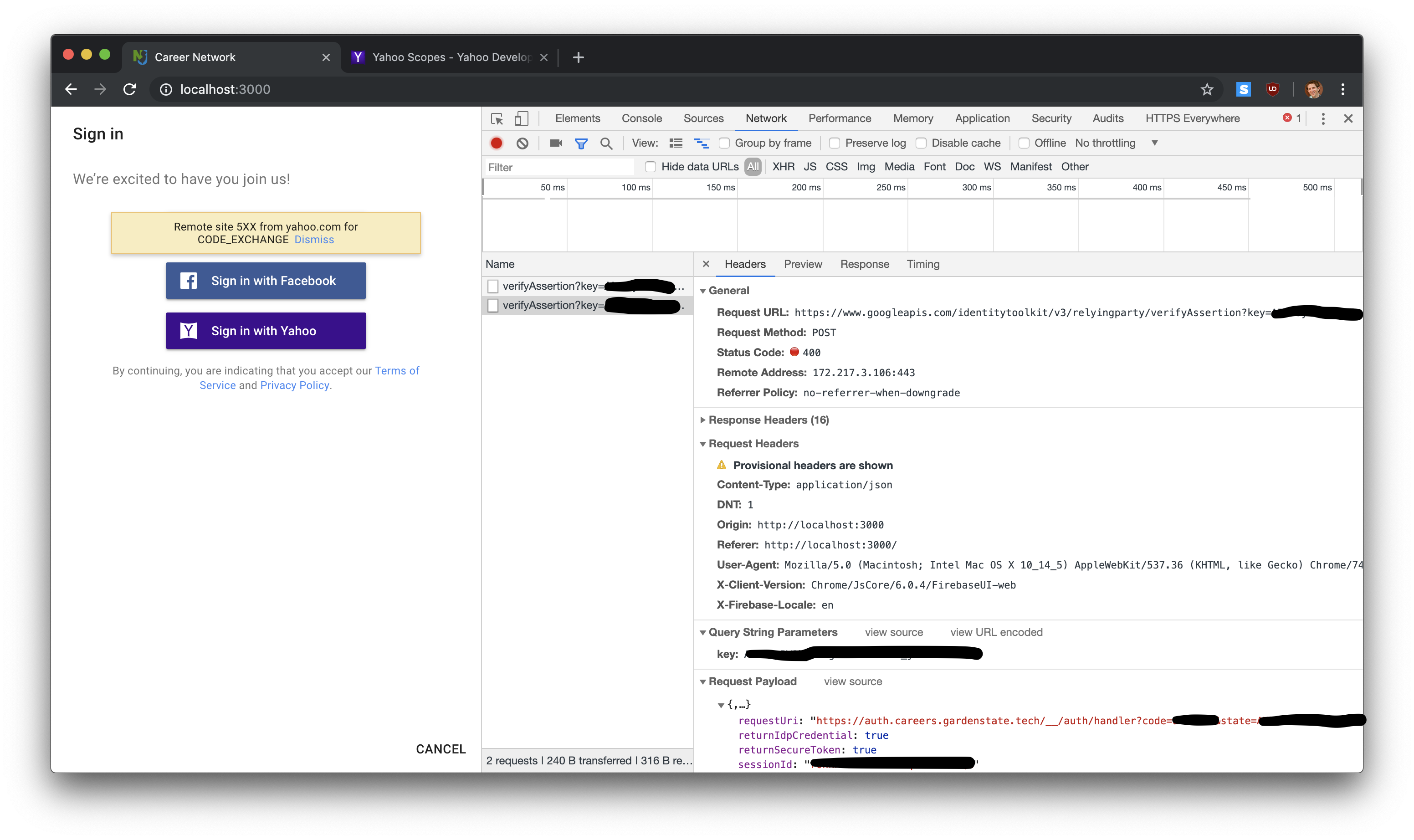
URL loaded in popup window:
https://auth.my.custom.domain/__/auth/handler?apiKey=[REDACTED]&appName=%5BDEFAULT%5D-firebaseui-temp&authType=signInViaPopup&providerId=yahoo.com&eventId=275911849&v=6.0.4&fw=FirebaseUI-web
Redirects to following Yahoo auth screen:
https://api.login.yahoo.com/oauth2/request_auth?response_type=code&client_id=[REDACTED]&redirect_uri=https://auth.my.custom.domain/__/auth/handler&state=[REDACTED]scope=openid

This does trigger an email from Yahoo, so it seems that things are somewhat working:

Thank you for looking into this!
 rossdakin
on 14 Jun 2019
rossdakin
on 14 Jun 2019
Please open a ticket with Firebase Support. They will route you to the right engineers to help you out. Also be prepared to provide information about your project so they can investigate it. This is not the best channel for backend related errors and sharing sensitive information about your project.
bojeil-google
on 14 Jun 2019
I am also experiencing this issue:
URL loaded in popup window:
https://auth.my.custom.domain/__/auth/handler?apiKey=[REDACTED]&appName=%5BDEFAULT%5D-firebaseui-temp&authType=signInViaPopup&providerId=yahoo.com&eventId=275911849&v=6.0.4&fw=FirebaseUI-webRedirects to following Yahoo auth screen:
https://api.login.yahoo.com/oauth2/request_auth?response_type=code&client_id=[REDACTED]&redirect_uri=https://auth.my.custom.domain/__/auth/handler&state=[REDACTED]scope=openid
This does trigger an email from Yahoo, so it seems that things are somewhat working:
Thank you for looking into this!
Well the stack over flow question was posted by me and it turned out to be a configuration issue about permissions on my end. I have fixed the issue, and yahoo login is working fine in production for our app.
Gist:
In my case the error boiled down to asking appropriate permission while making a request and the OAuth app you setup in Yahoo dashboard also must have the correct permissions setup. I needed user's email so to achieve this I had to do two things 1) In client app added provider.addScope('sdpp-w') . 2) While setting up the OAuth app, had to explicitly add can read and write profile permission (Kinda scary sounding -- stupid Yahoo).
And we are also integrated with Microsoft login and never had any issues.
 shakeelosmani
on 23 Jun 2019
shakeelosmani
on 23 Jun 2019
Well the stack over flow question was posted by me and it turned out to be a configuration issue about permissions on my end. I have fixed the issue, and yahoo login is working fine in production for our app.
Gist:
In my case the error boiled down to asking appropriate permission while making a request and the OAuth app you setup in Yahoo dashboard also must have the correct permissions setup. I needed user's email so to achieve this I had to do two things 1) In client app added provider.addScope('sdpp-w') . 2) While setting up the OAuth app, had to explicitly add can read and write profile permission (Kinda scary sounding -- stupid Yahoo).And we are also integrated with Microsoft login and never had any issues.
@shakeelosmani -- that solved it! Thank you so much!
I too had to authorize sdpp-w in the Yahoo configuration and request that scope in my client code.
I did get it working with just sdps-r but that did not provide an email address, as you noted.
Thanks again!
rossdakin
on 24 Jun 2019
Well the stack over flow question was posted by me and it turned out to be a configuration issue about permissions on my end. I have fixed the issue, and yahoo login is working fine in production for our app.
Gist:
In my case the error boiled down to asking appropriate permission while making a request and the OAuth app you setup in Yahoo dashboard also must have the correct permissions setup. I needed user's email so to achieve this I had to do two things 1) In client app added provider.addScope('sdpp-w') . 2) While setting up the OAuth app, had to explicitly add can read and write profile permission (Kinda scary sounding -- stupid Yahoo).
And we are also integrated with Microsoft login and never had any issues.@shakeelosmani -- that solved it! Thank you so much!
I too had to authorize
sdpp-win the Yahoo configuration and request that scope in my client code.I did get it working with just
sdps-rbut that did not provide an email address, as you noted.Thanks again!
Glad that worked out. Should be documented somewhere.
shakeelosmani
on 25 Jun 2019
We have documented that the requested OAuth scopes must be exact matches to the preconfigured ones in the app's API permissions from the first day we supported Yahoo sign-in.
bojeil-google
on 25 Jun 2019
We have documented that the requested OAuth scopes must be exact matches to the preconfigured ones in the app's API permissions from the first day we supported Yahoo sign-in.
@bojeil-google Well when I said it should be documented somewhere, I was meaning Yahoo OAuth documentation does not give any indication that you need sdpp-w permission to just read an Email. The fact that their APIs moved around a lot, they also had the primary email and secondary email concept, the company also changed hands somewhere this did not get clearly documented. The link in firebase documentation that takes you to Yahoo documentation, if you read it says mail-r is good enough to work with the APIs to read email address and from my practical experience and as confirmed by @rossdakin asking for just that permission would result in not being able to login at all.
shakeelosmani
on 25 Jun 2019
Hmm, we'll look into that. We can update our documentation once we confirm it.
bojeil-google
on 25 Jun 2019
Instead of sdpp-w (which requires scary write permissions), one can use sdpp-r which corresponds to this option (in the app creation page at https://developer.yahoo.com/apps/create/):
Read Public Extended - With your user's permission, you can read their Profile information that is marked as either public or shared with Connections.
sdpp-r will give you the email address of the logged in user: https://developer.yahoo.com/oauth/social-directory-eol/
 tainic
on 21 Feb 2020
tainic
on 21 Feb 2020
Instead of
sdpp-w(which requires scary write permissions), one can usesdpp-rwhich corresponds to this option (in the app creation page at https://developer.yahoo.com/apps/create/):Read Public Extended - With your user's permission, you can read their Profile information that is marked as either public or shared with Connections.
sdpp-rwill give you the email address of the logged in user: https://developer.yahoo.com/oauth/social-directory-eol/
This doesn't work for me by simply changing the scope request in my client code from sdpp-w to sdpp-r:
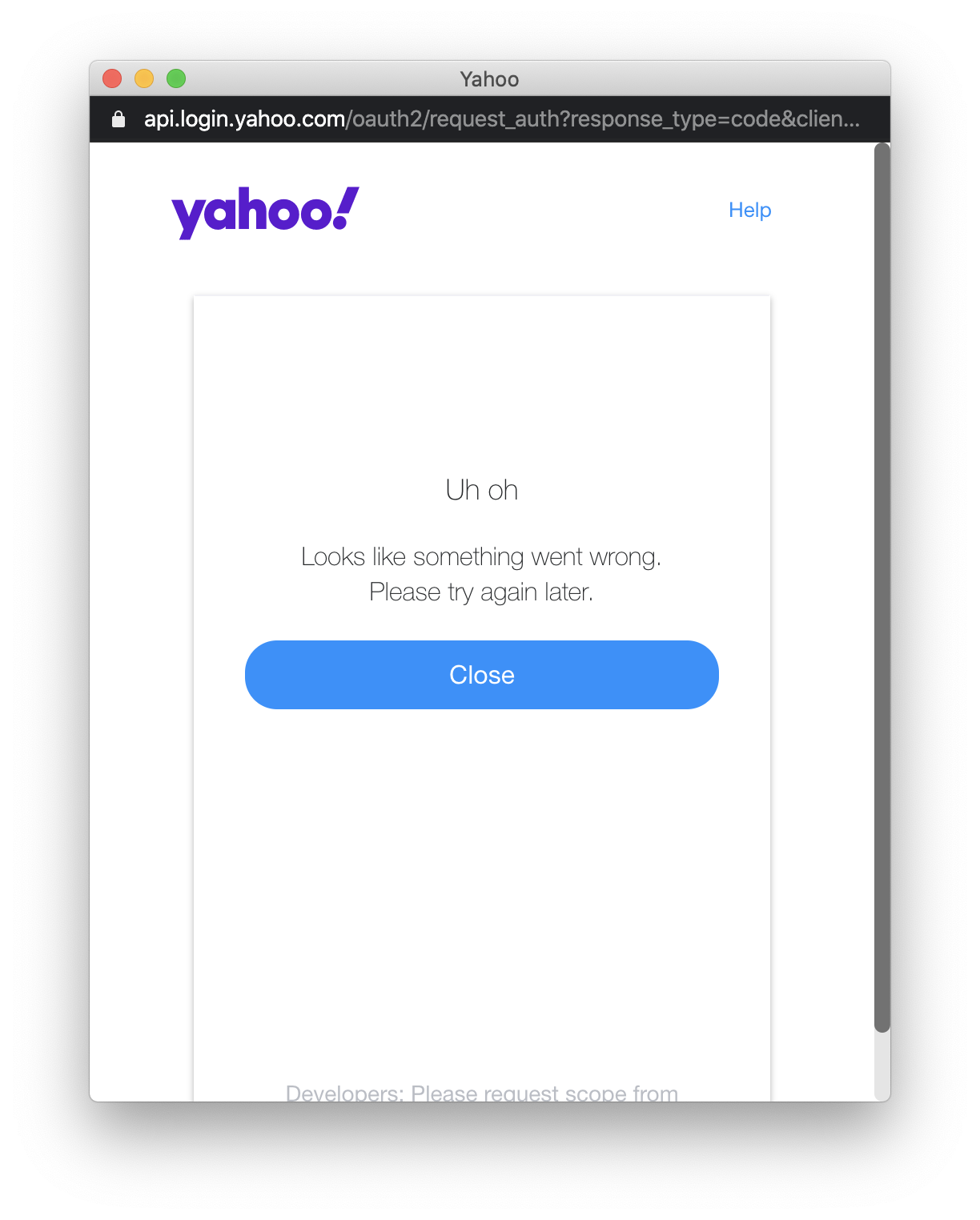
App configuration (unchanged):
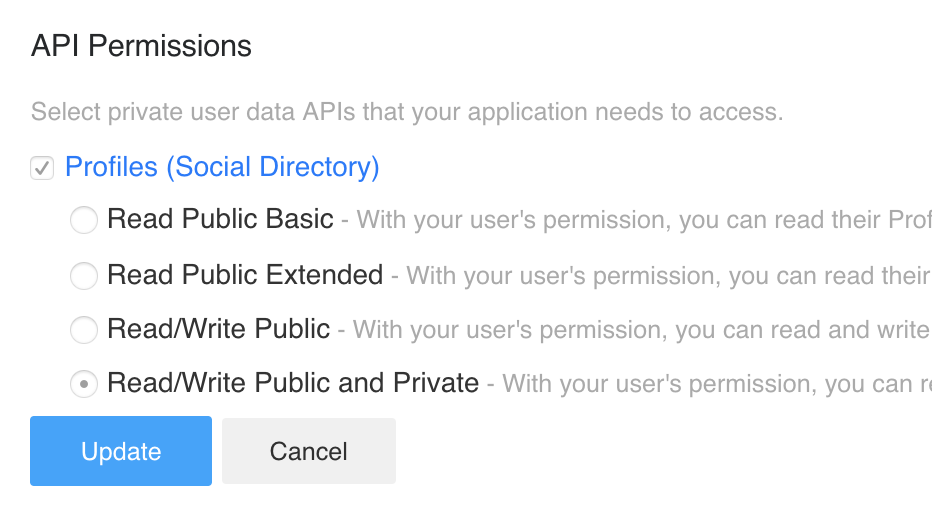
rossdakin
on 21 Feb 2020
@rossdakin: the API Permission in the Yahoo App must be set to Read Public Extended which corresponds to the sdpp-r scope set on the client.
tainic
on 21 Feb 2020
Related issues
 drixie
·
3Comments
drixie
·
3Comments
 MichaelFromin
·
5Comments
MichaelFromin
·
5Comments
 mattpalermo
·
3Comments
mattpalermo
·
3Comments
 saul-mtz
·
5Comments
saul-mtz
·
5Comments
 joshkuhar
·
5Comments
joshkuhar
·
5Comments
Most helpful comment
@agrohs Our plan is to release this feature in the next few weeks. I'll keep you guys posted. Thanks!