Firebaseui-web: Can the project domain displayed in account chooser be changed?
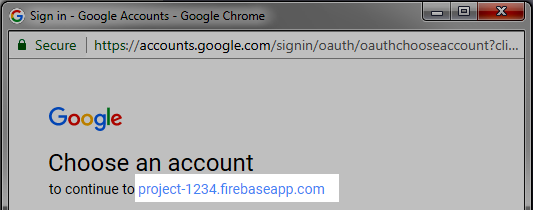
Can the project address displayed in account chooser be changed without having to host the domain on _Firebase hosting_?
 dwelle
All 7 comments
You can use a custom domain with Firebase Hosting. Once you get that working, update the authDomain to point to your custom domain. A developer documented this in stackoverflow: https://stackoverflow.com/questions/44815580/how-to-replace-the-myapp-123-firebaseapp-com-with-my-custom-domain-myapp-com
 bojeil-google
on 7 Aug 2017
bojeil-google
on 7 Aug 2017
But changing the authDomain to our local server will require our server to effectively become the auth server, since the client will send the auth request to it (http://ourdomain.com/__/auth/iframe?apiKey=....).
Is there a docs explaining how to set that up, or am I missing something here?
dwelle
on 8 Aug 2017
The iframe and handler page must be the same ones hosted by Firebase. You can customize the domain there (Firebase Hosting supports that).
It's pretty straightforward. You point a custom domain www.example.com -> example.firebaseapp.com (hosted by Firebase). You there update authDomain from example.firebaseapp.com to www.example.com. The same files example.firebaseapp.com/__/auth/* will be served.
bojeil-google
on 8 Aug 2017
Okay, I didn't understand the explanation very well mainly because we don't host on Firebase so it didn't click with me to use the Firebase Hosting to set it up properly.
For other people, here's what you need to do even if you don't host on Firebase Hosting, but want your custom domain to be associated with the authentication. It consists of two main steps:
- link your custom domain to the firebase (auth) app
- on https://console.firebase.google.com/
- go to Firebase Hosting for your project
- if you don't have any Firebase Hosting set up, click through the "get started" tutorial (which is super unintuitive) to get to the dashboard
- click the "connect domain" button
- add your domain/subdomain (e.g.
auth.example.com) - use the supplied
TXTrecord, and add it to your domain registrar DNS record for the respective domain. - also point your domain to firebase servers by adding an
ADNS record
- add an Authorized redirect URI
- go to https://console.developers.google.com/apis/credentials/
- under the
OAuth 2.0 client IDs, go to the the entry that was auto-created for your firebase auth app - under the
Authorized redirect URIs, addhttps://auth.example.com/__/auth/handler
Takes a few hours to propagate and for google to issue an SSL certificate for the domain.
dwelle
on 9 Aug 2017
Thanks for sharing the instructions for others to use, @dwelle.
bojeil-google
on 9 Aug 2017
also requires to update the authDomain in firebase config as well.
 jasan-s
on 29 May 2019
jasan-s
on 29 May 2019
6. use the supplied
TXTrecord, and add it to your domain registrar DNS record for the respective domain.
Can someone please explain this. How to set the custom domain name if the site is hosted on GitHub pages? How to get this - "Choose an account to continue to example.github.io"?
 ujjvlh
on 13 Sep 2019
ujjvlh
on 13 Sep 2019
Related issues
 ee92
·
4Comments
ee92
·
4Comments
 mahsa2
·
4Comments
mahsa2
·
4Comments
 mesqueeb
·
5Comments
mesqueeb
·
5Comments
 deepfriedbrain
·
5Comments
deepfriedbrain
·
5Comments
 saul-mtz
·
5Comments
saul-mtz
·
5Comments
Most helpful comment
Okay, I didn't understand the explanation very well mainly because we don't host on Firebase so it didn't click with me to use the Firebase Hosting to set it up properly.
For other people, here's what you need to do even if you don't host on Firebase Hosting, but want your custom domain to be associated with the authentication. It consists of two main steps:
auth.example.com)TXTrecord, and add it to your domain registrar DNS record for the respective domain.ADNS recordOAuth 2.0 client IDs, go to the the entry that was auto-created for your firebase auth appAuthorized redirect URIs, addhttps://auth.example.com/__/auth/handlerTakes a few hours to propagate and for google to issue an SSL certificate for the domain.