Firebaseui-web: No reset / forgot my password flow - does not exist or isn't documented
In Features it says it supports a reset password flow but it's not documented or doesn't exist. Also doesn't seem to be any reference to this on the web either.
 smorin
All 17 comments
I think we need a clearer API for it. If you create a webpage and render FirebaseUI on it via ui.start(), it will check the URL first (inspecting the mode parameter, if that doesn't exist it renders the sign in mode), if it looks like:
https://example.com/youractionpage?mode=verifyEmail&oobCode=bla&apiKey=bla
It will render the verify email widget. You would need to set https://example.com/youractionpage in the Firebase console in the templates section instead of https://$PROJECT_ID.firebaseapp.com//__/auth/action...
The same applies for password reset, etc.
 bojeil-google
on 15 Jun 2017
bojeil-google
on 15 Jun 2017
@bojeil-google so what is the mode for reset? is it ?mode=reset. Yes documenting these modes is definitely so this isn't just some sort of not usable PoC.
smorin
on 16 Jun 2017
oh are you talking about the reset password landing page mode (where the user enters their new password)? or are you talking about the ability to render the "forgot password" page directly (where the user provides their email and submits that form sending a reset password to their email)?
bojeil-google
on 16 Jun 2017
Now that you mention it both. I was originally just thinking the ability to render "forgot password" page, but that would have probably been my next question
smorin
on 16 Jun 2017
Well the "forgot password" page is currently part of the sign in flow. We show it on the password sign in screen. We don't provide the ability to render it on its own.
As for the landing page, to get the link, trigger the send password reset and you will receive the link in the email. The url will look like:
https://LINK?mode=resetPassword&oobCode=bla&apiKey=YOUR_API_KEY
Try it. Render UI on a page and pass these query parameters.
bojeil-google
on 16 Jun 2017
I couldn't find the forgot password till a few screens in, that's confusing
to users.
On Thu, Jun 15, 2017 at 4:10 PM, bojeil-google notifications@github.com
wrote:
Well the "forgot password" page is currently part of the sign in flow. We
show it on the password sign in screen. We don't provide the ability to
render it on its own.
As for the landing page, to get the link, trigger the send password reset
and you will receive the link in the email. The url will look like:
https://LINK?mode=resetPassword&oobCode=bla&apiKey=YOUR_API_KEY
Try it. Render UI on a page and pass these query parameters.—
You are receiving this because you authored the thread.
Reply to this email directly, view it on GitHub
https://github.com/firebase/firebaseui-web/issues/165#issuecomment-308889805,
or mute the thread
https://github.com/notifications/unsubscribe-auth/AAHnLwzQJpZrL7tKVZuRvQhknrBehTtFks5sEbnrgaJpZM4N386E
.
--
Steve Morin | Hacker, Entrepreneur, Startup Advisor
twitter.com/SteveMorin | stevemorin.com
Live the dream start a startup. Make the world ... a better place.
smorin
on 17 Jun 2017
Yes but for react
On Tue, Apr 3, 2018 at 11:40 PM Anthony Nahas notifications@github.com
wrote:
@smorin https://github.com/smorin Do you need something like this ?
[image: signin]
https://user-images.githubusercontent.com/20149774/38292290-8130b408-37e3-11e8-8762-9a0b00ffe164.png
[image: reset_passowrd]
https://user-images.githubusercontent.com/20149774/38292294-844bea90-37e3-11e8-81a8-996751ceea68.png
[image: reset_password_check_instructions]
https://user-images.githubusercontent.com/20149774/38292295-84689a28-37e3-11e8-914a-6438f2f46725.pngBuilt-in reset/forgot password as feature?
take a look at ngx-auth-firebaseui
https://www.npmjs.com/package/ngx-auth-firebaseui 👍live demo can be found here https://ngx-auth-firebaseui.firebaseapp.com
—
You are receiving this because you were mentioned.
Reply to this email directly, view it on GitHub
https://github.com/firebase/firebaseui-web/issues/165#issuecomment-378496582,
or mute the thread
https://github.com/notifications/unsubscribe-auth/AAHnLxtroEw5eNl1KsEc87756XdfM4fcks5tlGrVgaJpZM4N386E
.
--
Steve Morin | Hacker, Entrepreneur, Startup Advisor
twitter.com/SteveMorin | stevemorin.com
Live the dream start a startup. Make the world ... a better place.
smorin
on 4 Apr 2018
I tried https://example.com?mode=resetPassword&oobCode=ABC123adhsfuahdafudfuadhfd&apiKey=MY_API_KEY but keep getting:
Try resetting your password again
Your request to reset your password has expired or the link has already been used
inside my #firebaseui-auth-container div. :
I suspect it has something to do with oobCode (because I have no idea what this is). Docs just say "A one-time code, used to identify and verify a request" so I just put random stuff in there and get the same error...
Any help would be much appreciated.
 corysimmons
on 16 Apr 2018
corysimmons
on 16 Apr 2018
This is generated by the Firebase Auth backend and emailed to the user via the link. You can't just pick a random code.
bojeil-google
on 16 Apr 2018
@bojeil-google Is there a way to callback or await clientside password reset verification?
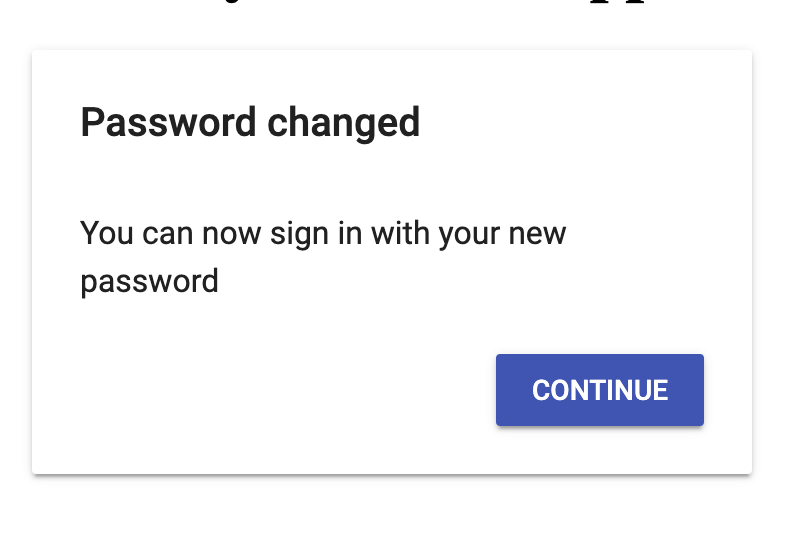
That is, I can get the email, reset password, and I get _"Password changed: You can now sign in with your new password"_, but then it just kinda sits there. I'd like to do something after they reset their password but nothing is jumping out at me.
corysimmons
on 16 Apr 2018
You need to pass a continue URL which will show a button to go back to app. These questions are better suited for stackoverflow.
bojeil-google
on 16 Apr 2018
These questions are better suited for stackoverflow.
Are these things clearly documented... anywhere? If not, it needs to be here until it is clearly documented so people who are paying to use your service don't have to go to StackOverflow and hope some random person can help them.
corysimmons
on 17 Apr 2018
Firebase Auth is mostly a free service except for projects processing more than 10k phone number users per month. Firebase support also is a free service. So all support you are getting is free.
Many Firebasers, including myself, patrol stackoverflow and answer these questions. Many times, the community is able to provide helpful answers to questions before we do and these answers end up helping the community.
My answer still stands, you need to pass a continueUrl to show a continue button at the end of the flow. These flows are not yet officially supported by FirebaseUI. That is why they are not documented as they are subject to change. We will make sure they are documented when they are ready and finalized.
bojeil-google
on 18 Apr 2018
I understand that.
Maybe if flows were documented, people—primarily the staff, but the community as well—could begin tracking/upgrading these flows, and creating a better-and-better experience for all users over time?
corysimmons
on 18 Apr 2018
Sorry, fellows,
And as for Reset Password template: I tried to customize the html: to modify a link into a button, but it doesn't reflect any customization on button size, like height and width, only color and border radiusw worked out
Could you please tell if it is a firebase limitation or I do smth wrong?
Many thanks for you kind comments in advance!
 kosmokot
on 24 Sep 2018
kosmokot
on 24 Sep 2018
I implemented the reset feature as follows:
````
successCallback(data: FirebaseUISignInSuccessWithAuthResult) {
//If this is a new user && his provider is password (username/password registeration) && his email is not verified,
if (
data.authResult.additionalUserInfo.isNewUser &&
data.authResult.additionalUserInfo.providerId == 'password' &&
!data.authResult.user.emailVerified
) {
//Send him the verification email, show him a toastr message, then apply a force logout
data.authResult.user.sendEmailVerification();
this.afAuth.auth.signOut();
alert("Account created successfully. Please verify your email address.");
}
//If this is not a new user && his provider is password (username/password registeration) && his email is not verified.
//On the other hand, the UI shows the user a button to resend the verification email.
else if (
  !data.authResult.additionalUserInfo.isNewUser &&
  data.authResult.additionalUserInfo.providerId == 'password' &&
  !data.authResult.user.emailVerified
) {
  //Show him a taostr message that his email is not verified, then apply a force logout.
  this.afAuth.auth.signOut();
  const shallSendVerficationEmail = confirm("Your email address is not verified. Would you like to resend verification email?")
  if (shallSendVerficationEmail){
        data.authResult.user.sendEmailVerification();

}
//Otherwise, either an old user, or other providers such as Facebook or Gmail, then login normally.
else {
    return;
}
}
```
 ahmedelazazy
on 6 Oct 2018
ahmedelazazy
on 6 Oct 2018
I don't know if continueUrl configuration was ever implemented for the pre-built widget (which I believe the original question referred to), but my solution was to listen for the password reset success screen with a MutationObserver, and then add a button that links to login.
I also customized the action URL in the firebase console to load within my domain, but I'm not sure that was necessary.
If continueUrl configuration in the pre-built widget _was_ implemented, I'm sure it's easier than this but I didn't find anything indicating it was added to the project.
function listenForPWResetSuccessPage() {
  let targetNode = document.getElementById('firebaseui-auth-container');

  // Options for the observer (which mutations to observe)
  let config = { childList: true };

  // Callback function to execute when reset success screen is observed
  let callback = function(mutationsList) {
    for(var mutation of mutationsList) {
      if (mutation.type == 'childList') {
        let mutatedNode = mutation.addedNodes[0]

        if (mutatedNode && mutatedNode.className.includes("firebaseui-id-page-password-reset-success")) {
          console.log('On password reset success screen.');

          let actionButtons = document.querySelector(".firebaseui-card-actions")
          actionButtons.innerHTML = `
            <button id='goto-login' type="submit" class="firebaseui-id-submit firebaseui-button mdl-button mdl-js-button mdl-button--raised mdl-button--colored" data-upgraded=",MaterialButton">
              <a href='http://some-domain/auth.html'>
                Continue
              </a>
            </button>
          `
        }
      }
    }
  };

  // Create an observer instance linked to the callback function
  let observer = new MutationObserver(callback);

  // Start observing the target node for configured mutations
  observer.observe(targetNode, config);

  // Later, you can stop observing
  // observer.disconnect();
}
And some CSS
#goto-login {
  float: right;
  padding: 0;
  width: 104px;
}

#goto-login a {
  color: white;
  display: block;
  height: 100%;
  width: 100%;
  text-decoration: none;
}
 TimothyClayton
on 14 Aug 2019
TimothyClayton
on 14 Aug 2019
Related issues
 jin-chong
·
5Comments
jin-chong
·
5Comments
 JarmoKukkola
·
4Comments
JarmoKukkola
·
4Comments
 andig
·
4Comments
andig
·
4Comments
 AnthonyNahas
·
3Comments
AnthonyNahas
·
3Comments
 joshkuhar
·
5Comments
joshkuhar
·
5Comments
Most helpful comment
Firebase Auth is mostly a free service except for projects processing more than 10k phone number users per month. Firebase support also is a free service. So all support you are getting is free.
Many Firebasers, including myself, patrol stackoverflow and answer these questions. Many times, the community is able to provide helpful answers to questions before we do and these answers end up helping the community.
My answer still stands, you need to pass a
continueUrlto show a continue button at the end of the flow. These flows are not yet officially supported by FirebaseUI. That is why they are not documented as they are subject to change. We will make sure they are documented when they are ready and finalized.