Firebaseui-ios: Phone Number Authentication With Swift Code
Dear All,
I want to implement firebase authentication with phone number
https://firebase.google.com/docs/auth/ios/phone-auth
But this only for Objective C ? Ex: FIRPhoneAuthProvider don't have in Firebase swift code
Can i apply this for swift code now ?
Thanks,
Khanh Le
 phukhanhlee
All 83 comments
What version of FirebaseUI are you using? Can you share your Podfile?
 morganchen12
on 18 May 2017
morganchen12
on 18 May 2017
Dear MorganChen,
Here is my pod for Firebase
pod 'Firebase/Core'
pod 'Firebase/Crash'
pod 'Firebase/Auth'
Thanks,
Khanh Le
phukhanhlee
on 19 May 2017
Have you tried running pod update?
morganchen12
on 19 May 2017
Dear Morgan,
    PhoneAuthProvider.provider().verifyPhoneNumber("+84971632246") { (verificationID, error) in
        if ((error) != nil) {
            // Verification code not sent.
            print(error)
        } else {
            // Successful. -> it's sucessfull here
            print(verificationID)
            UserDefaults.standard.set(verificationID, forKey: "firebase_verification")
            UserDefaults.standard.synchronize()
        }
    }
But sms verification code not send to my phone.
Can you help me
phukhanhlee
on 19 May 2017
Did you receive an error? If so the error would contain the necessary information.
Please note that the app must be able to receive APNs notifications as explained in the documentation, so phone number auth does not work on the simulator.
 XiangtianDai
on 19 May 2017
XiangtianDai
on 19 May 2017
Dear Xiangtian Dai,
I did't receive error. PhoneAuthProvider.provider().verifyPhoneNumber request successfully . I got verificationID already (ex: Optional("AM5PThAGaA98Y9mH-dShMKiLC0RQijYhsk42rnDWc4gOV4cZkNhQMtf2AIblMsRVrALdNQ_X4gKz8twVY8W_xmIcqlhS56p4IFmFYSGw_RBOQiPoq5Dq6gNBCUpC02Pam_tWpCvSYcFbviONcnBK03jEkWbfKTcwEA") ). But no sms send to my phone. I test in my real phone device.
Thanks,
Khanh
phukhanhlee
on 19 May 2017
Does sms verification support Viet Nam ?
phukhanhlee
on 19 May 2017
Dear ,
This is all my step but no sms send to my phone
1 In Xcode, enable push notifications for your project. -> turned on. But in apple developer it still in Configureable state, So i turn on it manually and create Push Notification service SSL Certificates for Development and Production.
2 Upload your APNs certificate to Firebase
+ Enable push notification on developer apple page

+ Download and click on it (So it will import to Keychain Access) and export from KeyChain Access as .p12 (Is this right ?)
+ upload it to Firebase, i don't know is this right but it look right

In AppDelegate.swift
func application(_ application: UIApplication, didRegisterForRemoteNotificationsWithDeviceToken deviceToken: Data) {
let firebaseAuth = Auth.auth()
firebaseAuth.setAPNSToken(deviceToken, type: AuthAPNSTokenType.sandbox)
}
func application(_ application: UIApplication, didReceiveRemoteNotification userInfo: [AnyHashable : Any], fetchCompletionHandler completionHandler: @escaping (UIBackgroundFetchResult) -> Void) {
    let firebaseAuth = Auth.auth()

    if (firebaseAuth.canHandleNotification(userInfo)){
        return
    }

}
And I make a request to verify
func verifyWithFirebase(phoneNumber :String){
PhoneAuthProvider.provider().verifyPhoneNumber("+84971632246") { (verificationID, error) in
if ((error) != nil) {
print(error)
} else {
print(verificationID)
UserDefaults.standard.set(verificationID, forKey: "firebase_verification")
UserDefaults.standard.synchronize()
}
}
}
Everything look right but no SMS send to my Phone. Do i need to do anything? Do i need setup a server ? my project is set pay as Blaze Plan
Please help !
phukhanhlee
on 19 May 2017
Getting back the verification ID without any error means that your APNs push notification set-up is correct and that our server has successfully issued the request to send the SMS code.
If you would like to send me (via email shown on my profile) your Google Developer Console project ID, the iOS client ID, and the phone number you're trying to verify, I can follow up with our backend teams.
XiangtianDai
on 19 May 2017
@XiangtianDai does all countries supported for SMS verification?
 yarodevuci
on 21 May 2017
yarodevuci
on 21 May 2017
@yarodevuci Please refer to the official FAQ for the list of countries Firebase Phone Number Auth supports: https://firebase.google.com/support/faq/#develop
XiangtianDai
on 22 May 2017
i have the exact same problem. i get back the verification ID but no sms is sent. and my country is supported (Germany).
 OliverRuebener1
on 22 May 2017
OliverRuebener1
on 22 May 2017
@OliverRuebener1 any way. Phone authorization is lame and like Firebase saying not ideal. Email is less hassle.
yarodevuci
on 22 May 2017
does phone auth work with the free plan?
OliverRuebener1
on 22 May 2017
@OliverRuebener1 Yes, phone number auth works with the free plan. Please refer to https://firebase.google.com/pricing (scroll down to "Phone Auth" row) for quota or cost for different plans.
XiangtianDai
on 22 May 2017
@yarodevuci it's working now suddenly! Problem must have definitively been on firebase side
OliverRuebener1
on 23 May 2017
@OliverRuebener1 same for me too. All good now
yarodevuci
on 23 May 2017
Any way to use default phone number verification UI from firebase ? Just like old digits UI !
 arpandesai
on 23 May 2017
arpandesai
on 23 May 2017
I'm getting the following errors:
- Use of undeclared type 'PhoneAuthProvider'
2 Use of undeclared type 'PhoneAuthCredential'
How did you solve this? @phukhanhlee
 manenga
on 23 May 2017
manenga
on 23 May 2017
@TheBachelor I received the same errors. My problem was that I didn't use the current Firebase SDK.
OliverRuebener1
on 23 May 2017
@TheBachelor Firstly, you need to update latest library with cocoa pods (pod update).
pod 'Firebase/Core'
pod 'Firebase/Crash'
pod 'Firebase/Auth'
pod 'Firebase/Messaging'
phukhanhlee
on 23 May 2017
Oh okay, thanks @OliverRuebener1 I just run pod install. Do you mind sending me your version number for Firebase/Auth? I would rather not update all my pods
manenga
on 23 May 2017
You'll need FirebaseAuth 4.0 or higher.
morganchen12
on 23 May 2017
My issue ia little more weired. Phone verification is suppprted in India and there is no error in the signup but there are few numbers where i am not able to receive sms while other numbers are working fine.
Has anyone faced similar issue?
 akaushik79
on 24 May 2017
akaushik79
on 24 May 2017
@XiangtianDai what is the pricing? I cannot find anything about phone auth in the provided pricing page.
 cprcrack
on 24 May 2017
cprcrack
on 24 May 2017
@cprcrack The https://firebase.google.com/pricing/ page had some issues and is fixed now. Please take another look. Sorry about that.
XiangtianDai
on 24 May 2017
@XiangtianDai thanks, however it states that the first 10k SMS verifications are free in the Blaze plan, but in the calculator, when you move the slider to 10.000 verifications, it reads $10 or $60, should it be 0 until you pass 10.000?
cprcrack
on 26 May 2017
@cprcrack Yes, this is a known issue that number of verifications in the calculator actually means the number beyond the free tier, which may be confusing.
XiangtianDai
on 26 May 2017
Tell me please, how can I edit the window (background color, text color) that opens when authorizing with a mobile phone?
let authVC = FUIAuth.defaultAuthUI()
authVC?.delegate = self
let phone = FUIPhoneAuth(authUI: authVC!)
authVC?.providers = [phone]
phone.signIn(withPresenting: self)
 SonnyMore
on 27 May 2017
SonnyMore
on 27 May 2017
@arpandesai I am also trying to use default phone number verification UI from firebase, but as of now its not working..
Can anyone help us on this?
 anilios
on 2 Jun 2017
anilios
on 2 Jun 2017
I am getting this error:
_"Cannot assign value of type 'LoginSignupViewController' to type 'FUIAuthDelegate?'"_

anilios
on 2 Jun 2017
@cprcrack The calculation is for Blaze Plan. As far as I know, on the Blaze Plan you have no free features that are given when on other plans.
 muratyasarr
on 5 Jun 2017
muratyasarr
on 5 Jun 2017
@phukhanhlee Have you seen the note on the documentation? _To prevent abuse, Firebase enforces a limit on the number of SMS messages that can be sent to a single phone number within a period of time. If you exceed this limit, phone number verification requests might be throttled. If you encounter this issue during development, use a different phone number for testing, or try the request again later._ This might be the reason they are not sending pin code every time you requested.
muratyasarr
on 5 Jun 2017
@muratyasarr of course but seem it has some problem from server side. They are trying to fix.
phukhanhlee
on 5 Jun 2017
Tell me please, how can I edit the window (background color, text color) that opens when authorizing with a mobile phone?
@SonnyMore Phone Auth screens doesn't support UI customization so far
I am getting this error:
"Cannot assign value of type 'LoginSignupViewController' to type 'FUIAuthDelegate?'"
@anilios Based on your screenshot, is it the same issue you've asked here: #288 ?
 yramanchuk
on 8 Jun 2017
yramanchuk
on 8 Jun 2017
yups. This is fixed now.
anilios
on 8 Jun 2017
@SonnyMore we will add Phone Auth customization in the next releases. Keep tuned.
yramanchuk
on 8 Jun 2017
I have error when set up Authenticate for Phone number:
Domain=FIRAuthErrorDomain Code=17048 "Token mismatch" UserInfo={NSLocalizedDescription=Token mismatch, error_name=INVALID_APP_CREDENTIAL}
does anyone have same problem and how to fix it
 hunglyba1985
on 27 Jun 2017
hunglyba1985
on 27 Jun 2017
@hunglyba1985 Please make sure the APNs key or certificate you have uploaded to the Firebase Console is for the exact same team prefix and bundle ID as these of your app, and if certificate is used, its type (production or sandbox) matches the aps-environment value of your app's entitlement.
In addition, if app delegate swizzling is disabled (not the default), please make sure auth.setAPNStoken is called either with the correct APNs token type that matches the aps-environment value of your app's entitlement, or without an explicit token type to allow FirebaseAuth to automatically detect it.
XiangtianDai
on 27 Jun 2017
Hi I m getting this kind of error please check
https://stackoverflow.com/questions/44922710/firebase-phone-number-authentication-error
 mitsBhadeshiya
on 5 Jul 2017
mitsBhadeshiya
on 5 Jul 2017
@mitsBhadeshiya Please check my response in that thread about adding -ObjC linker flag.
XiangtianDai
on 6 Jul 2017
i'm getting the same error as @hunglyba1985. i checked my apn key and bundle id but still get the error.
Error Domain=FIRAuthErrorDomain Code=17048 "Invalid token." UserInfo={NSLocalizedDescription=Invalid token., error_name=INVALID_APP_CREDENTIAL}
 jordan1166
on 14 Jul 2017
jordan1166
on 14 Jul 2017
@jordan1166 If you have uploaded APNs certificate (versus key) to the Firebase Console, please make sure its type (production or sandbox) matches the aps-environment value of your app's entitlement. In addition, if you call setAPNSToken yourself with an explicit token type, that type must match as well.
XiangtianDai
on 14 Jul 2017
XiangtianDai I already check all these things you said about but it still doesn't work at all, but when I test with Push Notification simple my app still get notification but it just doesn't work with Firebase.
 hunglb1985
on 19 Jul 2017
hunglb1985
on 19 Jul 2017
@hunglb1985 Do you have multiple iOS apps in the Firebase Console? Each app has its own APNs certificate/key so please make sure you checked the right app (the one you have downloaded GoogleService-Info.plist from).
XiangtianDai
on 19 Jul 2017
@XiangtianDai Please help me! When my user test via testflight, they are could not register via phone number, they get error: Invalid token!
//
//  AppDelegate.swift
//  qamqor
//
//  Created by Otel Danagul on 30.06.17.
//  Copyright © 2017 Otel Danagul. All rights reserved.
//

import UIKit
import Firebase
import FBSDKCoreKit
import IQKeyboardManagerSwift
import GoogleMaps
import FirebaseAuth
import UserNotifications
import Fabric
import Crashlytics

@UIApplicationMain
class AppDelegate: UIResponder, UIApplicationDelegate {

    var window: UIWindow?


    func application(_ application: UIApplication, didFinishLaunchingWithOptions launchOptions: [UIApplicationLaunchOptionsKey: Any]?) -> Bool {
        // Override point for customization after application launch.
        Fabric.with([Crashlytics.self])
        FirebaseApp.configure()
        if #available(iOS 10, *) {
            UNUserNotificationCenter.current().requestAuthorization(options: [.badge,.sound,.alert], completionHandler: { (granted, error) in
            })
            application.registerForRemoteNotifications()
        }else {
            let notificationSettings = UIUserNotificationSettings(types: [.badge, .sound, .alert], categories: nil)
            UIApplication.shared.registerUserNotificationSettings(notificationSettings)
            UIApplication.shared.registerForRemoteNotifications()
        }
        GMSServices.provideAPIKey("AIzaSyDxLKJqxKSTsQm8IkDNIafVv_SxZbc26a4")
        IQKeyboardManager.sharedManager().enable = true
        UIApplication.shared.statusBarView?.backgroundColor = .appColor
        configureAppereance()
        configureRootViewController()
        return true
    }

    func application(_ application: UIApplication, didRegisterForRemoteNotificationsWithDeviceToken deviceToken: Data) {
        // Pass device token to auth
        Auth.auth().setAPNSToken(deviceToken, type: AuthAPNSTokenType.prod)

    }

    func application(_ application: UIApplication,
                     didReceiveRemoteNotification notification: [AnyHashable : Any],
                     fetchCompletionHandler completionHandler: @escaping (UIBackgroundFetchResult) -> Void) {
        if Auth.auth().canHandleNotification(notification) {
            completionHandler(.noData)
            return
        }
        //UIBackgroundFetchResultNoData
        // This notification is not auth related, developer should handle it.
    }


    func application(_ application: UIApplication, handleActionWithIdentifier identifier: String?, for notification: UILocalNotification, completionHandler: @escaping () -> Void) {
        completionHandler()
    }
    func configureAppereance() {
        let appearance = UINavigationBar.appearance()
        appearance.barTintColor = .appColor

        appearance.shadowImage = UIImage()
        appearance.setBackgroundImage(UIImage(), for: .default)
        appearance.tintColor = .white
        appearance.titleTextAttributes = [
            NSFontAttributeName : UIFont.systemFont(ofSize: 17, weight: UIFontWeightSemibold),
            NSForegroundColorAttributeName: #colorLiteral(red: 1, green: 1, blue: 1, alpha: 1)]
    }

    func configureRootViewController() {
        if let id = UserDefaults.standard.value(forKey: CurrentUser.id) as? Int {
            User.fetchInformations(with: id) { (user, message) in
                if let _ = message {
                    self.loadMainPages()
                } else if let user = user {
                    User.currentUser = user
                    self.loadMainPages()
                }
            }
        } else {
            loadMainPages()
        }

    }
    func loadMainPages() {
        UserDefaults.standard.set(false, forKey: "isIslamError")
        if User.currentUser != nil {
            window?.rootViewController = TabBarViewController()
            window?.makeKeyAndVisible()
        } else {
            loadLoginPages()
        }
    }

    func loadLoginPages() {
        window?.rootViewController = UINavigationController(rootViewController: LoginViewController())
        window?.makeKeyAndVisible()
    }
}
 danchokobo
on 20 Jul 2017
danchokobo
on 20 Jul 2017
For some reason I have this same issue, but it worked if I change the below line from,
Auth.auth().setAPNSToken(deviceToken, type: AuthAPNSTokenType.prod)
to Auth.auth().setAPNSToken(deviceToken, type: AuthAPNSTokenType.sandbox)
 zivato
on 20 Jul 2017
zivato
on 20 Jul 2017
@danchokobo Assuming you do want to use production environments for your TestFlight build, i.e., not an Ad-Hoc build, please make sure your aps-environment value is production in your entitlement file, and the app is signed with your production (App Store) provisioning profile. If APNs certificate is used for your app, the production certificate is different than the development one so it also need to be uploaded to the Firebase Console.
In other words, all four items above needs to have the matching APNs type (production or sandbox):
- Provisioning profile used to sign the app.
aps-environmentvalue in the app entitlement.- APNs device token type declared in the code.
- (If certificate is used) The APNs certificate uploaded to Firebase Console. Note that you can upload both types of certificates.
XiangtianDai
on 20 Jul 2017
XiangtianDai I my mistake when I set FIRAuthAPNSTokenTypeProd for develop but when I set it to FIRAuthAPNSTokenTypeSandbox it doesn't show any error but nothing happen I don't get code send from sms to my phone number even though I still get verificationID.
hunglb1985
on 21 Jul 2017
@hunglb1985 If you successfully get the request ID back, i.e., not an error, but you don't receive the SMS, then it's not an APNs set-up issue. Please try again and send me the following information in email so that I can file an internal request to investigate:
- The phone number including the country code.
- The mobile carrier for the phone number.
- The approximate time that you have attempt the request.
Thanks.
XiangtianDai
on 21 Jul 2017
XiangtianDai Thank you very much for your support, my number I send to get code is +84982296766 (I'm from Viet Nam), device that have phone number is my iPhone 6, and about 1 minute I send it one time, but I doesn't send it more than 3 times. Can you check it and help me with this, I'm very appreciate.
hunglb1985
on 24 Jul 2017
@hunglb1985 I'm sorry that we're still working on some of Viet Nam mobile carriers. I'll let you know when (we think) we're done.
XiangtianDai
on 24 Jul 2017
XiangtianDai thank you for your info, can you tell me how long it will be take to make this work on my country.
hunglb1985
on 25 Jul 2017
@hunglb1985 Sorry but I don't have an estimate.
XiangtianDai
on 25 Jul 2017
I have error when set up Authenticate for Phone number:
Domain=FIRAuthErrorDomain Code=17048 "Token mismatch" UserInfo={NSLocalizedDescription=Token mismatch, error_name=INVALID_APP_CREDENTIAL}.
A few people already asked this question but i couldnt find a solution.
P.S. - I am using APNs Authentication Key instead of APNs certificates. Also I am able to receive push notifications but still the above error persists.
 argyrus
on 5 Aug 2017
argyrus
on 5 Aug 2017
@argyrus Do you call FIRAuth's setAPNSToken yourself? If so, please make sure the token type (sandbox or production) is specified correctly. This would be the mostly likely cause if push notification works for you otherwise.
XiangtianDai
on 5 Aug 2017
@XiangtianDai thank you.
The issue is resolved now thanks to you.
I was using [[FIRAuth auth] setAPNSToken:deviceToken type:FIRAuthAPNSTokenTypeProd];
instead of [[FIRAuth auth] setAPNSToken:deviceToken type:FIRAuthAPNSTokenTypeUnknown];
argyrus
on 6 Aug 2017
@XiangtianDai I am having the same problem, receiving a "token mismatch" error (17048). I have two different targets in my app for production and development and I've made separate Firebase projects with separate GoogleService-Info.plist files and I am also setting AuthAPNSTokenType.prod and AuthAPNSTokenType.sandbox according to the target. One thing I noticed is that setting aps-environment = production in the entitlements file causes xcode to complain that entitlements are not setup correctly in project capabilities. I am really stuck because I've checked the cert and all the settings, but I continue to get this error. Any idea where to look next? Thanks in advance...
 alijaza
on 23 Aug 2017
alijaza
on 23 Aug 2017
@alijaza For production builds you need a production (a.k.a. distribution) provisioning profile that includes the matching certificate. Please double check that.
XiangtianDai
on 23 Aug 2017
@XiangtianDai I am using automatic code signing feature of xcode 8. We have a team provisioning profile which matches the bundle ID and cert.
alijaza
on 23 Aug 2017
@alijaza A provisioning profile connects your app with the app ID you have registered at Apple. Please check your app ID referred by your provisioning profile on developer.apple.com, and make sure the "Push Notification" application service is enabled for that app ID for distribution (not just development).
XiangtianDai
on 26 Aug 2017
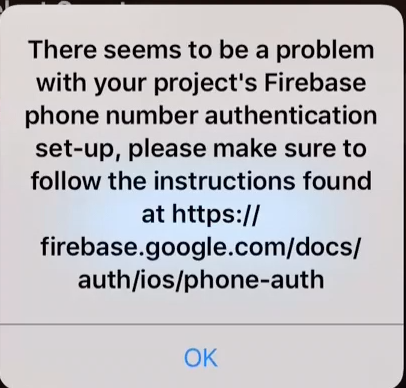
@XiangtianDai Hi I am using firebase in my project for phone number verification. Earlier during the apple review, a member of the apple team came across this alert. A few users have also had this issue. Any idea where to look next? Thanks in advance.
 ghost
on 1 Sep 2017
ghost
on 1 Sep 2017
@thirumaleshios If this isn't reproducible but only happens occasionally, it could be caused by other factors such as unstable network that our library cannot distinguish from incorrect app set-up. We're working on a solution for that. On the other hand, if this can be reproduced, say, for a particular build, then it indeed indicates an issue in the app set-up. You probably want to check APNs capability is enabled in both of your app ID and entitlement.
By the way, in general Firebase Auth error messages in the returned NSError objects are meant for developers, not for users. They contain technical details and instructions for the developer to troubleshoot the issue. And they are not localized either. The only exception is the message indexed by NSLocalizedFailureReasonErrorKey in the userInfo dictionary, which is meant for displaying to users, such as in the case of FIRAuthErrorCodeWeakPassword error.
XiangtianDai
on 1 Sep 2017
@XiangtianDai I am setting my token type as follows in didRegisterForRemoteNotificationsWithDeviceToken:
#if DEVELOPMENT
  Auth.auth().setAPNSToken(deviceToken, type: AuthAPNSTokenType.sandbox)
#else
  Auth.auth().setAPNSToken(deviceToken, type: AuthAPNSTokenType.prod)
#endif
When I set my .entitlements file APS Environment value to 'production', xCode complains that push capabilities are not enabled. I have separate Firebase projects set up for development and production environments of my app. Development works fine, but production gives me a 'token mismatch' error. Can you comment on these two settings to help me debug please? Thank you.
alijaza
on 6 Sep 2017
@alijaza Have you checked the Apple developer site for whether the "Push Notification" application service is enabled for your app ID for distribution?
XiangtianDai
on 6 Sep 2017
@XiangtianDai yes, it is enabled for production only on my production bundle ID (I have separate targets and bundle ID for development). I just tested and my production build works in TestFlight, but not when testing on device through xCode. There has to be a way to test the production certificate without using TestFlight, right?
Also, have you verified the entitlement bug I mentioned, and whether we are supposed to manually change the APS Environment value to 'production' or leave it as Apple recommends (they claim it will be submitted as production when archiving your build)?
alijaza
on 6 Sep 2017
@alijaza To test production APNs without using TestFlight, you can also use Ad Hoc distribution: https://developer.apple.com/library/content/documentation/IDEs/Conceptual/AppDistributionGuide/TestingYouriOSApp/TestingYouriOSApp.html . That being said, if your production build works in TestFlight, I would expect it to work in App Store as well, so I'm not sure what is the issue here. Or did you mean that phone number auth didn't work in your TestFlight build?
For the second part of your question, I'm sorry but I don't know whether or not Xcode would automatically set APNs environment value to 'production' in your entitlement. For what I know, you can either specific different .entitlements file for different builds in build settings, or use a variable in the .entitlements file to be replaced by a user-defined build settings.
XiangtianDai
on 6 Sep 2017
@XiangtianDai Sorry for the silly question, but when you say that the certificate type (production or sandbox) should match the aps-environment, do you mean that for a development-type certificate, the entitlement file should have "development" as an environment, and setAPNSToken should use a sandbox-type token?
 phlippieb
on 7 Sep 2017
phlippieb
on 7 Sep 2017
@phlippieb Correct, and please note that the "certificate" here refers to the APNs private certificate you upload to the Firebase Console, if you choose to use the private certificate instead of the authentication key. You can also choose to use the APNs authenticate key, which is recommended and does not have the development/production distinction. See https://firebase.google.com/docs/cloud-messaging/ios/certs for details.
XiangtianDai
on 7 Sep 2017
@hunglb1985 Sorry for the late reply but I believe SMS to Vietnam should work now (actually for quite some time). Please let me know if you experience any further issue.
XiangtianDai
on 13 Oct 2017
Thank you @XiangtianDai I will test this now.
hunglb1985
on 16 Oct 2017
Hello, I have very strange problem.
On my phone firebase phone auth work correctly, but when I loaded .IPA files to another devices SMS didn't came?
Why can it happened?
Thanks in advance
 GlebGer
on 17 Oct 2017
GlebGer
on 17 Oct 2017
@GlebGer Did FirebaseAuth return an error? or if you use FirebaseUI, did you see an error prompt?
XiangtianDai
on 17 Oct 2017
Yes, I get error "Invalid token". I changed APNs Certificates to APNs Authentication Key and its solved my problem.
Thanks for your answer anyway!
GlebGer
on 17 Oct 2017
Hello again!
I still have this problem.
I tested on different devices (3 iPhones and 1 iPad) and firebase phone auth worked great.
But apple reviewer had a crash after entering verification sms and tapping "done". Why could it happened?
I really have no idea what to do with this problem.
Reviewer send me crash report, can you look at this?
http://a1015.phobos.apple.com/us/r30/Purple118/v4/d5/fa/1e/d5fa1e9a-bb75-97f9-4929-997d254caddb/attachment-3861188544919408199crashlog-3CC2BF86-0F67-4968-9E0F-5123DE26E756.txt?downloadKey3=1508639358_b957f437eb4fb9dfcba267d2e347209f
I'm not sure but I think that problem have to be here
if let credential: PhoneAuthCredential = PhoneAuthProvider.provider().credential(withVerificationID: defaults.string(forKey: "authVID")!, verificationCode: codeTextField.text!)
Maybe you know what can I do to solve it?
Thanks in advance!
GlebGer
on 19 Oct 2017
This is an unsymbolicated crash log, so it'll be prohibitively difficult for anyone to debug. Apple has some good docs on how to symbolicate crash logs here.
EXC_BREAKPOINTs on device are most commonly caused by unsafe force-unwraps of optional types in Swift. Check that the values you're force unwrapping are guaranteed to be nonnull before proceeding.
In the future, generic crashes that are non-Firebase related are better suited for mediums like Stack Overflow.
morganchen12
on 19 Oct 2017
@GlebGer In addition to what Morgan said, please note that FirebaseAuth 4.2.0 has a bug that for some error cases the completion block is not called back in the main thread, which may trigger a crash if the app uses UIKit directly in the completion block. Upgrading to FirebaseAuth 4.2.1 or above would solve this issue. (Or if you use FirebaseUI, FirebaseUI 4.3.1 or above).
XiangtianDai
on 19 Oct 2017
@XiangtianDai Thanks, I'll try!
GlebGer
on 19 Oct 2017
@XiangtianDai nothing helped.
- I update pods.
- I also deleted all lines of code beside sign up function
now code, where reviewer had crash look like this:
` func handleLogIn(){
    let defaults = UserDefaults.standard

    if (codeTextField.text! == ""){
        return
    }

    if let credential: PhoneAuthCredential = PhoneAuthProvider.provider().credential(withVerificationID: defaults.string(forKey: "authVID")!, verificationCode: codeTextField.text!){


        Auth.auth().signIn(with: credential) { (user, error) in
            if error != nil {
                print("error: \(String(describing: error?.localizedDescription))")
                self.codeTextField.text = "error: \(String(describing: error?.localizedDescription))"
            } else {
                let userInfo = user?.providerData[0]
                print("Provider ID: \(String(describing: userInfo?.providerID))")
                self.codeTextField.text = "sign up successfull"
            }
        }

        }else{
            codeTextField.text = "credential error"
        }
}`
Maybe you have any other ideas what can I try?
GlebGer
on 20 Oct 2017
@GlebGer you shouldn't be force-unwrapping defaults.string(forKey: "authVID") or codeTextField.text, as these are both not guaranteed to be nonnull.
morganchen12
on 20 Oct 2017
hello,
There seem to be a problem in firebase phone authentication ...i get this message in the error statement...
PhoneAuthProvider.provider().verifyPhoneNumber(user.phone!) { (verificationID, error) in
            if let error = error {
                print(error.localizedDescription)

                Util.sharedInstance.popUpDisplayer(error.localizedDescription)
// self.showMessagePrompt(error.localizedDescription)
                return
            }
})
There seems to be a problem with your project's Firebase phone number authentication set-up, please make sure to follow the instructions found at https://firebase.google.com/docs/auth/ios/phone-auth
 faizantariq1
on 30 Oct 2017
faizantariq1
on 30 Oct 2017
One thing to keep in mind that caused me a LOT of headache: TestFlight builds always use the production entitlement and must therefore also use the production cert an GoogleService-Info.plist files (in case you have separated production and development).
alijaza
on 2 Nov 2017
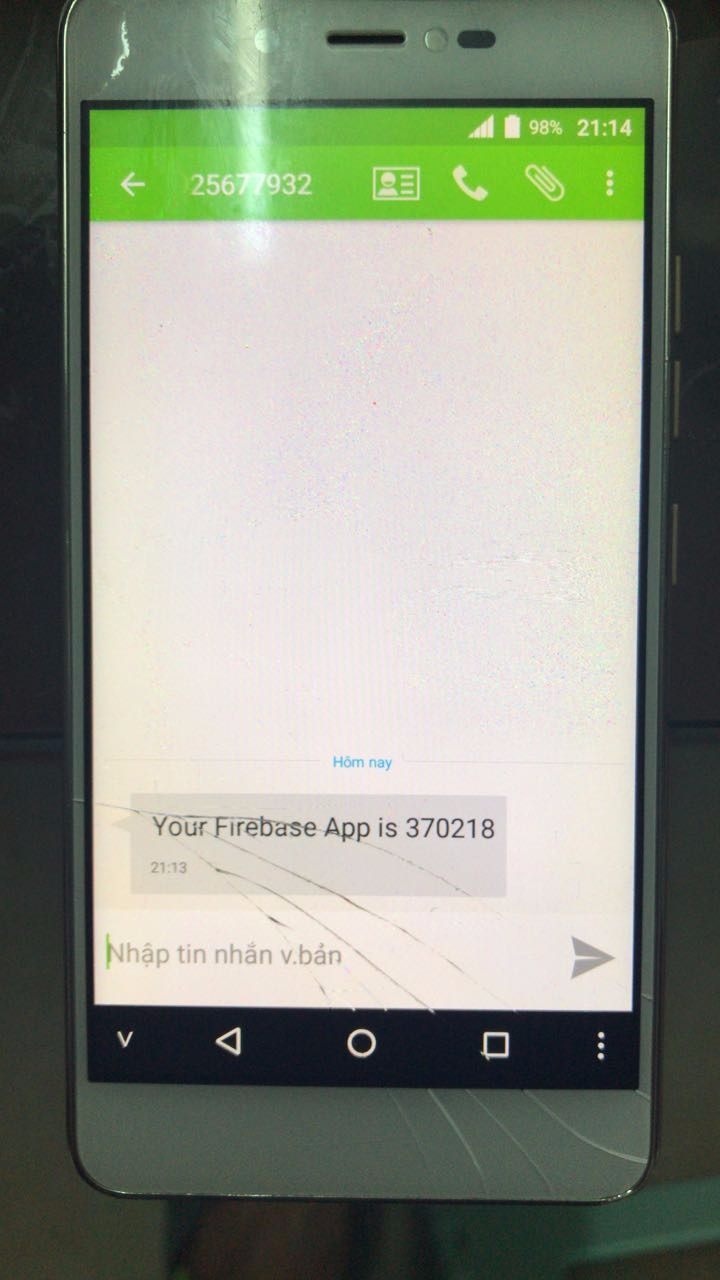
Posting this issue here since there is mention on sending sms verfication to Vietnam. Just confirm it is working now although just half a day earlier no message ever reached any phone in Vietnam.
Now this is weird: I sent 2 verifications to 2 different numbers and they receive 2 different templates, and none of them following the default template (%LOGIN_CODE% is your verification code for %APP_NAME%.)

 hongnk
on 6 Nov 2017
hongnk
on 6 Nov 2017
Related issues
 rodrigosol
·
3Comments
rodrigosol
·
3Comments
 alfongj
·
7Comments
alfongj
·
7Comments
 netdawgx
·
7Comments
netdawgx
·
7Comments
 georgstrieder
·
7Comments
ghost
·
7Comments
georgstrieder
·
7Comments
ghost
·
7Comments
Most helpful comment
I have error when set up Authenticate for Phone number:
Domain=FIRAuthErrorDomain Code=17048 "Token mismatch" UserInfo={NSLocalizedDescription=Token mismatch, error_name=INVALID_APP_CREDENTIAL}
does anyone have same problem and how to fix it