Firebase-tools: Command Not Found Error downloading latest release v8.11.0
Trying to install the latest release (https://github.com/firebase/firebase-tools/releases/tag/v8.11.0) via CircleCI using curl -sL firebase.tools | bash but it's failing with this error (both locally and on CI):
curl -sL firebase.tools | upgrade=true bash
tr: Illegal byte sequence
-- Checking for existing firebase-tools on PATH...
error: unknown option '--tool:setup-check'
-- Your machine has [email protected], attempting upgrade...
-- Checking your machine type...
-- Downloading binary from https://firebase.tools/bin/macos/latest
######################################################################## 100.0%##O=#  #
-- Setting permissions on binary...
/usr/local/bin/firebase: line 1: Not: command not found
bash: line 262: e: command not found
Something went wrong, firebase has not been installed.
Please file a bug with your system information on Github.
https://github.com/firebase/firebase-tools/
-- All done!
[REQUIRED] Environment info
firebase-tools: 7.14.0 (irrelevant since I'm just trying to install the latest with curl -sL firebase.tools | bash on CI and curl -sL firebase.tools | upgrade=true bash locally
Platform: macOS
[REQUIRED] Test case
run curl -sL firebase.tools | upgrade=true bash
[REQUIRED] Steps to reproduce
run curl -sL firebase.tools | upgrade=true bash
[REQUIRED] Expected behavior
it should install
[REQUIRED] Actual behavior
it fails to install
 jstheoriginal
All 10 comments
We started seeing this on our Travis build environment today as well. Here's the output:
$ curl -sL firebase.tools | bash
tr: Illegal byte sequence
-- Checking for existing firebase-tools on PATH...
-- Checking your machine type...
-- Downloading binary from https://firebase.tools/bin/macos/latest
######################################################################## 100.0%
-- Setting permissions on binary...
/usr/local/bin/firebase: line 1: Not: command not found
bash: line 262: e: command not found
Something went wrong, firebase has not been installed.
Please file a bug with your system information on Github.
https://github.com/firebase/firebase-tools/
-- All done!
The command "curl -sL firebase.tools | bash" failed and exited with 1 during .
Also occurs on the Linux image on travis as well:
$ curl -sL firebase.tools | bash
-- Checking for existing firebase-tools on PATH...
-- Checking your machine type...
-- Downloading binary from https://firebase.tools/bin/linux/latest
######################################################################## 100.0%
-- Setting permissions on binary...
/usr/local/bin/firebase: line 1: Not: command not found
bash: line 262: e: command not found
Something went wrong, firebase has not been installed.
Please file a bug with your system information on Github.
https://github.com/firebase/firebase-tools/
-- All done!
The command "curl -sL firebase.tools | bash" failed and exited with 1 during .
 misterwell
on 22 Sep 2020
misterwell
on 22 Sep 2020
Is it just me, or did an errant e character make it into the script at firebase.tools:
Starting at line 255, note the e after then... I'm no shell expert but seems like that might be causing issues:
if [ -z "$VERSION" ]
then
e
    echo "Something went wrong, firebase has not been installed."
    echo "Please file a bug with your system information on Github."
    echo "https://github.com/firebase/firebase-tools/"
    echo "-- All done!"

    send_analytics_event failure
    exit 1
fi
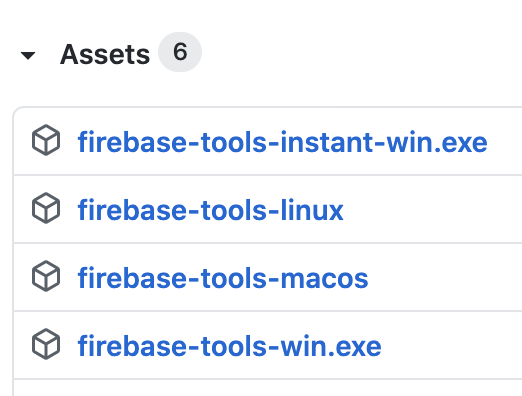
I also noticed that the latest release only has 2 Assets attached (the source code & its zip) and doesn't have these 4 files like all previous releases have.
jstheoriginal
on 23 Sep 2020
Thanks for the report. I'm raising the issue with the appropriate folks.
 bkendall
on 23 Sep 2020
bkendall
on 23 Sep 2020
Same issue from CircleCI:
```
-- Checking for existing firebase-tools on PATH...
-- Checking your machine type...
-- Downloading binary from https://firebase.tools/bin/macos/latest
################################################################## 100.0%#=#=#
-- Setting permissions on binary...
/usr/local/bin/firebase: line 1: Not: command not found
bash: line 262: e: command not found
Something went wrong, firebase has not been installed.
Please file a bug with your system information on Github.
https://github.com/firebase/firebase-tools/
-- All done!
Exited with code exit status 1
CircleCI received exit code 1
`
 mdobroggg
on 23 Sep 2020
mdobroggg
on 23 Sep 2020
I re-published the assets, which I think is the root cause here. Give it a go again and let me know if that didn't resolve the issue.
bkendall
on 23 Sep 2020
Can confirm my firebase.tools script run works now, at least on the travis linux build image we use. Thank you for the quick turnaround on this @bkendall & team! It's very much appreciated!
misterwell
on 23 Sep 2020
@bkendall all solved for me as well on my local mac & circleci. thanks for the quick turnaround!
jstheoriginal
on 23 Sep 2020
I’m actually still seeing this today when running a build on CircleCI
 jbrennan
on 25 Sep 2020
jbrennan
on 25 Sep 2020
When we make a new release, the binaries used by the firebase.tools script lag by a few minutes. If you're still seeing issues with the script, please open a new issue (the binaries for 8.11.2 are up and available, so I expect them to be working for you now)
bkendall
on 25 Sep 2020
Related issues
 francisrod01
·
3Comments
francisrod01
·
3Comments
 jefrydco
·
3Comments
jefrydco
·
3Comments
 adam-remotesocial
·
3Comments
adam-remotesocial
·
3Comments
 kyleabens
·
3Comments
kyleabens
·
3Comments
 chen86860
·
3Comments
chen86860
·
3Comments
Most helpful comment
I re-published the assets, which I think is the root cause here. Give it a go again and let me know if that didn't resolve the issue.