Firebase-tools: ERR_HTTP_HEADERS_SENT crash when reponding with 304 for a rewritten URL
Environment info
firebase-tools: 8.10.0
Platform: macOS
Test case
firebase.json:
{
  "hosting": {
    "public": "public",
    "rewrites": [
      {
        "source": "**",
        "destination": "/index.html"
      }
    ]
  }
}
public/index.html:
<!DOCTYPE html>
<html>
<head>
  <meta charset="utf-8">
  <meta name="viewport" content="width=device-width, initial-scale=1">
  <title>Test</title>
  <script src="/__/firebase/7.8.0/firebase-app.js"></script>
  <script src="/__/firebase/7.8.0/firebase-auth.js"></script>
  <script src="/__/firebase/7.8.0/firebase-firestore.js"></script>
  <script src="/__/firebase/init.js"></script>
  </head>
<body>
  </body>
</html>
Steps to reproduce
- Start the emulator:
firebase emulators:start - Load
http://localhost:5000/fooin Chrome. - Press reload in Chrome.
Expected behavior
The reload will reload the page without crashing the emulator.
Actual behavior
The reload triggers a 304 response, and causes the emulator to crash with:
i  hosting: 127.0.0.1 - - [11/Sep/2020:22:28:32 +0000] "GET /foo HTTP/1.1" 304 - "-" "Mozilla/5.0 (iPhone; CPU iPhone OS 13_2_3 like Mac OS X) AppleWebKit/605.1.15 (KHTML, like Gecko) Version/13.0.3 Mobile/15E148 Safari/604.1"
Error [ERR_HTTP_HEADERS_SENT]: Cannot remove headers after they are sent to the client
    at ServerResponse.removeHeader (_http_outgoing.js:593:11)
    at Responder.handleNotModified (/usr/local/lib/node_modules/firebase-tools/node_modules/superstatic/lib/responder.js:138:12)
    at /usr/local/lib/node_modules/firebase-tools/node_modules/superstatic/lib/responder.js:100:19
    at tryCatch (/usr/local/lib/node_modules/firebase-tools/node_modules/rsvp/dist/rsvp.js:525:12)
    at invokeCallback (/usr/local/lib/node_modules/firebase-tools/node_modules/rsvp/dist/rsvp.js:538:13)
    at publish (/usr/local/lib/node_modules/firebase-tools/node_modules/rsvp/dist/rsvp.js:508:7)
    at flush (/usr/local/lib/node_modules/firebase-tools/node_modules/rsvp/dist/rsvp.js:2415:5)
    at processTicksAndRejections (internal/process/task_queues.js:79:11)

Error: An unexpected error has occurred.
If you modify index.html before reloading, the crash doesn't happen, and the response is a 200 instead.
 dkagedal
All 11 comments
Suffering of this as well - since a while.
Wish there is a speedy fix to this because:
- there's nothing I as a developer can do to work around this, is there?
- deployment is pending on getting a stable local hosting
Editing the index.html does not work for me.
 akauppi
on 14 Sep 2020
akauppi
on 14 Sep 2020
@bkendall this looks like it might be related to the superstatic upgrade?
 samtstern
on 18 Sep 2020
samtstern
on 18 Sep 2020
I'm unable to reproduce this issue as described. I'm seeing 304s being returned successfully both on 8.9.0 and 8.10.0. If you're seeing this issue, could you uninstall firebase-tools (npm un -g firebase-tools) and re-install it? Maybe there's some latent dependency that's hanging around causing some issues. And confirm that you're using npm and not yarn (which we don't test against... and I don't use daily)?
 bkendall
on 18 Sep 2020
bkendall
on 18 Sep 2020
I'm using npm.
I tried uninstalling and reinstalling again, this time 8.11.0, and I still see the same issue.
One thing I do see when starting the emulator is this:
⚠ Your requested "node" version "10" doesn't match your global version "14"
I'm new to node, so I don't even know what to fix here, of if it could be causing this issue.
dkagedal
on 23 Sep 2020
@dkagedal that warning can usually be ignored, but it means that you're developing with Node 14 locally but your Cloud Functions will be deployed using Node 10. So there could be some behavioral differences, it's best to use the same version locally as you'll have in production.
To swap node versions, try using nvm
samtstern
on 23 Sep 2020
Can you provide your _full_ firebase.json for us? I'm still unable to reproduce this issue even on node 14.
The global version warning comes from Firebase Functions being started with a mismatched node version, which is _not_ something that happens when I run the reproduction steps you've provided:

Is it possible that a Firebase Function is interfering with this particular request? Unfortunately, without exact reproduction steps, I'm having a hard time discovering the issue...
bkendall
on 23 Sep 2020
The small firebase.jsonI included in the original post was what I used to reproduce this issue with.
The full version is at https://github.com/dkagedal/attendance-tracker/blob/master/firebase.json, but I saw the problem with just the minimal version. I still had the functionssubdir, but nothing about it in firebase.json.
When I retry now with the small firebase.json, I notice that firebase emulators:startdoes actually start functions as well. But even if I run firebase emulators:start --only hostingI get the same issue. I tried removing the functions subdir, same issue still.
I continued removing files that should not be used, and eventually it stopped failing.
It turns out that the culprit was the public/404.html file I had there. Removing thata file makes everything work fine again. Doing a touch public/404.htmlmakes it start failing. Creating a different html file is not a problem, but the 404.html file will make the emulator fail.
dkagedal
on 24 Sep 2020
I confirm that renaming public/404.html takes away the crashes also in my project. Weird. + thanks @dkagedal
akauppi
on 24 Sep 2020

That's very, very strange. I'll see if I can't replicate this with a little bit of functions hanging around too (even if they're not used).
bkendall
on 24 Sep 2020
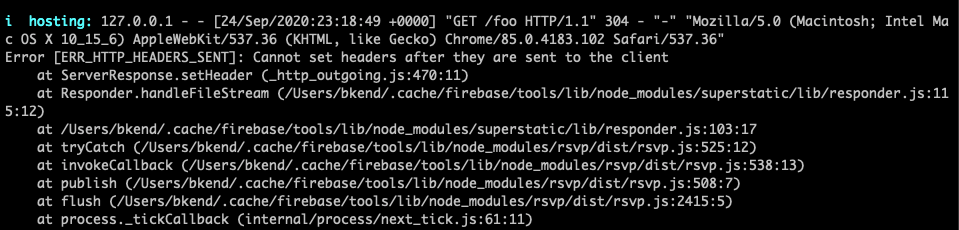
Great success! I've managed to reproduce it! In addition to your steps, creating public/404.html did the trick.
I'll take a look and see what I can find
bkendall
on 25 Sep 2020
Great success. I was able to update superstatic with the fix (see above) and made a 7.0.1 release of it.
If you re-install firebase-tools (might be healthy to npm un -g firebase-tools then npm i -g firebase-tools), it _should_ pick up the updated version of superstatic and the issue shouldn't happen any more!
Thanks again for the report!
bkendall
on 25 Sep 2020
Related issues
 ahmadalibaloch
·
3Comments
ahmadalibaloch
·
3Comments
 Symbolk
·
3Comments
Symbolk
·
3Comments
 laurenzlong
·
4Comments
laurenzlong
·
4Comments
 repentsinner
·
3Comments
repentsinner
·
3Comments
 Ridermansb
·
3Comments
Ridermansb
·
3Comments
Most helpful comment
Great success. I was able to update
superstaticwith the fix (see above) and made a7.0.1release of it.If you re-install
firebase-tools(might be healthy tonpm un -g firebase-toolsthennpm i -g firebase-tools), it _should_ pick up the updated version ofsuperstaticand the issue shouldn't happen any more!Thanks again for the report!