Firebase-tools: Function emulators throwing incorrect error message "Cannot find module './tsconfig.json' './tsconfig.json' error "
[REQUIRED] Environment info
firebase-tools: 8.4.2
Platform: Windows 10
[REQUIRED] Test case
I have a set of working and currently deployed functions I am trying to emulate. They are written in JavaScript and the project is not configured for TypeScript.
When I try to emulate my functions I am receiving the following error
!  functions: Cannot find module './tsconfig.json'
!  Your function was killed because it raised an unhandled error.
Trying to find the problem I init a clean project and wrote the following
index.js
const functions = require('firebase-functions');
const { text } = require('./utils/helpers')

exports.helloWorld = functions.https.onRequest((request, response) => {
  let responseText = text()
  response.send(responseText);
});
utils/helpers.js
exports.text = () => {
  return 'hello world'
}
Which worked.
However if I changed the require for helpers to ..utils/helpers (which does not exist) I received the error:
!  functions: Cannot find module './tsconfig.json'
!  Your function was killed because it raised an unhandled error.
I can only assume there is something in my code emulators does not like however this is the only error message I am getting so I cannot find it. If I remove all code from my index file (in my actual project) and write a simple function the emulators will run.
[REQUIRED] Steps to reproduce
Changed the require for helpers to ..utils/helpers (which does not exist) in index.js
[REQUIRED] Expected behavior
Receive meaningful error message
[REQUIRED] Actual behavior
Receive C:\Github\test-emulators\firebase-debug.log
!  functions: Cannot find module './tsconfig.json'
!  Your function was killed because it raised an unhandled error.
Project is not written in or configured for TypeScript
firebase-debug.log
firebase-debug.log
 pklitscher
All 7 comments
@pklitscher thank you for the super-simple reproduction! I can see the same bug and I will send a PR with a fix.
 samtstern
on 11 Jun 2020
samtstern
on 11 Jun 2020
@samtstern Thanks for fixing this so quick.
Just in case the issue is more than it seems I thought I'd share the behaviour I am seeing
Saw your comment on (#2352) I have been trying to find the issue with my code so pulled everything out and progressively adding back in. But I can't even get the most basic code to work.
index.js
exports.users = require('./scripts/users');
scripts/users.js (function commented out for testing)
const functions = require('firebase-functions');
const { auth } = require('../init/admin');

// exports.syncAdminUser = functions.database.ref('/system/admin/{uid}')
//   .onWrite(async (fbChange, fbContext) => {
//     let uid = fbContext.params.uid
//     let state = fbChange.after.exists()

//     return auth.setCustomUserClaims(uid, { admin: state })
//   })
init/admin.js
const admin = require('firebase-admin');

admin.initializeApp();

exports.db = admin.database();
exports.messaging = admin.messaging()
exports.auth = admin.auth()
exports.storage = admin.storage()
This will throw the tsconfig error.
If I comment out // const { auth } = require('../init/admin'); emulators will run.
This code runs in production error free. All directories exist and refs are correct. Will this be resolved in the fix or is it something more?
Folder structure
functions
  |-- init
  |    |-- admin.js
  |
  |-- scripts
  |    |-- users.js
  |
  |-- index.js
I think this will be resolved. If you really want to be sure you can check out the CLI at master, npm build and link, and then try and run it. If you have time I'd definitely appreciate hearing how it goes!
samtstern
on 12 Jun 2020
Hey guys, just finished cracking my head on this problem.
The main issue I found was the lack of .tsconfig file was obfuscating my stack trace.
I found (I think) that relative imports into index.js were the cause between the bug above and success.
A hacky way I did was just to add a tsconfig.json to the root directory with provided options.
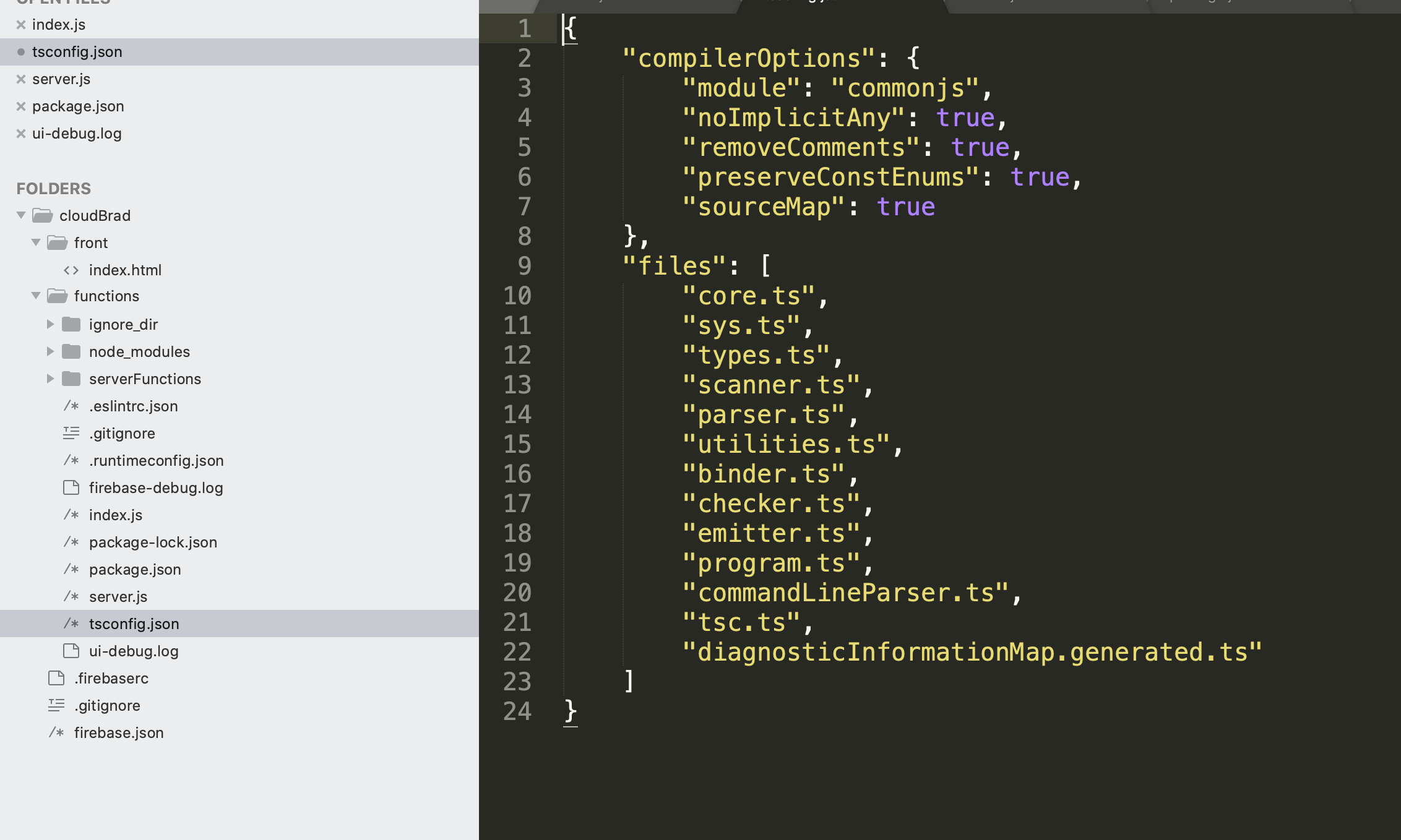
Here's the example file i sourced it from.(Under the files)
https://www.typescriptlang.org/docs/handbook/tsconfig-json.html
Allowed me to see the simple bugs that were causing the cloud function to not run correctly.
Out of curiosity, Would the fix be to add the .tsconfig.json file upon firebase init solve the issue regardless of js or ts?
edit: don't mind me; just saw the fix with the async. Just excited I got past my issue.
 LYRADNIS
on 13 Jun 2020
LYRADNIS
on 13 Jun 2020
Same problem here.
Googling the problem i found this solution:
https://medium.com/@onwuka_gideon/functions-cannot-find-module-tsconfig-json-how-i-fixed-it-70d7c4769174
Answer downgrade to 6.3.1 the firebase-tools, but seems to me much oldest, and unproductive without restart after some changes. But send to me a perfect description was happen to cause the error, I was using admin.initializeApp() twice at my code.
So, what is happening with meaningful erros?
 juloko
on 15 Jun 2020
juloko
on 15 Jun 2020
This will be resolved in the next release of the Firebase CLI. The fix is already in master. Please only comment if you have tried manually building the code on master and are still seeing this regression.
samtstern
on 15 Jun 2020
I just tried with master branch, and I got success. The emulator works fine. The issue is fixed. In case you want to try:
- uninstall already installed firebase tools
$ npm uninstall -g firebase-tools - install firebase tools with master branch
$ npm install -g git://github.com/firebase/firebase-tools.git#master --save - run emulator
/path/to/project/functions $ firebase emulators:start --only=functions
@samtstern I would like to know if there is any date time is set when the next version will be released, if yes please share.
Thanks very much.
 SOHELAHMED7
on 15 Jun 2020
SOHELAHMED7
on 15 Jun 2020
Related issues
 FluorescentHallucinogen
·
3Comments
FluorescentHallucinogen
·
3Comments
 Ridermansb
·
3Comments
Ridermansb
·
3Comments
 roosi
·
3Comments
roosi
·
3Comments
 ahmadalibaloch
·
3Comments
ahmadalibaloch
·
3Comments
 francisrod01
·
3Comments
francisrod01
·
3Comments
Most helpful comment
I just tried with master branch, and I got success. The emulator works fine. The issue is fixed. In case you want to try:
$ npm uninstall -g firebase-tools$ npm install -g git://github.com/firebase/firebase-tools.git#master --save/path/to/project/functions $ firebase emulators:start --only=functions@samtstern I would like to know if there is any date time is set when the next version will be released, if yes please share.
Thanks very much.