Firebase-tools: Can't deploy any functions to Cloud Functions by CLI v8.1.0
[REQUIRED] Environment info
firebase-tools: 8.1.0
Platform: macOS
[REQUIRED] Test case
N/A
[REQUIRED] Steps to reproduce
firebase deploy --only functions
[REQUIRED] Expected behavior
deploy like previous versions
[REQUIRED] Actual behavior
firebase deploy --only functions --debug
[2020-04-17T02:12:04.556Z] > command requires scopes: ["email","openid","https://www.googleapis.com/auth/cloudplatformprojects.readonly","https://www.googleapis.com/auth/firebase","https://www.googleapis.com/auth/cloud-platform"]
[2020-04-17T02:12:04.557Z] > authorizing via signed-in user
[2020-04-17T02:12:04.557Z] [iam] checking project jirawatee-108d7 for permissions ["cloudfunctions.functions.create","cloudfunctions.functions.delete","cloudfunctions.functions.get","cloudfunctions.functions.list","cloudfunctions.functions.update","cloudfunctions.operations.get","firebase.projects.get"]
[2020-04-17T02:12:04.560Z] >>> HTTP REQUEST POST https://cloudresourcemanager.googleapis.com/v1/projects/jirawatee-108d7:testIamPermissions
 {"permissions":["cloudfunctions.functions.create","cloudfunctions.functions.delete","cloudfunctions.functions.get","cloudfunctions.functions.list","cloudfunctions.functions.update","cloudfunctions.operations.get","firebase.projects.get"]}
[2020-04-17T02:12:05.949Z] <<< HTTP RESPONSE 200 {"content-type":"application/json; charset=UTF-8","vary":"X-Origin, Referer, Origin,Accept-Encoding","date":"Fri, 17 Apr 2020 02:12:07 GMT","server":"ESF","cache-control":"private","x-xss-protection":"0","x-frame-options":"SAMEORIGIN","x-content-type-options":"nosniff","server-timing":"gfet4t7; dur=1147","alt-svc":"quic=\":443\"; ma=2592000; v=\"46,43\",h3-Q050=\":443\"; ma=2592000,h3-Q049=\":443\"; ma=2592000,h3-Q048=\":443\"; ma=2592000,h3-Q046=\":443\"; ma=2592000,h3-Q043=\":443\"; ma=2592000,h3-T050=\":443\"; ma=2592000","accept-ranges":"none","transfer-encoding":"chunked"}
[2020-04-17T02:12:05.951Z] >>> HTTP REQUEST POST https://iam.googleapis.com/v1/projects/jirawatee-108d7/serviceAccounts/[email protected]:testIamPermissions
 {"permissions":["iam.serviceAccounts.actAs"]}
[2020-04-17T02:12:07.788Z] <<< HTTP RESPONSE 200 {"content-type":"application/json; charset=UTF-8","vary":"X-Origin, Referer, Origin,Accept-Encoding","date":"Fri, 17 Apr 2020 02:12:09 GMT","server":"ESF","cache-control":"private","x-xss-protection":"0","x-frame-options":"SAMEORIGIN","x-content-type-options":"nosniff","alt-svc":"quic=\":443\"; ma=2592000; v=\"46,43\",h3-Q050=\":443\"; ma=2592000,h3-Q049=\":443\"; ma=2592000,h3-Q048=\":443\"; ma=2592000,h3-Q046=\":443\"; ma=2592000,h3-Q043=\":443\"; ma=2592000,h3-T050=\":443\"; ma=2592000","accept-ranges":"none","transfer-encoding":"chunked"}

=== Deploying to 'jirawatee-108d7'...

i  deploying functions
Running command: npm --prefix "$RESOURCE_DIR" run lint

> functions@ lint /Users/jirawatk/Documents/Git/Firebase/functions
> eslint .

✔  functions: Finished running predeploy script.
[2020-04-17T02:12:10.703Z] > [functions] package.json contents: {
  "name": "functions",
  "description": "Cloud Functions for Firebase",
  "scripts": {
    "lint": "eslint .",
    "serve": "firebase serve --only functions",
    "shell": "firebase experimental:functions:shell",
    "start": "npm run shell",
    "deploy": "firebase deploy --only functions",
    "logs": "firebase functions:log"
  },
  "dependencies": {
    "@google-cloud/vision": "^1.11.0",
    "child-process-promise": "^2.2.1",
    "firebase-admin": "^8.10.0",
    "firebase-functions": "^3.6.0",
    "googleapis": "^49.0.0",
    "mkdirp": "^1.0.4",
    "mkdirp-promise": "^5.0.1",
    "request": "^2.88.2",
    "request-promise": "^4.2.5"
  },
  "devDependencies": {
    "eslint": "^6.8.0",
    "eslint-plugin-promise": "^4.2.1"
  },
  "engines": {
    "node": "8"
  },
  "private": true
}
[2020-04-17T02:12:10.705Z] Error: ENOENT: no such file or directory, stat 'functions/package.json'
    at Object.statSync (fs.js:933:3)
    at Object.load (/usr/local/lib/node_modules/firebase-tools/node_modules/cjson/index.js:200:12)
    at getRuntimeChoice (/usr/local/lib/node_modules/firebase-tools/lib/parseRuntimeAndValidateSDK.js:55:26)
    at module.exports (/usr/local/lib/node_modules/firebase-tools/lib/deploy/functions/prepare.js:26:29)
    at _chain (/usr/local/lib/node_modules/firebase-tools/lib/deploy/index.js:22:40)
    at /usr/local/lib/node_modules/firebase-tools/lib/deploy/index.js:63:16
    at processTicksAndRejections (internal/process/task_queues.js:97:5)

Error: An unexpected error has occurred.
 jirawatee
All 15 comments
This issue does not seem to follow the issue template. Make sure you provide all the required information.
 google-oss-bot
on 17 Apr 2020
google-oss-bot
on 17 Apr 2020
Can you please run the command with --debug and include the logs here (not
a screenshot)?
On Thu, Apr 16, 2020, 7:07 PM Google Open Source Bot <
[email protected]> wrote:
This issue does not seem to follow the issue template. Make sure you
provide all the required information.—
You are receiving this because you are subscribed to this thread.
Reply to this email directly, view it on GitHub
https://github.com/firebase/firebase-tools/issues/2138#issuecomment-614997500,
or unsubscribe
https://github.com/notifications/unsubscribe-auth/AAAAH7RJVE52R2LS7VSEHVLRM62VNANCNFSM4MKMGB4Q
.
 mbleigh
on 17 Apr 2020
mbleigh
on 17 Apr 2020
Can you please run the command with --debug and include the logs here (not a screenshot)?
…
On Thu, Apr 16, 2020, 7:07 PM Google Open Source Bot < @.*> wrote: This issue does not seem to follow the issue template. Make sure you provide all the required information. — You are receiving this because you are subscribed to this thread. Reply to this email directly, view it on GitHub <#2138 (comment)>, or unsubscribe https://github.com/notifications/unsubscribe-auth/AAAAH7RJVE52R2LS7VSEHVLRM62VNANCNFSM4MKMGB4Q .
Thank you for quick reply, I already updated my post.
jirawatee
on 17 Apr 2020
Hmm, this looks like a bug related to some changes we made in the most recent release.
Are you running the deploy command from your top-level project directory or from a subdirectory (e.g. the functions directory)? What is your project's folder structure?
mbleigh
on 17 Apr 2020
It's late evening where I am and we haven't had widespread reports of issues so we will likely pick this up tomorrow. If you can provide me with more information that'd be very helpful, but also feel free to downgrade to the previous release to unblock yourself:
npm i -g [email protected]
Hmm, this looks like a bug related to some changes we made in the most recent release.
Are you running the deploy command from your top-level project directory or from a subdirectory (e.g. the
functionsdirectory)? What is your project's folder structure?
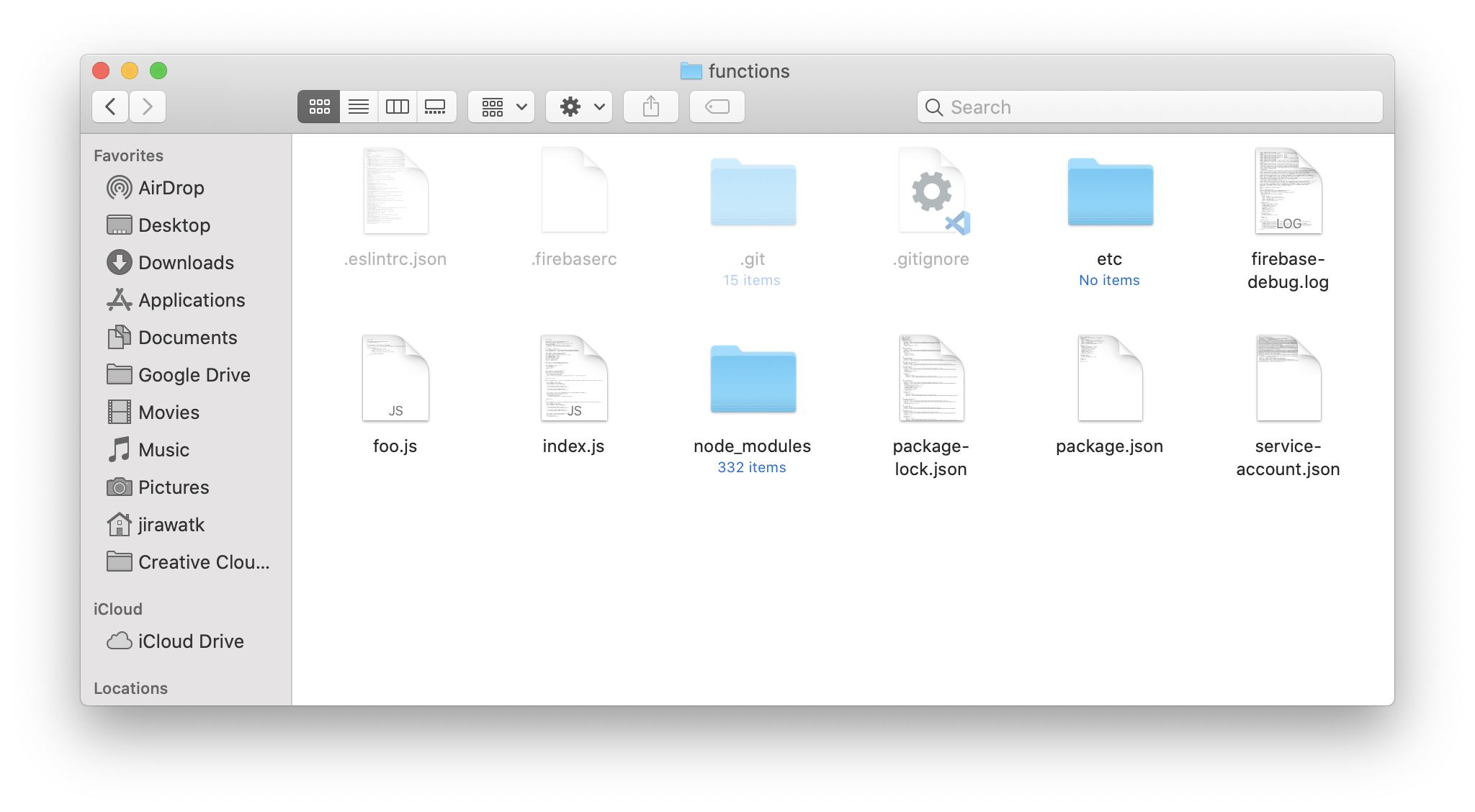
I run the deploy command from subdirectory(see it in debug log above)
project's folder structure
jirawatee
on 17 Apr 2020
Just to eliminate a possible issue -- can you try running firebase deploy from the main project directory instead (where your firebase.json is)? I'm wondering if this is a relative directory problem.
mbleigh
on 17 Apr 2020
Hey @mbleigh, I am also having a similar issue when i try to execute firebase deploy from the 'functions' sub-directory. However, just wanted to let you know it seemed to work when run the command from the project's root directory.
 patelneel55
on 17 Apr 2020
patelneel55
on 17 Apr 2020
I am facing the same problem.
The deployment to hosting was successful using firebase deploy --only hosting from the root directory. However, I cannot deploy for function using firebase deploy --only functions from the functions subdirectory.
"firebase-tools": "^8.0.0"
Directory structure
- firebase.json
- package.json
- functions/
  - package.json
firebase.json
{
  "firestore": {
    "rules": "firestore.rules"
  },
  "functions": {
    "predeploy": [
      "npm --prefix \"$RESOURCE_DIR\" run lint",
      "npm --prefix \"$RESOURCE_DIR\" run build"
    ],
    "ignore": [
      "firebase.json",
      "tsconfig.json",
      "tslint.json",
      "**/localSettings.*",
      "**/.*",
      "**/*.js.map",
      "**/node_modules/**",
      "**/README.md",
      "**/**.log",
      "**/**.lock",
      "src",
      "test"
    ],
    "source": "functions"
  },
  "hosting": {
    "public": "dist",
    "ignore": [
      "firebase.json",
      "**/.*",
      "**/node_modules/**"
    ]
  }
}
 gitackt
on 17 Apr 2020
gitackt
on 17 Apr 2020
Hey,
I am having the same issue while launching the deploy command from the functions subdir in a gitlab ci pipeline.
@mbleigh thanks, specifying the version solves the issue. It appears then to be related with the last version.
 arlito
on 17 Apr 2020
arlito
on 17 Apr 2020
Having the same issue with a newly created firebase project.
Downgrading to 8.0.3 solved the issue for me
npm install -g firebase-tools@ 8.0.3
The initial deploy with the helloWorld function uncommented worked fine. As soon as I added axios to my project with npm i axios I ran into the above issue
 matthewmullin01
on 17 Apr 2020
matthewmullin01
on 17 Apr 2020
This is the error log in firebase debug
[debug] [2020-04-17T16:10:12.500Z] Error: ENOENT: no such file or directory, stat 'functions/package.json'
    at Object.statSync (fs.js:855:3)
    at Object.load (/Users/piavgh/.config/yarn/global/node_modules/cjson/index.js:200:12)
    at getRuntimeChoice (/Users/piavgh/.config/yarn/global/node_modules/firebase-tools/lib/parseRuntimeAndValidateSDK.js:55:26)
    at module.exports (/Users/piavgh/.config/yarn/global/node_modules/firebase-tools/lib/deploy/functions/prepare.js:26:29)
    at _chain (/Users/piavgh/.config/yarn/global/node_modules/firebase-tools/lib/deploy/index.js:22:40)
    at /Users/piavgh/.config/yarn/global/node_modules/firebase-tools/lib/deploy/index.js:63:16
    at process._tickCallback (internal/process/next_tick.js:68:7)
[error]
[error] Error: An unexpected error has occurred.
 piavgh
on 17 Apr 2020
piavgh
on 17 Apr 2020
It seems that the relative path is broken if we deploy from inside functions folder (where npm run deploy works)
piavgh
on 17 Apr 2020
Nice work!. When will this be released? I see that the PR has been merged into master. Thanks again.
 breakingthebuild
on 17 Apr 2020
breakingthebuild
on 17 Apr 2020
It's out! v8.1.1 shipped today.
mbleigh
on 17 Apr 2020
Related issues
 chwzr
·
4Comments
chwzr
·
4Comments
 ahaverty
·
4Comments
ahaverty
·
4Comments
 jefrydco
·
3Comments
jefrydco
·
3Comments
 adam-remotesocial
·
3Comments
adam-remotesocial
·
3Comments
 satishverma143
·
4Comments
satishverma143
·
4Comments
Most helpful comment
It's out! v8.1.1 shipped today.