Firebase-tools: --except does not work on removed function
Environment info
firebase-tools: 7.12.1
Platform: macOS
Test case + Steps to reproduce
Run firebase deploy with the following index.js file:
const functions = require('firebase-functions');
exports.fn1 = functions.https.onRequest(function(request, response) {
    response.status(200).send("fn1");
};
Then change index.js to the following:
const functions = require('firebase-functions');
exports.fn2 = functions.https.onRequest(function(request, response) {
    response.status(200).send("fn2");
};
And run firebase deploy --except functions:fn1
Expected behavior
The missing function should be ignored because it is listed in the exceptions.
Actual behavior
Deployment pauses and asks if you want to delete the function
The following functions are found in your project but do not exist in your local source code:
    fn1(us-central1)

If you are renaming a function or changing its region, it is recommended that you create the new function first before deleting the old one to prevent event loss. For more info, visit https://firebase.google.com/docs/functions/manage-functions#modify

? Would you like to proceed with deletion? Selecting no will continue the rest of the deployments. No
Explanation
We have a particularly heavy function (requires dependencies that take a long time to deploy) that we have now isolated into its own deployment so that the rest of our functions don't also include these unnecessary dependencies and pay the big penalty in cold-start time.
This seems to work fine, but there's not a good way for our main deployment to tell firebase deploy that it's intentional that the heavy function is not included in our new index.js but that we do not want to remove it.
--except functions:fn1 should ignore the missing function and not request to delete it.
 yeldarby
All 4 comments
This issue does not seem to follow the issue template. Make sure you provide all the required information.
 google-oss-bot
on 2 Feb 2020
google-oss-bot
on 2 Feb 2020
Hey @yeldarby, thanks for reporting this. I just took a look at the functions deploy code, and it looks like we support individual function targets for the -- only flag, but not the --except flag. This would be a good feature to add when we have resources, so I filed an internal bug to implement it (b//148792304).
Fortunately, I think you can achieve what you'd like to do here using the --only flag. If you organize your functions into two deployment groups - one containing the large function that you want to keep separate (lets call this heavyFunctionGroup) and one containing the rest of your functions (lets call this normalGroup). Then, if you want to deploy your heavy function but not the rest, you can run
firebase deploy --only functions:heavyFunctionGroup
and if you want to deploy changes to the rest of your functions without affecting your heavy function:
firebase deploy --only functions:normalGroup
Hopefully this helps!
 joehan
on 3 Feb 2020
joehan
on 3 Feb 2020
That does almost what I want. But I also want to deploy everything besides functions (eg hosting, rules, etc). Do I need to enumerate them comma-separated?
And if so, is there a list of what constitutes the same as firebase deploy in a firebase deploy --only ____ command so I don't forget anything?
Edit: I think it's this: firestore deploy --only hosting,database,storage,firestore,firestore:rules,firestore:indexes,functions:myGroup
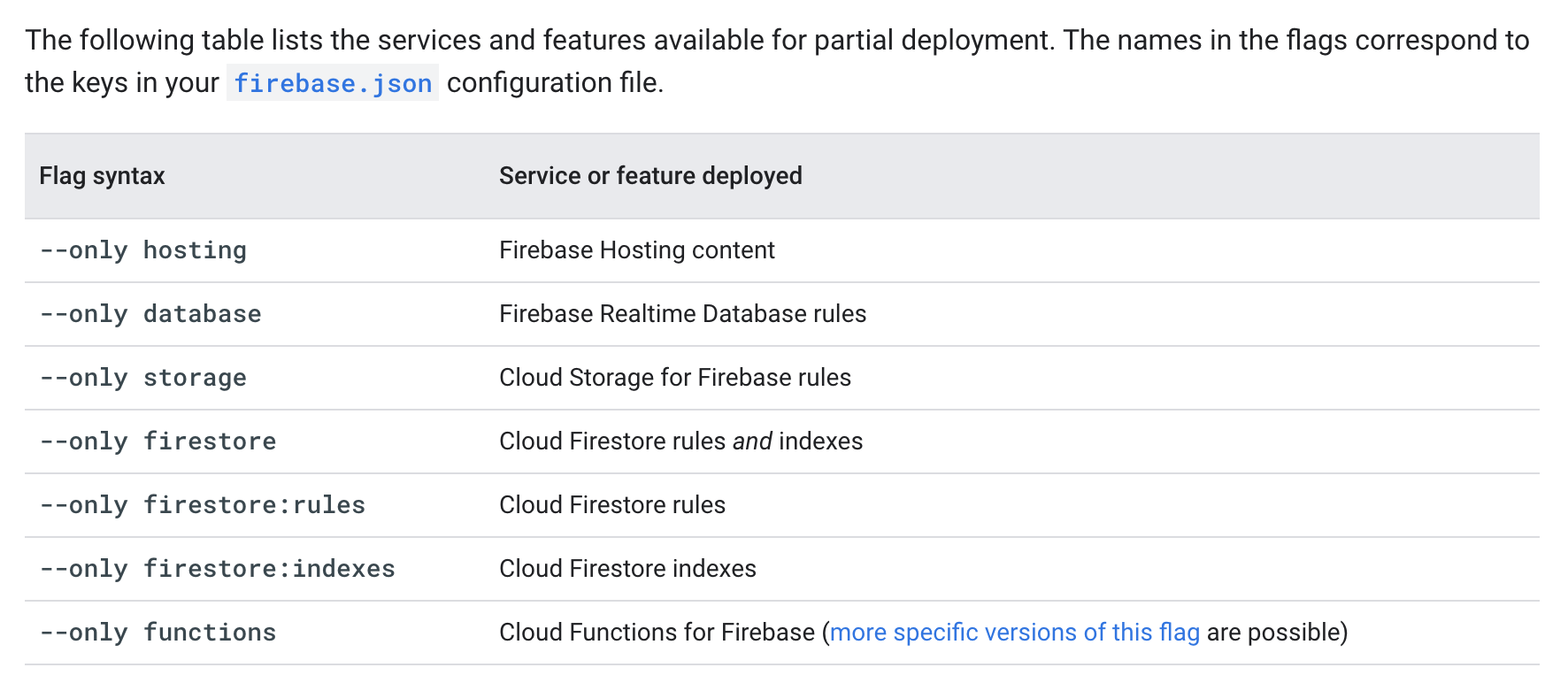
Edit 2: Looks like this almost worked; it renamed all those functions to group-functionName (which also means I need to change my hosting config to reference the new names) but that's Ok, I can adapt our environment to reflect that.
Edit 3: Yep, after updating firebase.json to reference the new function names and deleting the old ones manually via the Google Cloud Functions web interface I now have this working in our staging environment. Thanks for the help!
yeldarby
on 4 Feb 2020
Great to hear you found a deployment strategy that works for you! As you called out in your post, the
firebase deploy
command is effectively the same as
firebase deploy --only hosting,database,storage,firestore,functions
Additionally, to clarify, --only firestore is effectively the same as --only firestore:rules,firestore:indexes, so you won't need to include all three in your command.
Closing this since it seems like your issue has been resolved - if you have any more questions, feel free to reopen this issue :)
joehan
on 5 Feb 2020
Related issues
 laurenzlong
·
4Comments
laurenzlong
·
4Comments
 Symbolk
·
3Comments
Symbolk
·
3Comments
 nareshbhatia
·
4Comments
nareshbhatia
·
4Comments
 FluorescentHallucinogen
·
3Comments
FluorescentHallucinogen
·
3Comments
 ahmadalibaloch
·
3Comments
ahmadalibaloch
·
3Comments
Most helpful comment
Hey @yeldarby, thanks for reporting this. I just took a look at the functions deploy code, and it looks like we support individual function targets for the -- only flag, but not the --except flag. This would be a good feature to add when we have resources, so I filed an internal bug to implement it (b//148792304).
Fortunately, I think you can achieve what you'd like to do here using the --only flag. If you organize your functions into two deployment groups - one containing the large function that you want to keep separate (lets call this heavyFunctionGroup) and one containing the rest of your functions (lets call this normalGroup). Then, if you want to deploy your heavy function but not the rest, you can run
firebase deploy --only functions:heavyFunctionGroupand if you want to deploy changes to the rest of your functions without affecting your heavy function:
firebase deploy --only functions:normalGroupHopefully this helps!