Firebase-tools: [EASY!] firebase emulator:start (in debug mode)

Before we could debug firebase functions in a local machine by running emulator and attaching a debugger using (@google-cloud/functions-emulator) more info at https://cloud.google.com/functions/docs/emulator
For example
Debugging with the Node.js Emulator. You can debug your functions running in the Node.js Emulator using either the standard Node.js Debugger or the V8 Inspector integration. To debug using the standard Node.js Debugger, run the following command:
functions debug helloWorld
since The Cloud Functions Emulator has been deprecated
Now I use firebase emulators:start --only functions (more info https://firebase.google.com/docs/functions/local-emulator)
I can run my functions locally but can not attach debugger like I used to do. And seems there are no docs on how to attach debugger for functions served by command "firebase emulators:start"
My question how we can attach a debugger to set breakpoints like here https://github.com/googlearchive/cloud-functions-emulator/wiki/Debugging-with-Visual-Studio-Code
For example
firebase --debug emulators:start --only functions
and in my vscode attach to port/process and set breakpoints
Please submit feature requests through our support page.
 sultanmyrza
All 29 comments
@sultanmyrza thanks for the feedback. This is a known issue (https://github.com/firebase/firebase-tools/issues/1360) so let's discuss there. You can read the history of the issue as well.
 samtstern
on 24 Jul 2019
samtstern
on 24 Jul 2019
@samtstern question, the known issue you are pointing to is not very releated.
This issue demands some documentation on how to acctually do the debugging, because now since firebase emulators is the go to runner of a functions setup with emulators, there should be some way to run an attached process to the running node code.
The attached issue points to some issue after it seems he has gotten it to work.
But why is it not a clear way to just open a debugger inspect port?
 vongohren
on 21 Sep 2019
vongohren
on 21 Sep 2019
I switched to using @google-cloud/functions-framework to debug on vscode.
Breakpoints stay active.
HTH.
 palanik
on 21 Oct 2019
palanik
on 21 Oct 2019
@palanik are you able to test out pub sub and other event with this :D?
vongohren
on 21 Oct 2019
@vongohren were you able to find any solution?
 amalnaeem
on 7 Nov 2019
amalnaeem
on 7 Nov 2019
@amalnaeem yeah im able to test this with firebase emulators. Could get compile on changes and active pubsub connections with database storage. So it was good enough for me. But I thought it should have been more flexible, that is why I chased down this question:
https://github.com/GoogleCloudPlatform/functions-framework-nodejs/issues/101
Which leads to this:
https://github.com/firebase/firebase-tools/issues/1667
vongohren
on 7 Nov 2019
@vongohren we hope to have PubSub emulation as part of the Firebase emulators very soon (see #1755 for work in progress).
We are still working on how to enable breakpoint debugging here.
samtstern
on 7 Nov 2019
@samtstern that is cool! Im sorry I ment onChange storage of firebase database, not pub sub :) But its great that it is coming. I got my onchange to work with this emulator. But since the flexibility was so nice with the google functions-framework, I wanted it to work there as well! :)
vongohren
on 9 Nov 2019
@vongohren thanks for following up. Could you tell me a little more about the "flexibility" you like with the functions framework and how it affects your workflow?
We would like the Firebase Emulator Suite to work for every local workflow.
samtstern
on 11 Nov 2019
What I like about the functions framework is that it is so simple explained: https://cloud.google.com/functions/docs/functions-framework
While the firebase emulator is a bit more heavy on the sides with creating a project and stuff. This might still work in the emulator I guess, but the docs are not as lightweight as the functions framework.
I like that it will support different things as cloud run and all. So one framework for all the lightwheig infrastructure.
I have also described here: https://github.com/GoogleCloudPlatform/functions-framework-nodejs/issues/101 and here https://github.com/firebase/firebase-tools/issues/1667 of what type of flexibility I would like to see in the tool im using.
Does this give you some insight or is it something more I can expand one 😄 @samtstern
vongohren
on 12 Nov 2019
@vongohren thanks for the feedback! You're right, Functions Framework is definitely simpler and has many uses in production as well.
Our goals here (for now) are just to focus on the local development and testing experience for Firebase developers, but there's a lot of overlap.
samtstern
on 12 Nov 2019
Can somebody please explain how to run firebase emulators:start --only functions and debug with functions-framework as I'm having a hard time getting cloud functions to attach to a debugger.
 ChromeQ
on 10 Dec 2019
ChromeQ
on 10 Dec 2019
@ChromeQ this functionality will be included in the next release of firebase-tools (version 7.11.0) which should be released soon. See #1798 for more information.
samtstern
on 14 Dec 2019
@samtstern What about functions shell? In my opinion, it's only complete and usable solution for local testing and debugging. All this stuff with emulators is great, but it's hard to emulate everything you need for testing. For example, firestore emulator works, but i don't have UI like firebase console to change some document and trigger firestore function which i want to test and debug. I have to write justom script to make database update (which is similar to functions shell). With functions shell is easier to invoke and test function of any trigger type. It would be great if we could attach debugger to it.
 vdjurdjevic
on 18 Dec 2019
vdjurdjevic
on 18 Dec 2019
@vladimirdjurdjevic those are some good points.
- We are working on a UI for the emulators suite that will let you edit data directly, like how you can do it in the firebase console.
- I think debugging inside
functions:shellis a good idea. I will file a new feature request for that.
samtstern
on 18 Dec 2019
@vladimirdjurdjevic feature request filed here: https://github.com/firebase/firebase-tools/issues/1872
samtstern
on 18 Dec 2019
@samtstern I like how responsive you are :) If you mage to emulate all firebase services and provide firebase console on localhost, that would be mind-blowing :) In the meanwhile, functions:shell seems the only way to test all triggers locally, so debugging would be great :)
vdjurdjevic
on 18 Dec 2019
@vladimirdjurdjevic well I don't think we'll ever be able to emulate all the Firebase services locally but we'll try! The next two on our roadmap are authentication and storage but it will likely be a while, emulators are very complex to build.
samtstern
on 18 Dec 2019
@samtstern That's why I said it would be mind-blowing :D Maybe approach that Serverless framework is taking with Components and AWS Amplify is better in the long run. I've read somewhere that they are shifting focus from emulating everything to improving deployments configuration and speeds, incremental deployments, etc. That way, we could create an environment per developer under the project, or even an environment per user story, or bugfix.
You can find here exactly what I mean: https://docs.aws.amazon.com/amplify/latest/userguide/multi-environments.html
I don't wont to discourage you from emulating all the things, just to point to another approach that's interesting to me.
vdjurdjevic
on 18 Dec 2019
Thanks for the pointer! That looks like interesting reading. The most
similar thing I had read about before was localstack, which I think takes
emulators as far as they can go.
On Wed, Dec 18, 2019 at 2:52 PM Vladimir Djurdjevic <
[email protected]> wrote:
@samtstern https://github.com/samtstern That's why I said it would be
mind-blowing :D Maybe approach that Serverless framework is taking with
Components and AWS Amplify is better in the long run. I've read somewhere
that they are shifting focus from emulating everything to improving
deployments configuration and speeds, incremental deployments, etc. That
way, we could create an environment per developer under the project, or
even an environment per user story, or bugfix.You can find here exactly what I mean:
https://docs.aws.amazon.com/amplify/latest/userguide/multi-environments.htmlI don't wont to discourage you from emulating all the things, just to
point to another approach that's interesting to me.—
You are receiving this because you were mentioned.
Reply to this email directly, view it on GitHub
https://github.com/firebase/firebase-tools/issues/1541?email_source=notifications&email_token=ACATB2QEOWVFCVXVNL5ANQ3QZKSUNA5CNFSM4IGPFMD2YY3PNVWWK3TUL52HS4DFVREXG43VMVBW63LNMVXHJKTDN5WW2ZLOORPWSZGOEHHYNGQ#issuecomment-567248538,
or unsubscribe
https://github.com/notifications/unsubscribe-auth/ACATB2R2GZ64JBY7XGX5OTLQZKSUNANCNFSM4IGPFMDQ
.
samtstern
on 18 Dec 2019
Wow, that looks great, but I am sure it has limitations. That's why my personal opinion is that simplifying and improving the deployment process and dynamic environment and sandbox creation is superior approach. That way everyone works against a production-like environment all the time, automated tests also run with the same conditions, etc. Only issues with that approach I see are not being able to work offline (which might not be that important since developers usually depend on stable internet connection for various other reasons), and probably higher cost of infrastructure and bandwidth (but I would not mind paying for such convenience and confidence when going from dev to production).
If you ever consider something like this and you want to go deeper with discussion, feel free to email me :)
vdjurdjevic
on 19 Dec 2019
Hi @samtstern, is there any chance we could debug firebase background functions for storage/auth with the emulators?
 AndriiTsok
on 4 Jan 2020
AndriiTsok
on 4 Jan 2020
@AndriiTsok not yet but follow along here:
https://github.com/firebase/firebase-tools/issues/1872
That would let you do basic debugging for any kind of trigger without having to wait for full Auth and Storage emulators to be released.
samtstern
on 7 Jan 2020
I've used the functions framework quite a bit and talked to Grant:
https://learn.nikoskatsikanis.com/episodes/grant-timmerman
https://learn.nikoskatsikanis.com/episodes/grant-timmerman-2
and youtube: https://youtu.be/isN_-Ug6RLI?t=42
I guess its two different teams and way of thinking with some overlap so I guess it's hard to make a local debugging solution for everything. I'll read all the threads and report back.
 quantuminformation
on 11 May 2020
quantuminformation
on 11 May 2020
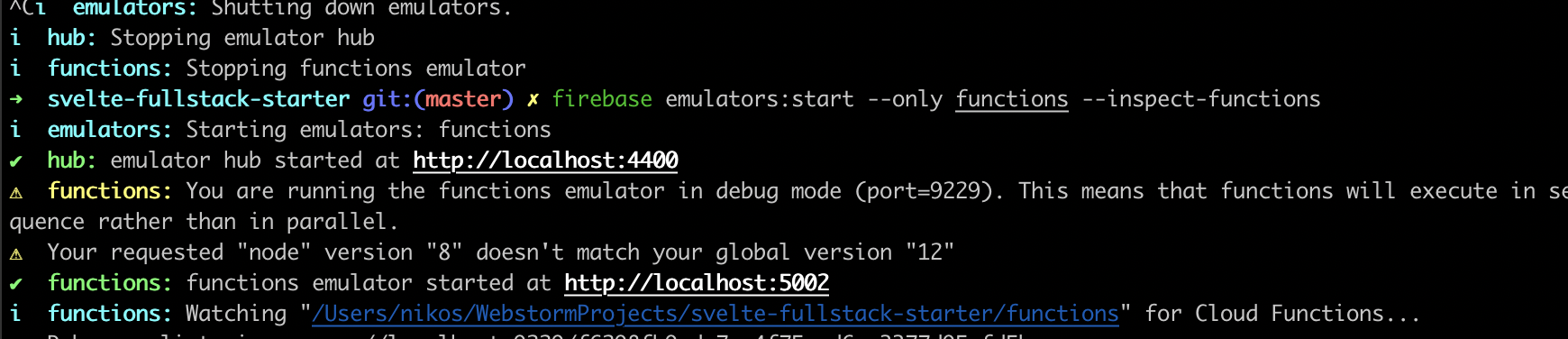
Ok, found out I just need --inspect-functions
Nice one guys!
Just in my testing I was hitting a snag:
1 started:
2 set a breakpoint in chrome:

3: hit the api, but it failed:

will dig around and see if I can fix
quantuminformation
on 11 May 2020
Solved: on how to debug firebase functions in emulator (without any dependencies like @google-cloud/functions-emulator)
✅ no need for external libs (@google-cloud/functions-emulator) pure firebase functions
✅. hot reload no code change
- init firebase project
firebase init - add npm script in package.json
"debug": "tsc -w | firebase emulators:start --inspect-functions", - run
npm run debug - press F1 in vscode select
Debug: Attach to Node Process - it will prompt running processes select process usually its first one
here are screenshot steps https://imgur.com/a/LUSW8NF
sultanmyrza
on 31 May 2020
I cracked it!
➜ functions git:(master) ✗ firebase emulators:start --only functions --inspect-functions
and I get:
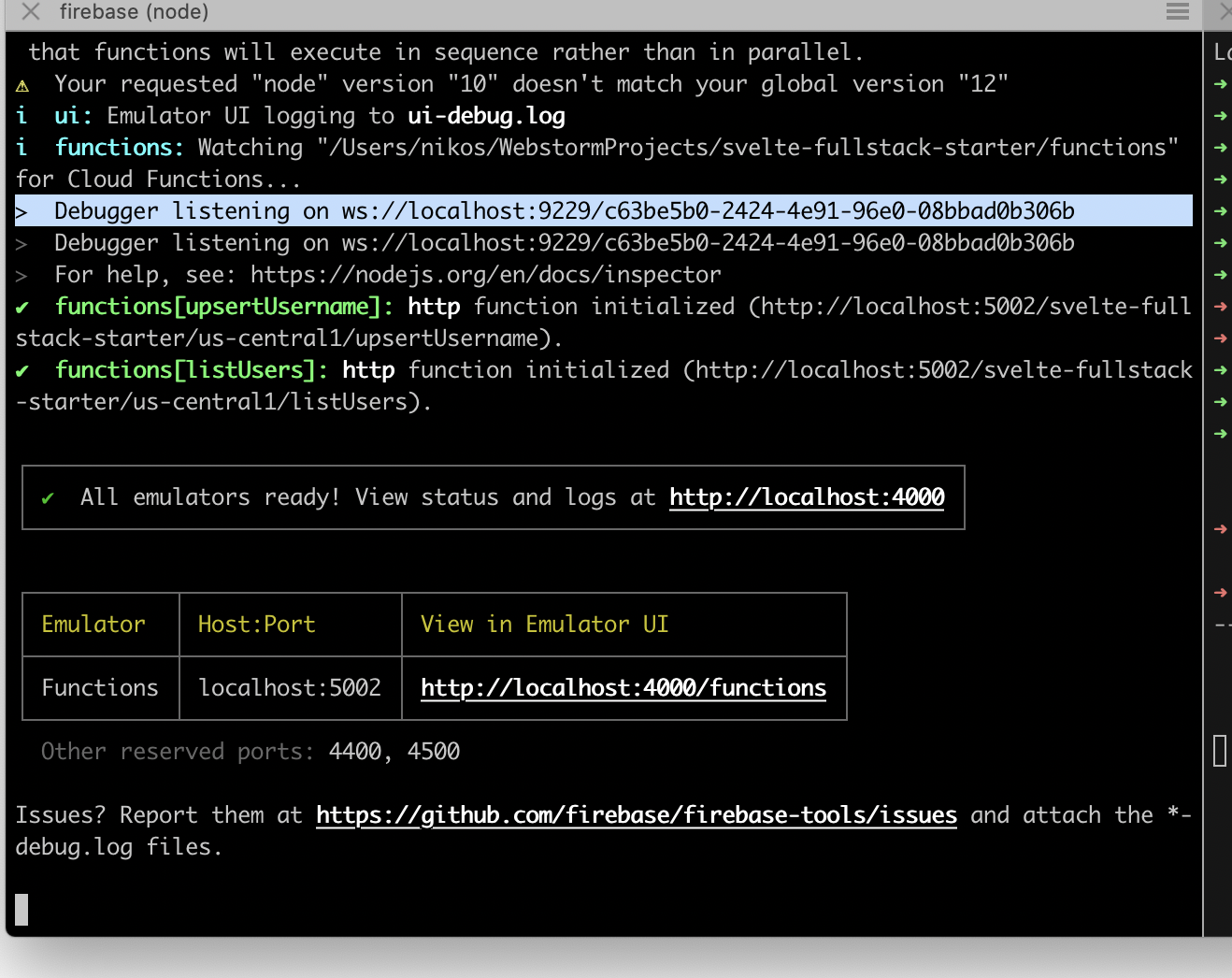
When I open chrome dev tools and attach to 9229 I can debug:

Only thing was I had to open a new chrome window with no security as so to get pass CORS:
/Applications/Google\ Chrome.app/Contents/MacOS/Google\ Chrome --user-data-dir="/tmp/chrome_dev_session" --disable-web-security
I will make a youtube video for this
quantuminformation
on 20 Jun 2020
I found the solution to this problem here https://stackoverflow.com/questions/45920014/functions-debugging-in-vs-code
 eugenio-tesio
on 24 Jun 2020
eugenio-tesio
on 24 Jun 2020
I followed @sultanmyrza recipe and it works, but each time I make a code change I have to do step 4: "press F1 in vscode select Debug: Attach to Node Process". Is the a way where this can be done automatically?
 gongevangen
on 12 Jul 2020
gongevangen
on 12 Jul 2020
Related issues
 hmazter
·
4Comments
hmazter
·
4Comments
 chen86860
·
3Comments
chen86860
·
3Comments
 jkeys089
·
3Comments
jkeys089
·
3Comments
 DragonOsman
·
3Comments
DragonOsman
·
3Comments
 nareshbhatia
·
4Comments
nareshbhatia
·
4Comments
Most helpful comment
Solved: on how to debug firebase functions in emulator (without any dependencies like
@google-cloud/functions-emulator)✅ no need for external libs (
@google-cloud/functions-emulator) pure firebase functions✅. hot reload no code change
firebase init"debug": "tsc -w | firebase emulators:start --inspect-functions",npm run debugDebug: Attach to Node Processhere are screenshot steps https://imgur.com/a/LUSW8NF