Firebase-tools: Firebase login error
I have installed node.js and npm. after i installed .Firebase command line tools also.after when i opened CMD and run firebase login .it says waiting for authentication .i waited nearly 1 hour.nothing happen.I found out the new command firebase login -- interactive this one also dosen't work. actually what should i do ?
 Isuru40
All 21 comments
Try running firebase login --no-localhost and following the instructions.
 mbleigh
on 29 Aug 2018
mbleigh
on 29 Aug 2018
I tried firebase login --no-localhost but it asked about paste authorization code here:.What is that ?
Isuru40
on 30 Aug 2018
You need to open the link that the command prints out in a browser, follow the steps there, and then it will give you an authorization code that you can paste back into the command line. If you're not seeing a URL printed out, can you please paste or screenshot the output you're seeing? Also, what platform are you on and what version of the Firebase CLI are you running?
mbleigh
on 30 Aug 2018
I used windows 8. Firebase CLI Version: 4.2.1

another thing is i run cmd from my project folder.it contain only one test html file to host. In that folder when i type cmd firebase login --no-localhost ,automatically .log file created .its name is firebase-debug
this is its contains
*[debug] [2018-08-31T09:44:21.260Z] ----------------------------------------------------------------------
[debug] [2018-08-31T09:44:21.264Z] Command: C:\Program Files (x86)\nodejs\node.exe C:\Users\User pc\AppData\Roaming\npm\node_modules\firebase-tools\bin\firebase login
[debug] [2018-08-31T09:44:21.264Z] CLI Version: 4.2.1
[debug] [2018-08-31T09:44:21.264Z] Platform: win32
[debug] [2018-08-31T09:44:21.264Z] Node Version: v8.9.4
[debug] [2018-08-31T09:44:21.273Z] Time: Fri Aug 31 2018 15:14:21 GMT+0530 (Sri Lanka Standard Time)
[debug] [2018-08-31T09:44:21.274Z] ----------------------------------------------------------------------
[debug]
[info]
[info] Visit this URL on any device to log in:
[info] https://accounts.google.com/o/oauth2/auth?client_id=563584335869-fgrhgmd47bqnekij5i8b5pr03ho849e6.apps.googleusercontent.com&scope=email%20openid%20https%3A%2F%2Fwww.googleapis.com%2Fauth%2Fcloudplatformprojects.readonly%20https%3A%2F%2Fwww.googleapis.com%2Fauth%2Ffirebase%2F%2Fwww.googleapis.com%2Fauth%2Fcloud-platform&response_type=code&state=355504027&redirect_uri=http%3A%2F%2Flocalhost%3A9005
[info]
[info] Waiting for authentication...
[debug] [2018-08-31T09:44:24.353Z] Unable to open URL: Error: spawn cmd ENOENT
at _errnoException (util.js:1022:11)
at Process.ChildProcess._handle.onexit (internal/child_process.js:190:19)
at onErrorNT (internal/child_process.js:372:16)
at _combinedTickCallback (internal/process/next_tick.js:138:11)
at process._tickDomainCallback (internal/process/next_tick.js:218:9)
*
Isuru40
on 31 Aug 2018
Did you follow the link that it prints out? The link after "Visit this URL on any device to log in:"?
Once you do that, you should be taken through a few screens and then get a code to paste.
mbleigh
on 31 Aug 2018
Yes it workes.Thankyou Mr Michael Bleigh
Isuru40
on 31 Aug 2018
I am having the same problem, even when I paste that link it shows Error 400.
 dhwanik9
on 21 Apr 2019
dhwanik9
on 21 Apr 2019
@dhwanik9 Can you share your platform information and debug logs? Run the command with "--debug".
 laurenzlong
on 29 Apr 2019
laurenzlong
on 29 Apr 2019
@dhwanik9 Please open a new bug with your issue, rather than commenting on this one. Thanks.
 bkendall
on 29 Apr 2019
bkendall
on 29 Apr 2019
I have the same error but I cannot fix it.
 cristiaan05
on 24 Jun 2019
cristiaan05
on 24 Jun 2019
@cristiaan05 please open a new issue with the appropriate information. Thanks.
bkendall
on 24 Jun 2019
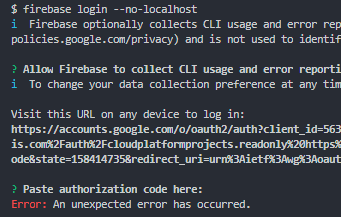
I have the same error but I cannot fix it.
 arifpetok
on 23 Aug 2019
arifpetok
on 23 Aug 2019
I am also facing the same issue like above
After Paster authorization code here:
Error: An unexpected error has occured.
There is no chance to paste the code ...Please do the neeful
 srilu8213
on 27 Aug 2019
srilu8213
on 27 Aug 2019
I am also facing the same issue like above
After Paster authorization code here:
Error: An unexpected error has occured.
There is no chance to paste the code ...Please do the neeful
change your PATH variable
append C:\Windows\System32 to the end of your PATH variable
If you don't know how to do that, see this article:
https://www.computerhope.com/issues/ch000549.htm
arifpetok
on 28 Aug 2019
@arifpetok thanks for your suggestion...its working now...
srilu8213
on 28 Aug 2019
C:\Windows\System32
thank u it works
 Radhi157
on 23 Jan 2020
Radhi157
on 23 Jan 2020
C:\Windows\System32
Really helped. After pasting it in the path, as soon as I typed "firebase login", a window popped and said you are logged in.
Helpful.
 hugekontrast
on 22 Apr 2020
hugekontrast
on 22 Apr 2020
So helpful.
Had this problem for hours, and the solution worked like a charm.
Thank you so much!
 PitayoSan
on 12 Jun 2020
PitayoSan
on 12 Jun 2020
Poner C: \ Windows \ System32 ayuda para cualquier sistema operativo de 64 bits ??
 ivan-lopez-camus
on 22 Jun 2020
ivan-lopez-camus
on 22 Jun 2020
I am also facing the same issue like above
After Paster authorization code here:
Error: An unexpected error has occured.
There is no chance to paste the code ...Please do the neefulchange your PATH variable
append C:\Windows\System32 to the end of your PATH variable
If you don't know how to do that, see this article:
https://www.computerhope.com/issues/ch000549.htm
I have added path also but I am still having issue can you help me out
 harshavallabhaneni56
on 18 Jul 2020
harshavallabhaneni56
on 18 Jul 2020
Run command prompt as an administrator
 ViratBhuwania
on 28 Jul 2020
ViratBhuwania
on 28 Jul 2020
Related issues
 ahmadalibaloch
·
3Comments
ahmadalibaloch
·
3Comments
 ahaverty
·
4Comments
ahaverty
·
4Comments
 Symbolk
·
3Comments
Symbolk
·
3Comments
 satishverma143
·
4Comments
satishverma143
·
4Comments
 repentsinner
·
3Comments
repentsinner
·
3Comments
Most helpful comment
change your PATH variable
append C:\Windows\System32 to the end of your PATH variable
If you don't know how to do that, see this article:
https://www.computerhope.com/issues/ch000549.htm