Firebase-tools: expose worker idle timeout options as per GCP emulator
Firebase functions currently timeout locally at 60 seconds, whereas this duration is configurable for remote executions.
GCP emulator provides the --idlePruneInterval and --maxIdle options for functions start, however these are currently not available from the firebase emulator cli.
see: https://github.com/GoogleCloudPlatform/cloud-functions-emulator/issues/66
also see: https://stackoverflow.com/questions/47897400/update-firebase-emulator-function-timeout-duration
 theprojectsomething
All 22 comments
I'm not sure that those are the right options to affect this particular timeout. There's actually a separate timeout option when one deploys a function, but currently firebase-tools doesn't set it.
In addition, there's currently a "functions proxy" timeout (also of 60s).
Both options should be set to a correct value to do the job. One can temporarily use patch-package to override them:
--- a/node_modules/firebase-tools/lib/functionsEmulator.js
+++ b/node_modules/firebase-tools/lib/functionsEmulator.js
@@ -133,7 +133,10 @@ FunctionsEmulator.prototype.start = function(shellMode) {
       if (trigger.httpsTrigger) {
         return controller.deploy(trigger.name, {
           localPath: functionsDir,
-          triggerHttp: true
+          triggerHttp: true,
+          timeout: {
+            seconds: 540,
+          },
         }).catch(function() {
           return RSVP.reject({name: trigger.name});
         });
--- a/node_modules/firebase-tools/lib/hosting/functionsProxy.js
+++ b/node_modules/firebase-tools/lib/hosting/functionsProxy.js
@@ -58,7 +58,7 @@ module.exports = function(options) {
           'Cookie': sessionCookie
         },
         followRedirect: false,
-        timeout: 60000
+        timeout: 540000
       });

       req.pipe(proxied);
After running firebase serve, one can verify that the first option was applied correctly:
functions describe <nameOfYourFunction>
┌────────────┬─────────────────────────────────────────────────────────────────────────────────────────────────────────┐
│ Property   │ Value                                                                                                   │
├────────────┼─────────────────────────────────────────────────────────────────────────────────────────────────────────┤
│ Name       │ <nameOfYourFunction>                                                                                         │
├────────────┼─────────────────────────────────────────────────────────────────────────────────────────────────────────┤
│ Trigger    │ HTTP                                                                                                    │
├────────────┼─────────────────────────────────────────────────────────────────────────────────────────────────────────┤
│ Resource   │ http://localhost:5001/xxx/yyy                               │
├────────────┼─────────────────────────────────────────────────────────────────────────────────────────────────────────┤
│ Timeout    │ 540 seconds
 dinvlad
on 21 Feb 2018
dinvlad
on 21 Feb 2018
Many thanks @dinvlad - especially for patch-package which has literally made my year (tho not sure how to make use of it for global dependancies).
Be great to see the above included as a CLI option in the future!
theprojectsomething
on 22 Feb 2018
@theprojectsomething yeah patch-package is awesome for what it does.
I did notice there's still some kind of timeout for the functions, which is >60s but <540s, that prevents long-running functions from returning their response in time. I.e. a function starts, runs for 3 minutes, and returns a successful response as indicated in the log. However, the emulator then waits all 540s and still says there was a timeout. The same function doesn't time out if the response is returned within 2 min or so. I'm not sure what might be causing this.
dinvlad
on 22 Feb 2018
@dinvlad also getting some interesting results here. Standalone tests have a function responding for ~300-480s seconds before timing out at as expected at 540s. See below for running the same function in tandem at staggered intervals (i.e. 1st via browser http request, 2nd is browser timing out after 2 mins then re-requesting, 3rd is fired after first two have stopped responding):
Started | Response duration | Last Response time | Timeout | Running duration | Notes
------------- | ------------ | ------------ | ------------ | ------------ | ------------
0 | 438 | 540 | 540 | 540 | stops responding after 438s
120 | 318 | 540 | 660 | 540 | starts 2mins into execution no.1 and stops responding after 318s
485 | 55 | 540 | 1025 | 540 | starts after no.1 and no.2 stop responding, responds for 55s before stopping as no.1 times out
theprojectsomething
on 22 Feb 2018
@theprojectsomething nice, thanks for those tests - I'm not sure about my 3 min here (might be longer), so your tests are probably more indicative.
dinvlad
on 23 Feb 2018
The latest firebase CLI release (v3.17.7) now sets maxIdle to 9 minutes for all emulated functions, that should hopefully fulfill your needs since emulated functions will no longer be timing out. We chose 9 min since that's the max timeout of deployed functions. We chose to simply set the timeout instead of making it configurable for an easier user experience, since there's no harm to have a longer timeout than you need for emulated functions, you can always quit the process by Ctrl + C
 laurenzlong
on 20 Mar 2018
laurenzlong
on 20 Mar 2018
Would there be a chance to expose functionTimeout as an option to the CLI (with a default that matches emulation)? Otherwise, whereas local emulation of long requests succeeds, it fails in a deployed function (unless we update the timeout manually through GCP console).
I can see functionTimeout as an option in https://github.com/firebase/firebase-tools/blob/b2594467d8980c5a1e2b8c4aff3de9877a98b42b/lib/gcp/cloudfunctions.js#L62-L64 but it doesn't appear to be exposed just yet.
dinvlad
on 31 May 2018
Hi @dinvlad we've opted to not expose this in order to not get into flag explosion where we have too many flags. As well, the function may execute faster or slower on your machine in comparison to the runtime due to variation in how fast your machine is, so you'll need to test timeout in production anyhow.
laurenzlong
on 31 May 2018
I was talking about exposing timeout option in emulation, if you're talking about in deploying functions, then yes we do have plans to expose this in the future.
laurenzlong
on 31 May 2018
Ok yes, I was talking about the production option. Thanks for letting us know!
dinvlad
on 31 May 2018
Hello,
I am trying to test a firebase storage triggered firebase function (functions.runWith(runtimeOpts).storage.bucket(MY_BUCKET).object().onFinalize((object) => { // some code... } where runtimeOpts = { timeoutSeconds: 540, memory: '2GB' }) using the local emulator on my computer (firebase functions:shell).
However, the function keeps timing out after 60 seconds (info: Execution took 60002 ms, finished with status: 'timeout').
Is this a known issue? Expected behavior? Will at @remie's latest push (Add 9-minute timeout to emulated functions) address this problem? Is this fix available in the lastest version of the Firebase CLI?
Any help or clarification would be greatly appreciated 🙏.
 devinmorgan
on 26 Jul 2018
devinmorgan
on 26 Jul 2018
@devinmorgan , yes @remie's fix is already in the latest CLI, have you tried updating by running npm i -g firebase-tools?
laurenzlong
on 26 Jul 2018
Thanks for getting back to me, @laurenzlong. It appears that I'm still getting timed out after 1 minute even after I run npm i -g firebase-tools:
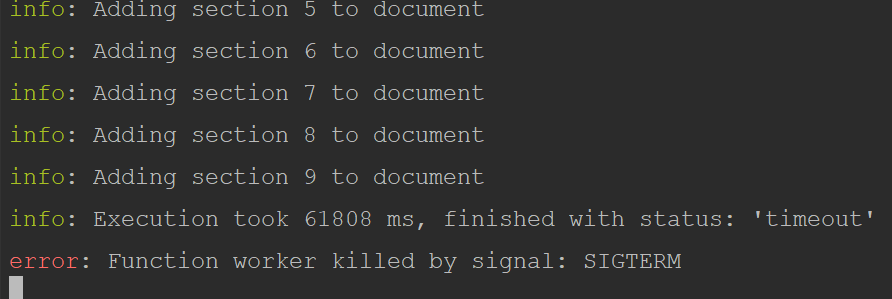
Is the .runWith(runtimeOptions) the appropriate way to indicate a longer execution time or should I be indicating this differently (e.g. a command line argument)?
Thanks for your time!
devinmorgan
on 27 Jul 2018
@devinmorgan that would be a bug indeed. The emulator should always set the timeout to 9 minutes, it doesn't depend on what you indicate with .runWith
laurenzlong
on 7 Aug 2018
@devinmorgan is this still happening with the latest firebase-tools version?
 thechenky
on 9 Jan 2019
thechenky
on 9 Jan 2019
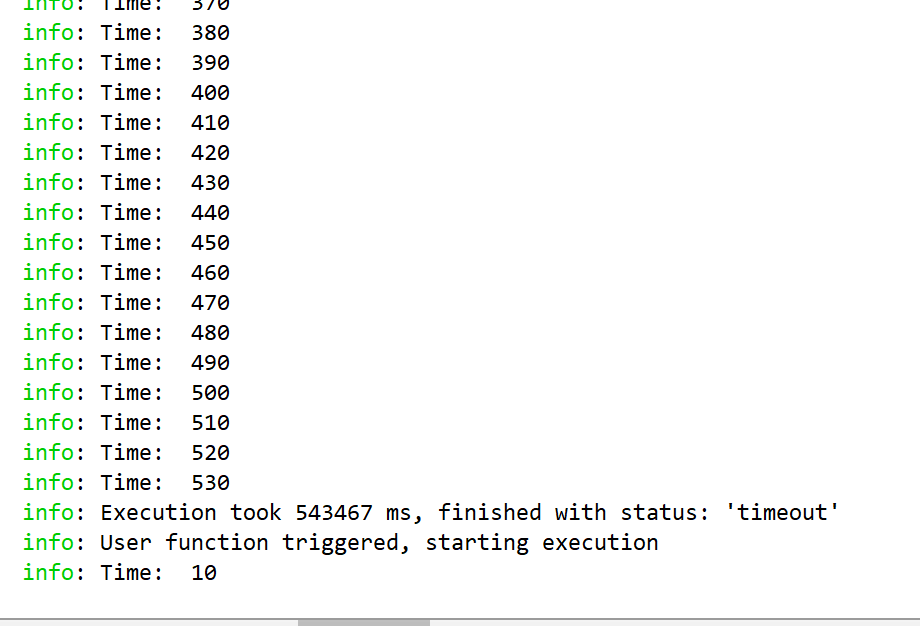
Hey @thechenky, I just put together a quick dummy function and it looks like the emulator went the full 9 minutes without timing out 🎉🎉
devinmorgan
on 9 Jan 2019
@devinmorgan that's great to hear! Thanks for the quick update - I'm going to close this out. As always, if you encounter any other problems, feel free to open a new issue.
thechenky
on 9 Jan 2019
I'm getting locally emulated firebase functions timing out after 60 seconds on [email protected]
 joemanfoo
on 27 Jan 2019
joemanfoo
on 27 Jan 2019
@joemanfoo how are you running your functions? Are you setting a timeout or using the default (which should be 9min now in the CLI)? It would be great to see a snippet of your functions that you're seeing this problem with.
thechenky
on 29 Jan 2019
Hi @thechenky - sorry for the slow reply. So the function being called doesn't matter, all of them will timeout after 60 seconds when running the shell.
The specific code I had for the function in question was tried in two different ways, the first was to just have the "normal" event listening and the other was with trying to specifically set the timeout for the function.
First way that caused me to try the second way:
exports.zipOnWrite = functions.database.ref('/export-request/{groupId}/request-type').onWrite(zip)
The second way:
exports.zipOnWrite = functions
  .runWith({ memory: '2GB', timeoutSeconds: 540 })
  .database
  .ref('/export-request/{groupId}/request-type')
  .onWrite(zip)
Both timeout after 60 seconds of execution time. The overall issue is pretty much moot for me at this point as even when using readStreams from Storage the function runs out of memory (which I don't understand completely since total number of bytes is well below 2GB limit - so I suspect that something internal to readStreams is really storing a file somewhere) on large exports so I'm moving this function task to Compute Engine but it would be nice for testing functions locally for them to obey .runWith() options to mimic production setting :)
joemanfoo
on 30 Jan 2019
Hi @joemanfoo, thanks for bringing this to our attention! I can confirm that we are seeing the 60s timeout instead of 540s like we are supposed to. We've filed an internal bug, and will be looking into this.
 tinaliang
on 31 Jan 2019
tinaliang
on 31 Jan 2019
Update: This is an open issue on the GCF emulator (https://github.com/GoogleCloudPlatform/cloud-functions-emulator/issues/218). Please leave all relevant comments on that bug.
tinaliang
on 5 Feb 2019
Related issues
 ahaverty
·
4Comments
ahaverty
·
4Comments
 DragonOsman
·
3Comments
DragonOsman
·
3Comments
 nareshbhatia
·
4Comments
nareshbhatia
·
4Comments
 satishverma143
·
4Comments
satishverma143
·
4Comments
 roosi
·
3Comments
roosi
·
3Comments
Most helpful comment
I was talking about exposing timeout option in emulation, if you're talking about in deploying functions, then yes we do have plans to expose this in the future.