Firebase-tools: Firebase Hosting / npm

pleas somebody help!
I've tried everything! but nothing works I've searched the web for more than 10 hours. I can not find anything that works
 RicoThorsoe
All 12 comments
What do you mean? What doesn't work?
 merlinnot
on 7 Jan 2018
merlinnot
on 7 Jan 2018


When I write (firebase init) my comando doesn't work, it would look like the image with the big firebase sign
RicoThorsoe
on 7 Jan 2018
It seems like your $HOME/.npm-global/bin is not in your $PATH
You can learn more about it here: https://coolestguidesontheplanet.com/add-shell-path-osx/
If you will still have a problem, please run echo $PATH and paste the output here.
merlinnot
on 7 Jan 2018
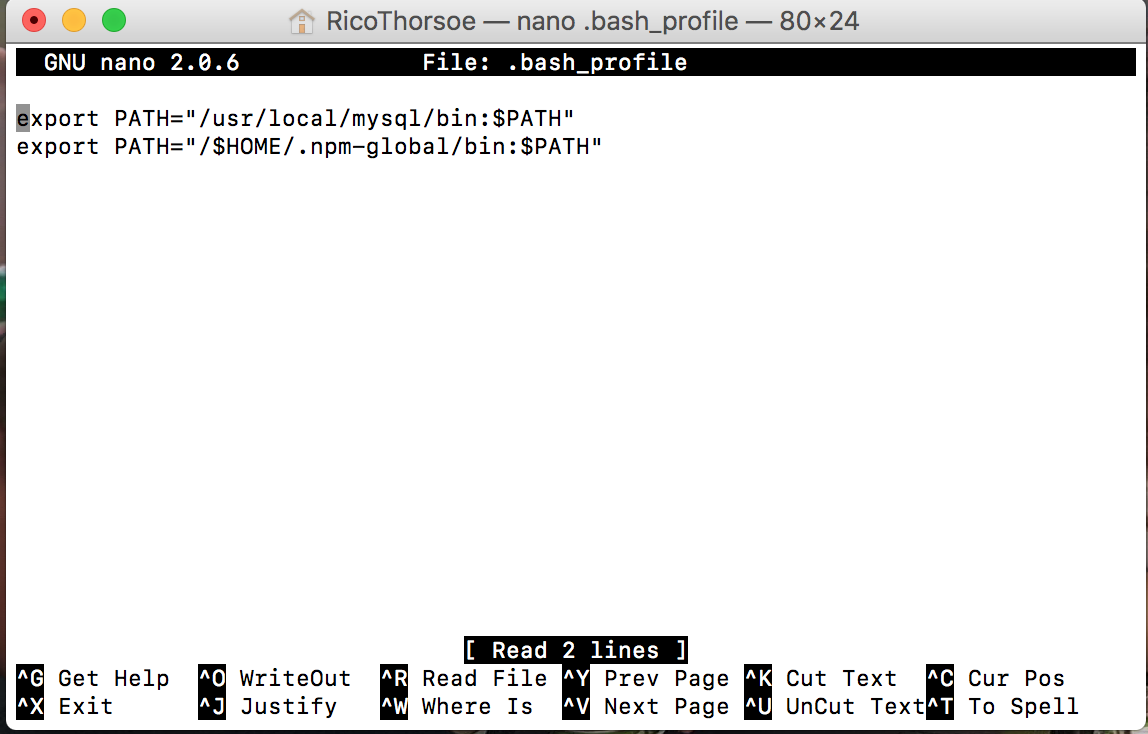
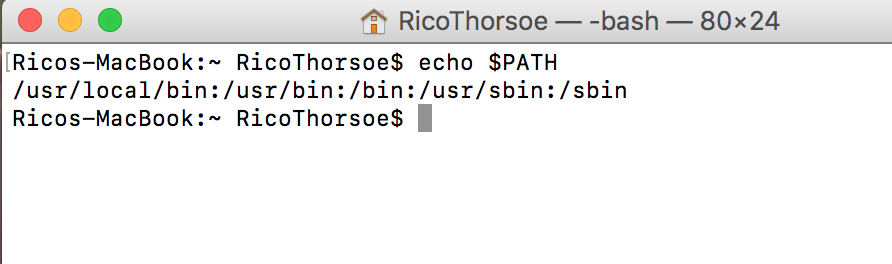
It still doesn't work :( Maybe I did something wrong with Picture Number 1?
Thank you for your help, you are a wonderful person
RicoThorsoe
on 7 Jan 2018
As you can see it doesn’t show up in your $PATH. Did you save the file? Did you restart your terminal?
merlinnot
on 7 Jan 2018
I can also highly recommend using https://brew.sh to make installing everything on the MacOS much easier, so you don’t run into problems like this.
merlinnot
on 7 Jan 2018
How can I see if I have saved the file?
RicoThorsoe
on 7 Jan 2018
ohh I will try that
RicoThorsoe
on 7 Jan 2018
You can run
echo 'export PATH="$HOME/.npm-global/bin:$PATH"' >> ~/.bash_profile, restart your terminal and you should be good.
Pro tip for the future: when you fix something, try to understand why didn’t it work earlier and why does it work now. The most important thing in programming is to learn every single day.
merlinnot
on 7 Jan 2018
Many thanks for all the help
RicoThorsoe
on 7 Jan 2018
it works now, thank you for your time
RicoThorsoe
on 7 Jan 2018
Remember to close the issue.
merlinnot
on 7 Jan 2018
Related issues
 SJAnderson
·
4Comments
SJAnderson
·
4Comments
 kyleabens
·
3Comments
kyleabens
·
3Comments
 jkeys089
·
3Comments
jkeys089
·
3Comments
 nareshbhatia
·
4Comments
nareshbhatia
·
4Comments
 Symbolk
·
3Comments
Symbolk
·
3Comments
Most helpful comment
You can run
echo 'export PATH="$HOME/.npm-global/bin:$PATH"' >> ~/.bash_profile, restart your terminal and you should be good.Pro tip for the future: when you fix something, try to understand why didn’t it work earlier and why does it work now. The most important thing in programming is to learn every single day.