Firebase-tools: Installation issue (enoversions)
Version info
Not installed
Steps to reproduce
Install Node.js, npm and run npm i -g firebase-tools
Expected behavior
firebase-tools is installed
Actual behavior
Installation fails with the message npm ERR! No valid versions available for timed-out
Other information
I haven't checked the logs because I don't know what to look for. Maybe someone who knows better can direct me. I updated Node.js and npm shortly before attempting. I'm on Windows. The whole message from the console is
npm WARN optional SKIPPING OPTIONAL DEPENDENCY: timed-out@^4.0.1 (node_modules\firebase-tools\node_modules\got\node_modules\timed-out):
npm WARN optional SKIPPING OPTIONAL DEPENDENCY: No valid versions available for timed-out
npm WARN optional SKIPPING OPTIONAL DEPENDENCY: duplexer3@^0.1.4 (node_modules\firebase-tools\node_modules\got\node_modules\duplexer3):
npm WARN 404 SKIPPING OPTIONAL DEPENDENCY: Not Found: duplexer3@^0.1.4

npm ERR! code ENOVERSIONS
npm ERR! No valid versions available for timed-out
 nimonian
All 10 comments
Someone reported this issue for my package as well. Did some digging and turned out to be a problem with update-notifier package. Simply running npm i update-notifier fails.
 githubsaturn
on 6 Jan 2018
githubsaturn
on 6 Jan 2018
I get the same error. When searching in the npm registry there is no such module. But I have no idea if there is actually a dependency on a module with such name. npm-remote-ls does not list a dependency with such name.
 twiedow
on 6 Jan 2018
twiedow
on 6 Jan 2018
I am having exactly the same issue..
Updated to node v8.9.4 and npm 5.6.0 did not help.
Here the relevant logs from npm
1428 warn optional SKIPPING OPTIONAL DEPENDENCY: timed-out@^4.0.1 (node_modules/firebase-tools/node_modules/got/node_modules/timed-out):
1429 warn optional SKIPPING OPTIONAL DEPENDENCY: No valid versions available for timed-out
1430 verbose type range
1431 verbose stack timed-out: No valid versions available for timed-out
 jwiesmann
on 6 Jan 2018
jwiesmann
on 6 Jan 2018
I think the author/maintainer for timed-out was already dead. Please fix this asap.
 terrybleger
on 6 Jan 2018
terrybleger
on 6 Jan 2018
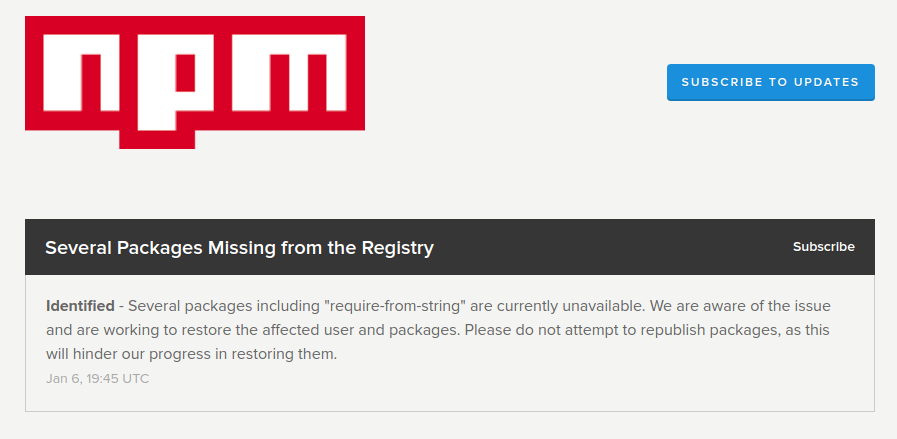
Turned out npm is down!
https://status.npmjs.org/
githubsaturn
on 6 Jan 2018
Then we should kill whoever that made npm down.
terrybleger
on 6 Jan 2018
Looks like this was just a case of bad timing! The npm status says there are a few more packages left to restore. I'll confirm when I have it working so the issue can be closed. (I'm now failing on pinkie-promise which either means that one has now disappeared or timed-out has reappeared.)
nimonian
on 6 Jan 2018
floatdrop/pinkie-promise#4
 krupper
on 6 Jan 2018
krupper
on 6 Jan 2018
The problem is solved! :D @nimonian
krupper
on 6 Jan 2018
Yes indeed! @krupper Another mystery solved. firebase-tools is now installed and working. Thanks everyone.
nimonian
on 7 Jan 2018
Related issues
 FluorescentHallucinogen
·
3Comments
FluorescentHallucinogen
·
3Comments
 kyleabens
·
3Comments
kyleabens
·
3Comments
 roosi
·
3Comments
roosi
·
3Comments
 Ridermansb
·
3Comments
Ridermansb
·
3Comments
 ahmadalibaloch
·
3Comments
ahmadalibaloch
·
3Comments
Most helpful comment
Looks like this was just a case of bad timing! The npm status says there are a few more packages left to restore. I'll confirm when I have it working so the issue can be closed. (I'm now failing on
pinkie-promisewhich either means that one has now disappeared ortimed-outhas reappeared.)