Firebase-tools: Firebase auth import from firebase to firebase
Hello, i am having some issues while trying to migrate auth users from one firebase project to another.
I followed this steps to get a json of the auth users in a project. Now i need to import them to another firebase project.
looking at the auth:import commands i would need the hash-algo for the import command, wish i found here that the new firebase is now using SCRYPT. But i still need the rounds and i guess the mem-cost for the import command.
 zetos
zetos
All 11 comments
Does it work if you leave those parameters out?
 Jeroeny
on 1 Feb 2017
Jeroeny
on 1 Feb 2017
No, if i enter the command:
$ firebase auth:import users.json --hash-algo=SCRYPT
i get the error:
Error: Must provide valid rounds(1..8) for hash algorithm SCRYPT
zetos
on 1 Feb 2017
If you contact custom support, they can give you detailed parameters for SCRYPT. But currently, the auth:import code still has a bug. It needs to pick up hash-key from command line options which I ignored before. We'll publish a new version to fix it and make sure the migration can work for you.
BTW, our auth:export will be available soon. This one will be deprecated.
Thanks.
 wyhao31
on 2 Feb 2017
wyhao31
on 2 Feb 2017
Good to know,
Thanks for the help.
zetos
on 2 Feb 2017
Hey zetos,
New auth:import and auth:export are available now! You can check the doc for more details.
wyhao31
on 16 Feb 2017
I still get error ! No hash algorithm specified. Password users cannot be imported. when I leave parameters out in auth:import. In this case users are created, but passwords don't work (INVALID_PASSWORD errors on login)
If I type firebase auth:import users.json --hash-algo=scrypt --rounds=8 --mem-cost=14 as in given example here, I get Error: Must provide hash key(base64 encoded) for hash algorithm scrypt
 bogacg
on 1 Mar 2017
bogacg
on 1 Mar 2017
Hi Bogac,
You still need hash key and salt separator for scrypt. Doc is here. You can contact customer support to get these two parameters.
We need to update the doc you attached. Thanks.
wyhao31
on 1 Mar 2017
Right now the only way to get those parameters is by contacting the custom support.
zetos
on 21 Mar 2017
These details are available through firebase admin now. Navigate to
Console > Project > Authentication > Three little dots on right side of all users > Password Hash Credentials

 pratiknikam
on 26 Jan 2018
pratiknikam
on 26 Jan 2018
I feel like we should add @pratiknikam 's response to the documentation for auth:export and auth:import.
We should also specify --project under an example command line.
I.E.
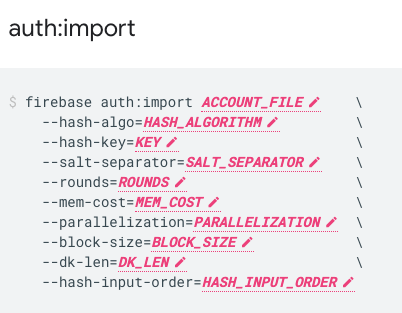
And add
--project projectid
Otherwise, it's hard to go find the parameter to specify the project that we are trying to import to.
 ptkpyitheim
on 4 Sep 2020
ptkpyitheim
on 4 Sep 2020
@ptkpyitheim that's a good idea, I'll add a note about password hash parameters.
 samtstern
on 8 Sep 2020
samtstern
on 8 Sep 2020
Related issues
 jefrydco
·
3Comments
jefrydco
·
3Comments
 ahmadalibaloch
·
3Comments
ahmadalibaloch
·
3Comments
 Ridermansb
·
3Comments
Ridermansb
·
3Comments
 repentsinner
·
3Comments
repentsinner
·
3Comments
 hmazter
·
4Comments
hmazter
·
4Comments
Most helpful comment
These details are available through firebase admin now. Navigate to