Firebase-js-sdk: Signin fails with message: "The popup has been closed by the user before finalizing the operation."
[REQUIRED] Describe your environment
- Operating System version: OSX 10.13.6
- Browser version: 83.0.4103.61
- Firebase SDK version: 7.14.6
- Firebase Product: auth
[REQUIRED] Describe the problem
Steps to reproduce:
To test this issue I created a new project as per below. The issue is that when I click the signin button, the popup opens, I click my google account to sign in, then the popup window spends about 10 seconds loading (with the blue progress bar moving), then the popup window closes, and shortly after I get the following error message in the chrome devtools console:
code: "auth/popup-closed-by-user"
message: "The popup has been closed by the user before finalizing the operation."
Relevant Code:
Run firebase init to create template project:
.firebaserc
{
  "projects": {
    "default": "testing-auth-signin"
  }
}
firebase.json
{
  "hosting": {
    "public": "public",
    "ignore": [
      "firebase.json",
      "**/.*",
      "**/node_modules/**"
    ]
  }
}
Enable Google signin in the authentication section of the Firebase web UI.
Update index.html to include Firebase Auth signin button
public/index.html
<!DOCTYPE html>
<html>
  <head>
    <meta charset="utf-8" />
    <meta name="viewport" content="width=device-width, initial-scale=1" />
    <title>Welcome to Firebase Hosting</title>

    <script src="/__/firebase/7.14.6/firebase-app.js"></script>
    <script src="/__/firebase/7.14.6/firebase-auth.js"></script>
    <script src="/__/firebase/init.js"></script>
  </head>
  <body>
    <button id="signin">sign in</button>
    <script>
      const provider = new firebase.auth.GoogleAuthProvider();
      const signinButton = document.querySelector("#signin");
      signinButton.addEventListener("click", () =>
        firebase
          .auth()
          .signInWithPopup(provider)
          .then(function (result) {
            console.log("result", result);
          })
          .catch(function (error) {
            console.error(error);
          })
      );
    </script>
  </body>
</html>
Run firebase serve and click signin button.
Here is the output from firebase serve after clicking signin:
=== Serving from '/Users/max/projects/testing-firebase-auth-signin'...

i  hosting: Serving hosting files from: public
✔  hosting: Local server: http://localhost:5000
i  hosting: 127.0.0.1 - - [08/Jun/2020:18:14:24 +0000] "GET /__/firebase/init.js HTTP/1.1" 200 - "http://localhost:5000/" "Mozilla/5.0 (Macintosh; Intel Mac OS X 10_13_6) AppleWebKit/537.36 (KHTML, like Gecko) Chrome/83.0.4103.61 Safari/537.36"
i  hosting: 127.0.0.1 - - [08/Jun/2020:18:14:26 +0000] "GET /__/firebase/7.14.6/firebase-app.js.map HTTP/1.1" 200 103498 "-" "Mozilla/5.0 (Macintosh; Intel Mac OS X 10_13_6) AppleWebKit/537.36 (KHTML, like Gecko) Chrome/83.0.4103.61 Safari/537.36"
i  hosting: 127.0.0.1 - - [08/Jun/2020:18:14:26 +0000] "GET /__/firebase/7.14.6/firebase-auth.js.map HTTP/1.1" 200 2340997 "-" "Mozilla/5.0 (Macintosh; Intel Mac OS X 10_13_6) AppleWebKit/537.36 (KHTML, like Gecko) Chrome/83.0.4103.61 Safari/537.36"
 maxwell8888
All 23 comments
Does this happen in other browsers? Would you mind opening the devtools in the popup window itself to see if there are any errors being returned there?
 samhorlbeck
on 15 Jun 2020
samhorlbeck
on 15 Jun 2020
Hey @maxwell8888. We need more information to resolve this issue but there hasn't been an update in 5 weekdays. I'm marking the issue as stale and if there are no new updates in the next 5 days I will close it automatically.
If you have more information that will help us get to the bottom of this, just add a comment!
 google-oss-bot
on 22 Jun 2020
google-oss-bot
on 22 Jun 2020
I tried in Firefox and I could sign in without any problems.
I tried opening the devtools in the popup window itself, but nothing is logged to the console before the popup window closes itself (and the devtools window).
I also tried signing in with a different Google account I used for testing and initially got an error message in the actual popup window (not console) which said something about a Youtube account. This account is just a google account I created for testing purposes and has never been used with Youtube. Then, every time after I tried signing in after this I got the exact same behaviour as the other account - no message in the pop window, just closes and logs the above error in the devtools console. I can't reproduce the "youtube account" error, even with "Empty cache and hard reload".
However, both accounts also sign in successfully in incognito tabs.
maxwell8888
on 22 Jun 2020
Internal tracking bug: b/160174585
 scottcrossen
on 29 Jun 2020
scottcrossen
on 29 Jun 2020
I tried in Firefox and I could sign in without any problems.
I tried opening the devtools in the popup window itself, but nothing is logged to the console before the popup window closes itself (and the devtools window).
I also tried signing in with a different Google account I used for testing and initially got an error message in the actual popup window (not console) which said something about a Youtube account. This account is just a google account I created for testing purposes and has never been used with Youtube. Then, every time after I tried signing in after this I got the exact same behaviour as the other account - no message in the pop window, just closes and logs the above error in the devtools console. I can't reproduce the "youtube account" error, even with "Empty cache and hard reload".
However, both accounts also sign in successfully in incognito tabs.
I have the same exact issue when using signinwithpopup in a chrome extension. It happens for some of the users, not everyone. I was trying to debug one user's issue and he said something like the popup tried to connect to accounts.youtube !!
 mogwely
on 2 Jul 2020
mogwely
on 2 Jul 2020
Getting the same error with firebase-auth 7.17.1 while working through the codelab example. I can consistently reproduce it, so if I can collect any debugging information please let me know.
 nickivanov
on 11 Aug 2020
nickivanov
on 11 Aug 2020
I got exact same issue. Been able to log in on Firefox. On my computer it's working fine in Chrome, but not in incognito mode. I made new google account, successfully loged in via google. Then tried to log in in the same account in incognito mode - the same problem occurs. Then tried in Firefox both in normal and incognito modes - everything fine. That's just ridiculous.
Edit: for some reason it's fixed by itself, for now
 mrspok407
on 13 Aug 2020
mrspok407
on 13 Aug 2020
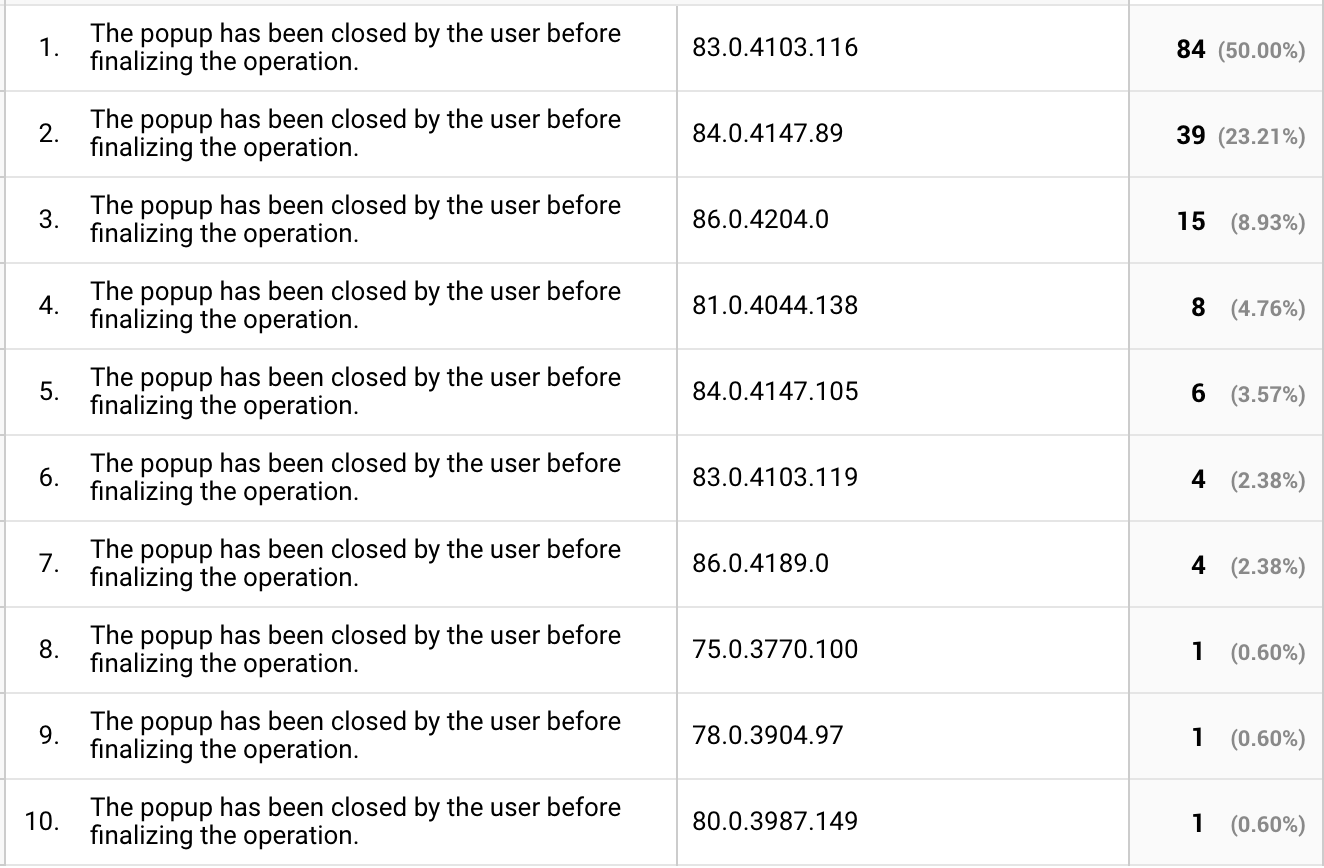
It sounds like this might be related to https://github.com/firebase/firebase-js-sdk/issues/3004 -- which affects popup flows because they are dependent on localStorage. @maxwell8888 can you verify that local storage is enabled? Can you report your version of chrome? (we've seen reports on similiar issues as early as v83. You can check your version by going to "settings" > "about").
Please see https://github.com/firebase/firebase-js-sdk/issues/3004#issuecomment-658871220 for workarounds until we're able to patch the main branch.
scottcrossen
on 17 Aug 2020
@scottcrossen for me it's not related to a certain version. Localstorage is also enabled.
mogwely
on 17 Aug 2020
The problem seems to have gone with Firebase 8.7.0
nickivanov
on 18 Aug 2020
Hey @maxwell8888. We need more information to resolve this issue but there hasn't been an update in 5 weekdays. I'm marking the issue as stale and if there are no new updates in the next 5 days I will close it automatically.
If you have more information that will help us get to the bottom of this, just add a comment!
google-oss-bot
on 24 Aug 2020
@scottcrossen sorry for the delay in responding. I can confirm local storage is enable and I'm using macOS Chrome version 84.0.4147.135 (Official Build) (64-bit). However, the problem seems to have resolved itself for me now.
maxwell8888
on 25 Aug 2020
Still getting this issue,
Operating System version: OSX 10.15.7
Browser version: 85.0.4183.121
Firebase SDK version: 7.22.0
Firebase Product: auth
Unable to connect Facebook and Google.
Seeing the same issue in Firefox and Safari as well.
 sheksushant
on 3 Oct 2020
sheksushant
on 3 Oct 2020
Hey @sheksushant - Are you able to open this using dev tools and see if there's any error code that you're seeing? Cheers!
 MeghaB
on 5 Oct 2020
MeghaB
on 5 Oct 2020
Hey @sheksushant - Are you able to open this using dev tools and see if there's any error code that you're seeing? Cheers!
Error is:
{code: "auth/popup-closed-by-user", message: "The popup has been closed by the user before finalizing the operation.", a: null}
It happens while I am waiting for Facebook to complete the linking.
sheksushant
on 6 Oct 2020
Happening to me too with Google provider.
No console errors in the popup window.
My project created with create-react-app and install firebase manually.
The odd thing that it's working in localhost (even with production build) but not on production.
I also noticed that even though the popup shows the accounts list, it takes more time than in localhost.
Update
I just figure because I didn't add the production domain to the "Authorized domains" (localhost is there by default).
I wonder why the error message (in the app's page) is not clear about it.
 moshfeu
on 6 Oct 2020
moshfeu
on 6 Oct 2020
As above, it appears the solution is to add the app domain to the list of authorized domains
Firebase Console -> Auth -> Sign-In Method -> Authorized Domains -> Add (domain)
 dbryar
on 23 Oct 2020
dbryar
on 23 Oct 2020
Yeah, I also had this issue testing my web app locally in Safari on a cellphone. I just had to add my local IP address to the Authorized domains in Firebase Authentication section.
 irvmar
on 30 Oct 2020
irvmar
on 30 Oct 2020
Getting the same error with Firebase 7.24.0. The popup is displaying and authenticated on the desktop, but the popup is closing automatically without finalizing the authentication on the mobile browser.
 TGihan
on 7 Nov 2020
TGihan
on 7 Nov 2020
I just figure because I didn't add the production domain to the "Authorized domains" (localhost is there by default).
I wonder why the error message (on the app's page) is not clear about it. After adding my domain to the Auth -> Sign-in method ->Authorized Domain the issue has been resolved
TGihan
on 7 Nov 2020
It sounds like this was due to misconfiguration. We will address this in documentation, but I'm going to close this out for now.
samhorlbeck
on 9 Nov 2020
Why is this getting closed? I definitely have my production domain in the authorized domains and it still affects thousands of my users. I was actually under the impression that this is getting investigated at the moment.
mogwely
on 9 Nov 2020
when i upgrade to "firebase": "^8.0.1" from ^7 this problem is gone
and dont forget to authorized domain in firebase too.
 wiztensai
on 11 Nov 2020
wiztensai
on 11 Nov 2020
Related issues
 colinskow
·
4Comments
colinskow
·
4Comments
 giladrom
·
3Comments
giladrom
·
3Comments
 fabianmarcus
·
3Comments
fabianmarcus
·
3Comments
 itsTeknas
·
3Comments
itsTeknas
·
3Comments
 damonmaria
·
4Comments
damonmaria
·
4Comments
Most helpful comment
As above, it appears the solution is to add the app domain to the list of authorized domains
Firebase Console -> Auth -> Sign-In Method -> Authorized Domains -> Add (domain)