Firebase-js-sdk: Unhandled Rejection (SecurityError): IDBFactory.open() called in an invalid security context in Analytics
Application crashes when firebase.analytics(); is called from within an iframe in macOS Safari.
Regression of or otherwise related to https://github.com/firebase/firebase-js-sdk/issues/631 ?
import * as firebase from 'firebase/app';
import 'firebase/analytics';
const app = firebase.initializeApp({...);
const analytics = firebase.analytics();
- Operating System version: macOS Mojave
- Browser version: Safari 13.0.3
- Firebase SDK version: [email protected]
- Firebase Product: @firebase/[email protected]
 tomsun
All 24 comments
I found a few problems with this issue:
- I couldn't figure out how to label this issue, so I've labeled it for a human to triage. Hang tight.
- This issue does not seem to follow the issue template. Make sure you provide all the required information.
 google-oss-bot
on 30 Nov 2019
google-oss-bot
on 30 Nov 2019
Thanks for reporting the issue. Not sure if I'm missing something here as I can't replicate it on end. Can you please include a more detailed repro so we can help you debug the issue?
 rommelpe
on 2 Dec 2019
rommelpe
on 2 Dec 2019
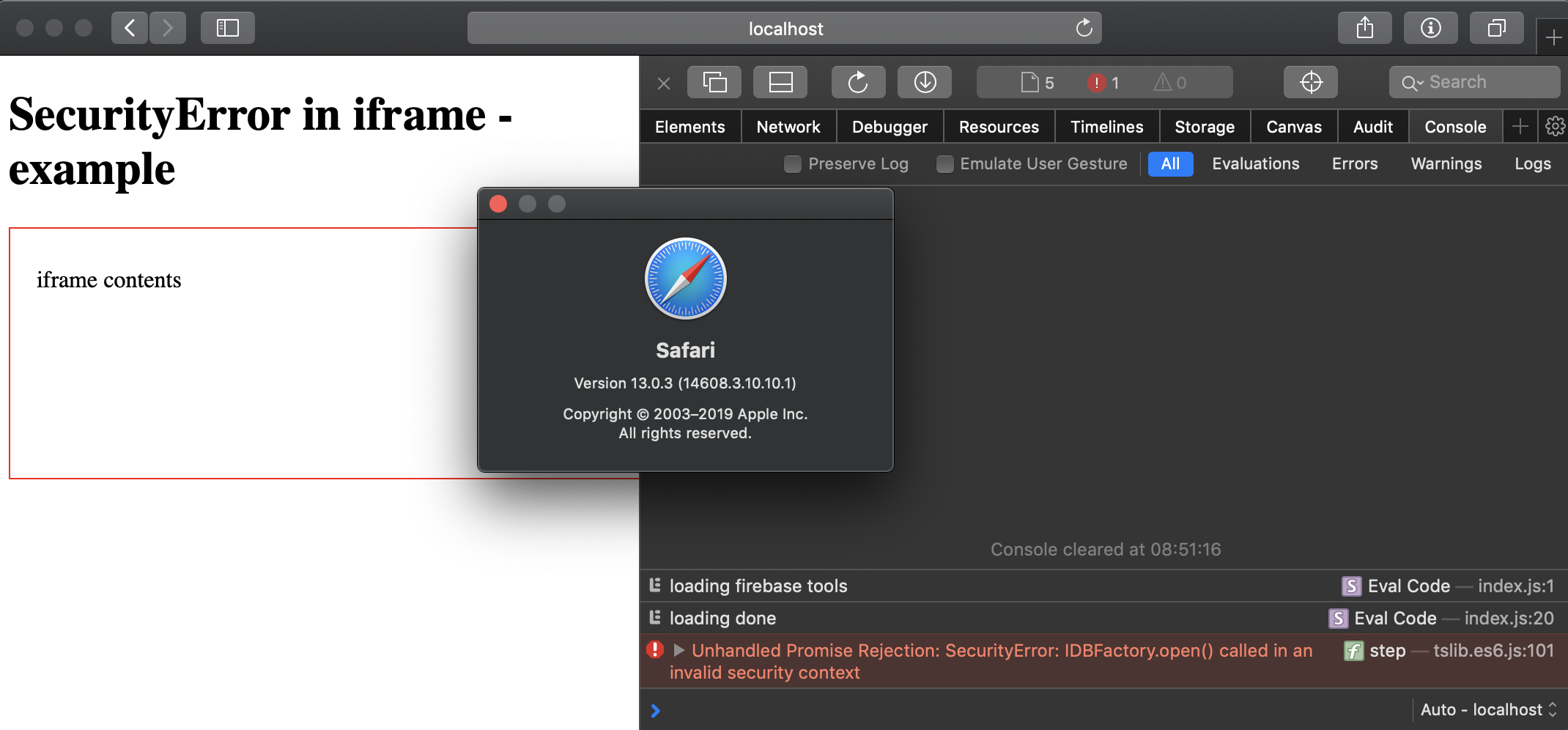
@rommelpe I see, it only happens in a cross-domain-loaded iframe apparently.
Here is a minimal failing example: https://github.com/tomsun/firebase-js-sdk-securityerror-example
It uses webpack-devserver to host a transpiled build of the example above plus firebase config for an analytics-enabled example project plus html files for parent and iframe. Served on http://localhost:8080.
To trigger the cross-domain scenario, the iframe is loaded from absolute url http://local.codemines.org:8080 (resolves to localhost) instead of same-domain.
tomsun
on 3 Dec 2019
Thanks for working on the reproducible code. It might be related to the one you mentioned (https://github.com/firebase/firebase-js-sdk/issues/631) as the issue only occurs in Safari, it works well in Firefox v70.0 & Chrome v78.0. I created an internal report (b/145587760) to confirm this behavior, and progress updates will be posted here as well.
rommelpe
on 3 Dec 2019
thanks!
tomsun
on 4 Dec 2019
Still taking a look but it seems like the issue is that analytics makes a call to the installations library for the Firebase instance ID (to associated the analytics data with the Firebase instance) and installations uses IndexedDB, which is restricted in the specific case of cross-origin iframes in Safari. I don't have an immediate solution or workaround unless you can change one of those criteria, but I think we've narrowed the problem down and will keep working on it.
 hsubox76
on 13 Dec 2019
hsubox76
on 13 Dec 2019
Taken in combination with https://github.com/firebase/firebase-js-sdk/issues/2465 I think we should maybe look into doing a check for the existence of IndexedDB in messaging and installations and throw a catchable error on init if it's not available? Will discuss.
hsubox76
on 29 Jan 2020
@hsubox76 Any suggested fix for this yet? Thanks.
 amardeepsingh20
on 14 Apr 2020
amardeepsingh20
on 14 Apr 2020
@tomsun Is this only reproducible with importing analytics? I seem to get it even without referencing analytics but I'm also using @angular/fire library so perhaps that might be adding side-effects.
 salmoro
on 6 May 2020
salmoro
on 6 May 2020
It is caused by the @firebase/installations library, which is used by Analytics, Messaging, and Remote Config. Installations requires IndexedDB, and fails when it's unexpectedly not available.
Messaging already has an isSupported() static method that can be used to catch this condition and then not import messaging. I am looking into catching this condition in Analytics and then maybe Remote Config, but I may have it throw a catchable error instead, which is more discoverable than having to know about an isSupported() method.
hsubox76
on 6 May 2020
+1 on having a catchable for now. What the FCM entry point checker do is to wrap and re-throw with a more intuitive formatted error message (supposingly be better documented and searchable). Ideally I wouldn't have to explicitly call the checker for it to give me a useful error :)
 zwu52
on 7 May 2020
zwu52
on 7 May 2020
@hsubox76 Thanks for clarifying.
So am I understanding correctly that these libraries (analytics, remote-config, etc.) fundamentally require indexedDB?
If yes this essentially disqualifies these libraries from being used in all scenarios of iframes in Safari.
salmoro
on 10 May 2020
Any news on this issue?
 klon
on 29 May 2020
klon
on 29 May 2020
The latest release (7.17.0) contains an isSupported() method that can be used in a conditional to prevent initialization in unsupported environments: https://firebase.google.com/support/release-notes/js#version_7170_-_july_23_2020
It should also throw an error on initialization in those environments.
See isSupported() reference doc. Note it returns a promise.
We are planning on adding similar functionality to other libraries that use indexedDB.
hsubox76
on 24 Jul 2020
I have run into a similar problem - Unhandled Rejection (SecurityError): IDBFactory.open() while using firebase remote config. Remote config doesn't have the isSupported method. Any ideas on how to fix this?
 biblicalph
on 5 Aug 2020
biblicalph
on 5 Aug 2020
We are slowly adding this method to all libraries. We are working on performance now, and remote-config would be next.
hsubox76
on 5 Aug 2020
I'm still seeing issues with the Performance API, after updating to 8.0.0, which appears to have the changes from the above merge (#3424). The issue is delayed, so it's no longer with initialization, but with the trace() call or something similar.
 etmiranda
on 6 Nov 2020
etmiranda
on 6 Nov 2020
Can you describe specifically which issues you are seeing? What is the exact error/warning message, and what happens next, does the application crash?
hsubox76
on 6 Nov 2020
Can you describe specifically which issues you are seeing? What is the exact error/warning message, and what happens next, does the application crash?
We've been seeing the error on Sentry.io. I don't have access to a machine it reproduces on, so I'm not sure on the behavior. I _suspect_ nothing crashes, it's just eating up our error quota (it's our number one error by count). We have a try-catch around all the calls on our end, but that appears to be insufficient for this. It used to error during initialization, but I updated to 8.0.0 and now it errors later, but it looks much the same:
SecurityError: IDBFactory.open() called in an invalid security context
Stack trace:
open@[native code]
https://www.gstatic.com/firebasejs/8.0.0/firebase-analytics.js:1:4865
initializePromise@[native code]
Promise@[native code]
P@https://www.gstatic.com/firebasejs/8.0.0/firebase-analytics.js:1:4836
be@https://www.gstatic.com/firebasejs/8.0.0/firebase-analytics.js:1:10766
https://www.gstatic.com/firebasejs/8.0.0/firebase-analytics.js:1:11735
https://www.gstatic.com/firebasejs/8.0.0/firebase-analytics.js:1:1986
https://www.gstatic.com/firebasejs/8.0.0/firebase-analytics.js:1:1032
initializePromise@[native code]
Promise@[native code]
h@https://www.gstatic.com/firebasejs/8.0.0/firebase-analytics.js:1:796
https://www.gstatic.com/firebasejs/8.0.0/firebase-analytics.js:1:12197
https://www.gstatic.com/firebasejs/8.0.0/firebase-analytics.js:1:1986
https://www.gstatic.com/firebasejs/8.0.0/firebase-analytics.js:1:1032
initializePromise@[native code]
Promise@[native code]
h@https://www.gstatic.com/firebasejs/8.0.0/firebase-analytics.js:1:796
https://www.gstatic.com/firebasejs/8.0.0/firebase-analytics.js:1:18988
https://www.gstatic.com/firebasejs/8.0.0/firebase-analytics.js:1:1986
https://www.gstatic.com/firebasejs/8.0.0/firebase-analytics.js:1:1032
initializePromise@[native code]
Promise@[native code]
h@https://www.gstatic.com/firebasejs/8.0.0/firebase-analytics.js:1:796
https://www.gstatic.com/firebasejs/8.0.0/firebase-performance.js:1:28826
promiseReactionJob@[native code]
etmiranda
on 6 Nov 2020
im shocked this isnt resolved yet...
 cor1
on 23 Nov 2020
cor1
on 23 Nov 2020
@etmiranda It looks like the error is being thrown by analytics and not performance, have you used the analytics.isSupported method and, if it fails, do not initialize analytics (firebase.analytics()) as mentioned above? (Note isSupported() returns a Promise so you will have to use await or then.)
hsubox76
on 24 Nov 2020
@hsubox76 it also happens when just using the auth module.
cor1
on 24 Nov 2020
@etmiranda It looks like the error is being thrown by analytics and not performance, have you used the analytics.isSupported method and, if it fails, do not initialize analytics (firebase.analytics()) as mentioned above? (Note
isSupported()returns a Promise so you will have to useawaitorthen.)
Yes, I'm checking isSupported before initializing Analytics. You'll notice in the stack trace that the first error (the bottom one) is inside Performance. I'm thinking perhaps Performance can call Analytics and maybe it doesn't check? That's just my guess. It's not originating, per the stack trace, from inside our code. And I'm pretty sure I've added all the supported checks and put everything I could inside a try-catch. I'm pretty confident this issue isn't with our code.
I've tried adding an exception to our Sentry handling to not send this error with our next release, hopefully it works, because it's eating up our quota enough that we don't get logs a quarter of the time because we're out of space. Fingers crossed!
etmiranda
on 25 Nov 2020
This is a really tricky issue to debug so I will try to explain what we know so maybe we can all work together and figure it out.
1) The actual error listed in the title of this issue is a native browser error, not generated by Firebase. Some Firebase code triggers this error by trying to call open() on IndexedDB in limited contexts like Safari iframes, Firefox private browsing, and probably others we don't know about, where IndexedDB.open() isn't allowed. Every package (analytics, performance, auth, etc.) makes this call at different times, for different purposes, so while the problems are related, the fix for one won't necessarily be the same as the fix for another.
2) To try to prevent this, we created a utility function to check if indexedDB.open() works by attempting to open a test database and wrapping that call in a try/catch. Unfortunately because of IndexedDB's async API, this check function has to be async. A simpler check, such as checking if window.indexedDB exists, or whether window.indexedDB.open exists, isn't good enough of a check, because in these contexts, everything exists, but open() will throw. https://github.com/firebase/firebase-js-sdk/blob/9c61afe3c03d30c15f648f81e3bd5ece073b58db/packages/util/src/environment.ts#L150
3) Analytics and Performance call this function at initialization and if it rejects, they will not call the methods that try to open IndexedDB. Auth could perhaps use similar logic but they can't import this function as-is because Auth is currently written in Closure.
It seems like what is going wrong is either, there is something wrong with the logic in (3) and the check is not blocking everything it should be, or the utility check function in (2) doesn't work in all cases and is letting some slip through.
If anyone has access to an environment where this error happens, one thing that would be really helpful is just try that function above (validateIndexedDBOpenable()) by itself and see if it does what you expect (it should reject if you are in an environment that throws when you call indexedDB.open(), it should resolve if you are not).
(As a final note, Performance doesn't call Analytics, but many of the calls in Analytics are async and the errors could be delayed and returning in the same tick as a performance async call returns which might confuse the stack?)
hsubox76
on 25 Nov 2020
Related issues
 giladrom
·
3Comments
giladrom
·
3Comments
 henrylearn2rock
·
4Comments
henrylearn2rock
·
4Comments
 barakd
·
3Comments
barakd
·
3Comments
 mohshraim
·
3Comments
mohshraim
·
3Comments
 ptrwtts
·
4Comments
ptrwtts
·
4Comments