Firebase-js-sdk: auth: Failed to execute 'transaction' on 'IDBDatabase'
[REQUIRED] Describe your environment
- Operating System version: Android/Windows
- Browser version: Chrome
- Firebase SDK version: 6.2.2
- Firebase Product: auth
[REQUIRED] Describe the problem
Migrating this issue on behalf of @alexplumb from #1533. We've seen this indexdb issue in Firestore on Safari 12.2 (both in #1533 and the canonical one for that issue, #1670).
However, Alex doesn't seem to have persistence enabled, so firestore shouldn't even be looking at indexdb. The name of the indexdb in question is "firebaseLocalStorageDb" which looks like it's the auth db (https://github.com/firebase/firebase-js-sdk/blob/master/packages/auth/src/storage/indexeddb.js#L191)
Steps to reproduce:
Happens inconsistently; unable to reproduce. :(
 rsgowman
All 94 comments
Any one else seeing this issue? I'm seeing this out in the field as well.
Is it possible to go back to the good old days of local storage for auth? IndexedDB seems extremely buggy.
 sengoontoh
on 3 Jul 2019
sengoontoh
on 3 Jul 2019
I have not been able to replicate it on a test device (test app using auth only) but according to the other bug, this seems to be a bug in indexedDB in iOS. Note that for our future modularization efforts, we will provide more granular control over how persistence is implemented. You will be able to use localStorage instead.
There is huge value in supporting indexedDB. This includes persisting sessions in worker environments (web workers, service workers, etc).
 bojeil-google
on 9 Jul 2019
bojeil-google
on 9 Jul 2019
There's definitely a known bug in indexdb in Safari on 12.2 (and I think 12.3 too), but at least @alexplumb has apparently observed this on non-iOS devices. Unfortunately, I'm not aware of anyone who's been able to reproduce this (on non-iOS devices) so this may not be actionable until someone's able to provide more details. :(
rsgowman
on 9 Jul 2019
Operating System version: Mac
Browser version: Chrome (localhost)
Firebase SDK version: 6.2.4
Firebase Product: auth
Hey, I'm also getting this error every time I try to createUserWithEmailAndPassword, but it always saves fine to Firebase. I came from the other thread, so I set the log level to true. I currently haven't set up any databases and am just working with auth right now.
 mlelien
on 10 Jul 2019
mlelien
on 10 Jul 2019
Hi @bojeil-google when will we be able to get a non-indexedDb version of auth?
sengoontoh
on 2 Aug 2019
I've just seen this issue reported through Sentry too, on Mac, Chrome v76:
- xhr | POST https://securetoken.googleapis.com/v1/token?key=key [200]
- exception | Error: InvalidStateError: Failed to execute 'transaction' on 'IDBDatabase': The database connection is closing.
Is there anything I can do to help debug this?
 alexlouden
on 20 Aug 2019
alexlouden
on 20 Aug 2019
We are also getting lots of this kind of events in multiple versions of Chrome (from 67 to 76) both on MacOS and Windows. This does not seem specific to Safari or to iOS devices.
As others have said, there is XHR POST to POST https://securetoken.googleapis.com/v1/token?key=
InvalidStateError: Failed to execute 'transaction' on 'IDBDatabase': The database connection is closing.
 vieira
on 27 Aug 2019
vieira
on 27 Aug 2019
We are tracking issues via Sentry and I can see increase in number of events from past couple of days.
Operating System - Mac OS X 10.14.4
Browser - Safari 12.1
I haven't been unable to reproduce this issue.
I have few questions regarding this incident:
- Can I reproduce by any means?
- Does it affect the end user?
 thandaanda
on 31 Aug 2019
thandaanda
on 31 Aug 2019
I confirm this bug since today.
- Firebase 6.3.5 or 6.6.0
- Win 7 x64
- Chrome 77.0.3865.56 (Build officiel) beta (64 bits)
Uncaught (in promise) DOMException: Failed to execute 'transaction' on 'IDBDatabase': The database connection is closing.
at zs (http://localhost:5000/firebase-auth-9de7143b.js:1:98305)
at http://localhost:5000/firebase-auth-9de7143b.js:1:101873
at e.g (http://localhost:5000/firebase-auth-9de7143b.js:1:14878)
at ae (http://localhost:5000/firebase-auth-9de7143b.js:1:15918)
at oe (http://localhost:5000/firebase-auth-9de7143b.js:1:15809)
at qt.t.Ub (http://localhost:5000/firebase-auth-9de7143b.js:1:16637)
at Ft (http://localhost:5000/firebase-auth-9de7143b.js:1:13696)
(It is a rollup-ed import of firebase auth as module)
In DevTools the errored source underlined is :
{return t.transaction(["firebaseLocalStorage"],e?"readwrite":"readonly")}
and triggers error on the word "transaction"
It happens after I Google One Tap (Smartlock) auto-sign-in, then make a...
await self.firebase.auth().signInWithCredential(credentials)
...to login to Firebase, in order to be able to get user-related stuff.
Weird because it was working 2-3 days ago, the last time I checked code, and I didn't make something special to trigger this error.
I deactivated all my Chrome extensions and I still get the error.
Maybe related to some hidden race condition in Firebase Auth code, but now no longer valid because reasons ?
 dtruffaut
on 5 Sep 2019
dtruffaut
on 5 Sep 2019
Disappeared today. Weird.
dtruffaut
on 8 Sep 2019
Just got a report of this on a Samsung s8 (will find out browser and os version).
 jaunt
on 9 Sep 2019
jaunt
on 9 Sep 2019
We are also seeing this issue some times. Reported in Rollbar 3 times over the last month. Safari and Chrome, both on mobile.
 anderssv
on 25 Sep 2019
anderssv
on 25 Sep 2019
Got this error today on OS X within angular fire on chrome.
 HarrisonCroaker
on 4 Oct 2019
HarrisonCroaker
on 4 Oct 2019
We just got a report from one of our users getting this issue when trying to login as well.
App is using firebase 6.0.4
User info (Desktop):
Chrome - Version 77.0.3865.120 (Official Build) (64-bit)
Windows 10 Enterprise
He also says he's behind a company firewall, not sure if that has anything to do with this...
 chanmathew
on 16 Oct 2019
chanmathew
on 16 Oct 2019
Was a fix found for this issue? I'm seeing this for some users when they try and create an account across all of our sites.
 samhoughton123
on 23 Oct 2019
samhoughton123
on 23 Oct 2019
App is using 7.2.2, still seeing this issue with some users. Please suggest workaround
 xerosanyam
on 15 Nov 2019
xerosanyam
on 15 Nov 2019
Same issue randomly. Got it on web in Chrome latest
 developdeez
on 3 Dec 2019
developdeez
on 3 Dec 2019
I can reproduce this error, whether this is the failure mode seen be users is an open question.
Load your page => clean cache => DO NOT refresh the page => try to Login or signup.
 bolekro
on 8 Dec 2019
bolekro
on 8 Dec 2019
We also see a number of these errors in our Sentry logs. We do not use Firestore persistence, but we are using session persistence for Firebase auth. Our errors are also not limited to iOS devices and seem to affect a number of different browsers and versions (mostly Chrome, Chrome Mobile + Safari).
The errors do not occur only during the auth process. Is it possible that having persistence enabled for the Auth service is affecting Firestore's persistence?
 jperasmus
on 10 Jan 2020
jperasmus
on 10 Jan 2020
I have also seen this bug on Safari 13.0.1 OSX 10.14.6
It happens when I clear my browsing history without restarting the browser. It can keep generating the error until the browser is completely closed and restarted.
 MatthewPringle
on 16 Jan 2020
MatthewPringle
on 16 Jan 2020
error started popping up out of nowhere
 tradingproject19
on 21 Jan 2020
tradingproject19
on 21 Jan 2020
Chrome
Version 79.0.3945.130 (Official Build) (64-bit)
I'm having this same error as well.
I am able to replicate it, it's the same as @bolekro is saying.
Load the page => Press "Clear Data" in the application tab in the Chrome DevTools => Do not reload, try to login with Google using signInWithPopup() or createUserWithEmailAndPassword(). Neither of them work.
Please let me know if any workaround is found. Thank you!
 sorinpav
on 28 Jan 2020
sorinpav
on 28 Jan 2020
I'm use firebase v7.7.0
I'm follow @sorinpav 's step in android chrome and show this same error.
 nothing628
on 28 Jan 2020
nothing628
on 28 Jan 2020
the error happens if you do Clear Data and Do not reload the page
reload of the page - and the issue gone
 BorisDaich
on 29 Jan 2020
BorisDaich
on 29 Jan 2020
@BorisDaich I think that by now everyone is aware of that. The actual question here is:
Can we do it in such a way that you wouldn't have to refresh for the error to be gone?
In my case, this has to work in conjunction with a PWA that I'm doing, in which case if you are offline and you refresh, you lose access to it entirely.
sorinpav
on 29 Jan 2020
Guys are you using react-redux-firebase library?
 HonzaTuron
on 21 Feb 2020
HonzaTuron
on 21 Feb 2020
@HonzaTuron no just the standard Firebase JS library.
The issue is in webkit rather than the library I believe.
MatthewPringle
on 21 Feb 2020
I'm seeing the same issue in my app build with Vue.js + Nuxt.js (SPA Mode).
Often comes together with https://github.com/firebase/firebase-js-sdk/issues/2581.
Affected so far...
| Browser | times_seen |
| ------------- | ------------- |
| Chrome 80.0.3987 | 1 |
|Mobile Safari 13.0.3 | 1|
|Chrome Mobile iOS 79.0.3945 | 1|
|Mobile Safari 13.0.5 | 142|
|Mobile Safari 13.0.1 | 17|
|Mobile Safari 13.0.4 | 130|
OS | times_seen
-- | --
Mac OS X 10.15.3 | 1
iOS 13.1.3 | 2
iOS 13.2 | 1
iOS 13.3.1 | 142
iOS 13.1.2 | 15
iOS 13.3 | 131
 lupas
on 25 Feb 2020
lupas
on 25 Feb 2020
We're still seeing this ever many times a week on our Production environment, mostly on Safari (iOS and Desktop). Any updates?
 edwinwalda
on 9 Mar 2020
edwinwalda
on 9 Mar 2020
@edwinwalda probably best to start looking for an alternative as I cant see this getting fixed any time soon.
MatthewPringle
on 9 Mar 2020
+1
 RuneStone0
on 24 May 2020
RuneStone0
on 24 May 2020
+1
 sadael
on 3 Jun 2020
sadael
on 3 Jun 2020
+1
 vicstr
on 4 Jun 2020
vicstr
on 4 Jun 2020
With release 7.15.0 they are declaring that all known issues have been fixed. Anyone validated whether it's fixed their issues yet?
"All known failure cases for IndexedDB-related crashes have now been addressed. Instead of crashing the client, IndexedDB failures result in rejected operations (for example, rejected Writes or errored Query listeners). If these rejections surface in your app, you can retry these operations when IndexedDB access is restored. IndexedDB failures that occur due to background work are automatically retried.
If you continue to see IndexedDB-related crashes, please provide feedback GitHub issue #2755."
sengoontoh
on 6 Jun 2020
Sentry reports this error for me too.
I don't have an iPhone so I can't try to reproduce this at the moment, so my question is how severe is this for users? Does it prevent the app from loading? Does it require a page refresh? Is it even fixable?
Thanks a lot!
 Dinduks
on 20 Jun 2020
Dinduks
on 20 Jun 2020
how severe is this for users? Does it prevent the app from loading? Does it require a page refresh? Is it even fixable?
We face this and it prevents logins. It usually follows a cache clear, and is related to some "Quote exceeded" errors (we are nowhere near our quota)
 Redmega
on 11 Aug 2020
Redmega
on 11 Aug 2020
b/163837921 for internal tracking
 scottcrossen
on 12 Aug 2020
scottcrossen
on 12 Aug 2020
For more context, the quota issues are related to repeated calls to /token, presumably by auth.onIdTokenChanged and the realtime database. https://github.com/firebase/firebase-js-sdk/issues/3222#issuecomment-672283383. So this error may not strictly be related, and might be specifically related to the clearing of browser cache / app data when attempting to fix the previous quota error (A common user action)
Redmega
on 13 Aug 2020
We are getting reports from our systems and users that seem to point to this problem. We are only using Firebase Auth.
The problem manifests for the user as the browser tab crashing and showing an error saying "An unexpected error occurred" (message varies between browsers). As far as I can gather, the browser or tab is not in the background when this happens.
It's obviously possible that the tab crashes as a consequence of this error, and not from the error directly.
 kimroen
on 19 Aug 2020
kimroen
on 19 Aug 2020
+1 -- seems to be happening most on Mobile Safari
 veeralpatel
on 20 Aug 2020
veeralpatel
on 20 Aug 2020
Seeing a lot of this erros only on Safari 13.1.2 in iOS 13.6, since august 13th.
I dont have desktop users, idk if the same happens on Mac OS.
Seems that it happens after a call to (POST) https://www.googleapis.com/identitytoolkit/v3/relyingparty/verifyAssertion?key=xxx
 VagnerGon
on 20 Aug 2020
VagnerGon
on 20 Aug 2020
I'm also seeing this happen with Mobile Safari a lot with our users.
 olearycrew
on 28 Aug 2020
olearycrew
on 28 Aug 2020
@scottcrossen any updates from the team on this one?
Does anyone know of a workaround to offer users?
olearycrew
on 28 Aug 2020
+1
 sundhar010
on 31 Aug 2020
sundhar010
on 31 Aug 2020
@olearycrew we started seeing this as well. We went through the changelog, and a fix was released back in July: https://firebase.google.com/support/release-notes/js#version_7161_-_july_16_2020
Have you upgraded to this version yet?
 arifsundrani
on 14 Sep 2020
arifsundrani
on 14 Sep 2020
We're on version 7.17.2
olearycrew
on 14 Sep 2020
Operating System version: iOS 14.0, iOS 13.7
Browser version: Mobile Safari 14.0, Mobile Safari 13.1.2
Firebase SDK version: firebase@^7.20.0 @firebase/[email protected]
Firebase Product: auth
unable to reproduce; details are coming from sentry logs of users;
 thosmos
on 25 Sep 2020
thosmos
on 25 Sep 2020
Are there any updates here?
veeralpatel
on 26 Sep 2020
We have reports of this error from some of our users running Chrome on Chrome OS. We are currently on Firebase 7.20.0.
I can reproduce by deleting the firebaseLocalStorageDb IndexDB in DevTools and then attempting to sign in with Google or email without refreshing the page. Refreshing the page recreates the DB instance and I'm able to sign in.
 thebiffboff
on 30 Sep 2020
thebiffboff
on 30 Sep 2020
We are seeing reports of this issue from a small number of customers in Chrome on a Chromebook (versions and devices TBC). Our JS SDK is @7.20.0. I noted that 7.21.1 contains an update to indexeddbshim v7 (see #3694) so we're going to try upgrading. I'll report back next week.
Edit: @thebiffboff and I work on the same team.
Another edit: we have a support case open with the Firebase team which they are actively working. I'll post any relevant info here as I get it.
 tteggel
on 30 Sep 2020
tteggel
on 30 Sep 2020
Tagging on to comments made by @tteggel & @thebiffboff, this behavior can be seen using the firebaseui-web demo app: https://fir-ui-demo-84a6c.firebaseapp.com/ via deleting the firebaseLocalStorageDb IndexDB in DevTools and then attempting to sign in with Google without refreshing the page.
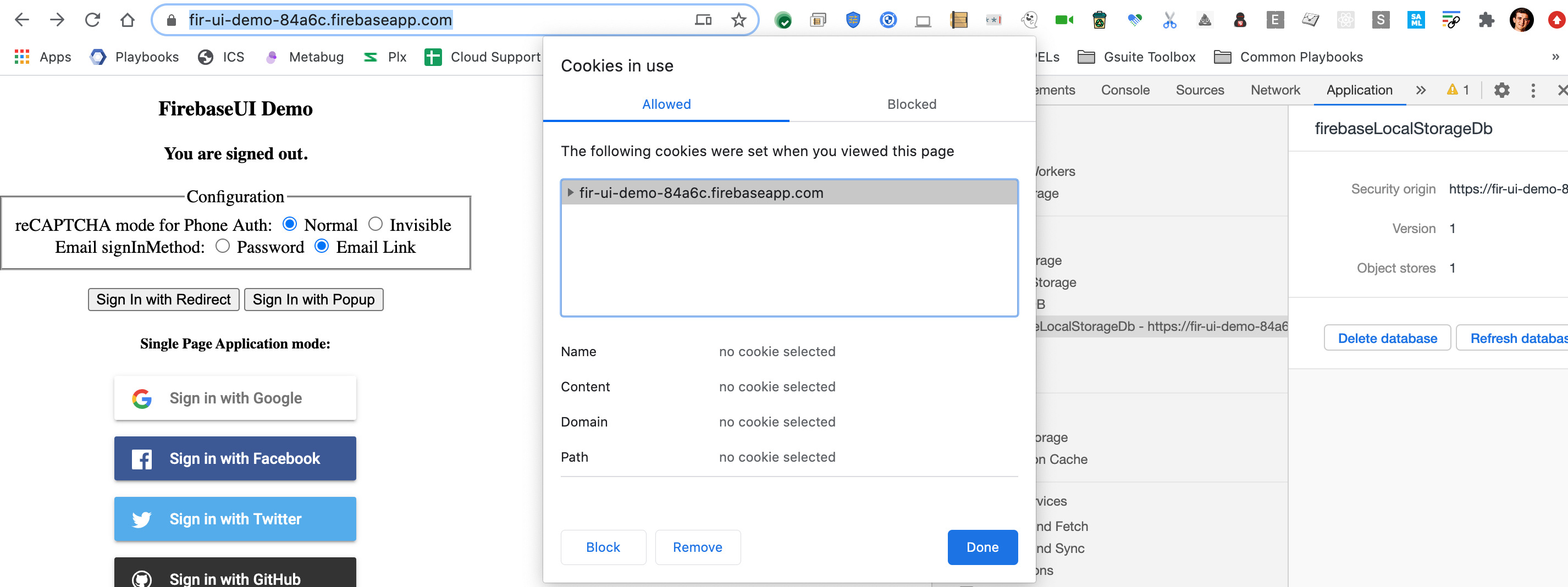
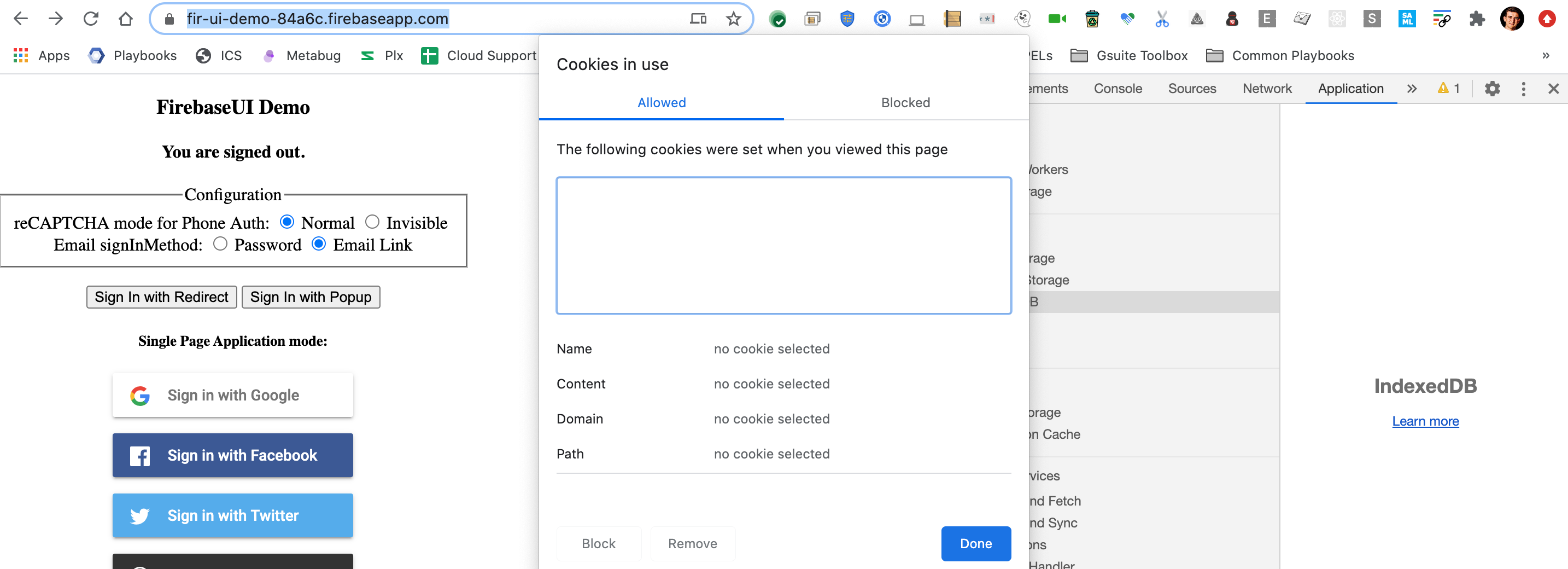
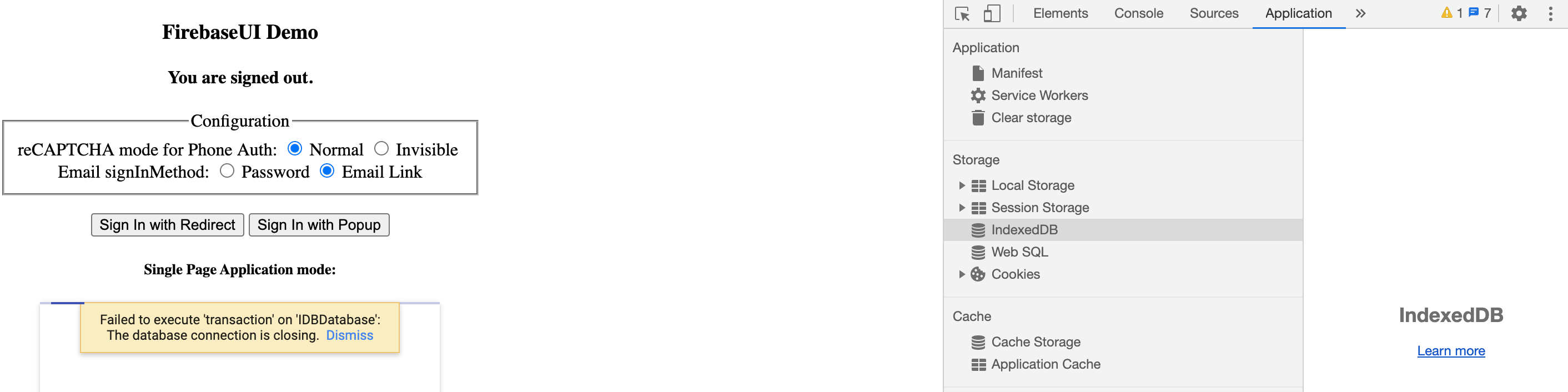
Another way to trigger this separate from manually deleting via Chrome DevTools is to delete the cookies associated with the site and then trying to sign in with Google without refreshing the page:
State prior to site cookie deletion
State post site cookie deletion
Error post Google Signin
 thomasmburke
on 1 Oct 2020
thomasmburke
on 1 Oct 2020
@tteggel are there any updates?
 zienna
on 8 Oct 2020
zienna
on 8 Oct 2020
Having the same issue on Safari Version 14.0 (15610.1.28.1.9, 15610), Mac 10.15.7
 dwanderton
on 11 Oct 2020
dwanderton
on 11 Oct 2020
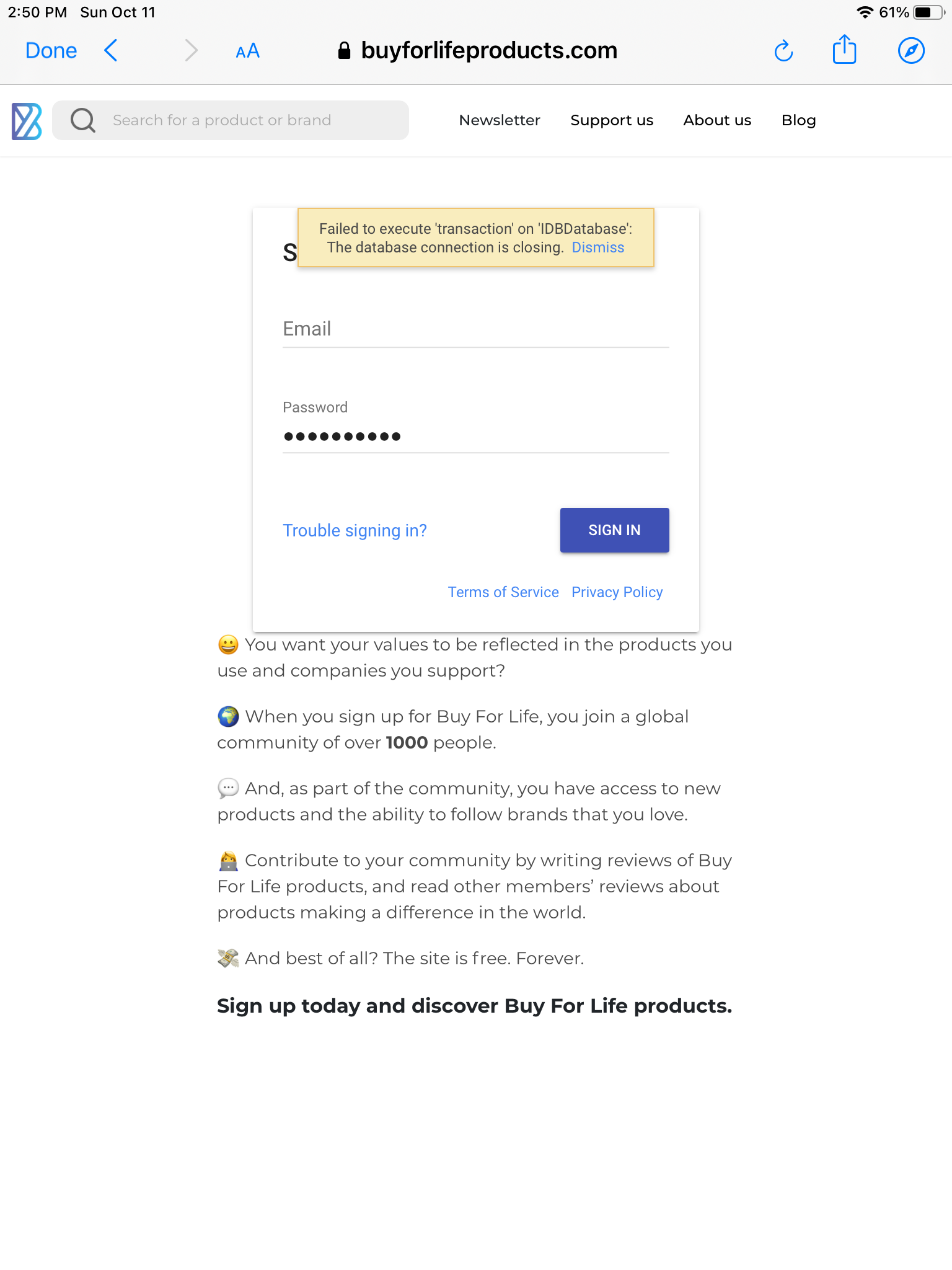
Users are reporting the same issue, mostly Safari:
 AdrianKrebs
on 11 Oct 2020
AdrianKrebs
on 11 Oct 2020
Seriously thinking in stop using firebase because of this issue. Months passed, lot of occurrences, lot of users affected and no care about this topic.
VagnerGon
on 21 Oct 2020
@avolkovi could you please let us know if there are any updates? We’ve already lost more than 300 users because of this issue
zienna
on 21 Oct 2020
An update on this would be highly appreciated.
veeralpatel
on 22 Oct 2020
+1
 ginagr
on 22 Oct 2020
ginagr
on 22 Oct 2020
Happens to me on every 3-4th user trying to sign up with phone auth, after they enter their SMS code (Web SDK, confirmationResult.confirm()).
Then, the next error (after a few seconds) is "SMS code has expired". Not sure what they do, probably they retry, but then the "SMS expired" and "IDB" errors are thrown repeatingly until the user gives up.
Could it be related to Safari private mode? Had issues there with Email link sign-in, too.
Please give this a high priority and if known a hint how to work around it (relaod page?), thanks!
 danbaechtold
on 23 Oct 2020
danbaechtold
on 23 Oct 2020
@danbaechtold as it seems the solution in the short term may be a community work around: Were you able to test a page reload as a solution? For us this seemed to show promise and is our current fix - although a pain to handle in terms of UX.
dwanderton
on 23 Oct 2020
@dwanderton Thank you, I'll try this right now and let you know in a few hours if it helps!
danbaechtold
on 23 Oct 2020
Yesss! The suggested workaround from @dwanderton did it!
The solution is ugly and a bad UX of course. I really just reload the whole page when this error happens. But so far all affected users (9 this morning) did fill the form and sign-up again. Crazy.
Some stats: This morning, I had 9 of these IDB errors, 8 others (code-expired, invalid (2 of them clearly misstyped), network-failed, internal, ..), and around 80 successfull SMS phone confirmations.
Thank you very much for your help, David!
Let's hope this get's fixed soon.
danbaechtold
on 23 Oct 2020
@danbaechtold although I've yet to implement it, I plan to pass a query param when reloading the page after the error, pick that up on reload, recover state, and trigger a notice on detecting the query param with something along the lines of "oops! sorry for the interruption - please try again"
dwanderton
on 23 Oct 2020
I had the experience that once the IDB errors started, a refresh did not
work, and if I had the app open in multiple tabs, even other tabs would
fail to reload ... It appeared to me that some kind of Safari IDB
service crashed for this domain, and it actually required restarting
Safari in order to recover. It appears that it is because the firebase
Auth service is using IDB for storing the record of the auth. The bug
showed up more often when we had localforage using IDB as well, and when
I removed IDB from localforage's available storage types, the firebase
auth problem decreased. One possible fix I was considering was
modifying the firebase auth codebase to use localStorage instead of IDB
for storing the auth session record. Has anyone tried forking the
firebase-sdk code and changing how auth stores its data?
T
On 10/23/20 10:29 AM, David Anderton wrote:
>
@danbaechtold https://github.com/danbaechtold although I've yet to
implement it, I plan to pass a query param when reloading the page
after the error, pick that up on reload, recover state, and trigger a
notice on detecting the query param with something along the lines of
"oops! sorry for the interruption - please try again"—
You are receiving this because you commented.
Reply to this email directly, view it on GitHub
https://github.com/firebase/firebase-js-sdk/issues/1926#issuecomment-715474991,
or unsubscribe
https://github.com/notifications/unsubscribe-auth/AAEXVZSZDHFVGKN2OMCPEVLSMG4P3ANCNFSM4H4HDYLQ.
thosmos
on 23 Oct 2020
The refresh doesn't work because we get the error on submit of the sign up form -- we end up creating the user in Firebase, but not within our own internal record of users. As a result, the only fix for us to go into the Firebase Admin panel and delete the user in Firebase.
This is a terrible workaround -- I'd prefer to have Firebase not create the User when hitting this error.
veeralpatel
on 23 Oct 2020
@arifsundrani The fix linked is for an unrelated issue in Firestore.
@VagnerGon Thanks for the feedback, we understand this is frustrating. We have had lots of difficulty replicating this in a consistent manner in a meaningful use-case (past just deleting the database while app is running). Any help in replicating or help with a PR is welcome.
@danbaechtold Thanks for the numbers. The correlation between the SMS code expired makes me feel this is something to do with the user leaving the tab open for a long time. We have had some luck replicating the error by leaving a tab idle for some time. Roughly what percentage of your total DAU do you believe are affected? This will help us prioritize a fix if we know that it's affecting more than a handful of users.
@thosmos we have a rewrite of the SDK going into alpha shortly that will allow you to specify localStorage instead of IndexedDB
@veeralpatel the error happens after the API call, there is no way for us to not create the user client side when this error occurs. One option is to present the user with a sign-in option after refresh by calling fetchSignInMethodsForEmail to see if the account exists.
Sorry for the lack of progress here folks, we are working on trying to understand the best way forward here... this is a weird bug that does not have a clear cut fix. As always, we welcome PRs and will gladly review any proposed fixes from the community while we work towards designing a long term solution.
 avolkovi
on 26 Oct 2020
avolkovi
on 26 Oct 2020
@avolkovi Thank you for investigating. In my case it's most probably not because of idle tabs. My app is for contact-tracing and is beeing used in restaurants, clubs and bars, where users scan a QR code which leads them to my app, where they fill-in their details and start the phone-auth sign-up flow. So really in most cases we're talking about first-time users (no second tabs open), which proceed in one go.
Yesterday I had around 40 new sign-ups, and 6 IDB errors.
If it could be of any help, you can contact me to get access to my custom logs and analytics, and we could also add even more log tracking to my code.
@dwanderton I also save the form to local storage now, then reload the page, but don't show any message. It works pretty well, all users submit again and then it works.
danbaechtold
on 27 Oct 2020
This is a webkit issue that has been around for more than a year and may never get fixed in its current form. Apple would need to apply the fix to a Safari release for one.
Inactivity can cause Apple to lock the database, then when webkit tries to write to the database we get a crash.
 mattsputnikdigital
on 27 Oct 2020
mattsputnikdigital
on 27 Oct 2020
@mattsputnikdigital Thanks for the link, it looks like that bug was filed by @schmidt-sebastian from Firebase.
@danbaechtold Could it be that the QR code reads are sending the App into a background state and triggering this bug in webkit?
avolkovi
on 27 Oct 2020
@avolkovi No, but.. when the SMS code arrives, they will quickly switch to the message (app) and back, so.. yes!
danbaechtold
on 27 Oct 2020
@avolkovi My app is quite similar than @danbaechtold, the user scan a QR code in a Restaurant to see the menu, but only social and anonymous authentication are used. The tab can go to the backgroud by signInWithPopup
VagnerGon
on 27 Oct 2020
When you say app are you wrapping it in Cordova or Capacitor?
mattsputnikdigital
on 27 Oct 2020
No, it's WEB
VagnerGon
on 27 Oct 2020
Then the only solution is to catch those errors and restart the app. I tried pretty much everything and could find nothing else which worked. These are the errors that I found Firebase / this bug generated.
What I did was to detect the error, throw up a loading screen over the app and then reboot the app. To do a loading screen, especially outside a JS framework, just add a class html with a loading screen :after body, and when the app boots detect if that class exists to restore the app and remove the loading screen.
/* Database Error */
if ( error && error.indexOf( 'An internal error was encountered in the Indexed Database server' ) !== -1 ) {
    this.reload();
}

/* Async Queue */
if ( error && error.indexOf( 'AsyncQueue' ) !== -1 ) {
    this.reload();
}

/* Failed To Execute */
if ( error && error.indexOf( 'IDBDatabase' ) !== -1 ) {
    this.reload();
}
If someone encountered such an error in their project and got into this topic, check if you are trying to save in idb an object of one of the properties of which the function
 kavaliov
on 1 Nov 2020
kavaliov
on 1 Nov 2020
One of my users just encountered this issue as well. On Safari.
 elucidsoft
on 4 Nov 2020
elucidsoft
on 4 Nov 2020
In case it helps: I got a solid 100% repro of this by having the following situation (I am not claiming this situation is valid, I did it by accident), on iPadOS 14.0.1:
- Safari (the app itself) is signed into my firebase web app as User1
- My app (native) is running, signed in as User 2
- My app pops a WKWebView and runs some javascript to sign in as User2
-->Failed to execute 'transaction' on 'IDBDatabase': The database connection is closing
Workaround for me: open Safari (the app itself), navigate to my web app, sign out. Then native app stops seeing this error in its WKWebView javascript.
I'm mentioning this because I think that if people are using FirebaseUI they might be hitting this issue, where there is actually someone already signed in (in some context) that is conflicting somehow.
 xaphod
on 4 Nov 2020
xaphod
on 4 Nov 2020
I have experienced this since we have users complaining they are not able to create their account. Our application is running on web only.
I understand that this is intermittent because this is happening on around 1-2% of the sign ups we have.
Our flow is simple:
- User registers and Auth entry is created
- Cloud Firestore user account entry is created
Observations:
- Auth entry is created BUT it is throwing IDBDatabase error.
- Cloud Firestore user account entry is NOT created because there was an exception.
- Since there was an error, user tries to create an account again and sees account already exists BECAUSE it is already in Auth.
Manual solution:
So our support has to manually delete the email Auth entry, ask the user to clear the cache and try again.
I added more logs since Oct 29, and found 27 errors.
Error code: 11
Failed to execute 'transaction' on 'IDBDatabase': The database connection is closing.
Suggestion to Firebase Team:
Would it be possible that when IDBDatabase error happens, the user MUST not be created in Auth?
Planned Workaround:
What I am thinking is when this happened:
- Automatically delete the Auth entry if only cloud firestore entry is not created
- Do a reload according to @mattsputnikdigital
Any comments would be very useful.
 jeynergil
on 5 Nov 2020
jeynergil
on 5 Nov 2020
This feels like its being swept under the rug by the Firebase Team, can we get some assurance you guys are treating this as a serious issue?
elucidsoft
on 5 Nov 2020
@xaphod Thanks for the steps, it doesn't look like anyone else is experiencing this in WebView, are you able to reproduce this in Safari or just WebView?
@jeynergil as mentioned in https://github.com/firebase/firebase-js-sdk/issues/1926#issuecomment-716815736 it's impossible for the user to not be created since this error occurs after the API call.
@elucidsoft As mentioned before, we are unable to reproduce this error in a meaningful way (short of manually deleting the database while the app is running). We have tried reproducing on devices using our test apps, and on the iOS simulator to no avail. We are looking into it, but without a way to reproduce there is no way for us to provide a fix that we can guarantee will work. We have had an open bug with Webkit (https://bugs.webkit.org/show_bug.cgi?id=197050) and they have not been able to reproduce either. Any help you can provide on reproducing this issue would be appreciated.
avolkovi
on 6 Nov 2020
@avolkovi I've only experienced it in WKWebView. You mentioned that you have not been able to reproduce it. Did you try the repro steps I outlined above? I was able to get a 100% repro, ie. every time the javascript loaded & executed, this error always occurred.
xaphod
on 6 Nov 2020
@xaphod we're trying to reproduce the error as seen by customers without being too contrived. For instance, we know the issue happens if someone clears their cookies or deletes their IndexedDB while the app is running, but that's not a supported flow and does not line up with the reports on this thread around the issue happening during signup. Your steps involve multiple apps and multiple users, which is not consistent with the error reports from end users. So while it may trigger a similar error, it brings us to no closer to understanding why it's happening or how to prevent it from happening in the first place.
avolkovi
on 6 Nov 2020
I having been having the same issue:
DOMException: Failed to execute 'transaction' on 'IDBDatabase': The database connection is closing.
at Gj (http://localhost:3000/static/js/bundle.js:2315:187)
at http://localhost:3000/static/js/bundle.js:2316:81
at e.g (http://localhost:3000/static/js/bundle.js:2101:101)
at Kb (http://localhost:3000/static/js/bundle.js:2104:195)
at Gb (http://localhost:3000/static/js/bundle.js:2104:85)
at C../node_modules/@firebase/auth/dist/auth.esm.js.k.Wb (http://localhost:3000/static/js/bundle.js:2103:303)
at pb (http://localhost:3000/static/js/bundle.js:2097:586)
I can reproduce it. It happens 100% for me
But if reload, the issue disappear
 bayareabear
on 6 Nov 2020
bayareabear
on 6 Nov 2020
I appreciate if anyone can help. Let me know if needed for me to reproduce the error
bayareabear
on 6 Nov 2020
This feels like its being swept under the rug by the Firebase Team, can we get some assurance you guys are treating this as a serious issue?
If firebase agrees to pay outsiders to fix this, I am sure lots of people will try
bayareabear
on 6 Nov 2020
Here is the stacktrace:
DOMException: Failed to execute 'transaction' on 'IDBDatabase': The database connection is closing.
at Gj (/Users/xzhang3/Documents/git/groupslice/node_modules/@firebase/auth/dist/auth.esm.js:236:1)
at /Users/xzhang3/Documents/git/groupslice/node_modules/@firebase/auth/dist/auth.esm.js:237:1
at e.g (/Users/xzhang3/Documents/git/groupslice/node_modules/@firebase/auth/dist/auth.esm.js:22:1)
at Kb (/Users/xzhang3/Documents/git/groupslice/node_modules/@firebase/auth/dist/auth.esm.js:25:1)
at Gb (/Users/xzhang3/Documents/git/groupslice/node_modules/@firebase/auth/dist/auth.esm.js:25:1)
at C../node_modules/@firebase/auth/dist/auth.esm.js.k.Wb (/Users/xzhang3/Documents/git/groupslice/node_modules/@firebase/auth/dist/auth.esm.js:24:1)
at pb (http://localhost:3000/static/js/bundle.js:2097:586) {stack:
bayareabear
on 7 Nov 2020
I am only in the testing stages but this also seems to happen to my users nearly 100% of the time when they try to
1.) Login Via Email/Password
I will deploy to a new channel
firebase hosting:channel:deploy 'foobar'
I send the link via gmail to a friend to test (all testers thus far have had iPhone)
On their first attempt to login they get the "Failed to execute 'transaction' on 'IDBDatabase' error.
They continue to get the error until they try to reload the page.
After a reload they are sometimes able to login.
 b0ot
on 7 Nov 2020
b0ot
on 7 Nov 2020
Out of 25 testers this has happened to 4 people. Not good numbers.
 joelmeaders
on 7 Nov 2020
joelmeaders
on 7 Nov 2020
This seems a very critical problem. I am surprised it lasts so long. What are the other alternatives?
bayareabear
on 7 Nov 2020
I was able to reproduce this locally following the instructions posted above (delete firestore indexdbs and try to sign in or create account).
Using that knowledge, I split my sign-up into two steps, the first being email/password and the second all the other info. On signup I catch the IDB error and redirect the user to a sign-in screen (their auth account is created despite the error), do a hard refresh of the page, prefill their email and ask them to sign in. The sign-in screen also catches the IDB error and will display a message asking them to try another browser or device, which would be the second time that error was experienced in this flow and a hard refresh did not regenerate the IDBs.
Originally I created a callable function that would be triggered on that error and would delete the auth account via adminsdk but it never got called, likely due to the disconnect.
joelmeaders
on 8 Nov 2020
Folks- the next release will retry these errors like Firestore does, please reopen if you're still experiencing issues on the new version.
avolkovi
on 12 Nov 2020
I thought I was able to reproduce this as I got it to happen about 4 times in a row. Then all a sudden I could never get it to happen again, no matter what I tried. Freaking bizarre...
elucidsoft
on 12 Nov 2020
Folks- the next release will retry these errors like Firestore does, please reopen if you're still experiencing issues on the new version.
Out of interest what is the new version that will fix this problem?
I just updated to the latest firebase 7.24.0 and I can reproduce this error locally consistently every-time by deleting my browser cookies. We also get this on our live and beta sites whenever we do a new deployment and its showing up in our rollbar errors.
 dirkesquire
on 3 Dec 2020
dirkesquire
on 3 Dec 2020
The most recent version is 8.1.2: https://firebase.google.com/support/release-notes/js#8.1.2
 hsubox76
on 4 Dec 2020
hsubox76
on 4 Dec 2020
Related issues
 larssn
·
51Comments
larssn
·
51Comments
 Luckygirlllll
·
60Comments
Luckygirlllll
·
60Comments
 saeedhei
·
58Comments
saeedhei
·
58Comments
 merlinnot
·
56Comments
merlinnot
·
56Comments
 lamplightdev
·
57Comments
lamplightdev
·
57Comments
Most helpful comment
Any one else seeing this issue? I'm seeing this out in the field as well.
Is it possible to go back to the good old days of local storage for auth? IndexedDB seems extremely buggy.