Firebase-js-sdk: FR: Firestore offline persistence in web workers
- Operating System version: n/a
- Browser version: n/a
- Firebase SDK version: n/a
- Firebase Product: firestore
Are there any plans to make offline persistence available in web workers? Inspired by @davideast 's article I dropped 95% of my Firebase bundle size using this one weird trick to use firebase in a worker, I've noticed offline persistence isn't available in that context. Browsing the source, I suspect it's the reliance on (and absence in workers of) localStorage that's the issue - so I was wondering if there's any alternative to using synchronous storage in this case? Thanks.
 lamplightdev
All 57 comments
Any news on this guys? The lack of offline persistence in service workers & web workers is a bit of a killer for PWA.
 joshdifabio
on 14 Jan 2019
joshdifabio
on 14 Jan 2019
Same here
 MarvinMiles
on 16 Jan 2019
MarvinMiles
on 16 Jan 2019
Thanks for the feedback. Could folks impacted by this tell us a little bit about their use case / architecture (what kind of worker they're trying to use Firestore from and for what purpose exactly)?
 mikelehen
on 16 Jan 2019
mikelehen
on 16 Jan 2019
@mikelehen thanks for responding.
In my case, the data I pull from Firestore sometimes needs quite a lot of processing before I present it to users. As a result, I do most of my Firestore interaction inside a Web Worker instead of on the main thread in order to reduce UI jank. I could move this work to the Service Worker instead but I assume that this Firestore SDK limitation applies to Service Workers too since they also do not support the localStorage API.
Unfortunately, this approach means that I lose offline persistence in my app, even though workers support IndexedDB.
As the Service Worker API in particular becomes more popular I imagine that this will become a problem for more people.
joshdifabio
on 17 Jan 2019
Thanks for your use case. One option would of course be to pull the data from Firestore on the main event loop and then just do the processing on the webworker, but if it's a lot of data, perhaps there are performance wins for moving the Firestore interaction off the main event loop as well. So it's a reasonable request.
Service workers are a bit more complicated. They don't support XHR, which Firestore (and possibly other parts of Firebase) depends on. And service worker lifetime is generally short-lived. Our supposition so far is that it doesn't make that much sense to use Firestore from a service worker. But if folks have use cases, please do share.
mikelehen
on 17 Jan 2019
Thanks for your use case. One option would of course be to pull the data from Firestore on the main event loop and then just do the processing on the webworker
Thanks. I did consider this, but it wasn't practical for a few reasons. For example:
1) This approach would significantly increase the amount of boilerplate code I'd need to write in order to get data in and out of the worker thread, as the worker thread often decides which queries to send to Firestore based on the results of other queries
2) When processing Firestore data I often need access to Firestore's snapshot objects in order to process the data more efficiently (e.g. using _DocumentSnapshot.get()_), but class instances cannot be passed between the main thread and workers.
joshdifabio
on 18 Jan 2019
Something I forgot to add previously: every now and then I see the main thread blocked for 100ms+ by Firestore XHR-related scripts shortly after cancelling snapshot listeners. (Note that this timing is taken on a powerful MacBook Pro and I'd expect the main thread to be blocked for much longer on mobile.) This is another reason I offload most of my Firestore interaction to a worker thread.
joshdifabio
on 22 Jan 2019
@joshdifabio That sounds pretty strange. Offhand I can't think of anything CPU-intensive we do when unsubscribing (and XHRs themselves are async). How exactly are you measuring the main thread blocking? Thanks!
mikelehen
on 22 Jan 2019
@mikelehen interesting. I observed jank and then used the performance profiler in Chrome. I haven't looked at it in detail yet, I only really saw that Firestore XHR was at the top -- perhaps it was GC or something in my own code being triggered. I'll have another look soonish and get back to you.
joshdifabio
on 23 Jan 2019
My use case is for offline updates to be saved to Firestore without having to open the relevant web site when online ie. like web push where only the browser is required to be open. I assume due to localstorage API unavailability, this will not be possible
 dexster
on 19 Feb 2019
dexster
on 19 Feb 2019
@dexster I don't think any kind of worker will be able to run when the relevant web site isn't open. For that you'd need a browser extension or something.
mikelehen
on 21 Feb 2019
I've done some more performance profiling over the past couple of weeks, and this is what I've observed regarding Firestore performance.
Whenever I read data from Firestore, I can see about about 50-150ms spent in Firestore code when the XHR response comes back. Everything happening in that time period appears to be Firebase code. Firestore processes the response synchronously on the main thread, and obviously even the lower bound of this figure (50ms) is way beyond what can realistically be accommodated on the main thread without introducing UI jank. These times were measured on a MacBook Pro; the times are higher on my Pixel 2.
I previously said that this work was happening whenever I cancelled Firestore snapshot listeners, but this was a mistake, it's when the data comes back. I see this all the time, it's not an edge case -- 50ms of work in the main thread is the lower bound when listening to a single record.
Unless I'm reading the figures wrong in Chrome's profiler and including my own application code in the figures, which I don't think I am, I suspect that these figures will be easily reproducible on any web app which uses the Firestore JS SDK.
joshdifabio
on 22 Feb 2019
@joshdifabio Thanks for the added details. I was able to reproduce ~50ms with a big document in Chrome on my Mac. The time was basically spent parsing the result from the backend.
Note that I believe I made a recent size optimization (https://github.com/firebase/firebase-js-sdk/commit/4983420937f1d8d0217a44ffdf505758f570dada) that will also improve performance a little (it removed some logging calls that should have an impact here). That should go out in our next release.
All that said, 50ms for a large document doesn't seem unreasonable to me. At 60fps, you might skip a couple frames, but for a typical web app, this should be imperceivable. A live-action game might be a different story. In any case, if you're sensitive to these sorts of hiccups, moving the processing to a separate worker seems like a reasonable approach. Sorry that persistence doesn't work at the moment. We'll give this some thought in the future.
mikelehen
on 1 Mar 2019
@mikelehen
This is really exicting based the powerful of web workers. I'm facing this error because said that offline persistence is not present on web workers yet on firebasejs 6.1.0. It's strange because IndexDB is available on web workers.

 SebasG22
on 6 Jun 2019
SebasG22
on 6 Jun 2019
@SebasG22 Oh, interesting... I guess you get _that_ error because we are checking for existence of the window global (https://github.com/firebase/firebase-js-sdk/blob/ee610626bef1f6f05852041b2161c01c5e99aa59/packages/firestore/src/local/simple_db.ts#L134) which doesn't exist in a web worker...
We could check directly for the indexedDB global but then you would just get a different error: 'IndexedDB persistence is only available on platforms that support LocalStorage.'
We may be able to make our dependency on LocalStorage optional, in which case persistence might work to some degree in a web worker... though there may be rough edges. I'll try to take a look at this.
mikelehen
on 6 Jun 2019
@mikelehen , It will be really helpful if you can take at look at this.
You right, from my perspective there is not need to access window or depends or localStorage. It will be better only ask for IndexedDB.
Thanks.
I'm willing to help in whatever you need 👍
SebasG22
on 6 Jun 2019
Hello All!
Just wondering if there is any update on this @mikelehen ?
Every other Firestore feature is totally fine in a worker except the persistence - really would like to avoid the cost on the main thread of serializing, copying, and sending snapshots into the worker for further processing. Our current architecture allows for our main thread to be entirely reactive to updates from off thread data changes.
Would appreciate any further information on this.
Cheers,
-Tsavo
 T-Knott-Mesh
on 11 Sep 2019
T-Knott-Mesh
on 11 Sep 2019
@T-Knott-Mesh Sorry! I have not spent time on this. @thebrianchen mentioned he may be able to take a look in the coming weeks though. So stay tuned.
mikelehen
on 11 Sep 2019
No problem ! Thank you for the response :) we will create a work around for now but we are really looking forward to potential capabilities in a worker.
Appreciate you all ! @mikelehen @thebrianchen
T-Knott-Mesh
on 11 Sep 2019
I've been looking into enabling persistence for web workers by removing the LocalStorage requirement, and it could work with a few caveats.
Firestore implements a leasing mechanism in enabling persistence to ensure that multiple clients do not concurrently write to the underlying IndexedDB that powers it. This leasing mechanism relies on LocalStorage, since it allows Firestore to reliably record lease information even when browser tabs are closing. IndexedDB on its own can't reliably write as a tab is closing. When a client enables persistence, it must first obtain the primary lease, which prevents other clients from becoming the primary. Then, when the client closes, it marks the lease as available in LocalStorage, which allows the next client to become the primary. Consequently, without LocalStorage, once a client holding the lease terminates, no other client can takeover the lease until it expires (after 5 seconds). This creates two limitations:
- Refreshing the page on a client with persistence enabled causes the client to lose persistence.
- Multi-tab functionality through
synchronizeTabsis not supported.
As a potential workaround, we're considering a firestore.enablePersistence({experimentalForce: true}) option, which will enable persistence for the client even if another client is already running with persistence enabled. We'll also change Firestore to allow operation even if LocalStorage is unavailable. With these changes you would have a few options for implementing web workers with persistence:
If you do not require multiple Firestore clients, you can enable persistence with the
experimentalForceflag every time to forcefully transfer the lease to the newest client. However, Firestore clients currently assume that once they are given the lease, it cannot be taken away. This means that if a user opens your app in a new tab, the new tab will have persistence enabled, but Firestore will break in all other tabs with an error that the AsyncQueue has failed. If this use case is popular, we can look into adding additional logic to make it more developer-friendly.To use web workers, and have page refresh work, you will have to manage multiple tabs yourself, either via LocalStorage in the main browser, or via a shared worker. You must provide additional logic to check when it is appropriate for a tab to takeover the primary lease via
experimentalForce.If you do not want to manage tabs, you can run a single instance of Firestore in a Shared Worker. Since Shared Worker persists across browser tabs, you can enable persistence with
experimentalForce: trueeach time.
Please try the experimental version by using npm install with the downloaded tarball (download UPDATE (2019/12/10): Uploaded new version that uses 1.8.1 instead of 1.7.0).
We are still evaluating if this functionality is useful and exactly how we expect folks to use it. So please provide us feedback based on whether it works for you and how you end up using it (in a web worker, shared worker, etc.) Thanks!
SAMPLE APP that implements Firestore with persistence in web workers
 thebrianchen
on 1 Oct 2019
thebrianchen
on 1 Oct 2019
@thebrianchen let's goooooo !! Woo! This is great, already do tab management with Service Worker and notification stuff so building out additional handling is no prob. Will be testing this out tomorrow 🎉
T-Knott-Mesh
on 1 Oct 2019
Great news! Too bad Safari dropped support for shared workers :confused: Will try with normal workers anyway.
 laurentpayot
on 1 Oct 2019
laurentpayot
on 1 Oct 2019
Also shared workers don't seem to be implemented on Chrome for Android (36% of global users).
laurentpayot
on 1 Oct 2019
@laurentpayot We understand that shared workers are of quite limited utility. They happen to work quite well with these changes though, so we've called that out. Anyone writing for the general web will have to avoid them and use one of the other options.
 wilhuff
on 1 Oct 2019
wilhuff
on 1 Oct 2019
Hey @thebrianchen,
Thanks for your contribution. 🚀
I will try it on the weekend on a demo repo
SebasG22
on 2 Oct 2019
@thebrianchen it's working for my SPA with option # 1 (dedicated web worker on a single tab). Awesome :+1:
As mentioned, opening the app on a second tab with forced persistence breaks Firestore on the first tab.
I will try to set persistence to false when opening new tabs, but it seems a bit tricky…
laurentpayot
on 7 Oct 2019
@T-Knott-Mesh @SebasG22 How is the experimentalForce option working for you? Are there any other issues or limitations that have arisen?
@laurentpayot Was Firestore still usable for you despite persistence breaking on the first tab, or were you able to create a workaround?
If you have tried the experimentalForce option, please let us know how your experience was!
thebrianchen
on 14 Oct 2019
@thebrianchen Firestore was still usable (online _and_ offline) in the second tab despite Firestore breaking (online _and_ offline) on the first tab. When opening a third tab Firestore breaks on this third tab (but after a successful initial query, so maybe when persistence starts) and the second tab keeps working (online _and_ offline).
At the moment I'm rewriting tests for the new worker way but later I'll try new tabs detection via localstorage events in the main thread and let you know if this workaround works.
laurentpayot
on 15 Oct 2019
Hey @thebrianchen,
Thanks for the update but I was not able to use your version over a firebase-worker demo repo.
Seems like the build was not optimized to be read on web workers./
I found really valuable to have this feature, I create an app based on the David east article and the performance is crazy.
Also, I added some basic flows that are common for this feature on the readme. PR's are accepted 🚀
Can you take a look?
Here is the repository https://github.com/SebasG22/firebase-worker.
I believe, for now, it's ok while all the browsers evolve regarding the worker or sharedWorker support this should be handled by the developer to avoid using multitab.
@laurentpayot can you share a repo using the experimental feature?
SebasG22
on 16 Oct 2019
@SebasG22 did you try to make a bundle of your Firebase modules, including Firestore experimental version?
In your repo it looks like you're importing a "normal" version.
laurentpayot
on 17 Oct 2019
Hey @laurentpayot,
I tried but the experimental version is not compiled as UMD. So it will throw an error when you tried to import.
The repo contains the experimental version over the firebastore-experimental folder and has a TODO on the worker.js
SebasG22
on 17 Oct 2019
@SebasG22
I tried but the experimental version is not compiled as UMD. So it will throw an error when you tried to import.
You can simply replace your node_modules/@firebase/firestore folder content with the experimental version archive content. And then bundle all your Firebase stuff (with Rollup or Webpack) and import it in the worker. It worked for me. Hope it helps…
laurentpayot
on 17 Oct 2019
@SebasG22 It does seem like you're currently pointing to the main release of Firestore. You would want to point to firebase-firestore.js. Would it be more helpful if I uploaded the raw firebase-firestore.js file instead?
thebrianchen
on 17 Oct 2019
@thebrianchen Sure, please pass me the firebase-firestore.js raw file.
@laurentpayot The repo firestore-worker is vanilla js that doesn't require any extra tools to be able to run, so in this case is better to provide the UMD version.
SebasG22
on 18 Oct 2019
thebrianchen
on 22 Oct 2019
Hey @thebrianchen,
Unfortunately, the brian firestore experimental version is not working correctly when you tried to access firestore.collection.
For unknown reasons, firestore.collection is not defined in the worker.
I made the updates to the firestore-worker repo, please let us know if the problem is regarding missing configuration from my side.
With firestore 7.2.0:
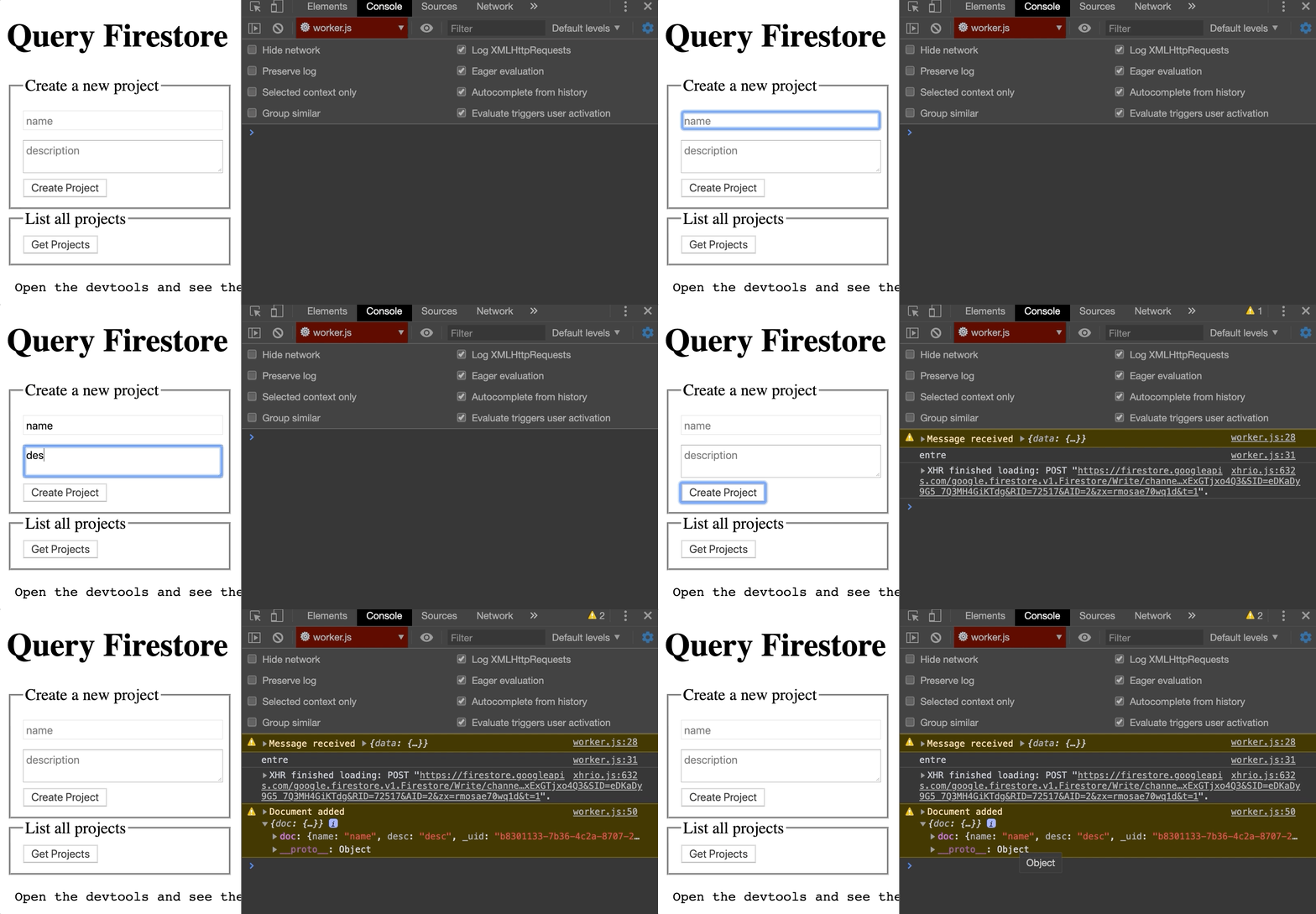
With firestore experimental:
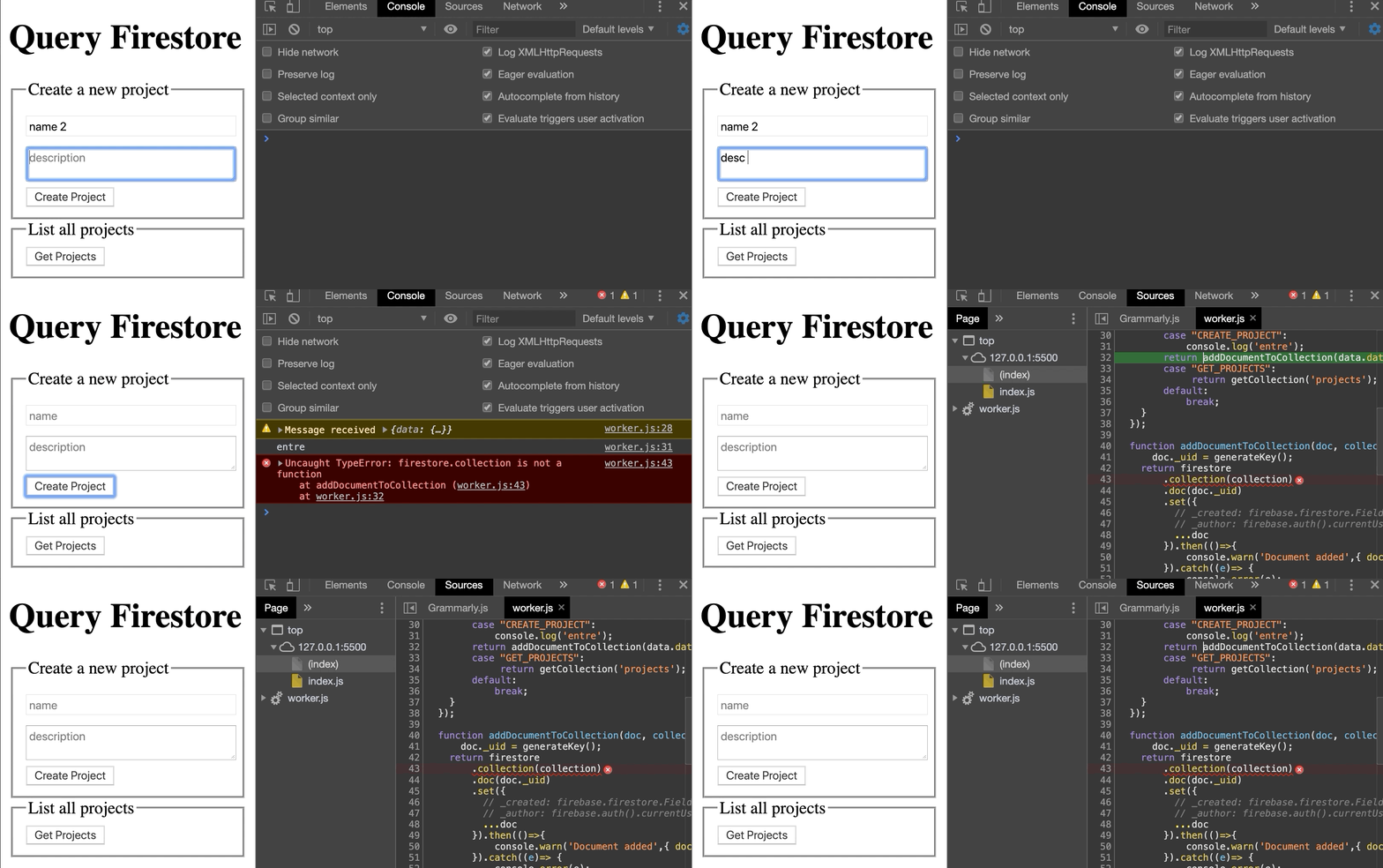
SebasG22
on 23 Oct 2019
@SebasG22 The easiest way is to install firebase via node modules and replace the firebase-app.js and firebase-firestore.js inside node_modules/firebase/, as @laurentpayot mentioned. The disadvantage to importing the firebase files as a script via importScript is that they are incompatible with the gstatic imports. If you want to only use importScripts, you will need the firebase-app.js files as well (.js and .js.map).
I've made a PR to your repo that allows it to work locally, but you'll have to manually copy in each additional firebase library that you wish to use (auth, storage, etc.). Hope this helps!
thebrianchen
on 24 Oct 2019
We are still evaluating if this functionality is useful and exactly how we expect folks to use it. So please provide us feedback based on whether it works for you and how you end up using it (in a web worker, shared worker, etc.) Thanks!
@thebrianchen After using Firestore offline persistence in web workers for a few weeks now I can tell it's working great. :+1:
To me one of the main appeals of Firestore is the offline persistence. _No offline persistence for workers was meaning no workers usage for me_. With this experimental feature enabled I could finally use a web worker and remove the Firebase downloading and parsing burden from the main thread and get nice performance metrics.
Now I also use Firebase Auth inside the worker. It means I can't use FirebaseUI anymore nor firebase.auth().signInWithPopup functions that expect to be run in the main thread. I have to send a message from the worker to the main thread to launch OAuth stuff and to return a message with a token to the worker to finish the authentication process. But this is a minor drawback. My app is an Elm app so I was kind of using messages already to use my database functions (via Elm's "ports"). All my Firebase stuff is now running in the worker, well separated from the main thread dedicated to UI only, as it should be.
I had no time yet to implement a workaround for the multiple tabs issue but clearly this is a minor bug compared to the benefits of web workers being finally usable thanks to the offline persistence feature.
Do you have more info about Firestore persistence in web workers being available in a "normal" version of Firestore? At least could you update the tarball from time to time to use a more up-to-date version of Firestore? Thanks!
laurentpayot
on 14 Nov 2019
Thank you for your feedback @laurentpayot! Hearing that Firestore and Firebase Auth work for you is very helpful to us in determining if this is something developers can use and benefit from.
I've updated the tarball link above and here with the latest web release. We still want to solicit more feedback from developers before officially adding the experimentalForce option, since this implementation does require a non-trivial amount of additional code to support persistence across multiple tabs and page refreshes.
In an effort to entice more people to try this out and share feedback, I've made a sample app that implements Firestore with persistence in web workers. It uses LocalStorage to ensure that only one web worker can enable persistence at a time, so additional tabs can fall back to persistence disabled (or surface a message to the user that another tab is open). Or if you can tolerate using a SharedWorker (even though there's limited browser support), there's an example of that as well, which allows for multi-tab scenarios since they all share the same instance of Firestore in the shared worker.
Please give it a shot and let me know if this fixes your multiple tabs issue!
thebrianchen
on 15 Nov 2019
@thebrianchen Awesome. Thank you so much for the tarball update. I will check your sample app out next week for sure and let you know about the multiple tabs issue.
laurentpayot
on 15 Nov 2019
@thebrianchen great sample app. As you noticed in the comments of isPersistenceAvailable():
if the page crashes, persistence could be permanently marked as unavailable in LocalStorage.
I had the same issue in my app so to be crash-proof I ended up setting the dedicated worker persistence on or off based on tab opening detection via localStorage events.
If you save the code below as an html file and open this file in multiple tabs, only the first tab opened should say persistence is available:
<html><script>
  const TAB_DETECTION_TIMEOUT = 50

  function isFirstTab() {
    return new Promise((resolve) => {
      // broadcast that a tab is opening  (before any addEventListener if first tab)
      localStorage.tabOpening = Date.now() // new value needed to trigger an event
      window.addEventListener('storage', e => {
        if (e.key == "tabOpening") localStorage.newTabDetected = Date.now()
        if (e.key == "newTabDetected") resolve(false)
      })
      setTimeout(() => resolve(true), TAB_DETECTION_TIMEOUT)
    })
  }

  (async () => {
    alert(`Persistence ${await isFirstTab() ? "" : "NOT "}available`)
  })()
</script></html>
I have no idea what exactly the timeout duration should be, but simply long enough for the events to be triggered from a preexisting tab.
What are your thoughts on this approach?
laurentpayot
on 18 Nov 2019
@laurentpayot That sounds like a viable option for your use case! However, Firestore doesn't do this because (1) it would add 50ms to the initialization time and (2) we aren't sure what timeout duration would be reliable given the potential throttling of background tabs.
In your case though, you could continue implementing this in your main application in combination with the current logic in the sample app. The onunload cleanup can track the active tab with persistence, and if and only if persistence is marked as unavailable, you can run your tab notification timeout trick. That way, if you only have one tab open, you won't have to wait for the timeout. Also, I'm not sure if 50ms is sufficient to complete all full cycle of read/writes. If you do end up using this approach though, please let us know how it works for you!
thebrianchen
on 24 Nov 2019
@thebrianchen
The onunload cleanup can track the active tab with persistence, and if and only if persistence is marked as unavailable, you can run your tab notification timeout trick.
Great idea, I will let you know how it works!
laurentpayot
on 25 Nov 2019
@thebrianchen I ended-up using the following code where tab detection is used only if persistence is taken. Tested after a kill -9 of chrome process to simulate a crash, works great too. Thanks for the idea!
const TAB_DETECTION_TIMEOUT = 100

let isOtherTab = new Promise(resolve => {
  localStorage.tabPing = Date.now()
  window.addEventListener('storage', e => {
    if (e.key == "tabPing") localStorage.tabPong = Date.now()
    if (e.key == "tabPong") resolve(true)
  })
  setTimeout(() => resolve(false), TAB_DETECTION_TIMEOUT)
})

// tab detection too in case of previous crash with unreleased persistence
let usingPersistence = !(!!localStorage.persistenceTaken && await isOtherTab)
if (usingPersistence) {
  localStorage.persistenceTaken = "1"
  dedicatedWorker.postMessage('enablePersistence')
  // releasing persistence when closing tab
  window.addEventListener("beforeunload", () => localStorage.persistenceTaken = "")
}
@thebrianchen sorry to bother you again but it looks like the firestore experimental build is not compatible with firebase 7.5.1 and higher (see #2420). Would you mind updating the build again?
laurentpayot
on 10 Dec 2019
@laurentpayot Updated. If you don't want to scroll up here is the link for 1.8.1.
thebrianchen
on 10 Dec 2019
Thanks @thebrianchen! It did fix #2420 :+1:
laurentpayot
on 11 Dec 2019
We're very interested in this for use in our Chrome Extension as extensions are moving away from a persistent background page model to service workers.
The constraints outlined in https://github.com/firebase/firebase-js-sdk/issues/983#issuecomment-536813965 are completely acceptable for this use case. There should only ever be one active service worker from the extension's origin so conflicts shouldn't happen.
As an aside, have you considered using web locks (https://developer.mozilla.org/en-US/docs/Web/API/Web_Locks_API) as an option where thy are available? It seems like it might solve this issue on Chrome.
 scottfr
on 18 Dec 2019
scottfr
on 18 Dec 2019
@scottfr That's exciting news! In your extension, does passing in experimentalForce: true allow persistence to work for you without any additional code, or do you have to add logic to release the persistence lock in edge cases?
Thanks for bringing up web locks -- we will definitely consider adding support once we determine the viability of experimentalForce.
thebrianchen
on 8 Jan 2020
Hi everyone. +1 interested in this feature.
Could folks impacted by this tell us a little bit about their use case / architecture (what kind of worker they're trying to use Firestore from and for what purpose exactly)?
In our case, we have an application that uses only Firestore and Auth, just to read and write user data, nothing fancy.
Even though, I'd just migrated the entirety of Firebase to a worker and the application has shown a significant increase in performance for its entry pages:
- avg -2.8s for
First CPU idle - avg -1.6s for
Speed Index - avg -1.1s for
Minimize main-thread work - avg -0.7s for
Reduce JavaScript execution time
I got those numbers running synthetic tests with Lighthouse server for the branch I'm currently working on.
Is there a way to ship the experimentalForce flag into the SDK so we can validate the data in production?
We also use the offline persistence (the app is a PWA) and would be ideal not to lose that.
 raphaelbs
on 5 Apr 2020
raphaelbs
on 5 Apr 2020
I will look into adding this as an experimental feature in the coming weeks. Thanks for sharing the feedback!
thebrianchen
on 9 Apr 2020
+1 for this as an experimental feature of the official Firestore releases. It's getting harder and harder to make custom builds work along with always changing Firebase products (modules location, types location, testing, etc.)
laurentpayot
on 16 Apr 2020
Case for this:
Worker Driven Design ~ 3:41 ~

Appreciate all the work Firebase is doing and I - as a development platform author of Runtime.dev am making it a first class citizen - Web worker support is paramount to data driven apps :)
Cheers,
-Tsavo
T-Knott-Mesh
on 18 Apr 2020
Im also using the trick of moving firebase-related logic to a service worker in order to have just 1 instance and 1 single connection to Firebase Realtime DB even when multiple app tabs are open, and Im keeping the worker alive via sending 10-seconds periodical empty messages. Now I was trying to implement Firestore and found a limitation in the service worker because this one doestn't support XMLHttpRequest (used for Firestore as mentioned before in the thread). There is a way to implement Fetch instead, or maybe a wrapper?
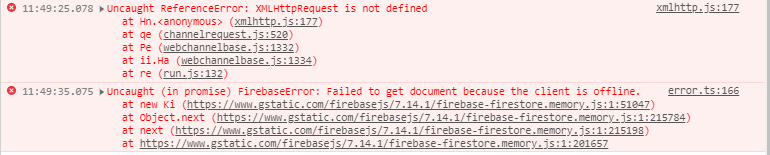
I got this error running a simple db.collection(..).doc(..).get() operation
Now i'm using Firebase 7.14.1 via importScripts
 marianopaulin02
on 19 Apr 2020
marianopaulin02
on 19 Apr 2020
So far the experimentalForceOwningTab option is working perfectly, thanks @thebrianchen for all the work! :+1:
laurentpayot
on 20 Jun 2020
Hey everyone! This experimental feature has been out for a few months now, and we're hoping to collect some usage feedback to see how this feature has been working for you to see if/how we should support this in the long term. In particular, how are you using experimentalForceOwningTab? Which workers are you using this with, and how much additional code are you writing to make Firestore requests? Thanks!
thebrianchen
on 12 Aug 2020
@thebrianchen It's been working great so far. I use dedicated workers, with this code to detect multi tab usage and disable persistence for new tabs.
laurentpayot
on 14 Aug 2020
Related issues
 larssn
·
51Comments
larssn
·
51Comments
 maheshkumar2150
·
87Comments
maheshkumar2150
·
87Comments
 Thaina
·
65Comments
Thaina
·
65Comments
 EpicButterz
·
153Comments
EpicButterz
·
153Comments
 Frou-HOS
·
47Comments
Frou-HOS
·
47Comments
Most helpful comment
I've been looking into enabling persistence for web workers by removing the LocalStorage requirement, and it could work with a few caveats.
Firestore implements a leasing mechanism in enabling persistence to ensure that multiple clients do not concurrently write to the underlying IndexedDB that powers it. This leasing mechanism relies on LocalStorage, since it allows Firestore to reliably record lease information even when browser tabs are closing. IndexedDB on its own can't reliably write as a tab is closing. When a client enables persistence, it must first obtain the primary lease, which prevents other clients from becoming the primary. Then, when the client closes, it marks the lease as available in LocalStorage, which allows the next client to become the primary. Consequently, without LocalStorage, once a client holding the lease terminates, no other client can takeover the lease until it expires (after 5 seconds). This creates two limitations:
synchronizeTabsis not supported.As a potential workaround, we're considering a
firestore.enablePersistence({experimentalForce: true})option, which will enable persistence for the client even if another client is already running with persistence enabled. We'll also change Firestore to allow operation even if LocalStorage is unavailable. With these changes you would have a few options for implementing web workers with persistence:If you do not require multiple Firestore clients, you can enable persistence with the
experimentalForceflag every time to forcefully transfer the lease to the newest client. However, Firestore clients currently assume that once they are given the lease, it cannot be taken away. This means that if a user opens your app in a new tab, the new tab will have persistence enabled, but Firestore will break in all other tabs with an error that the AsyncQueue has failed. If this use case is popular, we can look into adding additional logic to make it more developer-friendly.To use web workers, and have page refresh work, you will have to manage multiple tabs yourself, either via LocalStorage in the main browser, or via a shared worker. You must provide additional logic to check when it is appropriate for a tab to takeover the primary lease via
experimentalForce.If you do not want to manage tabs, you can run a single instance of Firestore in a Shared Worker. Since Shared Worker persists across browser tabs, you can enable persistence with
experimentalForce: trueeach time.Please try the experimental version by using
npm installwith the downloaded tarball (download UPDATE (2019/12/10): Uploaded new version that uses 1.8.1 instead of 1.7.0).We are still evaluating if this functionality is useful and exactly how we expect folks to use it. So please provide us feedback based on whether it works for you and how you end up using it (in a web worker, shared worker, etc.) Thanks!
SAMPLE APP that implements Firestore with persistence in web workers