Firebase-js-sdk: Although specifying packages i'm still receiving "It looks like you're using the development build of the Firebase JS SDK"
[REQUIRED] Describe your environment
Operating System version: macOs 10.13.4 and also when deployed to Firebase Hosting
Firebase SDK version: 5.0.3
Firebase Product: app, firestore, messaging (but also occurs when just implementing app)
[REQUIRED] Describe the problem
Receive browser console warning of
"It looks like you're using the development build of the Firebase JS SDK.
When deploying Firebase apps to production, it is advisable to only import
the individual SDK components you intend to use.
For the module builds, these are available in the following manner
(replace
npm install firebase
then in code:
import firebase from 'firebase/app'
import 'firebase/firestore'
import 'firebase/messaging'
It is part of a Vuejs project but that shouldn't affect anything.
Have also tried deleting node_modules folder and npm install again. Also tried npm installing the individual modules eg, npm install @firebase/app
all had same issue showing the console warning.
 devpascoe
All 29 comments
Hey there! I couldn't figure out what this issue is about, so I've labeled it for a human to triage. Hang tight.
 google-oss-bot
on 19 May 2018
google-oss-bot
on 19 May 2018
Hmmm this issue does not seem to follow the issue template. Make sure you provide all the required information.
google-oss-bot
on 19 May 2018
I'm having the same issue. I'm also using Firebase in a Vuejs project.
 mhuensch
on 20 May 2018
mhuensch
on 20 May 2018
Same here "firebase": "5.0.1" in a React bundled by webpack.
There is something wrong.
Documentation does not talk about:
import firebase from 'firebase/app';
import 'firebase/<PACKAGE>';
This is not super straight forward to guess that 🤨
 MacKentoch
on 21 May 2018
MacKentoch
on 21 May 2018
Hey there all appreciate the issue, but I still have no repro that I have been able to verify.
I tried the following and all worked as intended (i.e. no warning message):
Get Firebase from NPM
$ npm install firebase
Add Firebase Components to File
I did this 3 times:
Webpack 4
I created a file containing the following JS and included it in my app:
import firebase from 'firebase/app';
import 'firebase/app';
import 'firebase/firestore';

console.log(firebase);
I then compiled this file using webpack 4 (in production mode).
Webpack 3
I took the same file above and supplied a barebones webpack config that I then ran through webpack 3. The config is below:
const { resolve } = require('path');

module.exports = {
  entry: resolve(__dirname, 'src/index.js'),
  output: {
    path: resolve(__dirname, 'dist'),
    filename: 'main.js'
  }
};
Vue CLI
I then took a default Vue application and npm installed Firebase in the project. Added the lines from the sample file above to the main.js and compiled.
Results
In all cases, things worked as expected. No warning message, and minimal app size for what I included.
I would recommend looking through your applications to see where you are referencing firebase and see if you didn't accidentally include the big bundle. I'd suspect that is the case. If you can reproduce the issue in a small sample project send me a gist or a git repo I can look at to triage the error and we will get it fixed.
@MacKentoch we can definitely work on improving our documentation here. I will try and get something figured out to help ASAP.
 jshcrowthe
on 21 May 2018
jshcrowthe
on 21 May 2018
I can confirm that centralizing the calls to firebase and doing the following fixed my problem ...
import firebase from 'firebase/app'
import 'firebase/app'
import 'firebase/auth'
import 'firebase/firestore'
... so it was probably an errant import that wasn't updated.
mhuensch
on 22 May 2018
Thanks for prompting me to search through the project. Elsewhere in another file I was referencing firebase mega. Fixed up that reference and all good 👍
devpascoe
on 22 May 2018
@run00 and @devpascoe thanks for the due diligence here guys!
And best of all you just shaved off a bunch of JS weight for your users 👍 wins all around!
jshcrowthe
on 22 May 2018
Thank you @jshcrowthe !
Really appreciate your help and efforts (not easy task to make firebase clear it is such a huge library)!
MacKentoch
on 22 May 2018
Thanks you @jshcrowthe.
I'm use firebase for my vuejs projects, import firebase into main.js like this:
import firebase from 'firebase/app'
import 'firebase/<package>'
Always remember import firebase into your modules like this (IMPORTANT):
import firebase from 'firebase/app'
DON'T import like this:
import firebase from 'firebase'
DONE. Warning is gone!
 Jiangtaste
on 29 May 2018
Jiangtaste
on 29 May 2018
Hi folks! I know the issue is closed, I don't want to open it cause I am not really sure if I should. This is a really small example as a stackblitz to share with you the problem I am facing when importing messaging service. I am getting the warning "It looks like you're using the development build of the Firebase JS SDK...." - Any ideas? Thanks!
 alejandrocoding
on 26 Jun 2018
alejandrocoding
on 26 Jun 2018
Try this:
import firebase from 'firebase/app';
import 'firebase/firestore';
import 'firebase/message';
Use the firestore & message like this:
firestore:
firebase.firestore.xxxxx
message:
firebase.message.xxx
Jiangtaste
on 26 Jun 2018
Thanks @Jiangtaste but it seems that's not working for me. See the issues:
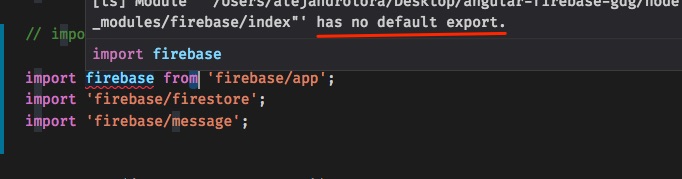

Using "firebase": "5.1.0" as in the stackblitz up here.

Any other ideas please?
alejandrocoding
on 26 Jun 2018
@ialex90 I took a look at your stackblitz and noticed just a couple things wrong: I corrected them here:
https://stackblitz.com/edit/angular-firebase-messaging-import-vamh9n?file=src/app/app.component.ts
Main issues were:
- You can't import firestore and messaging from the
firebase/apppackage. You can only get thefirebasenamespace. - It is
firebase/messagingnotfirebase/message
jshcrowthe
on 9 Jul 2018
Thanks for taking the time and help @jshcrowthe !!
alejandrocoding
on 9 Jul 2018
@ialex90 I have solved that error by this :
import * as firebase from 'firebase/app';
import 'firebase/firestore';
import 'firebase/messaging';
 idileepd
on 2 Sep 2018
idileepd
on 2 Sep 2018
I still get this message. I have my firebase initialization in one file like this:
import * as firebase from 'firebase/app';
import 'firebase/app'
import 'firebase/auth'
import 'firebase/firestore'

// Initialize Firebase
const firebaseConfig = {
    apiKey: "***",
    authDomain: "***",
    databaseURL: "***,"
    projectId: "***,"
    storageBucket: "***",
    messagingSenderId: "***"

};

firebase.initializeApp(firebaseConfig);

export default firebase
Then I import it into other files like this:
import firebase from '../../config/firebase';
What am I doing wrong?
 nickjuntilla
on 6 Oct 2018
nickjuntilla
on 6 Oct 2018
@NickChittle
1st
In the app.component
import * as firebase from 'firebase/app';

// Initialize Firebase
const firebaseConfig = {
    apiKey: "***",
    authDomain: "***",
    databaseURL: "***,"
    projectId: "***,"
    storageBucket: "***",
    messagingSenderId: "***"
};
firebase.initializeApp(firebaseConfig);
2nd
In the other files or services you import the 'firebase/app', and the other packages you need, like this :
import * as firebase from 'firebase/app';
import 'firebase/auth';
import 'firebase/firestore';
3rd
You use it like this for the authentication, Ex
newUser(email: string, password: string) {
  return new Promise((resolve, reject) => {
    firebase.auth().createUserWithEmailAndPassword(email, password)
      .then(() => resolve())
      .catch(err => reject(console.log(err.message)));
  });
}
I hope it help :smile:
 belachkar
on 20 Oct 2018
belachkar
on 20 Oct 2018
@belachkar This still does not work. I did exactly as you said and looked for any instance of importing firebase instead of firebase/app. I always use firebase/app and auth and firestore after that. I still get the message.
It looks like you're using the development build of the Firebase JS SDK.
When deploying Firebase apps to production, it is advisable to only import
the individual SDK components you intend to use.

For the CDN builds, these are available in the following manner
(replace <PACKAGE> with the name of a component - i.e. auth, database, etc):

https://www.gstatic.com/firebasejs/5.0.0/firebase-<PACKAGE>.js

(anonymous) @ firebase.js:1
(anonymous) @ firebase.js:1
(anonymous) @ firebase.js:1
Does this have something to do with using npm install firebase command? Do we npm install the packages separately?
nickjuntilla
on 29 Oct 2018
DON'T:
import * as firebase from 'firebase/app"
'*' means import everything from 'firebase/app', that's why you got the warning "It looks like you're using the development balabala..."
JUST IMPORT 'firebase':
import firebase from 'firebase/app'
I will show you my project's struct with firebase:
- In
/src/firebase/firebase.js, initialize firebase and export firebase package which we want to using in our App.
// 1. modifiy the config with your firebase project's config (includs prodConfig & devCofnig)

// IMPORTANT just import firebase
import firebase from "firebase/app";

// import package
import "firebase/auth";
import "firebase/firestore";

const prodConfig = {
  apiKey: "YOUR_API_KEY",
  authDomain: "YOUR_APP_NAME.firebaseapp.com",
  databaseURL: "https://YOUR_APP_NAME.firebaseio.com",
  projectId: "YOUR_APP_NAME",
  storageBucket: "YOUR_APP_NAME.appspot.com",
  messagingSenderId: "YOUR_MESSAGE_SENDER_ID"
};

const devConfig = {
  apiKey: "YOUR_API_KEY",
  authDomain: "YOUR_APP_NAME.firebaseapp.com",
  databaseURL: "https://YOUR_APP_NAME.firebaseio.com",
  projectId: "YOUR_APP_NAME",
  storageBucket: "YOUR_APP_NAME.appspot.com",
  messagingSenderId: "YOUR_MESSAGE_SENDER_ID"
};

const config = process.env.NODE_ENV === "production" ? prodConfig : devConfig;

if (!firebase.apps.length) {
  firebase.initializeApp(config);
}

const auth = firebase.auth();
const db = firebase.firestore();
const settings = { /* your settings... */ timestampsInSnapshots: true };
db.settings(settings);

export { firebase, auth, db };
- In
/src/firebase/auth.js, export your own functions instead, should not export firebase's package & functions direct. Keep you code more security.
import { firebase, auth } from "./firebase";

// Sign up with email
export const doCreateUserWithEmailAndPassword = (email, password) =>
  auth.createUserWithEmailAndPassword(email, password);

// Sign in with email
export const doSignInWithEmailAndPassword = (email, password) =>
  auth.signInWithEmailAndPassword(email, password);

// Sign out
export const doSignOut = () => auth.signOut();
- In
/src/firebase/index.js. This is more conversation for other modules to import your own functions.
import { firebase } from "./firebase";
import * as auth from "./auth";

export { firebase, auth };
- use your own auth functions In
/src/components/Auth.js
// import you own package from '/src/firebase/index.js'
import { firebase, auth } from '../firebase'

// use firebase, which imported from 'firebase/app'
firebase.auth.xxxxxx
// use auth
auth.doCreateUserWithEmailAndPassword(email, password)
@Jiangtaste This is still not working for me. Is there some other guide somewhere about how to do this? It doesn't make sent to do
import "firebase/auth";
Why would you do that? Shouldn't it be
import {auth} from "firebase/auth";
or something like that? Why can you import firebase/auth without specifying what you are importing. Why is it that importing "firebase/auth" allows firebase.auth to be used?
This is still not working.
nickjuntilla
on 30 Oct 2018
You may check some samples from firebase team.
https://firebase.google.com/docs/samples/
https://github.com/firebase/friendlypix-web/blob/master/src/FirebaseHelper.js
Jiangtaste
on 30 Oct 2018
It's still not working. This is my firebase initialization file:
import firebase from 'firebase/app';
import 'firebase/auth';
import 'firebase/database';
import 'firebase/storage';
// Initialize Firebase
const firebaseConfig = {
    apiKey: "***",
    authDomain: "***,"
    databaseURL: "***,"
    projectId: "***,"
    storageBucket: "*,**"
    messagingSenderId: "***"

};

firebase.initializeApp(firebaseConfig);

export default firebase
Then when I import that into another file and us it then it looks like this:
import firebase from '../config/firebase';

  loadMessages(callback) {
    this.messagesRef = firebase.database().ref('messages');
    this.messagesRef.off();
    const onReceive = (data) => {
      const message = data.val();
      callback({
        _id: data.key,
        text: message.text,
        createdAt: new Date(message.createdAt),
        user: {
          _id: message.user._id,
          name: message.user.name,
        },
      });
    };
    this.messagesRef.limitToLast(20).on('child_added', onReceive);
  }
I'm using "firebase": "^5.5.6",
nickjuntilla
on 30 Oct 2018
Hey @nickjuntilla, try configuring your code like so:
import firebase from 'firebase/app';
import 'firebase/auth';
import 'firebase/database';
import 'firebase/storage';

// Initialize Firebase
const firebaseConfig = {
    apiKey: "***",
    authDomain: "***,"
    databaseURL: "***,"
    projectId: "***,"
    storageBucket: "*,**"
    messagingSenderId: "***"

};

const firebaseApp = firebase.initializeApp(firebaseConfig);
firebaseApp.firestore().settings({ timestampsInSnapshots: true });

export default firebaseApp.firestore();
Add the firebaseApp.firestore().settings({ timestampsInSnapshots: true }) as shown, and see what happens.
 elnobun
on 16 Nov 2018
elnobun
on 16 Nov 2018
Try to add this line below;
<script src="https://www.gstatic.com/firebasejs/5.5.8/firebase-app.js"></script>
It works on me successfully
 engineerchef
on 19 Nov 2018
engineerchef
on 19 Nov 2018
hey guys,
i'm deploying my angular 6 app on heroku and in which i'm also using firebase auth. service.I am deploying this after installing universal-toolkit for making my angular app SEO freindly. But i'm getting this warning again and again and nothing worked for me till now.


 ashutoshsenger
on 20 Dec 2018
ashutoshsenger
on 20 Dec 2018
For those who still struggle
import {auth, User} from 'firebase/app';
ETC
 jimmykane
on 26 Dec 2018
jimmykane
on 26 Dec 2018
with Firestore I'm using it this way
import { apps, initializeApp, firestore } from "firebase/app";
import "firebase/app";
import "firebase/firestore";

(function() {
  const config = {
    apiKey: "xxxxxxxxxxxxxxx",
    authDomain: "xxxxxxxxxxxxx",
    databaseURL: "xxxxxxxxxxx",
    projectId: "xxxxxxxxx",
    storageBucket: "xxxxxxxxxx",
    messagingSenderId: "xxxxxxxxxxx"
  };

  if (!apps.length) {
    initializeApp(config);
  }
})();

export default firestore();
 machester4
on 4 Mar 2019
machester4
on 4 Mar 2019
I'am the only one that i'am doing this?
import {firestore} from 'firebase/app';
 Alessandroinfo
on 16 Jul 2019
Alessandroinfo
on 16 Jul 2019
Related issues
 maheshkumar2150
·
87Comments
maheshkumar2150
·
87Comments
 Thaina
·
65Comments
Thaina
·
65Comments
 anthony-elhaddad
·
90Comments
anthony-elhaddad
·
90Comments
 merlinnot
·
56Comments
merlinnot
·
56Comments
 Hollerweger
·
99Comments
Hollerweger
·
99Comments
Most helpful comment
I can confirm that centralizing the calls to firebase and doing the following fixed my problem ...
import firebase from 'firebase/app'
import 'firebase/app'
import 'firebase/auth'
import 'firebase/firestore'
... so it was probably an errant import that wasn't updated.