Firebase-ios-sdk: Xcode 12 GM Archive Error SPM - unexpected Mach-O header code: 0x72613c21
[REQUIRED] Step 1: Describe your environment
- Xcode version: Xcode 12 GM (12A7208)
- Firebase SDK version: 6.32-spm-beta
- Firebase Component: Analytics
- Component version: 6.32
- Installation method: Swift Package Manager
[REQUIRED] Step 2: Describe the problem
When trying to upload an archive to App Store connect Xcode 12 GM gives me the following error:
Found an unexpected Mach-O header code: 0x72613c21
If I change my build configuration to development the app builds and runs fine but if I switch to a release configuration and try to run the app on the latest iOS 14 iPhone 11 Pro simulator I get the following error:
Undefined symbol: _OBJC_CLASS_$_FIRAnalytics
and the following warnings:
missing required architecture arm64 in file /Users/neil/Library/Developer/Xcode/DerivedData/Kantinebaas-gnwjztsimxavkscwhhoheneylhus/Build/Products/Alpha-iphonesimulator/FirebaseAnalytics.framework/FirebaseAnalytics
missing required architecture arm64 in file /Users/neil/Library/Developer/Xcode/DerivedData/Kantinebaas-gnwjztsimxavkscwhhoheneylhus/Build/Products/Alpha-iphonesimulator/FIRAnalyticsConnector.framework/FIRAnalyticsConnector
missing required architecture arm64 in file /Users/neil/Library/Developer/Xcode/DerivedData/Kantinebaas-gnwjztsimxavkscwhhoheneylhus/Build/Products/Alpha-iphonesimulator/GoogleAppMeasurement.framework/GoogleAppMeasurement (2 slices)
Steps to reproduce:
Archive and try to submit project with a release build configuration using Xcode 12 GM with Firebase analytics added to the project using SPM.
 Neilfau
All 146 comments
I couldn't figure out how to label this issue, so I've labeled it for a human to triage. Hang tight.
 google-oss-bot
on 16 Sep 2020
google-oss-bot
on 16 Sep 2020
Thanks for the report - I'll look into this right away. To confirm, did you add the -ObjC linker option for Analytics?
 ryanwilson
on 16 Sep 2020
ryanwilson
on 16 Sep 2020
@ryanwilson yeah it was the first thing I checked! I went back to the Xcode 12 beta 6 and had no issues at all. Something that might be of note is apple released a new version of the Xcode 12 GM with build number of (12A7209). Im currently downloading it and I will try with that version also as it could of been a Xcode bug.
Neilfau
on 16 Sep 2020
Yeah I'm downloading it as well, will report back when I can repro or not. Currently trying on 12A7208 but it's currently hanging when trying to check out grpc.. 😬 EDIT: it resolved, just took a while.
ryanwilson
on 16 Sep 2020
I reproduced the issue, still unzipping the new GM seed and will test it there but I'll see if I can find a workaround for the first GM seed.
ryanwilson
on 16 Sep 2020
Initial thought: if it's packaging for release, it may be trying to include all the architectures to run on device and it's not expecting to be run on the simulator? That's why it's searching for the arm64 architecture even though it's running on an x86 simulator. I tried running on device and get a different issue though, will try the new Xcode version.
ryanwilson
on 16 Sep 2020
Yeah I think its something to do with that also.
Neilfau
on 16 Sep 2020
I can confirm I get the same issue with the new seed also.
Neilfau
on 16 Sep 2020
Same re: running with Release. I am able to Archive though, selecting "Any iOS Device (arm64)" and hitting "Product -> Archive" in the menu.
Based on the original issue - you're unable to archive right?
ryanwilson
on 16 Sep 2020
I can archive its when I try to upload to the App Store I get the Found an unexpected Mach-O header code: 0x72613c21 error. The other error was when I tried to run it on a simulator.
Neilfau
on 16 Sep 2020
Yeah, so right now the firebase framework artifacts are being copied into the /Frameworks folder of the ipa and are embedded. The frameworks themselves are static frameworks.... If you delete them from the xcarchive manually, everything works as expected. I'm not sure what's running behind the scenes to trigger this embedding phase though, but it needs to be removed.
 ThePragmaticArt
on 16 Sep 2020
ThePragmaticArt
on 16 Sep 2020
I can archive its when I try to upload to the App Store I get the
Found an unexpected Mach-O header code: 0x72613c21error. The other error was when I tried to run it on a simulator.
This is due to a static framework being embedded within the /Frameworks folder of the archive.
ThePragmaticArt
on 16 Sep 2020
Thanks @ThePragmaticArt for finding that! I'm wondering if that's an Xcode bug or that's an artifact based on how we set up our Package.swift manifest. I'll see about reproducing with the upload case and filing some Feedback about it - especially since binary packages are new in SwiftPM.
ryanwilson
on 16 Sep 2020
Thanks @ThePragmaticArt for finding that! I'm wondering if that's an Xcode bug or that's an artifact based on how we set up our
Package.swiftmanifest. I'll see about reproducing with the upload case and filing some Feedback about it - especially since binary packages are new in SwiftPM.
Mach-O universal binary with 2 architectures: [i386:current ar archive random library] [x86_64:current ar archive random library]
FirebaseAnalytics (for architecture i386): current ar archive random library
FirebaseAnalytics (for architecture x86_64): current ar archive random library
It seems to have to do with the xcframework bundles included. That's at least the only lead I can see. Actual root cause, I'm not entirely sure. It does seem to be those 3 artifacts though.
ThePragmaticArt
on 16 Sep 2020
Those are in fact the only binary frameworks that we offer - all the rest are source based. It could be due to packaging of the XCFrameworks since they're manually generated from regular .frameworks (we hope to be changing over to build XCFrameworks directly very soon), or it could be an issue with binary frameworks in general on the Xcode side.
ryanwilson
on 16 Sep 2020
@ryanwilson I believe Realm has some embedded xcframework artifacts as well but do not have this issue:
https://github.com/realm/realm-cocoa.git
https://github.com/realm/realm-cocoa/tree/master/core
Not sure if that helps as a reference point for something that might be similar.
ThePragmaticArt
on 16 Sep 2020
@ThePragmaticArt that must be outside of Swift Package Manager though - see here for where we define binaryTargets: https://github.com/firebase/firebase-ios-sdk/blob/cd844903abed3c4e73210af9b258808d21f455fe/Package.swift#L225-L239
This was introduced in swift-tools-version:5.3 and Realm is still on 5.0 and doesn't have any binaryTargets in their Package.swift file. We ship xcframeworks for our zip file and haven't had this issue, so I assume it's specific to SwiftPM's integration of binaries.
ryanwilson
on 16 Sep 2020
@ryanwilson interesting. I don't have anything separate I can test. I might be able to spin up something later today just to play around and see. Not sure if there are any quick samples that are already out there that could validate the behavior. It would be disappointing to hear there's a bug in the GM that requires a script to clean this up.
ThePragmaticArt
on 16 Sep 2020
It looks like this is related to https://github.com/PSPDFKit-labs/radar.apple.com/commit/9b6c842d0d00465f20a82252df3735e4396beb06 (FB7785691). This was an issue opened stating that the archive should include those frameworks, fixed in the GM, and now we're running into an issue for Firebase.
@steipete - are you able to share how the XCFrameworks are generated and anything that may be going on here? Perhaps static vs dynamic frameworks? (Also, thanks for having that repo and the context - we would have been blind to it otherwise).
ryanwilson
on 16 Sep 2020
Here's an yet unreleased blog post how we explain our SwiftPM integration:
https://pspdfkit.com/blog/2020/binary-frameworks-as-swift-packages/ - will become a public URL in a few days but I'm ok with sharing it early here if it helps.
We use dynamic frameworks only, not statics, and the above radar has been fixed in the GM. Let me know if that helps, happy to share more to get Firebase across to SwiftPM! I also know the SwiftPM maintainer if we need further help.
 steipete
on 16 Sep 2020
steipete
on 16 Sep 2020
Thanks @steipete, helpful as always! :D That must be the issue, we package FrameworkAnalytics as a static framework. Will have to do some digging and chat offline with @paulb777 about how to proceed, but at least we have a workaround right now.
Workaround:
Yeah, so right now the firebase framework artifacts are being copied into the
/Frameworksfolder of the ipa and are embedded. The frameworks themselves are static frameworks.... If you delete them from the xcarchive manually, everything works as expected.
ryanwilson
on 16 Sep 2020
Keep in mind that there is another issue cropping up on Xcode 12 GM when deploying to device Code: -402620388 No code signature found:
https://forums.swift.org/t/swiftpm-binarytarget-dependency-and-code-signing/38953
 sjmueller
on 17 Sep 2020
sjmueller
on 17 Sep 2020
As a temporary workaround for building add Post Action to your Scheme with the following content:
rm -rf "${TARGET_BUILD_DIR}/${TARGET_NAME}.app/Frameworks/"*.framework
rm -rf "${TARGET_BUILD_DIR}/${TARGET_NAME}.app/Plugins/"*.framework
 din
on 17 Sep 2020
din
on 17 Sep 2020
@din that workaround did not work for me :(
 kylebrowning
on 17 Sep 2020
kylebrowning
on 17 Sep 2020
It looks like a workaround is excluding arm64 in the Build Settings. See https://stackoverflow.com/a/63622570
 paulb777
on 17 Sep 2020
paulb777
on 17 Sep 2020
@paulb777 that doesn't work either, can't build to device.
kylebrowning
on 17 Sep 2020
@kylebrowning Looks like I was conflating with another issue. Any change in behavior with @din's suggestion?
paulb777
on 17 Sep 2020
@paulb777 @din's workaround did not work out either.
Just to be clear:
- building for simulator works
- installing on simulator works
- building for device works
- installing to device fails
- archiving works
- uploading archive fails.
Things I've tried for each new process.
- Delete Derived data
- Delete app from Phone
- Restart Phone
- Restart Xcode
- Din's suggestion for post action build script on the build section in my scheme
- Din's suggestion for post action build script on the run section in my scheme
- Excluding arm64
kylebrowning
on 17 Sep 2020
Thanks @kylebrowning. I reproduced and reported the Xcode regression at https://feedbackassistant.apple.com/feedback/8705974 and will continue to investigate workarounds.
paulb777
on 17 Sep 2020
I was able to get a variation of @din's suggested workaround to work for me:
Add the following to the Scheme's Build Post-Action:
rm -rf "${TARGET_BUILD_DIR}/${TARGET_NAME}.app/Frameworks/FirebaseAnalytics.framework"
rm -rf "${TARGET_BUILD_DIR}/${TARGET_NAME}.app/Frameworks/GoogleAppMeasurement.framework"
rm -rf "${TARGET_BUILD_DIR}/${TARGET_NAME}.app/Frameworks/FIRAnalyticsConnector.framework"
Make sure to select Provide build settings from the app.

paulb777
on 17 Sep 2020
@paulb777 Thanks for that, im still getting the error, so maybe teach a friend to fish?
how did you determine which frameworks you should remove? I might have others being affected by this that are unrelated to Firebase so I wan't to either rule those out, or try the same work around.
kylebrowning
on 17 Sep 2020
I specifically identified the Firebase ones, since it would be problematic to remove dynamic frameworks. You could remove all of them to start? Unfortunately, I wasn't able to find a way to log Scheme Post-Actions. It wasn't working for me until I selected the "Provide build settings ...."
paulb777
on 17 Sep 2020
@paulb777 Okay that worked for me. However my other third party library(Kochava) fails for the same reasons, and following the same solution, I get a bigger error, probably because its dynamic and not static. I know not something you're required to fix, but Im going to link them to this issue for posterity.
dyld: Library not loaded: @rpath/KochavaTracker.framework/KochavaTracker
Referenced from: /private/var/containers/Bundle/Application/5A24965B-7D21-4065-8717-BB725CB4D2E8/theathletic-ios.app/theathletic-ios
Reason: image not found
dyld: launch, loading dependent libraries
DYLD_LIBRARY_PATH=/usr/lib/system/introspection
DYLD_PRINT_STATISTICS=1
DYLD_INSERT_LIBRARIES=/Developer/usr/lib/libBacktraceRecording.dylib:/Developer/usr/lib/libMainThreadChecker.dylib:/Developer/Library/PrivateFrameworks/DTDDISupport.framework/libViewDebuggerSupport.dylib
DYLD_PRINT_TO_STDERR=YES
(lldb)
@kylebrowning See the discussion at https://forums.swift.org/t/swiftpm-binarytarget-dependency-and-code-signing/38953 about dynamic frameworks. We probably can't help too much here on that part of it since Firebase only builds static binary frameworks.
paulb777
on 17 Sep 2020
Thanks @paulb777 I was already there for a bit. Haha. I'll jump back over there and post an update.
kylebrowning
on 17 Sep 2020
I had to adapt the workaround for my unique setup. I have a separate target that contains all of my dependencies, so I had to change the path to go into the nested Frameworks directory within that other target. Then on top of that, because the other target's Frameworks was empty, I needed to change the script to delete the entire Frameworks directory instead of the individual frameworks within:
rm -rf "${TARGET_BUILD_DIR}/${TARGET_NAME}.app/Frameworks/OtherTarget.framework/Frameworks"
 jchitel
on 23 Sep 2020
jchitel
on 23 Sep 2020
I was able to get a variation of @din's suggested workaround to work for me:
Add the following to the Scheme's Build Post-Action:
rm -rf "${TARGET_BUILD_DIR}/${TARGET_NAME}.app/Frameworks/FirebaseAnalytics.framework"
rm -rf "${TARGET_BUILD_DIR}/${TARGET_NAME}.app/Frameworks/GoogleAppMeasurement.framework"
rm -rf "${TARGET_BUILD_DIR}/${TARGET_NAME}.app/Frameworks/FIRAnalyticsConnector.framework"
Make sure to select Provide build settings from the app.
I just wanted to chime in and say that this workaround is unfortunately not working for me. I'm in the exact same boat that @kylebrowning was at a few days ago, with the following working/not working:
- building for simulator works
- installing on simulator works
- building for device works
- installing to device fails (no code signature found)
- archiving works
- uploading archive fails (found an unexpected Mach-O header)
As for my setup, I have a few static (non-Firebase) frameworks in a /Frameworks folder, and Firebase Analytics and Crashlytics imported via Swift Package Manager. I'll keep a steady eye on this issue while I try to solve it.
 antonmartinsson
on 23 Sep 2020
antonmartinsson
on 23 Sep 2020
installing to device fails (no code signature found)
@antonmartinsson check that your TARGET_NAME is the same as a product that you try to deploy to device. In my case, I had JuiceFit target but Juice.app and that fix would not work until I've fixed my naming
 SergeyPetrachkov
on 23 Sep 2020
SergeyPetrachkov
on 23 Sep 2020
At this time SPM way seems to take much longer to fetch and resolve the dependencies graph. At least longer than with cocoapods. Even if we forget about the fact that it has some things to fix at this point, will it always take so long?
SergeyPetrachkov
on 23 Sep 2020
@antonmartinsson check that your TARGET_NAME is the same as a product that you try to deploy to device. In my case, I had JuiceFit target but Juice.app and that fix would not work until I've fixed my naming
@SergeyPetrachkov That did it! My target name was somewhat different from the app name, and switching the target name to the actual app name solved it. Thank you so much!
antonmartinsson
on 23 Sep 2020
Changing TARGET_NAME to PRODUCT_NAME worked splendidly for me. I guess it might not work for everyone depending on your project-settings, but if I'm not mistaking it is the Xcode default.
rm -rf "${TARGET_BUILD_DIR}/${PRODUCT_NAME}.app/Frameworks/FirebaseAnalytics.framework"
rm -rf "${TARGET_BUILD_DIR}/${PRODUCT_NAME}.app/Frameworks/GoogleAppMeasurement.framework"
rm -rf "${TARGET_BUILD_DIR}/${PRODUCT_NAME}.app/Frameworks/FIRAnalyticsConnector.framework"
 tomasgreen
on 23 Sep 2020
tomasgreen
on 23 Sep 2020
So I can build to my device now, but I still have the mach errors when archiving.

kylebrowning
on 23 Sep 2020
@kylebrowning same here, mate. Had to rollback to cocoapods for now :(
SergeyPetrachkov
on 23 Sep 2020
I'm also currently encountering this and need to rollback to Cocoapods for the time being. Please ping me if I can help in debugging this in some way.
FWIW The issue is happening also with Xcode 12.2 beta (12B5018i).
 sampsakuronen
on 24 Sep 2020
sampsakuronen
on 24 Sep 2020
At this time SPM way seems to take much longer to fetch and resolve the dependencies graph. At least longer than with cocoapods. Even if we forget about the fact that it has some things to fix at this point, will it always take so long?
This is an opinionated statement that probably shouldn't be here. Without cache, SPM is drastically faster than Cocoapods and avoids many of the clashing cache issues and project config issues Pods have. Pods have to download that insane Spec repo on top of everything else...
ThePragmaticArt
on 24 Sep 2020
This is an opinionated statement that probably shouldn't be here.
This statement is only relevant to this particular thread and this particular sdk transition from cocoapods to spm. And this happens to be related to https://github.com/firebase/firebase-ios-sdk/issues/6532
SergeyPetrachkov
on 24 Sep 2020
This is an opinionated statement that probably shouldn't be here.
This statement is only relevant to this particular thread and this particular sdk transition from cocoapods to spm. And this happens to be related to https://github.com/firebase/firebase-ios-sdk/issues/6532
Ah, the verbiage made it sound like an attack on the core toolsets (SPM & Cocoapods) rather the handlings of the actual libraries (Firebase + Dependencies). It's always helpful to reference or add clear and concise information as this is what can lead to an answer or conclusive response.
ThePragmaticArt
on 24 Sep 2020
@ThePragmaticArt Sorry mate. Didn't mean to insult anyone here. I'm actually a huge fan of SPM and promote it in local dev communities here in Russia. So, no hard feelings.
SergeyPetrachkov
on 24 Sep 2020
@paulb777 Do we have an update on how this issue can be resolved? The post action build scripts no longer work anymore so it's impossible to archive the project now. Any other possible work arounds?
Neilfau
on 25 Sep 2020
@Neifau I haven't seen an example where the post-action workaround doesn't work once it is confirmed to remove all static frameworks from the app bundle.
Since this is an Xcode bug, I think the only other options are to go back to Xcode 12 beta 6 or wait for a fix in an upcoming Xcode release.
paulb777
on 25 Sep 2020
The post build script works for getting the build onto a device. It does seem to archive but when attempting to upload to Apple it's the issue marked at the top of this ticket.
kylebrowning
on 25 Sep 2020
The post script doesn't even work to run on my device anymore. I'm not aware of any other static frameworks being added to my project it seemed to stopped working after the latest Xcode update. What's the easiest way to find the static frameworks in the project?
Neilfau
on 25 Sep 2020
"Pods have to download that insane Spec repo on top of everything else..." stupid statement with cocoapods cdn
 jafara
on 27 Sep 2020
jafara
on 27 Sep 2020
The workaround suggested by @paulb777 worked for me, using Xcode Version 12.0 (12A7208). Thank you 💯
 dchakarov
on 27 Sep 2020
dchakarov
on 27 Sep 2020
"Pods have to download that insane Spec repo on top of everything else..." stupid statement with cocoapods cdn
Not that this is an appropriate conversation in this context, but a CDN doesn't change the fact that you're downloading over a gig of data. For most automation setups involving proper configurations (VMs spun up for single one offs with no cache), this is a heavy hit on time setting up a fresh copy of the project and overall overhead on the HDD/SSD among other things and can take around 5-10 minutes per run. It's extraordinarily inefficient and slow especially for variable environments and network speeds. CDN doesn't change that....
ThePragmaticArt
on 27 Sep 2020
Does anyone have the script working with Xcode Version 12.0.1 (12A7300)?
Neilfau
on 5 Oct 2020
Does anyone have the script working with Xcode Version 12.0.1 (12A7300)?
You mean the Build Post-Action that @paulb777 suggested? Yep, that's working fine on Xcode 12.0.1 (12A7300) for me.
antonmartinsson
on 5 Oct 2020
Ok thanks.. I will check the script is correct then because it keeps failing in another project I have setup.
Neilfau
on 5 Oct 2020
@paulb777 the bug report link that you shared is not working for me - "Feedback Not Found"
https://feedbackassistant.apple.com/feedback/8705974
This is because the report is non-public, or its been closed by Apple? Do we have any indication from Apple if this will be patched for the next Xcode release? Could you kindly update us with any correspondence from Apple? Thanks.
 jamiehunt
on 6 Oct 2020
jamiehunt
on 6 Oct 2020
@jamiehunt Only acknowledgement that it is an issue so far.
paulb777
on 6 Oct 2020
As stated the workarounds mentioned here still produce the same error as detailed in #6676 @paulb777
 RealTechyGod
on 6 Oct 2020
RealTechyGod
on 6 Oct 2020
also since CocoaPods no longer works on Mac please prioritize making this work with an officially maintained solution!
RealTechyGod
on 6 Oct 2020
We still fully support CocoaPods on Mac. If you have an issue with CocoaPods and Firebase, please open an issue describing how to reproduce.
The Firebase SwiftPM distribution is supported as documented at beta. This particular issue is an Xcode 12 issue acknowledged by Apple that we can't do a lot on the Firebase side besides discuss workarounds above like using one of the later Xcode 12 betas or removing static libraries from the built bundle.
paulb777
on 6 Oct 2020
Cocoapods will not install on the Mac beta I'm sick of wasting my time on something that wants me to downgrade software or OS to use @paulb777
The best option is dropping support for Cocoapods as it's an unofficial backend thats dying (dead) or developing a separate fully functional version for Swift packages
RealTechyGod
on 6 Oct 2020
the fact Firebase can't create a working product when Parse can means I'm dropping Firebase I'm tired of fighting with code and waisting my time when it's clear supporting standards isn't a priority
RealTechyGod
on 6 Oct 2020
Hey @RealTechyGod,
We support both CocoaPods and Swift Package Manager on the most recent non-beta version of macOS. macOS 11 beta may have some compatibility issues, though from what I understand CocoaPods still works for most users and based on the issue you filed on the CocoaPods repository you may need to adjust your local Ruby environment in order to get it to work. You may be able to find some relevant materials for fixing your local Ruby environment on StackOverflow.
While we appreciate your classification of dead vs not-dead dependency managers, it's not useful for us to collapse dependency manager usage into a binary state, since a dependency manager with a relatively small market share may still be used by enough developers to warrant support.
I'll be hiding some of these comments since they've gone off-topic from the original issue, but their contents will still be accessible. Thanks for your feedback!
 morganchen12
on 6 Oct 2020
morganchen12
on 6 Oct 2020
No problem @morganchen12 thanks for the heads up and explanation
RealTechyGod
on 7 Oct 2020
Probably worth extending @paulb777s answer to also remove these anomalies from the Plugins directory?
 joshuapoq
on 8 Oct 2020
joshuapoq
on 8 Oct 2020
The answer posted by @paulb777 initially worked for me. But after I added a widget extension to my app, I started getting the same error again when uploading to the app store.
After digging into the .xcarchive files of the successfully uploaded and the failed uploads, it seems that XCode adds a new PlugIns directory to the archive if you add a widget with the same Firebase frameworks in that directory, so I had to remove the Firebase frameworks from the PlugIns directory in addition to Frameworks.
There might be other reasons the PlugIns directory shows up in your archive.
So here's my post-script:
rm -rf "${TARGET_BUILD_DIR}/${TARGET_NAME}.app/Frameworks/FirebaseAnalytics.framework"
rm -rf "${TARGET_BUILD_DIR}/${TARGET_NAME}.app/Frameworks/GoogleAppMeasurement.framework"
rm -rf "${TARGET_BUILD_DIR}/${TARGET_NAME}.app/Frameworks/FIRAnalyticsConnector.framework"
rm -rf "${TARGET_BUILD_DIR}/${TARGET_NAME}.app/PlugIns/FirebaseAnalytics.framework"
rm -rf "${TARGET_BUILD_DIR}/${TARGET_NAME}.app/PlugIns/GoogleAppMeasurement.framework"
rm -rf "${TARGET_BUILD_DIR}/${TARGET_NAME}.app/PlugIns/FIRAnalyticsConnector.framework"
Now it uploads to the App Store! Hopefully this helps.
 moesalih
on 13 Oct 2020
moesalih
on 13 Oct 2020
Hey @moesalih, thank you for the help. Just to verify, the post-script runs on the Archive scheme (on Release), right? (If my need is to upload it to the store).
 SocialKitLtd
on 15 Oct 2020
SocialKitLtd
on 15 Oct 2020
It's probably better to use PRODUCT_NAME instead of TARGET_NAME because they can be different (like in my case) and the workaround wouldn't work in this situation.
rm -rf "${TARGET_BUILD_DIR}/${PRODUCT_NAME}.app/Frameworks/FirebaseAnalytics.framework"
rm -rf "${TARGET_BUILD_DIR}/${PRODUCT_NAME}.app/Frameworks/GoogleAppMeasurement.framework"
rm -rf "${TARGET_BUILD_DIR}/${PRODUCT_NAME}.app/Frameworks/FIRAnalyticsConnector.framework"
 alessionossa
on 19 Oct 2020
alessionossa
on 19 Oct 2020
As a note to follow up on the original diagnosis, I do recommend adding the remove process as a build phase action (no different than stripping binaries) to prevent the need for duplicating across targets and decoupling it from the schemes as such:

ThePragmaticArt
on 20 Oct 2020
Combining @paulb777 and @ThePragmaticArt solutions works for me.
 callo90
on 20 Oct 2020
callo90
on 20 Oct 2020
Does anyone have the script working with Xcode Version 12.0.1 (12A7300)?
Yep, the Build Post-Action worked for me in Xcode Version 12.0.1 (12A7300), but using PRODUCT_NAME instead of TARGET_NAME as @alessionossa suggested
 jhonpi
on 22 Oct 2020
jhonpi
on 22 Oct 2020
I cannot make it work on the latest Xcode 12.1. I've tried everything, still get the same error on upload 🤔
 borut-t
on 22 Oct 2020
borut-t
on 22 Oct 2020
I cannot make it work on the latest Xcode 12.1. I've tried everything, still get the same error on upload 🤔
Do you get an error on upload or validation? Also, what is the error?
Also, did you apply the following fix:
https://github.com/firebase/firebase-ios-sdk/issues/6472#issuecomment-712475637
ThePragmaticArt
on 22 Oct 2020
Before upload, so yeah on validation: Found an unexpected Mach-O header code: 0x72613c21

I've followed your instructions:

Maybe it's worth mentioning at this point that I also have OneSignal extension target in the project. But that's not related to Firebase 🤔
borut-t
on 22 Oct 2020
@borut-t I have a framework that includes Firebase, so I had to modify those paths, open the organizer -> .xcarchive --> .ipa and look for the actual paths.
callo90
on 22 Oct 2020
Before upload, so yeah on validation:
Found an unexpected Mach-O header code: 0x72613c21
I've followed your instructions:
Maybe it's worth mentioning at this point that I also have OneSignal extension target in the project. But that's not related to Firebase 🤔
Log out the app path and read it in the console. Double check there's nothing unexpected configured in your build settings (like product/bundle/etc path or name). Small out of place configurations could lead to a needed tweak. The "APP_PATH" should lead you to were the copy framework phase would copy you frameworks too (how they ultimately end up in the bundle). The error itself just means the path is likely wrong for your config and the frameworks are still being copied into the bundle.
ThePragmaticArt
on 22 Oct 2020
@callo90, @ThePragmaticArt I've double-checked the paths and they looked fine and the frameworks were actually deleted for regular app build. It got interesting for the archive step. The thing is that I have two schemes defined, like App Dev and App Prod. See space in the name. So I've modified the script a bit to escape space:
APP_PATH="${TARGET_BUILD_DIR// /\\ }/${PRODUCT_NAME}.app"
echo "App path ${APP_PATH}"
rm -rf "${APP_PATH}/Frameworks/FirebaseAnalytics.framework"
rm -rf "${APP_PATH}/Frameworks/GoogleAppMeasurement.framework"
rm -rf "${APP_PATH}/Frameworks/FIRAnalyticsConnector.framework"
Now the path is properly escaped but for some reason, the path doesn't exist after I archive project:
/Users/borutt/Library/Developer/Xcode/DerivedData/App-dgdyqjgydzesslewypbrfsqeitxg/Build/Intermediates.noindex/ArchiveIntermediates/App\ Dev/InstallationBuildProductsLocation/Applications/App.app/Frameworks/FirebaseAnalytics.framework
Checked the actual path on the terminal and it starts falling apart at after the scheme part. InstallationBuildProductsLocation doesn't exist, I can only see BuildProductsPath and IntermediateBuildFilesPath.
So the result of this is that the frameworks aren't deleted.
Do you have any suggestion about what could be wrong here?
borut-t
on 22 Oct 2020
@ryanwilson @paulb777 Quick question for you guys, these beta branches have been evolving and updated fairly often and quickly (which is definitely good), but I don't believe any of this has made it beyond the beta branches into master branches or official releases. Is there a roadmap to when this may get out of beta and become part of the official release life cycle? Currently, I believe we're up to the 7.0-spm-beta branch and I believe they started around 6.1.
ThePragmaticArt
on 28 Oct 2020
@ThePragmaticArt thanks for the question. The Package.swift manifest is definitely in master, let me share our current release strategy compared to CocoaPods and hopefully that clears things up a bit:
- We create a release branch off
masterfor our regular releases (to CocoaPods) (release-7.0for example) - We create a new branch off the release branch with the same versioning as the
7.0-spm-betafor example, specifically for the purpose of having thespmandbetain the name.
- We may add a few SwiftPM specific commits to this branch in case we find them for that release, like this one to speed up SwiftPM, but those are also cherry-picked into
masterafterwards
- We may add a few SwiftPM specific commits to this branch in case we find them for that release, like this one to speed up SwiftPM, but those are also cherry-picked into
I'd like to differentiate the product offering of SwiftPM being beta quality and the "official release lifecycle". As of right now, SwiftPM support is part of the official release lifecycle and that will not change. The reasons that it's being called beta right now are for issues like this one (which is in Xcode so we can't provide a fix, but every Analytics user is going to run into it which is a bad experience in our opinion) along with the fact that not all SDKs are currently offered in the SwiftPM release.
The versions in the SwiftPM branch are directly related to the CocoaPods version (or the "official release"). We will likely switch to a proper semver strategy soon for ease of consumption, but the "Beta support" won't go away quite yet until we're confident users can have a great experience without having to struggle through things like this.
Thanks for helping us work through these issues! You can find other tasks that are being worked on in https://github.com/firebase/firebase-ios-sdk/projects/1, although not all are required for "Official" support as some are test related.
ryanwilson
on 28 Oct 2020
For case like mine, where the TARGET_NAME is different from the app name, the suggested hack will not work. A better way to do this is this:
rm -rf "${BUILT_PRODUCTS_DIR}/${FRAMEWORKS_FOLDER_PATH}/FirebaseAnalytics.framework"
 EugeneMarkin
on 28 Oct 2020
EugeneMarkin
on 28 Oct 2020
If your project has Watch extension as well, you need to delete Firebase frameworks from Watch folder, too. Here is my script which works for this scenario.
rm -rf "${TARGET_BUILD_DIR}/${TARGET_NAME}.app/Frameworks/FIRAnalyticsConnector.framework"
rm -rf "${TARGET_BUILD_DIR}/${TARGET_NAME}.app/Frameworks/FirebaseAnalytics.framework"
rm -rf "${TARGET_BUILD_DIR}/${TARGET_NAME}.app/Frameworks/GoogleAppMeasurement.framework"
rm -rf "${TARGET_BUILD_DIR}/${TARGET_NAME}.app/PlugIns/FIRAnalyticsConnector.framework"
rm -rf "${TARGET_BUILD_DIR}/${TARGET_NAME}.app/PlugIns/FirebaseAnalytics.framework"
rm -rf "${TARGET_BUILD_DIR}/${TARGET_NAME}.app/PlugIns/GoogleAppMeasurement.framework"
rm -rf "${TARGET_BUILD_DIR}/${TARGET_NAME}.app/Watch/FIRAnalyticsConnector.framework"
rm -rf "${TARGET_BUILD_DIR}/${TARGET_NAME}.app/Watch/FirebaseAnalytics.framework"
rm -rf "${TARGET_BUILD_DIR}/${TARGET_NAME}.app/Watch/GoogleAppMeasurement.framework"
Firebase using SwiftPM is definitely the hackiest approach you can take 😄
 marekpridal
on 28 Oct 2020
marekpridal
on 28 Oct 2020
@marekpridal thank you for the updated script! I totally spaced frameworks being part of the plug ins. The only thing is that I had to change it to use PRODUCT_NAME instead of TARGET_NAME
 bscothern-Cricut
on 30 Oct 2020
bscothern-Cricut
on 30 Oct 2020
According to https://forums.swift.org/t/swiftpm-binarytarget-dependency-and-code-signing/38953/35, the issue is fixed with Xcode 12.2 beta 3
paulb777
on 2 Nov 2020
I was able to get a variation of @din's suggested workaround to work for me:
Add the following to the Scheme's Build Post-Action:
rm -rf "${TARGET_BUILD_DIR}/${TARGET_NAME}.app/Frameworks/FirebaseAnalytics.framework"
rm -rf "${TARGET_BUILD_DIR}/${TARGET_NAME}.app/Frameworks/GoogleAppMeasurement.framework"
rm -rf "${TARGET_BUILD_DIR}/${TARGET_NAME}.app/Frameworks/FIRAnalyticsConnector.framework"
Make sure to select Provide build settings from the app.
I confirm also with this modification I could compile and archive on Xcode Server CI
I'm wondering if we can add this on Xcode server's post trigger actions. I didn't try but maybe someone did?
 trevor-sonic
on 4 Nov 2020
trevor-sonic
on 4 Nov 2020
According to https://forums.swift.org/t/swiftpm-binarytarget-dependency-and-code-signing/38953/35, the issue is fixed with Xcode 12.2 beta 3
Unfortunately I just tried with Xcode 12.2 RC released yesterday and the .framework files are still embedded.
ryanwilson
on 6 Nov 2020
@ryanwilson Thank you for the info regarding the release process. I do have a side question and also understand this isn't necessarily your teams responsibility, but have you guys caught wind of any roadmap/path forward with SPM and GoogleTagManager + Firebase? I can't say their team is necessarily up to date with certain things, and they still only offer Cocoapods as an "official" supported package manager (which is quite disappointing). I'm not exactly fond of having to use a solution like Pods + Rome separately in order to have their binaries in our project.
ThePragmaticArt
on 6 Nov 2020
Using the scheme's Post Build Action work-around did not work for me. Adding a run-script build phase to execute the rm command did.
rm -rf "${TARGET_BUILD_DIR}/${TARGET_NAME}.app/Frameworks/"*.framework
 MynaBay
on 9 Nov 2020
MynaBay
on 9 Nov 2020
Using the scheme's Post Build Action work-around did not work for me. Adding a run-script build phase to execute the rm command did.
rm -rf "${TARGET_BUILD_DIR}/${TARGET_NAME}.app/Frameworks/"*.framework
I tried doing the same thing as trying to remove the frameworks as part of the post build phase leaves them in the archive. However, removing them from the archive causes a submission error:
ITMS-90562: Invalid Bundle - One or more dynamic libraries that are referenced by your app are not present in the dylib search path.
Ultimately, a copy of each framework does need to be in the bundle, right? I'm kind of stuck -- removing the frameworks gets me past the "Mach-O header" error, but then it appears that since the frameworks are not in the archive, you get the dylib not present error.
 romayev
on 10 Nov 2020
romayev
on 10 Nov 2020
@romayev Only static frameworks should be deleted. They're linked at build time and shouldn't be in the bundle. Dynamic frameworks should remain in the bundle. The file command can help you determine which is which.
paulb777
on 10 Nov 2020
@paulb777 Thanks, makes sense. The missing dlyb issue turned out be related to something else. So to summarize, the workaround worked for me, but not as a Post Build Action, but as a run-script build phase to be able to submit the archive to Apple.
romayev
on 11 Nov 2020
I am also experiencing this issue. I have tried the Post action on the build phase and a run script. Neither of them worked for me.
I will have to revert back to pods until this is fixed
 MalcolmnDEV
on 12 Nov 2020
MalcolmnDEV
on 12 Nov 2020
I'm using the Xcode 12.2 still not working. :/
 andre991
on 12 Nov 2020
andre991
on 12 Nov 2020
After checking the product after building, I noticed that the frameworks may be copied to several folders, so I used the following commands:
rm -rf "${TARGET_BUILD_DIR}/${TARGET_NAME}.app/Frameworks/FirebaseAnalytics.framework"
rm -rf "${TARGET_BUILD_DIR}/${TARGET_NAME}.app/Frameworks/GoogleAppMeasurement.framework"
rm -rf "${TARGET_BUILD_DIR}/${TARGET_NAME}.app/Frameworks/FIRAnalyticsConnector.framework"
rm -rf "${TARGET_BUILD_DIR}/${TARGET_NAME}.app/Plugins/FirebaseAnalytics.framework"
rm -rf "${TARGET_BUILD_DIR}/${TARGET_NAME}.app/Plugins/GoogleAppMeasurement.framework"
rm -rf "${TARGET_BUILD_DIR}/${TARGET_NAME}.app/Plugins/FIRAnalyticsConnector.framework"
rm -rf "${TARGET_BUILD_DIR}/${TARGET_NAME}.app/Watch/FirebaseAnalytics.framework"
rm -rf "${TARGET_BUILD_DIR}/${TARGET_NAME}.app/Watch/GoogleAppMeasurement.framework"
rm -rf "${TARGET_BUILD_DIR}/${TARGET_NAME}.app/Watch/FIRAnalyticsConnector.framework"
I was able to successfully submit a build to the App Store 👍🏼
 rcpastor
on 13 Nov 2020
rcpastor
on 13 Nov 2020
${PRODUCT_NAME} should be used instead of ${TARGET_NAME}, since the target name might differ from the product name (which is what we're after). So:
rm -rf "${TARGET_BUILD_DIR}/${PRODUCT_NAME}.app/Frameworks/FIRAnalyticsConnector.framework"
rm -rf "${TARGET_BUILD_DIR}/${PRODUCT_NAME}.app/Frameworks/FirebaseAnalytics.framework"
rm -rf "${TARGET_BUILD_DIR}/${PRODUCT_NAME}.app/Frameworks/GoogleAppMeasurement.framework"
rm -rf "${TARGET_BUILD_DIR}/${PRODUCT_NAME}.app/PlugIns/FIRAnalyticsConnector.framework"
rm -rf "${TARGET_BUILD_DIR}/${PRODUCT_NAME}.app/PlugIns/FirebaseAnalytics.framework"
rm -rf "${TARGET_BUILD_DIR}/${PRODUCT_NAME}.app/PlugIns/GoogleAppMeasurement.framework"
rm -rf "${TARGET_BUILD_DIR}/${PRODUCT_NAME}.app/Watch/FIRAnalyticsConnector.framework"
rm -rf "${TARGET_BUILD_DIR}/${PRODUCT_NAME}.app/Watch/FirebaseAnalytics.framework"
rm -rf "${TARGET_BUILD_DIR}/${PRODUCT_NAME}.app/Watch/GoogleAppMeasurement.framework"
 davdroman
on 13 Nov 2020
davdroman
on 13 Nov 2020
According to https://forums.swift.org/t/swiftpm-binarytarget-dependency-and-code-signing/38953/35, the issue is fixed with Xcode 12.2 beta 3
Unfortunately I just tried with Xcode 12.2 RC released yesterday and the
.frameworkfiles are still embedded.
I tried with Xcode 12.3 beta 1 release today and the .framework files are still embedded. Hopefully this gets resolved in this cycle of betas.
ryanwilson
on 13 Nov 2020
I've done the workaround and it's working when i archive upload. But using fastlane gym i'm still getting the following errors.
xcodebuild: error: Could not resolve package dependencies:
  artifact of binary target 'FIRAnalyticsConnector' failed extraction: The operation couldn’t be completed. (TSCBasic.StringError error 1.)
  artifact of binary target 'FirebaseAnalytics' failed extraction: The operation couldn’t be completed. (TSCBasic.StringError error 1.)
  artifact of binary target 'GoogleAppMeasurement' failed extraction: The operation couldn’t be completed. (TSCBasic.StringError error 1.)
Are any others having this same issue?
 jamesyorke
on 19 Nov 2020
jamesyorke
on 19 Nov 2020
I encountered this issue too and had to modify the post-action script to remove additional frameworks. It looks like you also need to remove the frameworks for any other targets you might have, such as the Watch extension (as someone mentioned above) but also for the App Clips. Notice the the extra couple of frameworks in the AppClips folder.
rm -rf "${TARGET_BUILD_DIR}/MyApp.app/Frameworks/FirebaseAnalytics.framework"
rm -rf "${TARGET_BUILD_DIR}/MyApp.app/Frameworks/GoogleAppMeasurement.framework"
rm -rf "${TARGET_BUILD_DIR}/MyApp.app/Frameworks/FIRAnalyticsConnector.framework"
rm -rf "${TARGET_BUILD_DIR}/MyApp.app/AppClips/FirebaseAnalytics.framework"
rm -rf "${TARGET_BUILD_DIR}/MyApp.app/AppClips/GoogleAppMeasurement.framework"
rm -rf "${TARGET_BUILD_DIR}/MyApp.app/AppClips/FIRAnalyticsConnector.framework"
rm -rf "${TARGET_BUILD_DIR}/MyApp.app/AppClips/AppClip.app/Frameworks/FirebaseAnalytics.framework"
rm -rf "${TARGET_BUILD_DIR}/MyApp.app/AppClips/AppClip.app/Frameworks/GoogleAppMeasurement.framework"
rm -rf "${TARGET_BUILD_DIR}/MyApp.app/AppClips/AppClip.app/Frameworks/FIRAnalyticsConnector.framework"
 casperriboe
on 27 Nov 2020
casperriboe
on 27 Nov 2020
According to https://forums.swift.org/t/swiftpm-binarytarget-dependency-and-code-signing/38953/35, the issue is fixed with Xcode 12.2 beta 3
but then you can't submit a production build because you're using a beta Xcode version
 iosdec
on 4 Dec 2020
iosdec
on 4 Dec 2020
@iosdec I believe that comment refers to a different issue than this one. That Forum thread includes multiple topics.
paulb777
on 4 Dec 2020
Unexpected Mach-O header code: 0x72613c21 is still an issue on Xcode 12.3 beta. In my case, the Post-Action workaround worked well.
Here are the steps to follow, in case someone is still having issues:
- Produce an Archive the way you normally do. Once Organizer lists your Archive, right click on it and select
Show in Finder - In Finder, right click on your Archive to select
Show Package Contents - Navigate to
Products > Applicationsand then right click onYourApp.apptoShow Package Contents - Navigate to
Frameworks - Take note of the Frameworks you'll have to remove. In my case it was only
FirebaseAnalytics.frameworkandGoogleAppMeasurement.framework - Close Organizer, and go to
Manage schemes > Edit scheme, then underBuild, selectPost-actions. Make sure to checkProvide build settings from -> YourApp. - Add a new
run scriptPost-action with the following:
#https://github.com/firebase/firebase-ios-sdk/issues/6472#issuecomment-707793520
rm -rf "${TARGET_BUILD_DIR}/${TARGET_NAME}.app/Frameworks/FirebaseAnalytics.framework"
rm -rf "${TARGET_BUILD_DIR}/${TARGET_NAME}.app/Frameworks/GoogleAppMeasurement.framework"
Generate a new Archive. It should validate now.
p.s. In step 4, you can actually delete the frameworks manually from Finder, then go back to Organizer and click Validate. This is a quick way to test whether you're deleting the right frameworks to bypass the Mach-O error.
 0x6A75616E
on 7 Dec 2020
0x6A75616E
on 7 Dec 2020
Unfortunately this issue still reproduces in the 12.3 RC released today.
ryanwilson
on 8 Dec 2020
@0x6A75616E Thanks for the detailed walkthrough, worked for me. Had to choose my app in the 'Provide build settings from' dropdown in Post-action.
 jorgenfaunaapp
on 9 Dec 2020
jorgenfaunaapp
on 9 Dec 2020
I've done the workaround and it's working when i archive upload. But using fastlane gym i'm still getting the following errors.
xcodebuild: error: Could not resolve package dependencies:
  artifact of binary target 'FIRAnalyticsConnector' failed extraction: The operation couldn’t be completed. (TSCBasic.StringError error 1.)
  artifact of binary target 'FirebaseAnalytics' failed extraction: The operation couldn’t be completed. (TSCBasic.StringError error 1.)
  artifact of binary target 'GoogleAppMeasurement' failed extraction: The operation couldn’t be completed. (TSCBasic.StringError error 1.)```

Are any others having this same issue?
We are also encountering the same issue with gym, while we have the 'rm -rf' workaround in a post build script in Xcode, gym fails at the end when archiving. Firebase with Swift Package Manager also.
** ARCHIVE FAILED **

The following build commands failed:
    CodeSign /Library/Developer/Xcode/DerivedData/teckro-ecyroeikhjpkxrbanultecxrweiv/Build/Intermediates.noindex/ArchiveIntermediates/teckroDev/InstallationBuildProductsLocation/Applications/Teckro.app/Frameworks/FIRAnalyticsConnector.framework
    CodeSign /Library/Developer/Xcode/DerivedData/teckro-ecyroeikhjpkxrbanultecxrweiv/Build/Intermediates.noindex/ArchiveIntermediates/teckroDev/InstallationBuildProductsLocation/Applications/Teckro.app/Frameworks/FirebaseAnalytics.framework
    CodeSign /Library/Developer/Xcode/DerivedData/teckro-ecyroeikhjpkxrbanultecxrweiv/Build/Intermediates.noindex/ArchiveIntermediates/teckroDev/InstallationBuildProductsLocation/Applications/Teckro.app/Frameworks/GoogleAppMeasurement.framework
(3 failures)
[09:47:38]: Exit status: 65
 EvanMasterson
on 10 Dec 2020
EvanMasterson
on 10 Dec 2020
We also had a few app extensions containing the frameworks, which we had to remove as well:
#https://github.com/firebase/firebase-ios-sdk/issues/6472#issuecomment-707793520
rm -rf "${TARGET_BUILD_DIR}/${PRODUCT_NAME}.app/Frameworks/FirebaseAnalytics.framework"
rm -rf "${TARGET_BUILD_DIR}/${PRODUCT_NAME}.app/Frameworks/GoogleAppMeasurement.framework"
rm -rf "${TARGET_BUILD_DIR}/${PRODUCT_NAME}.app/Plugins/FirebaseAnalytics.framework"
rm -rf "${TARGET_BUILD_DIR}/${PRODUCT_NAME}.app/Plugins/GoogleAppMeasurement.framework"
rm -rf "${TARGET_BUILD_DIR}/${PRODUCT_NAME}.app/Plugins/Coyote Add to Board Action Extension.appex/Frameworks/FirebaseAnalytics.framework"
rm -rf "${TARGET_BUILD_DIR}/${PRODUCT_NAME}.app/Plugins/Coyote Add to Board Action Extension.appex/Frameworks/GoogleAppMeasurement.framework"
rm -rf "${TARGET_BUILD_DIR}/${PRODUCT_NAME}.app/PlugIns/Coyote Share Extension.appex/Frameworks/FirebaseAnalytics.framework"
rm -rf "${TARGET_BUILD_DIR}/${PRODUCT_NAME}.app/PlugIns/Coyote Share Extension.appex/Frameworks/GoogleAppMeasurement.framework"
 AvdLee
on 14 Dec 2020
AvdLee
on 14 Dec 2020
Issus still there with Xcode 12.3.
Xcode version: 12.3 (12C33)
Firebase SDK version: 7.3.0
Firebase Components: Analytics, Crashlytics
Component version: 7.3.0
Installation method: Swift Package Manager
 bixcorp
on 15 Dec 2020
bixcorp
on 15 Dec 2020
So. I followed the steps everyone has mentioned above and I get past the Mach O error when uploading.
However upon install of said app to the device it crashes with a library not loaded error.
Did anyone get around that?
kylebrowning
on 16 Dec 2020
@kylebrowning same
 georgmay
on 16 Dec 2020
georgmay
on 16 Dec 2020
@kylebrowning @georgmay do you get an error of which library is not loaded? I believe dynamic frameworks need to stay there but static frameworks (FirebaseAnalytics, GoogleAppMeasurement) do not.
ryanwilson
on 16 Dec 2020
@ryanwilson I'm not getting any errors of that nature on my side, I only encountered this issue when attempted to upload the binary into AppStore Connect (Mach-O).
Everything works after manually removing FirebaseAnalytics and GoogleAppMeasurement frameworks.
georgmay
on 16 Dec 2020
The mentioned above Build scheme post-actions didn't help in my case, so I did a bit differently, maybe it will help someone as well:
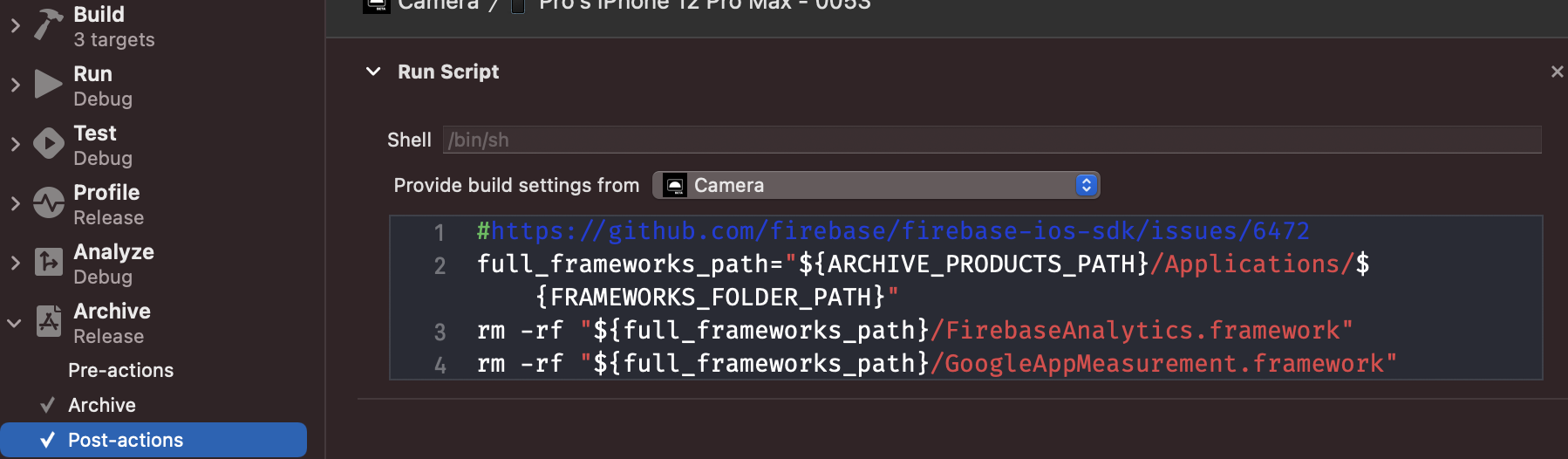
I added the following script in the post-actions of Archive scheme:
#https://github.com/firebase/firebase-ios-sdk/issues/6472
full_frameworks_path="${ARCHIVE_PRODUCTS_PATH}/Applications/${FRAMEWORKS_FOLDER_PATH}"
rm -rf "${full_frameworks_path}/FirebaseAnalytics.framework"
rm -rf "${full_frameworks_path}/GoogleAppMeasurement.framework"
 Fedos
on 17 Dec 2020
Fedos
on 17 Dec 2020
Checked the actual path on the terminal and it starts falling apart at after the scheme part. InstallationBuildProductsLocation doesn't exist, I can only see BuildProductsPath and IntermediateBuildFilesPath.
@borut-t Any luck with the missing InstallationBuildProductsLocation? I'm having the same problem and I'm trying to figure out where and what environment variables I can use to remove the static firebase framework.
 johndelong
on 22 Dec 2020
johndelong
on 22 Dec 2020
Why do you expect the application to work fine after removing these dependencies from bundle?
 nikolay-kapustin
on 23 Dec 2020
nikolay-kapustin
on 23 Dec 2020
@nikolay-kapustin Static libraries are linked into the app at build time and redundant at runtime.
paulb777
on 23 Dec 2020
rm -rf "${TARGET_BUILD_DIR}/${PRODUCT_NAME}.app/Frameworks/FIRAnalyticsConnector.framework"
rm -rf "${TARGET_BUILD_DIR}/${PRODUCT_NAME}.app/Frameworks/FirebaseAnalytics.framework"
rm -rf "${TARGET_BUILD_DIR}/${PRODUCT_NAME}.app/Frameworks/GoogleAppMeasurement.framework"
rm -rf "${TARGET_BUILD_DIR}/${PRODUCT_NAME}.app/PlugIns/FIRAnalyticsConnector.framework"
rm -rf "${TARGET_BUILD_DIR}/${PRODUCT_NAME}.app/PlugIns/FirebaseAnalytics.framework"
rm -rf "${TARGET_BUILD_DIR}/${PRODUCT_NAME}.app/PlugIns/GoogleAppMeasurement.framework"
rm -rf "${TARGET_BUILD_DIR}/${PRODUCT_NAME}.app/Watch/FIRAnalyticsConnector.framework"
rm -rf "${TARGET_BUILD_DIR}/${PRODUCT_NAME}.app/Watch/FirebaseAnalytics.framework"
rm -rf "${TARGET_BUILD_DIR}/${PRODUCT_NAME}.app/Watch/GoogleAppMeasurement.framework"
The problem with this solution is that if you have a Run Script which is required for Crashlytics is going to fail because it can't find the files
.../Build/Intermediates.noindex/ArchiveIntermediates/SourcePackages/checkouts/firebase-ios-sdk/Crashlytics/run: No such file or directory
Is there a solution for this?
 ZaniLuca
on 26 Dec 2020
ZaniLuca
on 26 Dec 2020
@ZaniLuca try my solution above, i. e. run script after the archiving (you'll have to change paths)
Fedos
on 29 Dec 2020
Unexpected Mach-O header code: 0x72613c21 is still an issue on Xcode 12.3 beta. In my case, the Post-Action workaround worked well.
Here are the steps to follow, in case someone is still having issues:
- Produce an Archive the way you normally do. Once Organizer lists your Archive, right click on it and select
Show in Finder- In Finder, right click on your Archive to select
Show Package Contents- Navigate to
Products > Applicationsand then right click onYourApp.apptoShow Package Contents- Navigate to
Frameworks- Take note of the Frameworks you'll have to remove. In my case it was only
FirebaseAnalytics.frameworkandGoogleAppMeasurement.framework- Close Organizer, and go to
Manage schemes > Edit scheme, then underBuild, selectPost-actions. _Make sure to check_Provide build settings from -> YourApp.- Add a new
run scriptPost-action with the following:#https://github.com/firebase/firebase-ios-sdk/issues/6472#issuecomment-707793520 rm -rf "${TARGET_BUILD_DIR}/${TARGET_NAME}.app/Frameworks/FirebaseAnalytics.framework" rm -rf "${TARGET_BUILD_DIR}/${TARGET_NAME}.app/Frameworks/GoogleAppMeasurement.framework"Generate a new Archive. It should validate now.
p.s. In step 4, you can actually delete the frameworks manually from Finder, then go back to Organizer and click
Validate. This is a quick way to test whether you're deleting the right frameworks to bypass the Mach-O error.
great help this worked just right.
 fortrese
on 1 Jan 2021
fortrese
on 1 Jan 2021
post-actions of Archive scheme
Where I can find this window with post-actions?
Product > Scheme > Edit Scheme > Click on Build > Post Action
 JonathanNox
on 10 Jan 2021
JonathanNox
on 10 Jan 2021
Except for me it worked not on Build but on Archive scheme:
Product > Scheme > Edit Scheme > Click on Archive > Post Action
Fedos
on 10 Jan 2021
I literally followed the exact same steps as above would have been clue less otherwise.
fortrese
on 12 Jan 2021
I followed the instructions provided by @0x6A75616E and @Fedos here:
- https://github.com/firebase/firebase-ios-sdk/issues/6472#issuecomment-740186615
- https://github.com/firebase/firebase-ios-sdk/issues/6472#issuecomment-747375434
After doing it, the app archives, passes validation, and successfully uploads to App Store Connect from Xcode 12.3 (12C33).
Unfortunately, it can't be processed. It doesn't appear on App Store Connect website at all. After a while, I received following email message from App Store Connect for the build I've uploaded:
Dear Developer,
We identified one or more issues with a recent delivery for your app, "NameOfMyApp" 1.2.3 (456). Please correct the following issues, then upload again.
ITMS-90000: This bundle is invalid - $message.
Best regards,
The App Store Team
It looks like the solution is not valid anymore.
 darrarski
on 14 Jan 2021
darrarski
on 14 Jan 2021
Just got the same above error as well.
kylebrowning
on 14 Jan 2021
I've heard that this error is a current App Store Connect issue, rather than related to this workaround.
 AndrewBennet
on 14 Jan 2021
AndrewBennet
on 14 Jan 2021
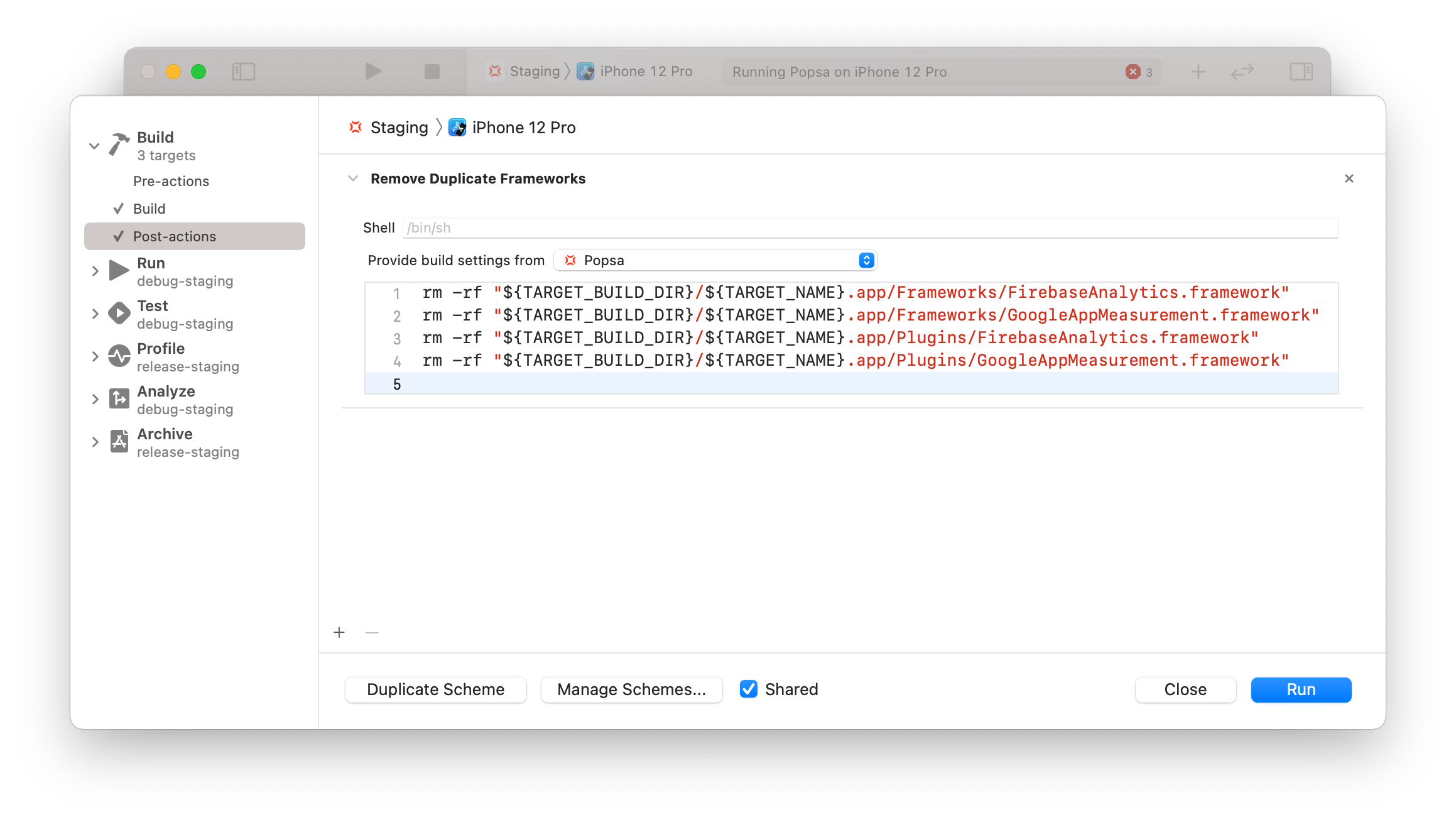
My company's app uses FirebaseAnalytics via Swift Package Manager with this workaround and we successfully submitted a build to Apple as recently as last night with no issues.
 JonathanDowning
on 14 Jan 2021
JonathanDowning
on 14 Jan 2021
For folks having issues today: this is an outage on Apple's side and is not related to this issue. https://developer.apple.com/system-status/
cc @darrarski, @kylebrowning, @AndrewBennet
ryanwilson
on 14 Jan 2021
We use both Google and Firebase Frameworks. If your using FirebaseAuth or Firebase and some other Google Product then you probably are too.
Do an archive and look inside the frameworks, plugins and watch folders.
If you have something googley or Firebase in those folders chances are it shouldn't be there.
rm -rf "${full_frameworks_path}/${PRODUCT_NAME}.app/Frameworks/Google"*.framework
rm -rf "${full_frameworks_path}/${PRODUCT_NAME}.app/Plugins/Google"*.framework
rm -rf "${full_frameworks_path}/${PRODUCT_NAME}.app/Watch/Google"*.framework

rm -rf "${full_frameworks_path}/${PRODUCT_NAME}.app/Frameworks/Firebase"*.framework
rm -rf "${full_frameworks_path}/${PRODUCT_NAME}.app/Plugins/Firebase"*.framework
rm -rf "${full_frameworks_path}/${PRODUCT_NAME}.app/Watch/Firebase"*.framework
Possibly if you don't have a watch app you might need to delete the entire folder
ie
rm -rf "${full_frameworks_path}/${PRODUCT_NAME}.app/Watch"
 LukeDurrant
on 15 Jan 2021
LukeDurrant
on 15 Jan 2021
Quick update to my previous comment:
Apparently, the problem was connected with App Store Connect issues. I tried again today, and it works as expected. The build was successfully deployed on TestFlight.
There is one more thing I would like to add. Perhaps it will be useful for someone struggling with the issue:
In my project (iOS app) I have multiple framework targets. One of them is a "shared" framework (named Common.framework) that I use as a dependency for all other targets. All libraries added via SPM (in Xcode) are added to this framework. For that reason, my app's archive structure looked a bit different from what is described in this topic. I browsed my archive in Finder to locate where the Firebase frameworks are located exactly, and it looked like this:
├─ Products
│  └─ Applications
|     └─ MyApp.app
|        ├─ Frameworks
|        |  ├─ Common.framework
|        |  |  ├─ Frameworks
|        |  |  |  ├─ FirebaseAnalytics.framework
|        |  |  |  └─ GoogleAppMeasurement.framework
To make it work, I needed not only to remove FirebaseAnalytics.framework and GoogleAppMeasurement.framework but also the whole Frameworks directory containing the frameworks. Even if the Frameworks directory was empty, I couldn't upload the archive to App Store Connect.
I adjusted the post-action script (added to Archive action) to remove the whole Frameworks directory:
rm -rf "${ARCHIVE_PRODUCTS_PATH}/Applications/MyApp.app/Frameworks/Common.framework/Frameworks"
In "Provide build settings from" I have my app target selected.
With the above, I can archive and upload my app with Firebase integrated via SPM to App Store Connect without an issue using Xcode 12.3 (12C33).
darrarski
on 15 Jan 2021
Applied @darrarski solutions above for GoogleMaps as well - didn't realize that had the same issue as Firebase. Posting here because I originally thought it was a Firebase issue even after using the solution, so this should save some google maps people some time
rm -rf "${ARCHIVE_PRODUCTS_PATH}/Applications/outfield-swift.app/Frameworks/GoogleMapsUtils.framework"
rm -rf "${ARCHIVE_PRODUCTS_PATH}/Applications/outfield-swift.app/PlugIns/GoogleMapsUtils.framework"
 michael-mckenna
on 15 Jan 2021
michael-mckenna
on 15 Jan 2021
The mentioned above Build scheme post-actions didn't help in my case, so I did a bit differently, maybe it will help someone as well:
I added the following script in the post-actions of Archive scheme:
#https://github.com/firebase/firebase-ios-sdk/issues/6472
full_frameworks_path="${ARCHIVE_PRODUCTS_PATH}/Applications/${FRAMEWORKS_FOLDER_PATH}"
rm -rf "${full_frameworks_path}/FirebaseAnalytics.framework"
rm -rf "${full_frameworks_path}/GoogleAppMeasurement.framework"
I Have added a widget in my application and now this solution, that was working fine for me doesn't work anymore, anyone has an idea on how can I solve it?
ZaniLuca
on 18 Jan 2021
I Have added a widget in my application and now this solution, that was working fine for me doesn't work anymore, anyone has an idea on how can I solve it?
Hi @ZaniLuca ! Try adding the similar scripts for all your targets. I suppose you'll have to add something similar to your widget scheme. Try opening failed build products (your archive --> open package contents --> ... --> open package contents --> Frameworks) and see if there are miscopied frameworks that need to be removed.
SergeyPetrachkov
on 19 Jan 2021
That workaround and that one worked well here. Thank you guys.
 ramonteiro
on 19 Jan 2021
ramonteiro
on 19 Jan 2021
Despite following all the previously recommended suggestions for removing frameworks in either Build or Archive steps, I couldn't get Firebase Analytics through Swift Package Manager to work. Ended up removing everything from Swift Package Manager and following manual integration steps. Do keep in mind all Firebase frameworks are static, so you'll have to avoid embedding them into your app. More info on that approach here:
https://firebase.google.com/download/ios#integrate-without-cocoapods
https://www.simpleswiftguide.com/how-to-add-xcframework-to-xcode-project/ (skip the embed+sign)
Explanation of static/dynamic and signing:
https://stackoverflow.com/questions/33076819/found-an-unexpected-mach-o-header-code-0x72613c21-in-xcode-7
 InnaBoycheva
on 21 Jan 2021
InnaBoycheva
on 21 Jan 2021
This issue is acknowledged in the Xcode 12.4 release notes along with a variation of the workarounds discussed here.
paulb777
on 21 Jan 2021
Thanks for everyone's help. I did something similar, but attempted an automated approach to look for static frameworks.
In my scheme's Build Post-action I added a run script which I call with:
$SRCROOT/buildScripts/fix_swift_pm_build_post_action.sh
Remember to chmod it so it can execute. The shell script I used is:
path="${TARGET_BUILD_DIR}/${PRODUCT_NAME}.app"
cd "$SRCROOT"
find -E . -type f -iregex ".*\.framework\/[^./]*" -exec file {} \; | grep 'current ar archive' | sed 's/.*\/\(.*.framework\).*/\1/' | sort | uniq | while read -r line ; do
    rm -vrf "${path}/Frameworks/$line"
    rm -vrf "${path}/Plugins/$line"
    rm -vrf "${path}/Watch/$line"
    rm -vrf "${path}/AppClips/$line"
    rm -vrf "${path}/AppClip.app/Frameworks/$line"
done
 wittkamp
on 22 Jan 2021
wittkamp
on 22 Jan 2021
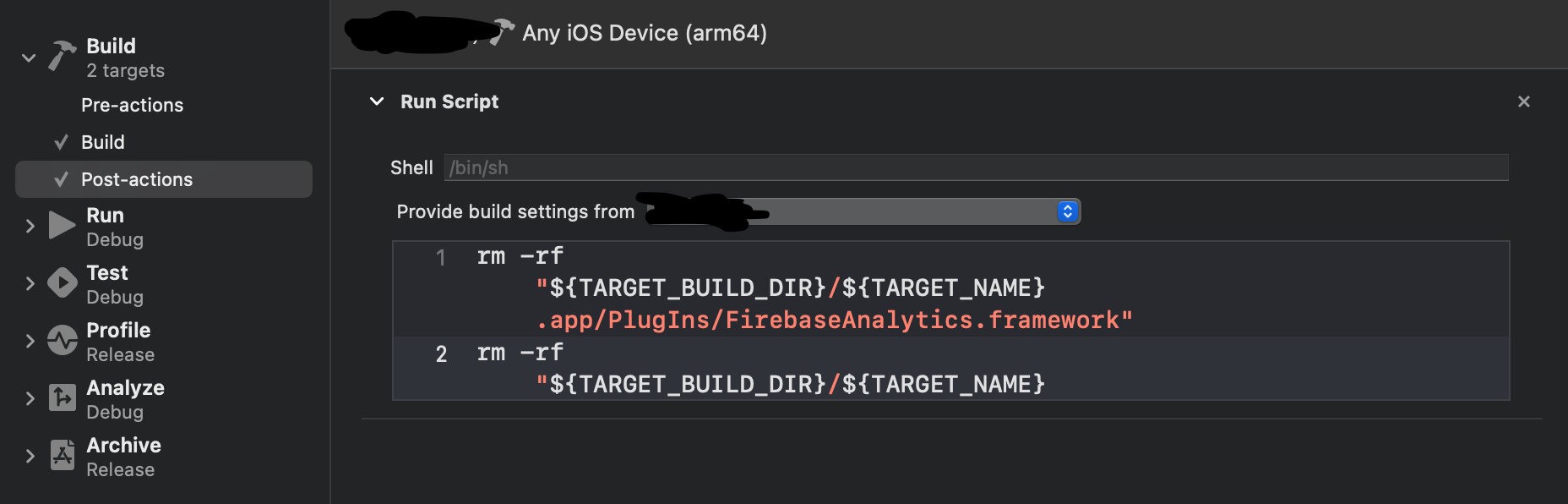
For me, it worked by adding the post-actions for the build scheme.
rm -rf "${TARGET_BUILD_DIR}/${TARGET_NAME}.app/PlugIns/FirebaseAnalytics.framework"
rm -rf "${TARGET_BUILD_DIR}/${TARGET_NAME}.app/PlugIns/GoogleAppMeasurement.framework"
rm -rf "${TARGET_BUILD_DIR}/${TARGET_NAME}.app/Frameworks/FirebaseAnalytics.framework"
rm -rf "${TARGET_BUILD_DIR}/${TARGET_NAME}.app/Frameworks/GoogleAppMeasurement.framework"
 Mofawaw
on 23 Jan 2021
Mofawaw
on 23 Jan 2021
I have a Share Extension that was causing this Match-O header issue and this is what worked for me as well as an Archive post action:
# There was a problem when archiving because of Firebase in the Share Extension. This script is a workaround. Inspired from: https://github.com/firebase/firebase-ios-sdk/issues/6472
rm -rf "${ARCHIVE_PRODUCTS_PATH}/Applications/MyAppName.app/PlugIns/ShareExtension.appex/Frameworks/FirebaseAnalytics.framework"
rm -rf "${ARCHIVE_PRODUCTS_PATH}/Applications/MyAppName.app/PlugIns/ShareExtension.appex/Frameworks/GoogleAppMeasurement.framework"
 jfsagasti
on 27 Jan 2021
jfsagasti
on 27 Jan 2021
The issue still exists in Xcode 12.4 (12D4e), but it looks like it's not necessarily an Xcode issue. fortrese's solution worked for me although have not tried the script yet (manual deletion of the two Firebase dependencies did the trick). I had installed Analytics through cocoapods before but whatever I tried, I could not make it work any more on the simulator of my M1 Mac starting from v 7.3 (7.2-M1 worked though). No issues building on M1 iOS simulator once I installed all Firebase dependencies through SPM.
 DominikButz
on 1 Feb 2021
DominikButz
on 1 Feb 2021
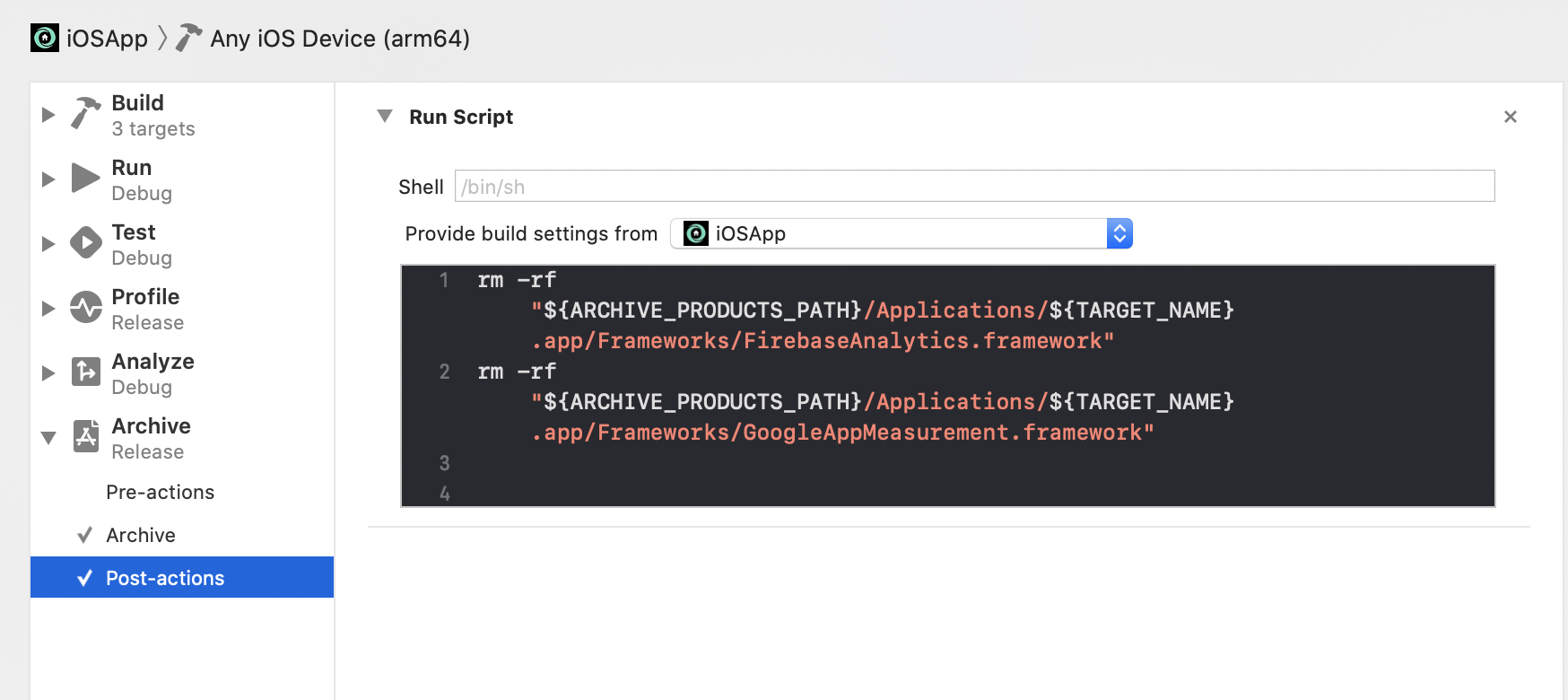
This is the only solution that worked for me. None of the above did the trick, because the path to the frameworks was never found. But I based on those solutions for writing this one. Using Xcode 12.4, just in case.
rm -rf "${ARCHIVE_PRODUCTS_PATH}/Applications/${TARGET_NAME}.app/Frameworks/FirebaseAnalytics.framework"
rm -rf "${ARCHIVE_PRODUCTS_PATH}/Applications/${TARGET_NAME}.app/Frameworks/GoogleAppMeasurement.framework"
 cacarlassare
on 2 Feb 2021
cacarlassare
on 2 Feb 2021
As of Xcode version 12.4, I have verified following script eliminates this issue when added to "Post-actions" phase of "Archive". It removes all static frameworks as some people are experiencing issues due to unrelated frameworks.
# https://github.com/firebase/firebase-ios-sdk/issues/6472
LOGFILE="${ARCHIVE_PATH}/static-frameworks.log"
echo "Removing static frameworks from ${WRAPPER_NAME} archive" > $LOGFILE
find "${ARCHIVE_PRODUCTS_PATH}/Applications/${WRAPPER_NAME}" -name '*.framework' -print0 | while IFS= read -r -d '' fm; do
    name=$(basename "${fm}" .framework)
    target="${fm}/${name}"
    echo "Checking: ${fm}" >> $LOGFILE
    if file "${target}" | grep -q "current ar archive"; then
        rm -rf "${fm}"
        echo "Removed static framework: ${fm}" >> $LOGFILE
    fi
done
 surajbarkale
on 2 Feb 2021
surajbarkale
on 2 Feb 2021
The script posted by @surajbarkale seems like the most generic working one, especially if you have extensions or App Clips there are more places where the static framework needs to be removed from, i.e. the PlugIns and AppClips directory.
 EmDee
on 2 Feb 2021
EmDee
on 2 Feb 2021
Thank you @surajbarkale! The script does the magic!
 misolubarda
on 3 Feb 2021
misolubarda
on 3 Feb 2021
Tested on Xcode 12.5 beta (12E5220o) and this doesn't seem to be an issue anymore. I've only tested with a basic iOS app with no extensions and got the archive successfully validated.
 marius-serban
on 3 Feb 2021
marius-serban
on 3 Feb 2021
Thanks for sharing the news @marius-serban! It would be great to hear if Xcode 12.5 addresses other variants of the issue as well. I'll keep this issue open until Xcode 12.5 exits beta.
paulb777
on 3 Feb 2021
For us, we had to use ${PRODUCT_NAME} instead of ${TARGET_NAME} in the directory path:
cd "$SRCROOT"
rm -rf "${TARGET_BUILD_DIR}/${PRODUCT_NAME}.app/PlugIns/FirebaseAnalytics.framework"
rm -rf "${TARGET_BUILD_DIR}/${PRODUCT_NAME}.app/PlugIns/GoogleAppMeasurement.framework"
rm -rf "${TARGET_BUILD_DIR}/${PRODUCT_NAME}.app/Frameworks/FirebaseAnalytics.framework"
rm -rf "${TARGET_BUILD_DIR}/${PRODUCT_NAME}.app/Frameworks/GoogleAppMeasurement.framework"
 rmigneco
on 3 Feb 2021
rmigneco
on 3 Feb 2021
Related issues
 mlmcgrath
·
3Comments
mlmcgrath
·
3Comments
 ManuelRiegler
·
3Comments
ManuelRiegler
·
3Comments
 averello
·
4Comments
averello
·
4Comments
 jaschaio
·
3Comments
jaschaio
·
3Comments
 jaumard
·
3Comments
jaumard
·
3Comments
Most helpful comment
I was able to get a variation of @din's suggested workaround to work for me:
Add the following to the Scheme's Build Post-Action:
Make sure to select Provide build settings from the app.