Firebase-ios-sdk: import Firebase is not sufficient to define the FirebaseApp symbol in my build environment.
[REQUIRED] Step 1: Describe your environment
- Xcode version: 11.6 (11E708)
- Firebase SDK version: 6.31.0
- Firebase Component: Analytics
- Component version: 6.8.0
- Installation method: CocoaPods
- macOS version: 10.15.6 (19G2021)
[REQUIRED] Step 2: Describe the problem
'import Firebase' is no longer sufficient to define the FirebaseApp symbol in my build environment. Using Xcode 11.6, with Firebase 6.31.0, I have to import FirebaseCore to avoid getting: "error: use of unresolved identifier 'FirebaseApp'". I was previously using Firebase 6.27.0 on this same build machine without issue when only importing Firebase.
I believe this is the same issue as #6066. The comments in that issue indicate that 'import Firebase' should be sufficient and that importing the specific component (or firebase core) is not needed. I have run through the proposed resolution in that issue (quit Xcode, remove pods dir, remove xcworkspace dir, rerun pod install, open newly created xcworkspace). This does not resolve the issue in my project.
I am able to reproduce the same issue with the QuickStart sample for analytics.
This problem does not occur on my other build machine, which has the same firebase environment, but is running Xcode 11.5 (11E608c) on macOS 10.15.4 (19E266).
Steps to reproduce:
Reproducible with QuickStart sample:
$ git clone https://github.com/firebase/quickstart-ios.git
$ cd quickstart-ios/analytics/
$ pod install --repo-update
$ open AnalyticsExample.xcworkspace
Building with the Debug configuration for physical device running iOS 13 produces:
Prepare build
note: Using new build system
note: Building targets in parallel
note: Planning build
note: Constructing build description

Build target nanopb of project Pods with configuration Debug
Build target Pods-AnalyticsExample of project Pods with configuration Debug
Build target FirebaseCoreDiagnostics of project Pods with configuration Debug
Build target PromisesObjC of project Pods with configuration Debug
Build target GoogleDataTransport of project Pods with configuration Debug
Build target FirebaseCore of project Pods with configuration Debug
Build target AnalyticsExample of project AnalyticsExample with configuration Debug

CompileSwiftSources normal arm64 com.apple.xcode.tools.swift.compiler (in target 'AnalyticsExample' from project 'AnalyticsExample')
    cd /Users/user/workspaces/quickstart-ios/analytics
    export DEVELOPER_DIR=/Applications/Xcode.app/Contents/Developer
    export SDKROOT=/Applications/Xcode.app/Contents/Developer/Platforms/iPhoneOS.platform/Developer/SDKs/iPhoneOS13.6.sdk

<...build removed for brevity...>

/Users/user/workspaces/quickstart-ios/analytics/AnalyticsExample/AppDelegate.swift:23:5: error: use of unresolved identifier 'FirebaseApp'
    FirebaseApp.configure()
    ^~~~~~~~~~~

Build target FirebaseInstallations of project Pods with configuration Debug
Build target GoogleUtilities of project Pods with configuration Debug

Build failed    8/26/20, 11:45 PM    12.7 seconds
Relevant Code:
From QuickStart sample/analytics/AnalyticsExample/AppDelegate.swift:
import UIKit
import Firebase

@UIApplicationMain
class AppDelegate: UIResponder, UIApplicationDelegate {
  func application(_ application: UIApplication,
                   didFinishLaunchingWithOptions launchOptions: [UIApplication
                     .LaunchOptionsKey: Any]?) -> Bool {
    FirebaseApp.configure()
    return true
  }
 canfieldtim
All 19 comments
I found a few problems with this issue:
- I couldn't figure out how to label this issue, so I've labeled it for a human to triage. Hang tight.
- This issue does not seem to follow the issue template. Make sure you provide all the required information.
 google-oss-bot
on 27 Aug 2020
google-oss-bot
on 27 Aug 2020
Some additional info:
When the code has "import FirebaseCore" and just after performing a 'Clean Build Folder', Xcode complains "No such module Firebase". However, that error is cleared upon running a build and both the QuickStart app and my app seem to work fine with the 'import FirebaseCore'. See Screenshot.

canfieldtim
on 27 Aug 2020
The No such module 'FirebaseCore' issue is the result of how CocoaPods and Xcode interact. The Xcode source parser doesn't work correctly until after the FirebaseCore module gets built.
I appreciate the detailed steps, but still wasn't able to reproduce the FirebaseApp issue on Xcode 11.6. One of my teammates will try to see if there's something different about our environments.
Two additional questions:
- Does the problem only occur with a device or does it also occur with a simulator?
- What version of CocoaPods are you using?
pod --version
 paulb777
on 27 Aug 2020
paulb777
on 27 Aug 2020
Another quick update: After restarting Xcode 11.5 on the machine which I previously reported was working, the error "use of unresolved identifier 'FirebaseApp'..." is now happening on that machine. The upgrade from Firebase 6.27.0 to 6.31.0 was done on that machine and then shared with the Xcode 11.6 machine through git. The Xcode 11.5 machine was able to build fine until the restart of Xcode.
Thanks for following up @paulb777.
Yes, the unresolved identifier issue also happens when I build for a simulator (iPad Pro 4th gen iOS 13).
$ pod --version
1.9.3

canfieldtim
on 27 Aug 2020
More info:
Sometimes the build succeeds without having to import FirebaseCore. Even when the build succeeds, Xcode still complains about the use of unresolved identifiers, but the build succeeds and the app launches. I haven't determined a reliable pattern that ensures a the build with succeed (nor one that ensures failure). I've messed with things like building with FirebaseCore imported, then removing it and rebuilding. I've messed with running a clean build or not. In my own project, I don't have a consistent pattern, but I do see a fairly consistent pattern in the QuickStart project:
In the QuickStart project, without any modification to the code, it fails to perform a clean build in Debug, but succeeds and runs when running a clean build in Release. Xcode still reports the errors, but the build succeeds in Release.
canfieldtim
on 27 Aug 2020
Thanks for the continued investigation. It really sounds like something non-deterministic is going on.
Separate from the Xcode complaints, does a clean build ever fail?
paulb777
on 27 Aug 2020
Yes, a clean build fails (unless I import FirebaseCore).
Sorry if my previous comment wasn't clear. Most builds fail. My main goal was to convey that sometimes a build will succeed even though Xcode continues to complain. I haven't yet determined a reliable pattern to this. I've updated my previous comment to make it more direct.
canfieldtim
on 28 Aug 2020
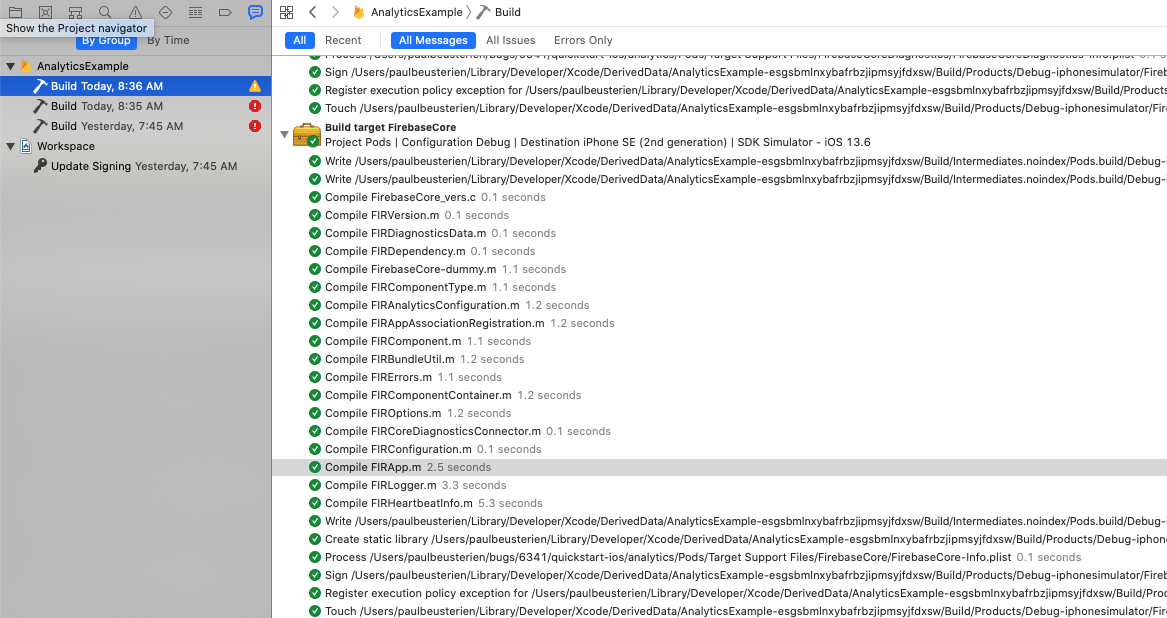
I wonder if there's an Xcode race condition and Xcode tries to build the app code before it builds FirebaseCore? Will you check the timestamps in the build log when it fails to see if that's the case?
The timestamp shows up if you hover over a compile line in the Xcode build log:
paulb777
on 28 Aug 2020
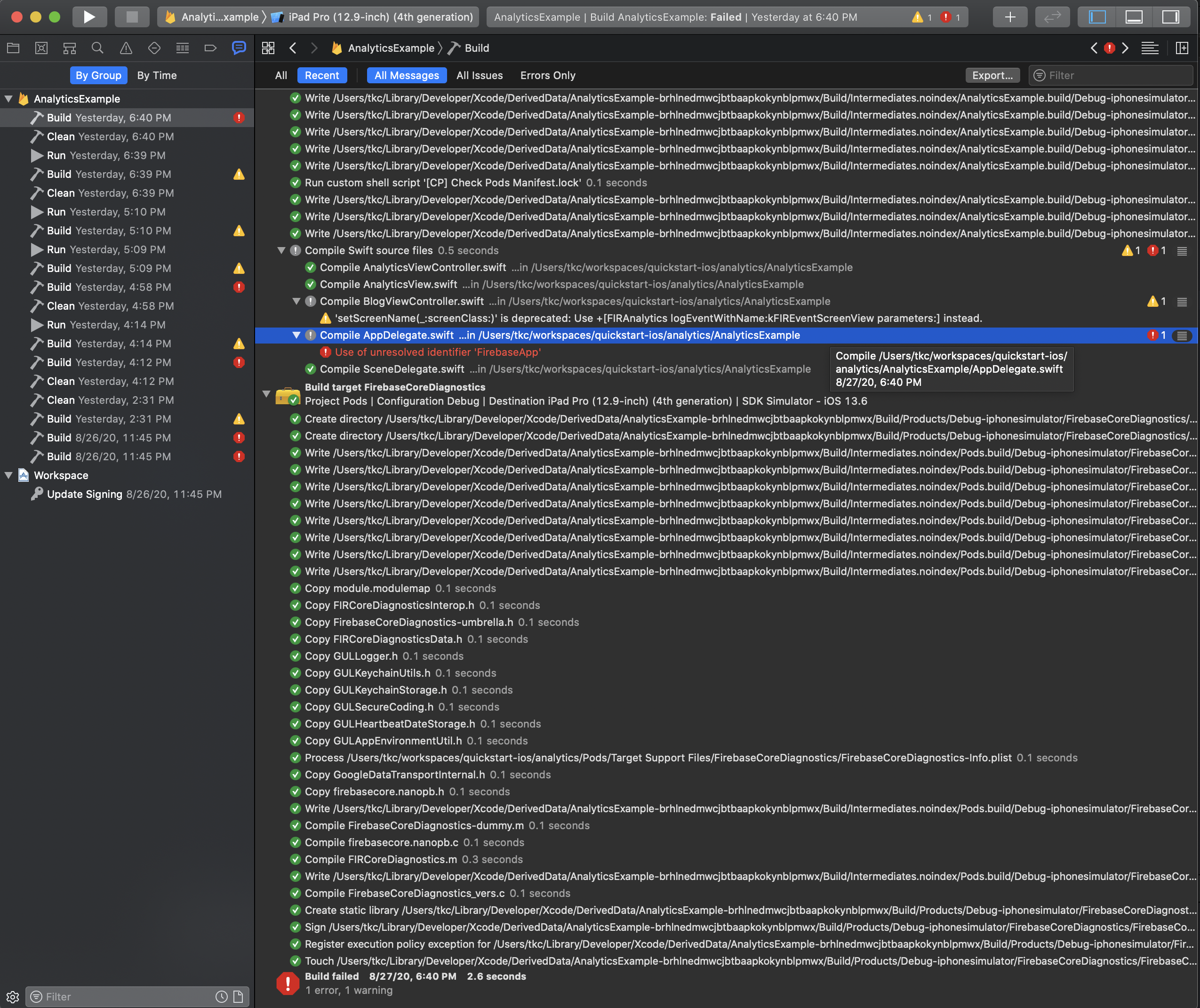
I think you have a good theory. The build fails in just a few seconds, so the 1 minute granularity of the hover timestamp may not be revealing, but I included a screenshot below.
Given that I am intermittently able to coax a successful build out of it, I think there may be some left over state from a previous build, combined with something like a race condition like you theorized that may be interacting and leading to the intermittent success.
Does your build succeed with Xcode 11.6, using the Debug configuration, following a clean build? That has never built successfully for me with the AnalyticsExample project from QuickStart, using Firebase 6.31.0.
canfieldtim
on 28 Aug 2020
Yep, it always succeeds for me. I haven't been able to reproduce. However, I'm still on 10.15.5 so it might be exposed by 10.15.6
Just the fact that your log shows the app build before building FirebaseCoreDiagnostics is concerning since FirebaseCoreDiagnostics is a dependency of FirebaseCore ...
paulb777
on 28 Aug 2020
Does it make a difference to disable Parallel Builds?

paulb777
on 28 Aug 2020
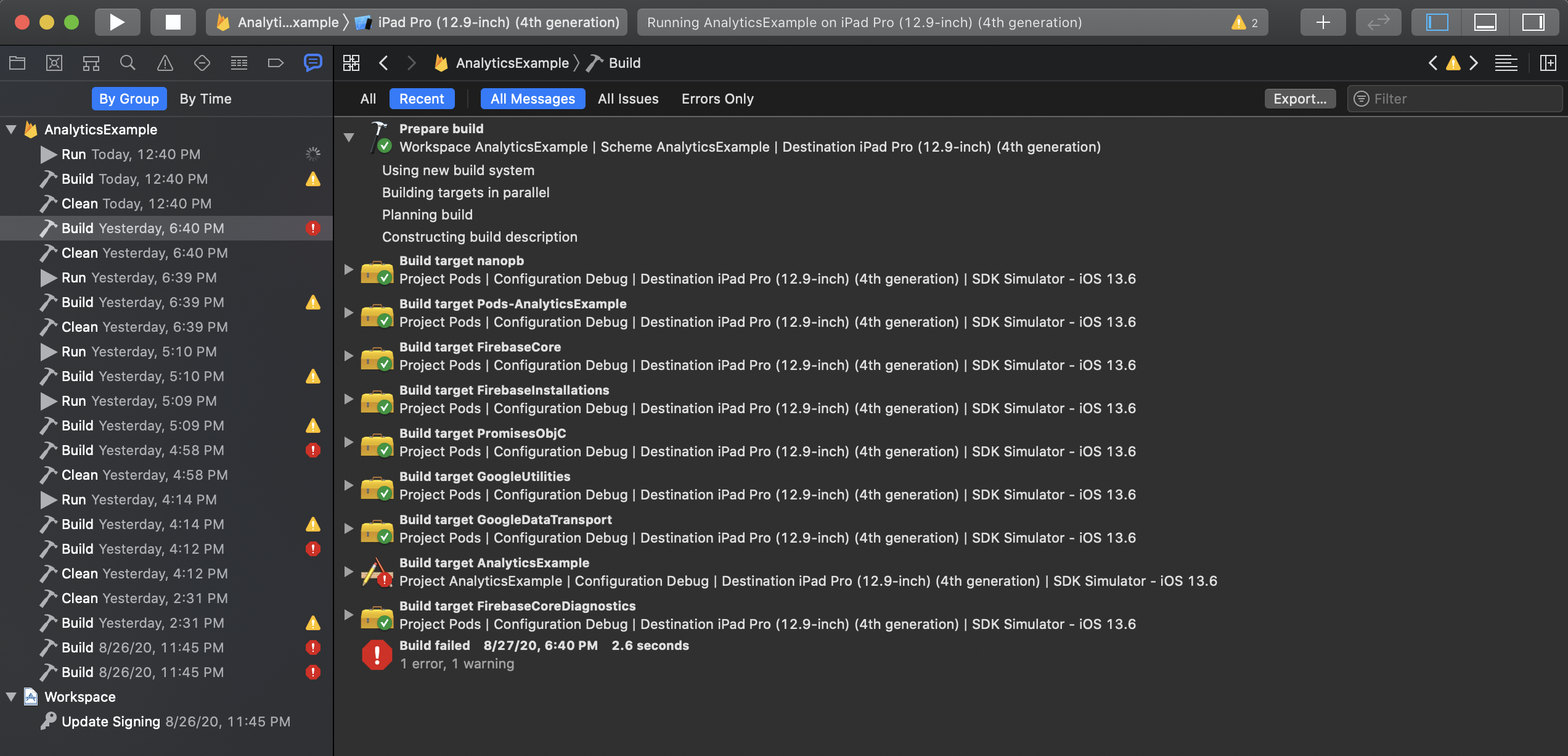
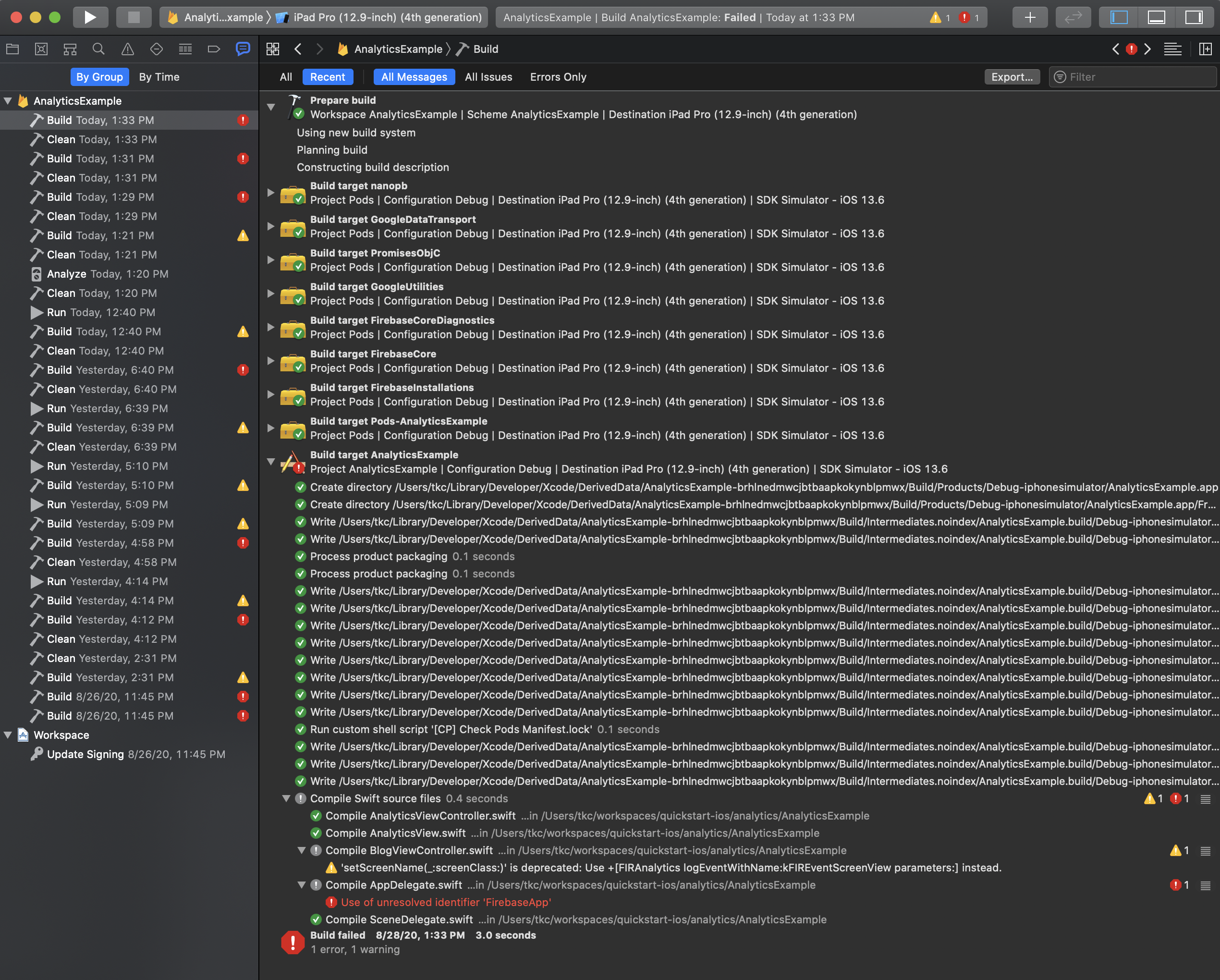
Here are three screen shots of the build log. The first with the Debug configuration, which failed. The next two with the Release configuration, which succeeded. The different components show up in a different order across the two builds. I can't tell if this is relevant.
Debug Build:
Release Build:

Release Build"

canfieldtim
on 28 Aug 2020
Disabling parallel builds does not seems to change the outcome. Debug build still fails for QuickStart and Release build succeeds.
canfieldtim
on 28 Aug 2020
I'm wondering if https://github.com/firebase/firebase-ios-sdk/pull/5884/files exposed this.
Does it make a difference if you go back to a Firebase version before that change like 6.27.0?
paulb777
on 28 Aug 2020
I had been using 6.27.0 prior to this week without any issues.
canfieldtim
on 28 Aug 2020
@canfieldtim Thanks for all of your help tracking this down! I'm hopeful that #6367 will be a fix.
paulb777
on 28 Aug 2020
Firebase 6.31.1 is now published on CocoaPods with the fix.
paulb777
on 31 Aug 2020
@paulb777 This seems to fix it and things build as expected with 6.31.1 in my environment. Thanks!
canfieldtim
on 4 Sep 2020
@canfieldtim Thanks for confirming and thanks again for the assistance tracking it down!
paulb777
on 4 Sep 2020
Related issues
 kamechan8
·
3Comments
kamechan8
·
3Comments
 professorbk
·
3Comments
professorbk
·
3Comments
 skuske
·
3Comments
skuske
·
3Comments
 subdan
·
3Comments
subdan
·
3Comments
 jaumard
·
3Comments
jaumard
·
3Comments
Most helpful comment
@paulb777 This seems to fix it and things build as expected with 6.31.1 in my environment. Thanks!