Firebase-ios-sdk: Do not building iOS app - Firebase doesn't find FirebaseCore.h
[REQUIRED] Step 1: Describe your environment
- Xcode version: 11.3.1
- Firebase SDK version: 6.16
- Firebase Component: Core, Messaging, Analytics
- Installation method:
CocoaPods
I am facing with a big problem to use Firebase pod.
It isn't allow me to build my pipeline on Azure DevOps.
Basically, when I try #import <Firebase/Firebase.h> in AppDelegate.m, that pod doesn't find FirebaseCore.
Use can see better in image that I have attached here.
P.S: I needed to hidden some important informations about my project on image. Sorry

 itsector-esanti
All 22 comments
Hi @itsector-esanti sorry for the trouble - can you please post the Podfile.lock and Podfile you have so we can see what's being pulled in? Another thing to confirm - are you using the generated .xcworkspace for the project or the .xcodeproj instead? With CocoaPods you should be using the .xcworkspace.
 ryanwilson
on 29 Jan 2020
itsector-esanti
on 29 Jan 2020
ryanwilson
on 29 Jan 2020
itsector-esanti
on 29 Jan 2020
I used the same Podfile setup (changing the name to my target's name), ended up with the exact same Podfile.lock (minus the Podfile checksum for the naming reason) and was unable to reproduce this.
Can you reproduce it locally in your project?
ryanwilson
on 29 Jan 2020
Hi @itsector-esanti, as per docs, it's not needed to include pod 'Firebase/Core' in your Pod file.
Hi @ryanwilson I was able to reproduce it, but it works well when I removed the pod 'Firebase/Core'.
 rizafran
on 29 Jan 2020
rizafran
on 29 Jan 2020
Hmm, including or excluding Firebase/Core shouldn't make a difference.
Firebase/Core just points to FirebaseAnalytics and Firebase/CoreOnly, and Firebase/Analytics internally points to Firebase/Core so it should bring in the exact same set of dependencies.
I'll try to repro again.
ryanwilson
on 29 Jan 2020
@itsector-esanti I chatted offline with @rizafran and afterwards we were both unable to reproduce the issue.
Is it possible that the target name is different from the xxxxxx Private you had put? It could be that the pods are being included for a different target than you're trying to include.
It'd also be helpful to know if you can reproduce this locally or it's just in CI.
Thanks!
ryanwilson
on 29 Jan 2020
@ryanwilson I'll remove Firebase/Core from my Podfile and try build it locally again.
As soon as possible, I write my results here.
itsector-esanti
on 30 Jan 2020
@ryanwilson I removed Firebase/Core and tried again, but I got the same error in my CI.
About run it locally, I got the same problem too
itsector-esanti
on 30 Jan 2020
I don't know if for you it's important, but I'm running that workspace with configured Build System as Legacy Build System. And about it, in my pipeline I'm using -UseModernBuildSystem=NO as parameter
itsector-esanti
on 30 Jan 2020
Hmm, I just tried with the Legacy Build System as well and was unable to reproduce (thanks for mentioning it though, definitely could have been the cause).
Are you able to reproduce it with our quickstart applications as well? If not, sounds like it's a project specific setup that's causing the issue. If you could share a simplified project it would be great for us to be able to debug!
ryanwilson
on 30 Jan 2020
@ryanwilson I just (unfortunately) can share with you some paths, configs for example...
Let me know if it can help you!
itsector-esanti
on 30 Jan 2020
Since you can't share your project (no worries, it's understandable 😄) if you could reproduce it with one of our quickstart applications (found at https://github.com/Firebase/quickstart-ios) that would be very helpful (and would allow you to share it). It should also give us an idea whether or not it's specific to your project or a larger issue.
ryanwilson
on 30 Jan 2020
@ryanwilson Yes I can do it.
Just to confirm, Would you like that I use my Podfile into that quickstart project?
itsector-esanti
on 30 Jan 2020
Thanks! Sure, having similar contents would be great and a higher likelihood of reproducing the issue. Please make sure to update the name of the target in the Podfile as well to match the quickstart app.
ryanwilson
on 30 Jan 2020
@ryanwilson let me make a question
What is the diference for Firebase with there imports below?
@import Firebase; vs #import <Firebase/Firebase.h>
itsector-esanti
on 30 Jan 2020
The imports are equivalent if you have clang modules enabled. Clang modules are enabled by default.
 morganchen12
on 30 Jan 2020
morganchen12
on 30 Jan 2020
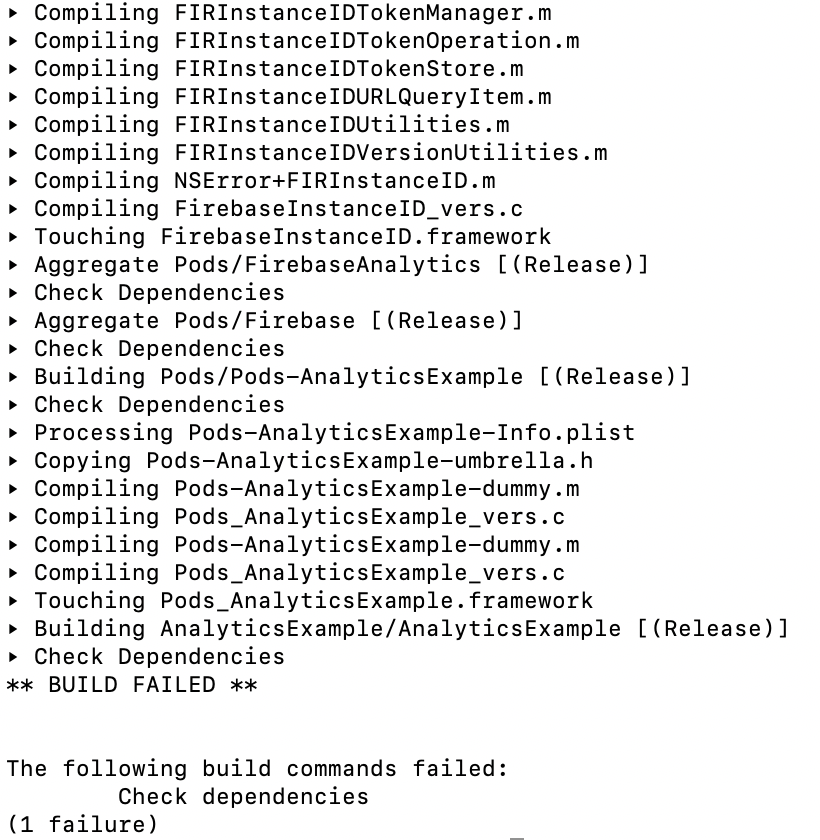
People, I tried to build the AnalyticsExample using exactly the same Podfile that I am using into my project and I got again the same error 😞
I am attaching here a printscreen and .zip with AnalyticsExample.
This one was my command line: xcodebuild -sdk iphoneos -configuration Enterprise -workspace AnalyticsExample.xcworkspace -scheme AnalyticsExample build -UseModernBuildSystem=NO | xcpretty -r junit --no-color
itsector-esanti
on 30 Jan 2020
Thanks for working with us on this.
Can you please copy what the error is without xcpretty? I downloaded the project, had to massage a few things (there were some shared resources in the parent directory that I didn't know about, I just removed them from the project and changed the LaunchImage) and ran the project to get the same error as you did with the command given. I then avoided piping the results into xcpretty and it was a code signing issue I had, not a Firebase issue. I fixed the code signing issue by changing the Provisioning Profile used, then the build command succeeded for me both from the command line and from Xcode itself.
ryanwilson
on 30 Jan 2020
I ran the same command line without xcpretty in my project and I got this:
* BUILD FAILED *
The following build commands failed:
CompileC /Users/itsector/Library/Developer/Xcode/DerivedData/XXXXX-dsuyzgpscamuojbwbttmckenjfsc/Build/Intermediates.noindex/XXXXXX.build/CI1-iphoneos/XXXXXX Private.build/Objects-normal/armv7/AppDelegate.o XXXXX/AppDelegate.m normal armv7 objective-c com.apple.compilers.llvm.clang.1_0.compiler
(1 failure)
This is the same error that I can see in Azure DevOps
❌ /Users/itsector/agentAzure/_work/2/s/XXXXXX/XXXXXX/Pods/Firebase/CoreOnly/Sources/Firebase.h:15:9: 'FirebaseCore/FirebaseCore.h' file not found
import
^❌ /Users/itsector/agentAzure/_work/2/s/XXXXXXX/XXXXXX/XXXXXX/AppDelegate.m:52:9: could not build module 'Firebase'
@import Firebase;
^~~~~~~~~▸ Compiling SocialBankingSettingsViewController.m
▸ Compiling FinancialOverviewTableViewCell.m
▸ Compiling ShortcutEventHandler.m
▸ Compiling DetailsHeaderView.m
▸ Compiling PriceListViewController.m
▸ Compiling OnboardingCancelViewController.m
* BUILD FAILED *The following build commands failed:
CompileC /Users/itsector/Library/Developer/Xcode/DerivedData/XXXXXX-grcwuaouxwddthbgnhwrazbzvfhe/Build/Intermediates.noindex/XXXXXX.build/CI1-iphoneos/XXXXXX Private.build/Objects-normal/armv7/AppDelegate.o XXXXXX/AppDelegate.m normal armv7 objective-c com.apple.compilers.llvm.clang.1_0.compiler
(1 failure)[debug]success of first tool:false
[debug]rc:0
[debug]success:true
[debug]task result: Failed
[error]Error: /usr/bin/xcodebuild failed with return code: 65
[debug]Processed: ##vso[task.issue type=error;]Error: /usr/bin/xcodebuild failed with return code: 65
[debug]Processed: ##vso[task.complete result=Failed;]Error: /usr/bin/xcodebuild failed with return code: 65
[debug]Agent.Version=2.164.6
[debug]Processed: ##vso[telemetry.publish area=TaskHub;feature=Xcode]{"xcodeVersionSelection":"default","actions":["build"],"packageApp":true,"xcodeVersion":"11.3.1","signingOption":"default"}
[section]Finishing: Xcode build
itsector-esanti
on 31 Jan 2020
Hi @itsector-esanti, I also tried to replicate the issue using the mcve you provided, but similar to @ryanwilson, I can't seem to reproduce it on my end.
To isolate the issue, could you try to rebuild your sample project, add code signing (to remove the error displayed on this previous comment) and see if the issue persists?
If so, maybe could you try cleaning the Cocoapods cache, try a new project with just Firebase in it, and see how far you can get without it failing?
People, I tried to build the
AnalyticsExampleusing exactly the samePodfilethat I am using into my project and I got again the same errorI am attaching here a printscreen and .zip with
AnalyticsExample.This one was my command line:
xcodebuild -sdk iphoneos -configuration Enterprise -workspace AnalyticsExample.xcworkspace -scheme AnalyticsExample build -UseModernBuildSystem=NO | xcpretty -r junit --no-color
rizafran
on 6 Feb 2020
Hey @itsector-esanti. We need more information to resolve this issue but there hasn't been an update in 7 days. I'm marking the issue as stale and if there are no new updates in the next 3 days I will close it automatically.
If you have more information that will help us get to the bottom of this, just add a comment!
 google-oss-bot
on 14 Feb 2020
google-oss-bot
on 14 Feb 2020
Since there haven't been any recent updates here, I am going to close this issue.
@itsector-esanti if you're still experiencing this problem and want to continue the discussion just leave a comment here and we are happy to re-open this.
google-oss-bot
on 18 Feb 2020
Related issues
 aschuch
·
3Comments
aschuch
·
3Comments
 professorbk
·
3Comments
professorbk
·
3Comments
 pot8os
·
4Comments
pot8os
·
4Comments
 henrymoulton
·
3Comments
henrymoulton
·
3Comments
 averello
·
4Comments
averello
·
4Comments
Most helpful comment
Hi @itsector-esanti sorry for the trouble - can you please post the
Podfile.lockandPodfileyou have so we can see what's being pulled in? Another thing to confirm - are you using the generated.xcworkspacefor the project or the.xcodeprojinstead? With CocoaPods you should be using the.xcworkspace.