Firebase-ios-sdk: Firebase/RTDB MACOS help. No where else to turn.
Alright so , i feel like i have no where to turn atm. I've tried over and over to sync firebase to my mac OS application so i can create user accounts, followed countless tutorials and i feel like no matter what I do, I cant get this to work. I always get this: "BeatsCloud[7819:3867413] 6.15.0 - [Firebase/Core][I-COR000028] tvOS and macOS SDK support is not part of the official Firebase product. Instead they are community supported. Details at https://github.com/firebase/firebase-ios-sdk/blob/master/README.md." which doesnt really seem like an error, so i tried ignoring it and to keep building. But it seems like my ref for Database.database.reference() is null because when i tried create a user, all i get is 0x000000 so then i tried looking on here and i found a number of problems with the same issues. One was try to incorporate -objc into my build, dont know how to do that and that im sure that was patched by now because im on 1.9 of cocoapods rather than 1.5. Next, ive tried following a couple of issues where people found that adding "firebaseapp.configure()" wasnt allowed to be in the appdelegate function so some people moved it and brought it down to a viewdidload and that seemed to work for them. Not for me though! im not sure if im having a hard time following instructions or not lol. But all i keep getting is "Checking if the app has communicated with our servers. You may need to uninstall and reinstall your app." Ive tried moving the pods i have around which is no longer pod 'firebase/analytics', i have the core ones such as storage, core, auth, etc.
im on xcode 11, firebase comp is auth , core, store, database.
firebase sdk, the latest one? started this like last week
component version: ??
steps to reproduce, use firebase on macOS
tutorial i followed: https://medium.com/flawless-app-stories/how-to-build-a-firebase-app-with-swiftui-5919d2d8a396
 MathewGarcia
All 8 comments
I found a few problems with this issue:
- I couldn't figure out how to label this issue, so I've labeled it for a human to triage. Hang tight.
- This issue does not seem to follow the issue template. Make sure you provide all the required information.
 google-oss-bot
on 20 Jan 2020
google-oss-bot
on 20 Jan 2020
Hi @MathewGarcia - sorry for the troubles you're running into.
A few things that can hopefully unblock you:
- The log message you're seeing is purely informational to direct people to our notes about macOS/tvOS and can be safely ignored
FirebaseApp.configure()is required before any other Firebase API calls will work, so leaving it in theapplicationDidFinishLaunching(_:)method is recommended- The "Checking if the app has communicated with our servers" bit unfortunately relies on an Analytics call and it will not work on macOS but it's safe to ignore and things will work as expected. Our bad for not clarifying that in the README, I'll update it shortly to do so for future readers.
- It may be fixed by now but if the
-ObjCflag isn't set in your project, you can see how to add it in step 7 of the Zip instructions
Hope that helps!
 ryanwilson
on 20 Jan 2020
ryanwilson
on 20 Jan 2020
Going to close for now since there are no further actions for us. We can still continue the discussion if there are additional questions.
 paulb777
on 21 Jan 2020
paulb777
on 21 Jan 2020
Hi sorry for the reopen, but ive still followed so many tutorials and i still cant create a new user. I am able to make a new document but my "createnewuser" keeps failing
MathewGarcia
on 27 Jan 2020
Can you share the error returned when createnewuser fails? If the database instance is still nil, have you tried Ryan's suggestions above (moving the initialization call and adding the -ObjC flag)?
 morganchen12
on 27 Jan 2020
morganchen12
on 27 Jan 2020
Can you share the error returned when
createnewuserfails? If the database instance is still nil, have you tried Ryan's suggestions above (moving the initialization call and adding the -ObjC flag)?
Hi sorry! was at work, but yes I have the only error im getting is "error" as in
 session.signUp(email: email , password: password){ (authResult, err) in self.loading = false
            if err != nil{
                self.error = true
                print("error")
                }
                else {
                self.email = ""
                self.password = ""
            }
error is returning true mind you, ive also tried (result,error) and switched variables around
MathewGarcia
on 28 Jan 2020
The error returned from Auth is being passed through here but not read: the tuple (authResult, err) has the type (AuthDataResult?, Error?). The contents we're looking for is the err you have defined.
Instead of print("error") which just prints the String "error", you should be able to print the actual error with print(err) or print(err.localizedDescription).
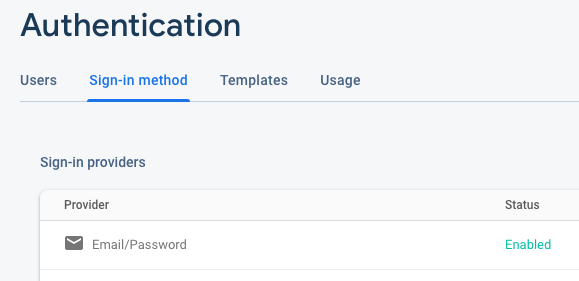
Another thing that was very briefly mentioned without pictures in that tutorial you're using - please ensure that "Email/Password" provider sign in is enabled in the console. You can do this by going to the console, clicking "Authentication" in the side menu, "Sign-in method", then clicking "Email/Password".
ryanwilson
on 28 Jan 2020
The error returned from
Authis being passed through here but not read: the tuple(authResult, err)has the type(AuthDataResult?, Error?). The contents we're looking for is theerryou have defined.Instead of
print("error")which just prints the String"error", you should be able to print the actual error withprint(err)orprint(err.localizedDescription).Another thing that was very briefly mentioned without pictures in that tutorial you're using - please ensure that "Email/Password" provider sign in is enabled in the console. You can do this by going to the console, clicking "Authentication" in the side menu, "Sign-in method", then clicking "Email/Password".
("There is no user record corresponding to this identifier. The user may have been deleted.")
thats the error im getting! Thank you btw, maybe you can get to me in time or maybe i can work with this!
EDIT: I FRIGGEN GOT IT THANK YOU
MathewGarcia
on 29 Jan 2020
Related issues
 jaumard
·
3Comments
jaumard
·
3Comments
 jlaws
·
4Comments
jlaws
·
4Comments
 averello
·
4Comments
averello
·
4Comments
 matthieuchappaz
·
3Comments
matthieuchappaz
·
3Comments
 WillLewis
·
4Comments
WillLewis
·
4Comments
Most helpful comment
("There is no user record corresponding to this identifier. The user may have been deleted.")
thats the error im getting! Thank you btw, maybe you can get to me in time or maybe i can work with this!
EDIT: I FRIGGEN GOT IT THANK YOU