Firebase-ios-sdk: [FirebaseCrashlytics 4.0.0-beta.1] Failed to download settings Error on catalyst
Describe your environment
- Xcode version: 11.3.1
- Firebase SDK version: 6.15.0
- Firebase Component: [Firebase/Crashlytics]
- Component version:=Version 4.0.0-beta.1
Describe the problem
6.15.0 - [Firebase/Crashlytics][I-CLS000000] Failed to download settings Error Domain=FIRCLSNetworkError Code=-6 "(null)" UserInfo={retryLimit=1, NSErrorFailingURLStringKey=https://firebase-settings.crashlytics.com/spi/v2/platforms/mac/gmp/x3/settings?build_version=5&display_version=6.1.2&instance=xxxxxxxxx&source=1}
The firebase project is not correctly initialized. I'm not seeing the Crashlytics console, but the setup screen. It properly worked when I ran the app in iOS and the setup screen was removed.
Steps to reproduce:
Run the catalyst app on Mac and [FIRApp configure] which produces the error.
 chrisvanbuskirk
All 20 comments
I found a few problems with this issue:
- I couldn't figure out how to label this issue, so I've labeled it for a human to triage. Hang tight.
- This issue does not seem to follow the issue template. Make sure you provide all the required information.
 google-oss-bot
on 16 Jan 2020
google-oss-bot
on 16 Jan 2020
Hey @chrisvanbuskirk, going to add a few questions / debugging steps. A lot of these are also in https://github.com/firebase/firebase-ios-sdk/issues/4316 if you want to follow the thread that was there. They had success running the app in Release mode. Let me know if any of these work for you:
It's necessary to have the Crashlytics run script set up for catalyst to work:
"${PODS_ROOT}/FirebaseCrashlytics/run". If this wasn't in your Xcode project before, try adding it, building, and then making a code change + incrementing the build version or number (to make sure you get new SDK settings).Make sure you're including a new, different GoogleService-info.plist file from your iOS app, and make sure the app has started the onboarding process in the Firebase Crashlytics dashboard. Eg. this is what my Build Phases looks like:

Make sure that when you cause a crash, the Xcode debugger isn't attached. Eg. Click Run, click Stop, and then run the app from your phone / simulator home screen
In addition, can you turn on debug logs by adding
-FIRDebugEnabledto the list of run arguments in "Edit Scheme" > Arguments Passed On Launch, and seeing if there's any errors or messages?
 samedson
on 16 Jan 2020
samedson
on 16 Jan 2020
@samedson
I was indeed following #4316 and did the set up accordingly. For some reason that endpoint is not being reached. The Crashlytics project is not initialized on firebase. I have a plist for both Mac/iOS like above. The iOS project did initialize and recorded a crash, while the Mac side throws the above error. Let me know if there's anything else I should try. I just tried it again and it failed. I know it's using the correct project id in firebase, and I did remove it from the link.
2020-01-16 09:25:43.176486-0700 xxx[66765:10804595] 6.15.0 - [Firebase/Crashlytics][I-CLS000000] Failed to download settings Error Domain=FIRCLSNetworkError Code=-6 "(null)" UserInfo={retryLimit=1, NSErrorFailingURLStringKey=https://firebase-settings.crashlytics.com/spi/v2/platforms/mac/gmp/1:xxxx:ios:xxxx/settings?build_version=5&display_version=6.1.2&instance=xxx&source=1}
chrisvanbuskirk
on 16 Jan 2020
Could there be a VPN / Adblocker / Pi-Hole that's blocking the connection (assuming you ran the iOS app on a device, not simulator)?
samedson
on 16 Jan 2020
Actually, the iOS app on device did everything right. I never use simulators. It's the catalyst app that failed when I ran on the Mac. I have no VPN's running, and no other blockers that I can think off. The plist transport security settings allow arbitrary loads, so that's not blocking. For sanity sake, I may try to switch Macs to see if its reproduced elsewhere.
chrisvanbuskirk
on 16 Jan 2020
@samedson Just an update. I'm working with beta 3 and it's producing a new issue. Not sure I mentioned, but when I created the new instance to get a firebase settings file, I did attach the maccatalyst.com.xxxx. When I run it on the Mac, this is what it produces.
2020-02-04 14:49:35.122748-0700 [35167:679600] [Firebase/Crashlytics] Version 4.0.0-beta.3
2020-02-04 14:49:35.569603-0700 [35167:680027] 6.16.0 - [Firebase/Crashlytics][I-CLS000000] Failed to get Firebase Instance ID: Error Domain=com.firebase.installations Code=1 "SecItemAdd (-34018)" UserInfo={NSLocalizedFailureReason=SecItemAdd (-34018)}
2020-02-04 14:49:37.819609-0700 [35167:680082] 6.16.0 - [Firebase/Crashlytics][I-CLS000000] Failed to download settings Error Domain=FIRCLSNetworkError Code=-6 "(null)" UserInfo={retryLimit=1, NSErrorFailingURLStringKey=https://firebase-settings.crashlytics.com/spi/v2/platforms/mac/gmp/1:xxxxxxxx:ios:xxx/settings?build_version=2&display_version=2.0&instance=xxxx&source=1}
chrisvanbuskirk
on 4 Feb 2020
Hey @chrisvanbuskirk, the error code from InstanceID is errSecMissingEntitlement. Looks like the access group in Installations is specified here. @maksymmalyhin, is there a group entitlement that's required for Catalyst developers that we're missing in our documentation?
 morganchen12
on 5 Feb 2020
morganchen12
on 5 Feb 2020
In terms of the settings error, I believe the issue is that Crashlytics hasn't been set up in the Firebase console (we're working on making this experience better, cause it's easy to run into this issue). The catalyst app is a separate iOS app in the Firebase console, so you need to click setup for the catalyst app separately from the iOS app.
Could you try going to Crashlytics in the Firebase console, choose your catalyst app in the app dropdown in the upper left, and then click "Set up Crashlytics" and then "No, set up a new Firebase app", so that your screen looks like:
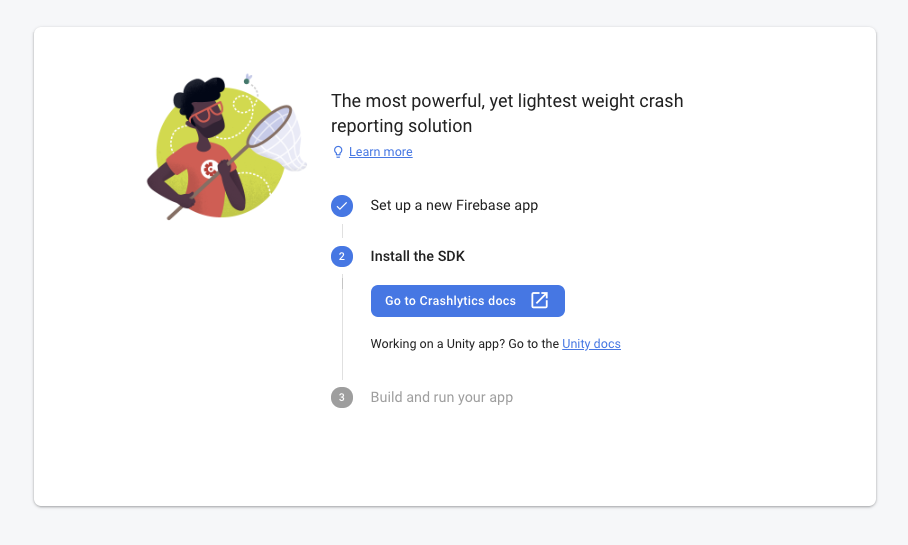
After that, try running the app on your device / simulator.
samedson
on 7 Feb 2020
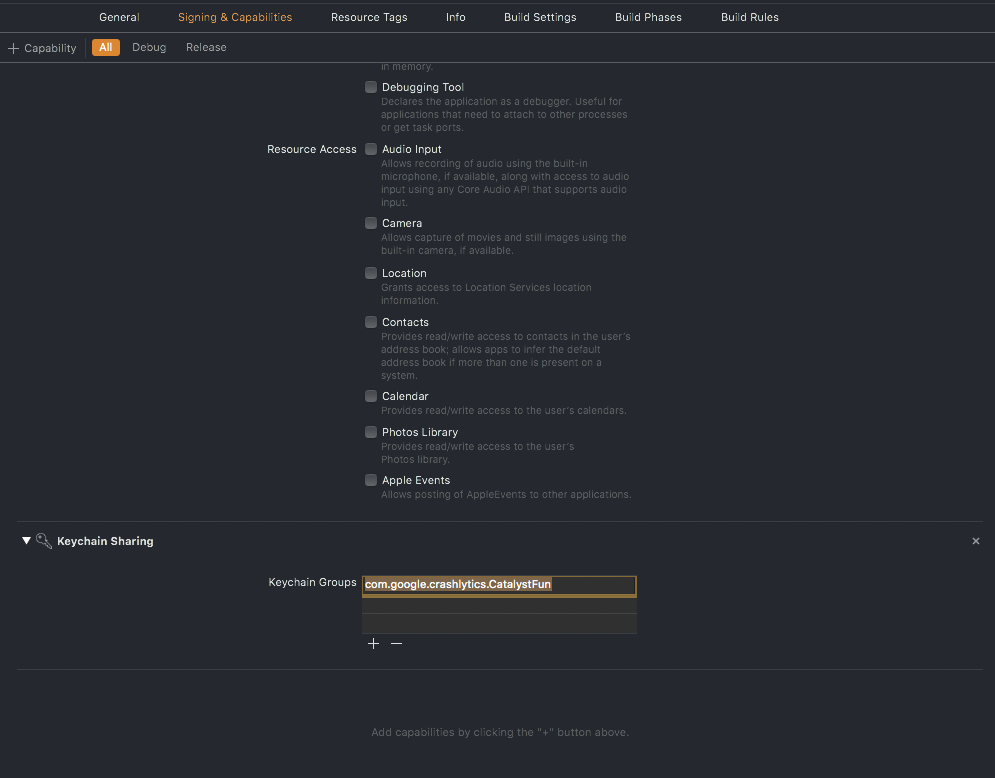
The way I've been fixing the FIID entitlement issues is the following. Can you double check this is correct @maksymmalyhin ?
- Click the project in the left nav, "Signing & Capabilities" tab, click "+ Capability" in the top left
- Search for "Keychain Sharing", and click it
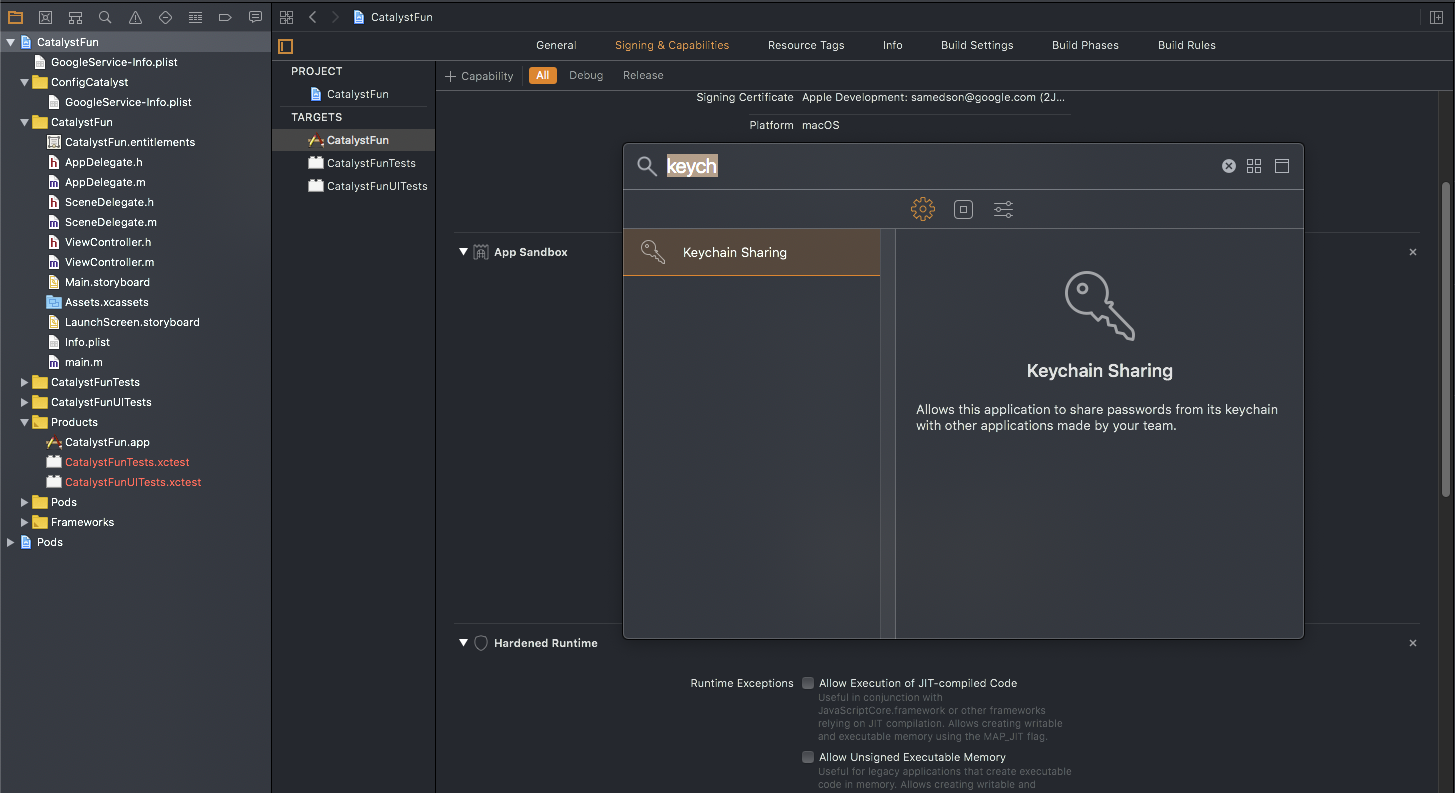
- Then it'll add a section for Keychain Sharing. Click the little + in the lower left of that box and it'll add your app's bundle ID to the list:
samedson
on 7 Feb 2020
Yeah, enabling Keychain sharing and adding the Keychain group is the workaround we had to use to access Keychain in Catalysts apps as well.
 maksymmalyhin
on 7 Feb 2020
maksymmalyhin
on 7 Feb 2020
@chrisvanbuskirk Could you please try to enable Keychain Sharing for you Catalyst app and let us know if this option works for you.
maksymmalyhin
on 7 Feb 2020
Will try it all out.
chrisvanbuskirk
on 7 Feb 2020
@samedson Huzzah! That was the fix for the settings.
chrisvanbuskirk
on 11 Feb 2020
@samedson Ok, the catalyst app was fixed with the keychain addition.
chrisvanbuskirk
on 11 Feb 2020
Ok, the only hurdle is actually getting crash reports.
2020-02-11 12:01:14.285206-0700 Inside[54186:4456470] [Firebase/Crashlytics] Version 4.0.0-beta.4
2020-02-11 12:01:14.311162-0700 Inside[54186:4456540] 6.17.0 - [Firebase/Crashlytics][I-CLS000000] [Crashlytics] Running on MacBookPro16,1, 10.15.2 (19C57)
2020-02-11 12:01:14.311203-0700 Inside[54186:4456540] 6.17.0 - [Firebase/Crashlytics][I-CLS000000] Root: /Users/administrator/Library/Containers/maccatalyst.com.xx.xxx/Data/Library/Caches/com.crashlytics.data/maccatalyst.com.xxx.xxx
2020-02-11 12:01:14.311390-0700 Inside[54186:4456540] 6.17.0 - [Firebase/Crashlytics][I-CLS000000] Automatic data collection is enabled.
2020-02-11 12:01:14.311459-0700 Inside[54186:4456540] 6.17.0 - [Firebase/Crashlytics][I-CLS000000] Unsent reports will be uploaded at startup
print(Crashlytics.crashlytics().didCrashDuringPreviousExecution())
returns false. I used fatalError() to create the crash.
This is all in debug mode of course.
chrisvanbuskirk
on 11 Feb 2020
Have you made sure to detach the debugger before creating the crash?
morganchen12
on 11 Feb 2020
@morganchen12 Yes.
print(Crashlytics.crashlytics().didCrashDuringPreviousExecution()) still returns false.
chrisvanbuskirk
on 11 Feb 2020
@morganchen12 The crashes came through. Must have been a delay or something. I think guys can close this if you like.
chrisvanbuskirk
on 11 Feb 2020
Awesome, thanks for following up. Generally Crashlytics reports should be visible within 5 or so minutes (@samedson please correct me if I'm wrong). If you notice they're consistently slow to appear, please file a support ticket and we'll try to pinpoint the cause of the slowness.
morganchen12
on 11 Feb 2020
I know this is closed, but it might help, because it fixed the issue for me. If you see this on the simulator, reset content and settings and try again.
 pacu
on 10 Mar 2020
pacu
on 10 Mar 2020
Related issues
 PierBover
·
3Comments
PierBover
·
3Comments
 jaschaio
·
3Comments
jaschaio
·
3Comments
 jlaws
·
4Comments
jlaws
·
4Comments
 kamechan8
·
3Comments
kamechan8
·
3Comments
 pot8os
·
4Comments
pot8os
·
4Comments
Most helpful comment
@samedson Huzzah! That was the fix for the settings.