Firebase-ios-sdk: Firebase A/B testing does not show correct user counts
- Xcode version: 10.3
- Firebase SDK version: 6.14.0
- Firebase Component: Remote Config
- Component version: 4.4.6
[REQUIRED] Describe the problem
When we run A/B testing for a specific remote config key with 50% for control group and 50% for test group.
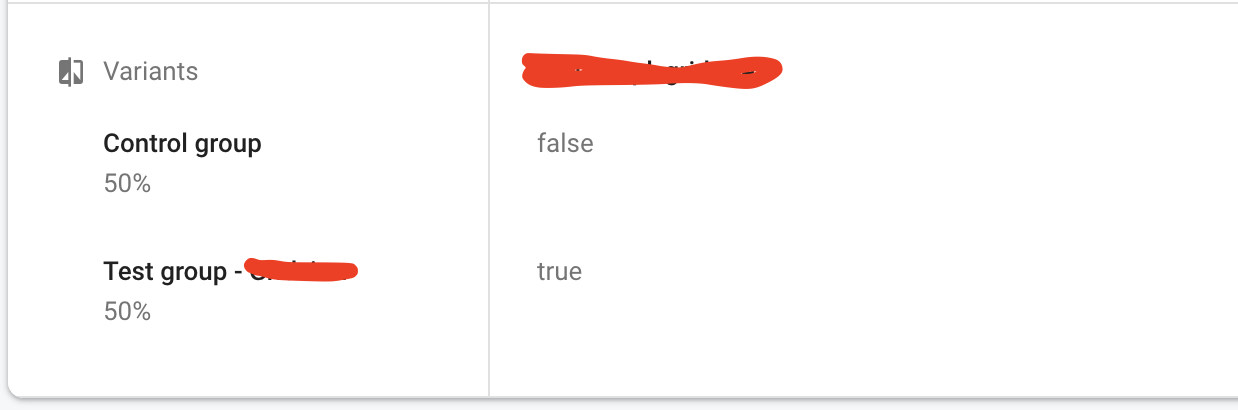
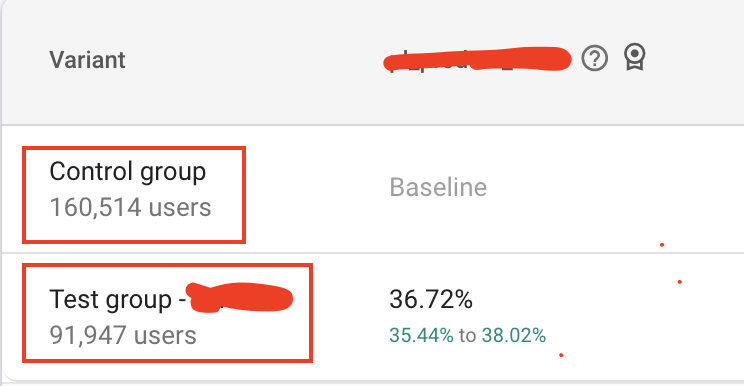
But it usually show wrong number of users in both groups (is not equal to the percentage):
Steps to reproduce:
Run the A/B test for a remote config key. Set control group and test group to 50%.
Wait for several days, see result that not equal.
 phuc-nguyen4-tiki
All 11 comments
I found a few problems with this issue:
- I couldn't figure out how to label this issue, so I've labeled it for a human to triage. Hang tight.
- This issue does not seem to follow the issue template. Make sure you provide all the required information.
 google-oss-bot
on 13 Jan 2020
google-oss-bot
on 13 Jan 2020
Thanks for the report. We are aware of this issue and working on it.
 christibbs
on 12 Feb 2020
christibbs
on 12 Feb 2020
I'm experiencing a similar (but not identical) issue.
I also have an experiment in my app that I configured to have 50% of users set to be in the control group, and 50% in an experimental group. In the firebase console A/B testing page, it looks about correct - it says the groups are currently about 47% vs 53%.
But in my app, I take the result of what remoteConfig gives us and add it to a user property, and it is not evenly distributed. We're seeing about 27% of users in our control group, and 73% of users in our experimental group.
Anecdotally (talking to about 20 users), it seems like about 75% of users are being placed in our experimental group as well.
 zporges
on 13 Feb 2020
zporges
on 13 Feb 2020
@christibbs Thanks a lot, we are depending on Firebase A/B testing. Hope your team can fix asap.
phuc-nguyen4-tiki
on 16 Feb 2020
@christibbs, any update on this? It's been very disruptive for us.
zporges
on 3 Mar 2020
Update on this: sorry for the delay.
The bug is actually in the web console (in aggregating the user count totals). This is being worked on. From what I'm told, you should be able to see accurate data when fetching analytics data from BigQuery. But in production, the correct amount of users are being assigned.
I'll update this issue and close it when the console-side aggregation bug is fixed.
christibbs
on 16 Mar 2020
I actually figured out my issue - I had configured an experiment to go to 50% of users, and I split those users into an experimental group and a control group. But the other 50% of users had the default value of being in the experimental group, which caused us to have a 75/25 split overall. Sorry about that!
zporges
on 16 Mar 2020
@zporges OK, great. Will keep this open for @phuc-nguyen4-tiki's issue.
christibbs
on 16 Mar 2020
@christibbs Great, Hope your team can help us.
phuc-nguyen4-tiki
on 17 Mar 2020
I faced the same issue. For a few days, everything went well, but then users counter froze on approximately 850 users. Any updates?
 alectogeek
on 19 Mar 2020
alectogeek
on 19 Mar 2020
I have a similar issue. I've configured my A/B test and the audience size was let's say, 100 users. However, the experiment is running for two days now and I get 0 users exposed. 😕
 ntemposd
on 19 Aug 2020
ntemposd
on 19 Aug 2020
Related issues
 PierBover
·
3Comments
PierBover
·
3Comments
 ManuelRiegler
·
3Comments
ManuelRiegler
·
3Comments
 lorenzofiamingo
·
3Comments
lorenzofiamingo
·
3Comments
 subdan
·
3Comments
subdan
·
3Comments
 terryworona
·
4Comments
terryworona
·
4Comments
Most helpful comment
I have a similar issue. I've configured my A/B test and the audience size was let's say, 100 users. However, the experiment is running for two days now and I get 0 users exposed. 😕