Firebase-ios-sdk: InAppMessaging does not log expected InstanceId and other info
- Xcode version: 11.2.1
- Firebase SDK version:
 pod 'Firebase'
  pod 'Firebase/InAppMessagingDisplay'
  pod 'Firebase/Analytics'
- Firebase Component:InAppMessaging
- Component version: ???
[REQUIRED] Step 3: Describe the problem
Steps to reproduce:
I am following the steps here for adding messaging: https://firebase.google.com/docs/in-app-messaging/get-started?platform=ios
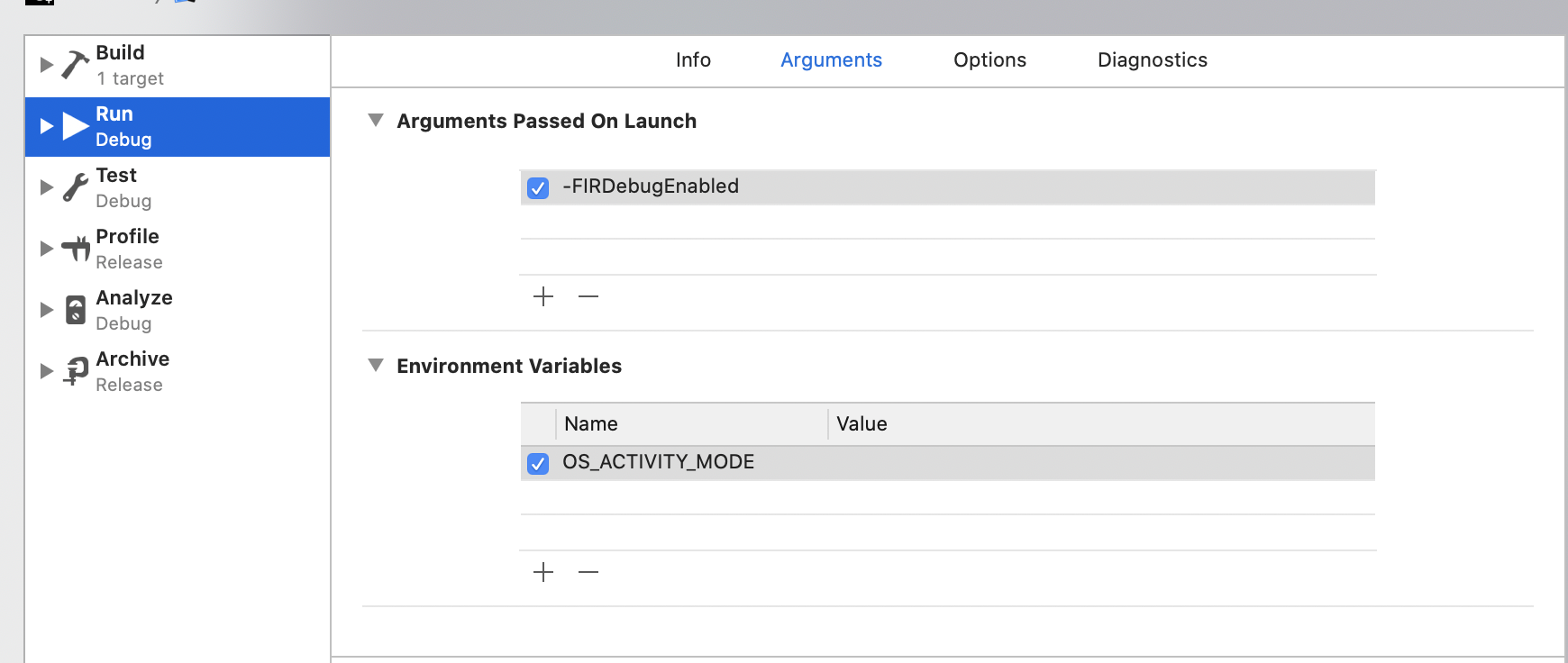
I never see the expected log [Firebase/InAppMessaging][I-IAM180017] Starting InAppMessaging runtime with Instance ID YOUR_APP_ID which identifiers the instance. I have set -FIRDebugEnabled. and configured all other steps. I am expecting this log but do not get it. I have run pod update today.
Relevant Code:
PodFile:
  pod 'Firebase'
  pod 'Firebase/InAppMessagingDisplay'
  pod 'Firebase/Analytics'
AppDelegate:
- (BOOL)application:(UIApplication *)application didFinishLaunchingWithOptions:(NSDictionary *)launchOptions
{

    [FIRApp configure];
//...
Logs:
2019-12-23 13:26:54.560903-0500 myapp[60742:2168236]  - <AppMeasurement>[I-ACS036002] Analytics screen reporting is enabled. Call +[FIRAnalytics setScreenName:setScreenClass:] to set the screen name or override the default screen class name. To disable screen reporting, set the flag FirebaseScreenReportingEnabled to NO (boolean) in the Info.plist
2019-12-23 13:26:54.791965-0500 myapp[60742:2168252] 6.14.0 - [Firebase/Analytics][I-ACS02XXXX] Analytics v.60107000 started
2019-12-23 13:26:54.792130-0500 myapp[60742:2168252] 6.14.0 - [Firebase/Analytics][I-ACS02XXXX] To disable debug logging set the following application argument: -noFIRAnalyticsDebugEnabled (see http://goo.gl/RfcP7r)
2019-12-23 13:26:54.824032-0500 myapp[60742:2168083] Created managed object context
2019-12-23 13:26:54.858805-0500 myapp[60742:2168083] App Launched!
2019-12-23 13:26:56.876107-0500 myapp[60742:2168236] 6.14.0 - [Firebase/InstanceID][I-IID00XXXX] Successfully fetched default token.
 objectiveSee
All 6 comments
I found a few problems with this issue:
- I couldn't figure out how to label this issue, so I've labeled it for a human to triage. Hang tight.
- This issue does not seem to follow the issue template. Make sure you provide all the required information.
 google-oss-bot
on 23 Dec 2019
google-oss-bot
on 23 Dec 2019
Thanks for reporting, @objectiveSee. I noticed that the logs aren't showing when there is an Environment Variable set, but the logs displayed when I removed it. We'll take a look into this.
 rizafran
on 23 Dec 2019
rizafran
on 23 Dec 2019
@objectiveSee Any reason that the OS_ACTIVITY_MODE environment variable is being set?
This works for me in the inappmessaging quickstart, but doesn't if I add the OS_ACTIVITY_MODE environment variable.

 paulb777
on 24 Dec 2019
paulb777
on 24 Dec 2019
Hey @objectiveSee. We need more information to resolve this issue but there hasn't been an update in 7 days. I'm marking the issue as stale and if there are no new updates in the next 3 days I will close it automatically.
If you have more information that will help us get to the bottom of this, just add a comment!
google-oss-bot
on 31 Dec 2019
Since there haven't been any recent updates here, I am going to close this issue.
@objectiveSee if you're still experiencing this problem and want to continue the discussion just leave a comment here and we are happy to re-open this.
google-oss-bot
on 3 Jan 2020
@objectiveSee Any reason that the
OS_ACTIVITY_MODEenvironment variable is being set?This works for me in the inappmessaging quickstart, but doesn't if I add the
OS_ACTIVITY_MODEenvironment variable.
This worked for me, thanks!
 Smnelson13
on 16 Jan 2020
Smnelson13
on 16 Jan 2020
Related issues
 jaschaio
·
3Comments
jaschaio
·
3Comments
 kamechan8
·
3Comments
kamechan8
·
3Comments
 professorbk
·
3Comments
professorbk
·
3Comments
 skuske
·
3Comments
skuske
·
3Comments
 matthieuchappaz
·
3Comments
matthieuchappaz
·
3Comments
Most helpful comment
@objectiveSee Any reason that the
OS_ACTIVITY_MODEenvironment variable is being set?This works for me in the inappmessaging quickstart, but doesn't if I add the
OS_ACTIVITY_MODEenvironment variable.