Firebase-ios-sdk: App Freezes on Main Thread on Xcode 11
Xcode version: 11
Firebase SDK version: 6.9.0
Firebase Component: [DynamicLinks, Messaging]
Component version: [4.0.5, 4.1.5]
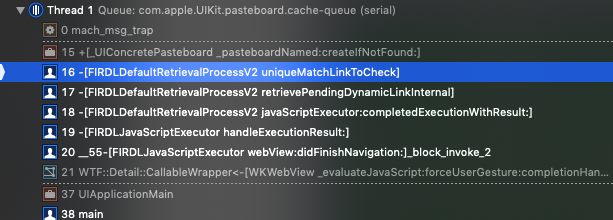
After upgrading to latest version of Firebase, and using it on Xcode 11, sometimes the app freezes, and when I check the main thread appears this:
 iDevid
All 15 comments
I think I know what's going on here, but I'm not sure the best way to go about fixing it.
This is likely due to iCloud clipboard sharing. I've seen this happen in many apps that I use (whether they include Firebase or not). During the startup we read from the clipboard here:
https://github.com/firebase/firebase-ios-sdk/blob/75a8356c98d774743d488f6f03d2a79ed05453b9/Firebase/DynamicLinks/FIRDLDefaultRetrievalProcessV2.m#L273
Looks like this has been reported before with https://openradar.appspot.com/28774309 and https://openradar.appspot.com/28787338 but it's likely we'll have to try some sort of workaround.
cc @dmandar
 ryanwilson
on 27 Sep 2019
ryanwilson
on 27 Sep 2019
@ryanwilson thanks for the update! We are seeing this happen in our app as well and were wondering if there is an ETA on a fix from the Firebase team yet as this is impacting our customers quite a bit?
 tspecht
on 1 Oct 2019
tspecht
on 1 Oct 2019
@tspecht thanks for reporting. We are looking to see if there are any workarounds and if this issue gets resolved in an upcoming iOS version. In the interim, the only workaround is to disable unique match (app preview page), but it relies on basic fingerprinting and is not as reliable.
 dmandar
on 2 Oct 2019
dmandar
on 2 Oct 2019
Just a curiosity, why do you check for the pasteboard contents at startup? :C
iDevid
on 2 Oct 2019
hey 👋 do we have any updates on it? I'm having the same issue.
(Xcode 11.1, latest firebase Pod).
To get rid of I need to uncheck "Automatically Sync Pasteboard" on the simulator
 casevictor
on 16 Oct 2019
casevictor
on 16 Oct 2019
Just a curiosity, why do you check for the pasteboard contents at startup? :C
All the code reading the pasteboard is found here: https://github.com/firebase/firebase-ios-sdk/blob/7c53489e03a2f2a4c4b3d1baad6796fb35719d3c/Firebase/DynamicLinks/FIRDLDefaultRetrievalProcessV2.m#L273
Looks like it's checking to see if it's a dynamic link currently copied on the clipboard in order to determine if it's the same device that triggered the initial link, but @dmandar should be able to provide more context.
hey 👋 do we have any updates on it? I'm having the same issue.
(Xcode 11.1, latest firebase Pod).
I'm not sure there's going to be a whole lot we can do if we are depending on this to match directly at startup. Any ideas @dmandar?
ryanwilson
on 17 Oct 2019
@iDevid this is used to enable unique match. More details here: https://firebase.google.com/docs/dynamic-links/link-previews
@casevictor we have not been able to repro this on our end. Is this happening only on certain set of devices for you? How frequently does this occur?
dmandar
on 19 Oct 2019
Hey, @dmandar, thanks for looking into this 👋I'm only experiencing that issue with simulators (building with Xcode 11.1) and only with "Automatically Sync Pasteboard" checked.
casevictor
on 20 Oct 2019
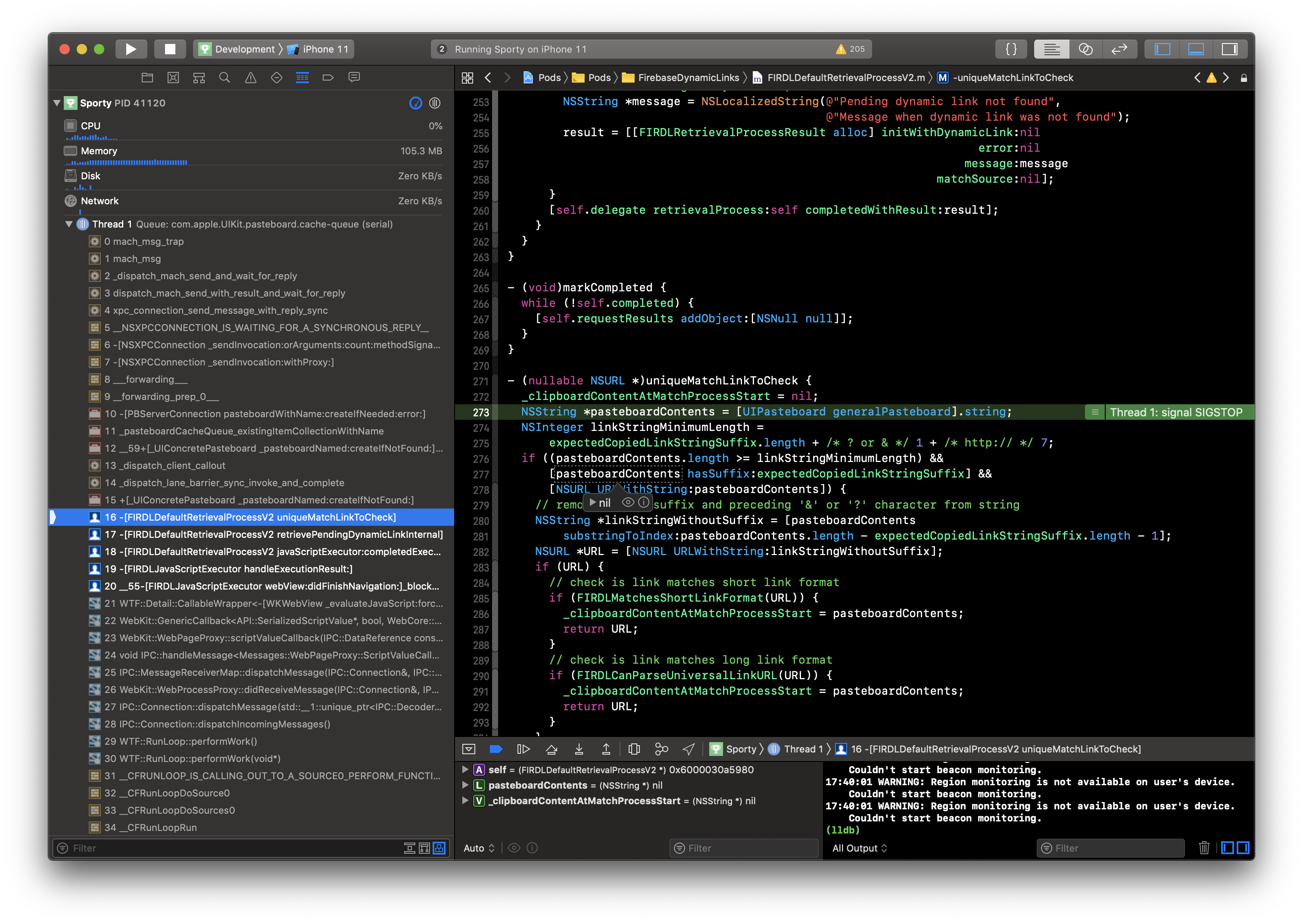
I'm experiencing this issue too. Found that it doesn't depend on iOS SDK: after building with Xcode 10.3 (and command line tools 10.3) it was still freezing for me. Though the built app was launched on iOS 13 Simulator provided by Xcode 11.
Also the firebase version doesn't need to be latest one. Mine is:
- Firebase/DynamicLinks (6.8.1):
- Firebase/CoreOnly
- FirebaseDynamicLinks (~> 4.0.5)
It just happens occasionally. I was not able to find any STR. In my recent case having "Automatically Sync Pasteboard" checked or unchecked didn't make much difference. But relaunching the simulator did help immediately.
My main question is if this is a simulator-only problem or not? I have never experienced this freeze myself while testing on device yet, ~but I have a few reports about app freezing on launch from users, can't check if they related to this freeze or not~.
UPD: The freezes I mentioned above were found to be unrelated to this issue. To me it sounds as a simulator-only problem, at least I hope so.
 vitalii-tym
on 22 Oct 2019
vitalii-tym
on 22 Oct 2019
I'm experiencing this issue too. Please provide an update for this
 HabibAliAtFolio3
on 13 Jan 2020
HabibAliAtFolio3
on 13 Jan 2020
@HabibAliAtFolio3 is it only occurring on the simulator for you as well? FWIW, i was not able to repro this xcode 11.3.1 with iphone 11 simulator. Would appreciate if anybody has a concrete repro case.
dmandar
on 31 Jan 2020
Hey @iDevid. We need more information to resolve this issue but there hasn't been an update in 7 days. I'm marking the issue as stale and if there are no new updates in the next 3 days I will close it automatically.
If you have more information that will help us get to the bottom of this, just add a comment!
 google-oss-bot
on 8 Feb 2020
google-oss-bot
on 8 Feb 2020
@dmandar yes I am getting this issue on simulator. It does not occur every time. It occurs after spending one hour or so and it has something to do with Pasteboard settings of simulator. Keep Automatically Sync pasteboard ON in Edit->Automatically Sync Pasteboard
HabibAliAtFolio3
on 9 Feb 2020
Some helpful people on twitter mentioned that you may be able to work around this issue by disabling Pasteboard sync in the simulator. (1, 2)
defaults write http://com.apple.iphonesimulator PasteboardAutomaticSync -bool false
In the meantime, please continue to file your feedback to Apple.
 morganchen12
on 12 Feb 2020
morganchen12
on 12 Feb 2020
Closing this since the workaround of falling back to fingerprinting will lead to significant debugging headaches (weak match false positives) and disabling pasteboard sync in Simulator seems like a reasonable way to avoid the issue.
morganchen12
on 18 Feb 2020
Related issues
 terryworona
·
4Comments
terryworona
·
4Comments
 henrymoulton
·
3Comments
henrymoulton
·
3Comments
 paulharter
·
3Comments
paulharter
·
3Comments
 ManuelRiegler
·
3Comments
ManuelRiegler
·
3Comments
 jaumard
·
3Comments
jaumard
·
3Comments
Most helpful comment
I'm experiencing this issue too. Found that it doesn't depend on iOS SDK: after building with Xcode 10.3 (and command line tools 10.3) it was still freezing for me. Though the built app was launched on iOS 13 Simulator provided by Xcode 11.
Also the firebase version doesn't need to be latest one. Mine is:
It just happens occasionally. I was not able to find any STR. In my recent case having "Automatically Sync Pasteboard" checked or unchecked didn't make much difference. But relaunching the simulator did help immediately.
My main question is if this is a simulator-only problem or not? I have never experienced this freeze myself while testing on device yet, ~but I have a few reports about app freezing on launch from users, can't check if they related to this freeze or not~.
UPD: The freezes I mentioned above were found to be unrelated to this issue. To me it sounds as a simulator-only problem, at least I hope so.