Firebase-ios-sdk: 'FirebaseCore/FirebaseCore.h' file not found when trying to Archive iOS Project
- Xcode version: 10.1
- Firebase SDK version: Firebase (5.15.0)
- Firebase Component: Core (what it seems to be)
- Component version: _____
Describe the problem
I cant seem to archive my iOS project due to the fact that two errors, the following is what is shown in the logs:
**/Users/omar/Desktop/Xcode/Jama3aV2/Pods/Firebase/CoreOnly/Sources/Firebase.h:1:9: error: 'FirebaseCore/FirebaseCore.h' file not found
import
^
/Users/omar/Desktop/Xcode/Jama3aV2/Jama3aV2/Services/UserService.swift:10:8: error: could not build Objective-C module 'Firebase'
import Firebase**


I can build my project fine when I am simulating it, however when it comes to Archiving it, it is throwing this error. For reference this is my Podfile:

Steps to reproduce:
What happened? How can we make the problem occur? To reproduce this issue, I just changed the device to "Generic iOS Device" and the Product > Archive
Somethings I have done:
- In build settings, I removed armv7 from the Valid Architecture.
- In build settings, under "Enable Modules (C and Objective C)" I made Release == "NO"
- I have tried cleaning, reinstalling and building the project multiple times.
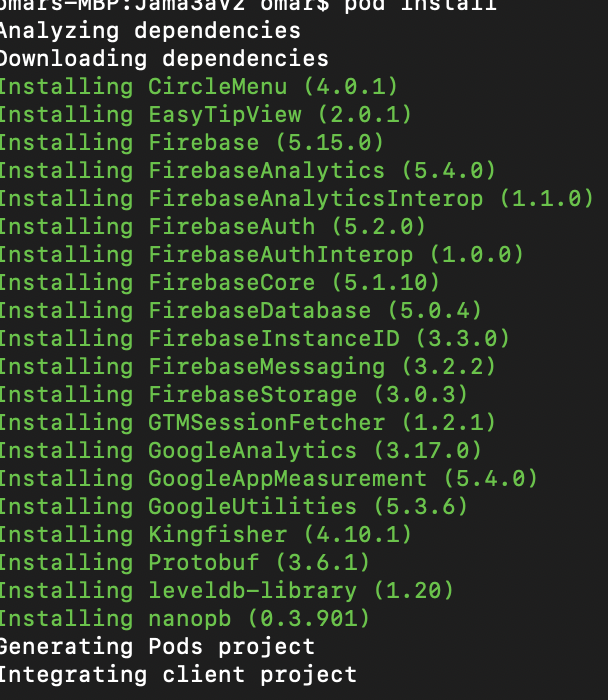
Please help, I have spent at least 8 hours nonstop trying to figure this out and I cant understand why its failing only when I try to archive it. Lastly, The following are the versions of my pods:
 1omarsaid
All 11 comments
I was able to reproduce the issue with the Firebase Messaging quick start app and then able to get past it and successfully archive. The issue seems to be related to bad Xcode state, but I'm not sure what the minimal steps are to solve. The important warning that showed up in the build log:
Target 'Pods-MessagingExample' of project 'Pods' was rejected as an implicit dependency for 'Pods_MessagingExample.framework' because its architectures 'arm64' didn't contain all required architectures 'armv7 arm64'
I initially got it to archive by changing Valid Architectures on to arm64 only. However, that wasn't necessary in the end after the other steps:
close Xcode
rm -rf ~/Library/Developer/Xcode/DerivedData/
pod deintegrate
pod install
restart Xcode
 paulb777
on 4 Jan 2019
paulb777
on 4 Jan 2019
@paulb777 Where were you able to see more fine logging? I tried that but it didnt work either.
1omarsaid
on 4 Jan 2019
@1omarsaid See https://stackoverflow.com/questions/30060898/xcode-how-to-see-build-command-and-log/30084344
paulb777
on 4 Jan 2019
@1omarsaid I'm having the same issue. Any luck resolving this?
 keshavkaul
on 20 Mar 2019
keshavkaul
on 20 Mar 2019
I'm having that issue as well. I tried cleaning Xcode and its caches but it seems to be not working. Any progress?
 vysotsky
on 20 Mar 2019
vysotsky
on 20 Mar 2019
FYI, I switched to the legacy build system in xcode 10 and this issue disappears.
keshavkaul
on 20 Mar 2019
Im having this same issue, i switched to legacy build system but i still receive firebasecore.h not found
 veronesecoms
on 26 Mar 2019
veronesecoms
on 26 Mar 2019
If the steps at https://github.com/firebase/firebase-ios-sdk/issues/2233#issuecomment-451357893, don't work for you, please share a reproducible example.
paulb777
on 26 Mar 2019
Hi, I am also face this issue. But I have fixed error. First goto project folder in ios folder and open profile file you just Commit use_framework. Then delete projectName.xcworkspace, pod folders and profile.lock file. And pod update, pod install finally open project to xcode and build. Easy to solve this issue and fixed.
 Sarathphd
on 10 Jul 2019
Sarathphd
on 10 Jul 2019
Try remove the Podfile.lock file and Pods folder. Run 'pod install'. This working for me
 GabrielScalici
on 16 Jul 2019
GabrielScalici
on 16 Jul 2019
Bonehead move on my part (just came back to project after a break). But the reason I was getting this error is because I was opening "App.xcodeproj/" not "App.xcworkspace/" as a I should have when using Firebase.
Double-check you are opening correct folder!
 aus10powell
on 22 Sep 2019
aus10powell
on 22 Sep 2019
Related issues
 averello
·
4Comments
averello
·
4Comments
 skuske
·
3Comments
skuske
·
3Comments
 matthieuchappaz
·
3Comments
matthieuchappaz
·
3Comments
 mlmcgrath
·
3Comments
mlmcgrath
·
3Comments
 josemssilva
·
4Comments
josemssilva
·
4Comments
Most helpful comment
I was able to reproduce the issue with the Firebase Messaging quick start app and then able to get past it and successfully archive. The issue seems to be related to bad Xcode state, but I'm not sure what the minimal steps are to solve. The important warning that showed up in the build log:
Target 'Pods-MessagingExample' of project 'Pods' was rejected as an implicit dependency for 'Pods_MessagingExample.framework' because its architectures 'arm64' didn't contain all required architectures 'armv7 arm64'I initially got it to archive by changing Valid Architectures on to
arm64only. However, that wasn't necessary in the end after the other steps:close Xcode
rm -rf ~/Library/Developer/Xcode/DerivedData/pod deintegratepod installrestart Xcode