Firebase-ios-sdk: Linker error because symbol _OBJC_CLASS_$_GULAppDelegateSwizzler is not found
Environment
- Xcode version: 10.0 beta 6 (10L232m)
- Firebase (5.6.0)
- FirebaseAnalytics (5.1.1)
- FirebaseAuth (5.0.3)
- FirebaseAuthInterop (1.0.0)
- FirebaseCore (5.1.1)
- FirebaseDynamicLinks (3.0.2)
- FirebaseFirestore (0.13.1)
- FirebaseInstanceID (3.2.1)
- FirebaseMessaging (3.1.0)
- FirebasePerformance (2.1.1)
- GSKStretchyHeaderView (1.0.4)
- GTMSessionFetcher (1.2.0)
- Google-Mobile-Ads-SDK (7.31.0)
- GoogleAppMeasurement (5.1.1)
- GoogleToolboxForMac (2.1.4)
- GoogleUtilities (5.2.2)
Problem
Whenever I try to run the project, it crashes because it cannot find the following symbol __OBJC_CLASS_$_GULAppDelegateSwizzler. The GULAppDelegateSwizzler header file seems to be marked as private in the Pod target.
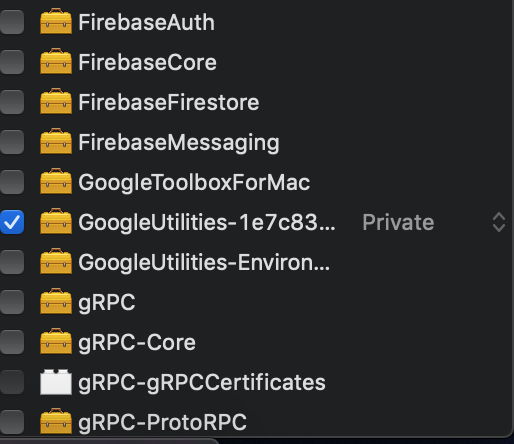
Steps to reproduce:
pod install
build & run project on either the simulator or a device
Relevant Code:
Pod file:
    pod 'FirebaseCore'
    pod 'FirebaseAuth'
    pod 'FirebaseFirestore'
    pod 'FirebaseMessaging'
    pod 'Firebase/Performance'
    pod 'Firebase/AdMob'
    pod 'Firebase/DynamicLinks'
Crash log:
dyld: Symbol not found: _OBJC_CLASS_$_GULAppDelegateSwizzler
  Referenced from: /var/containers/Bundle/Application/AD8EE835-9A64-4D31-A865-AD90422BE9BF/MyApp.app/MyApp
  Expected in: /private/var/containers/Bundle/Application/AD8EE835-9A64-4D31-A865-AD90422BE9BF/MyApp.app/Frameworks/GoogleUtilities.framework/GoogleUtilities
 in /var/containers/Bundle/Application/AD8EE835-9A64-4D31-A865-AD90422BE9BF/Cloudy.app/Cloudy
 cyupa
cyupa
All 27 comments
@cyupa Thanks for the report. We'll investigate. Are you able to test if the same issue occurs with Xcode 9.x?
 paulb777
on 22 Aug 2018
paulb777
on 22 Aug 2018
@paulb777 You're welcome. Hmm... seems to be happening on Xcode 9.4.1 (9F2000) as well now. I'm on mojave 10.14 Beta (18A365a). I'll try with some previous versions of the pods, I've just given Xcode 10 a try and thought it was related, sorry about that, I will come back with more feedback.
Thansk!
cyupa
on 22 Aug 2018
@cyupa Hm, I didn't reproduce with Xcode 9.4.1 on a sample app with those pods. What version of CocoaPods are you using?
Regarding the pods versions, it may be exposed by the Firebase pod reorganization done in Firebase 5.5.0, but definitely want to track down the issue with the current pod structure.
paulb777
on 22 Aug 2018
Hi @cyupa - I haven't been able to reproduce this on Xcode 9.4.1 or on Xcode 10 beta 6 running on MacOS High Sierra (10.13.6) on a clean app using exactly the pods you've listed in your initial report using the latest version of Cocoapods (v.1.5.3).
Like @paulb777 mentioned, what version of cocoapods are you using? Additionally, would you perhaps be able to upload a sample project in which we can reproduce this?
 tejasd
on 23 Aug 2018
tejasd
on 23 Aug 2018
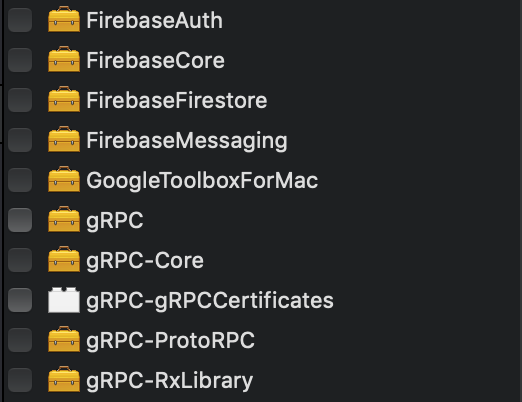
@tejasd @paulb777 I think It was due to the switch from Xcode 9 to 10 plus a pod update that somehow messed up my project. I did a rollback and tried it again and worked. I also no longer have two GoogleUtilities frameworks linked right now, I have none, apparently.
Thanks for reaching out to me, you guys are doing a great job and last but not least thanks for building this great tools.
cyupa
on 23 Aug 2018
I am now having this exact problem. I started working on a widget for my iOS App and now I can't run the app.
 jimijon
on 27 Aug 2018
jimijon
on 27 Aug 2018
@tejasd When adding firebase/firestore to my Widget target I get a linker error.
target 'WIDGET' do
pod 'Firebase/Firestore' <=== no good
end
jimijon
on 28 Aug 2018
@jimijon Try removing ~/Library/Developer/Xcode/DerivedData and do a clean build. If you're still having trouble, we'll need more information to help - at least your Podfile and ideally a reproducible example.
paulb777
on 28 Aug 2018
now I get after pod update, delete derived, complete clean and build:
Check dependencies
error: unable to read module map contents from 'Target Support Files/GoogleUtilities/GoogleUtilities.modulemap': Error Domain=NSCocoaErrorDomain Code=260 "The file “GoogleUtilities.modulemap” couldn’t be opened because there is no such file." UserInfo={NSFilePath=/Users/James/Documents/Development/INDX420/Pods/Target Support Files/GoogleUtilities/GoogleUtilities.modulemap, NSUnderlyingError=0x7fb713ababe0 {Error Domain=NSPOSIXErrorDomain Code=2 "No such file or directory"}}
warning: no umbrella header found for target 'GoogleUtilities', module map will not be generated
Here is the contents of my pod:
source 'https://github.com/CocoaPods/Specs.git'

platform :ios, '9'

workspace 'XX'
project   'XX'

inhibit_all_warnings!
use_frameworks!

abstract_target 'SharedPods' do
    pod 'Alamofire'
    pod 'Sync'

    pod 'RxSwift',    '~> 4.0'
    pod 'RxCocoa',    '~> 4.0'
    pod 'RxDataSources', '~> 3.0'
    pod 'RxAlamofire'
    pod 'RxFirebase/Firestore'
    pod 'RxFirebase/RemoteConfig'
    pod 'Moya/RxSwift', '~> 11.0'
    pod 'CryptoSwift'

    pod 'SwiftyJSON'
    pod 'SwiftyStoreKit'

    pod 'Siren'
    pod 'Groot'
    pod 'PKHUD', '~> 5.0'


    pod 'SwiftCharts', '~> 0.6.1'
    pod 'PieCharts'
    pod 'ChartLegends'
    pod 'PopupDialog'

    pod 'p2.OAuth2'

    pod 'ActionSheetPicker-3.0'
    pod 'Kingfisher'
    pod 'EZLoadingActivity'
    pod 'FeedKit'

    pod 'ChatSDK'
    pod "ChatSDK/UI"
    pod "ChatSDK/FirebaseAdapter"
    pod "ChatSDK/FirebaseFileStorage"
    pod "ChatSDK/FirebasePush"
    pod "ChatSDK/FirebaseSocialLogin"

    pod 'ChatSDKModules/StickerMessage', :path => './ChatSDKModules'
    pod 'ChatSDKModules/KeyboardOverlayOptions', :path => './ChatSDKModules'
    pod 'ChatSDKModules/ContactBook', :path => './ChatSDKModules'

    pod 'CodableFirebase'
    pod 'Crashlytics'

    pod 'Firebase/Firestore'

    pod 'FirebaseUI/Database'
    pod 'FirebaseUI/Google'
    pod 'FirebaseUI/Facebook'
    pod 'FirebaseUI/Twitter'
    pod 'FirebaseUI/Phone'

    target 'XX' do
    end

    target 'WIDGET' do
     pod 'Firebase/Firestore'  # <== if I take this out it build
     pod 'Alamofire'
     pod 'SwiftyJSON'
     pod 'Kingfisher'
     pod 'Moya/RxSwift', '~> 11.0'
    end
@jimijon what version of CocoaPods are you using?
You may find more help on StackOverflow, since your issue seems to be a configuration issue and not a Firebase issue.
 morganchen12
on 28 Aug 2018
morganchen12
on 28 Aug 2018
cocoapods 1.6.0.beta.1
The error could be a red herring I don't really know. Once I tried to use it in my widget, it just never worked with other issues too, depending on what level of old, restore, update, clean, build etc.
Have you successfully built a project with a widget target? Curious.
jimijon
on 28 Aug 2018
@jimijon If you can share a reproducible example, we could take a deeper look.
paulb777
on 30 Aug 2018
Sadly, I'm back to this issue 😞 I'll try to see if I can find a solution. The one above is no longer applicable.
cyupa
on 14 Sep 2018
Here's a git repo that replicates the issue:
https://github.com/cyupa/GooglePodsSwizzle
cyupa
on 15 Sep 2018
@cyupa The Xcode workspace is not buildable by me. I worked through a few errors, but my buffer overflowed. Please verify it works from a clean clone, and post exact instructions to repro. Also, if possible, make it smaller. Make sure you specify the CocoaPods version and Xcode version.
paulb777
on 15 Sep 2018
@paulb777 Sorry, it was 3 AM in the morning on my timezone 😅 I did a clean clone and still get the same issue. I will look into it more today.
Swift 4
Cocoapods 1.6.0.beta.1
Xcode 10 GM
macOS Mojave GM
You run a pod install and then run on a iPhone XS for example.
cyupa
on 15 Sep 2018
As a follow-up, I now tend to believe this is a Cocoapods misconfiguration. I realised that for some reason, the GoogleUtilities framework in the Pods project had Allow app extension API only toggled ON in the target General tab. @jimijon could you please check if this is the case for you as well? Thanks.
cyupa
on 16 Sep 2018
After more investigation I came to the conclusion that it is indeed a Cocoapods issue. Somehow, it doesn't play well with the Google Utilities subspecs (Logging, Environment), but I didn't had time to look more closely into it.
@jimijon, I would go with something like:
source 'https://github.com/CocoaPods/Specs.git'

platform :ios, '9'

workspace 'XX'
project   'XX'

inhibit_all_warnings!
use_frameworks!

abstract_target 'SharedPods' do

  pod 'Alamofire'
  pod 'SwiftyJSON'
  pod 'Kingfisher'
  pod 'Moya/RxSwift', '~> 11.0'

  target 'MyApp' do
    platform :ios, '9.0'
    inherit! :complete
    pod 'Sync'

    pod 'RxSwift',    '~> 4.0'
    pod 'RxCocoa',    '~> 4.0'
    pod 'RxDataSources', '~> 3.0'
    pod 'RxAlamofire'
    pod 'RxFirebase/Firestore'
    pod 'RxFirebase/RemoteConfig'
    pod 'CryptoSwift'

    pod 'SwiftyStoreKit'

    pod 'Siren'
    pod 'Groot'
    pod 'PKHUD', '~> 5.0'


    pod 'SwiftCharts', '~> 0.6.1'
    pod 'PieCharts'
    pod 'ChartLegends'
    pod 'PopupDialog'

    pod 'p2.OAuth2'

    pod 'ActionSheetPicker-3.0'
    pod 'EZLoadingActivity'
    pod 'FeedKit'

    pod 'ChatSDK'
    pod "ChatSDK/UI"
    pod "ChatSDK/FirebaseAdapter"
    pod "ChatSDK/FirebaseFileStorage"
    pod "ChatSDK/FirebasePush"
    pod "ChatSDK/FirebaseSocialLogin"

    pod 'ChatSDKModules/StickerMessage', :path => './ChatSDKModules'
    pod 'ChatSDKModules/KeyboardOverlayOptions', :path => './ChatSDKModules'
    pod 'ChatSDKModules/ContactBook', :path => './ChatSDKModules'

    pod 'CodableFirebase'
    pod 'Crashlytics'

    pod 'Firebase/Firestore'

    pod 'FirebaseUI/Database'
    pod 'FirebaseUI/Google'
    pod 'FirebaseUI/Facebook'
    pod 'FirebaseUI/Twitter'
    pod 'FirebaseUI/Phone'
  end

  target 'XX' do
  platform :SPECIFY YOUR PLATFORM
  inherit! :none
  end

  target 'WIDGET' do
  platform :ios, '9.0'
  inherit! :complete
  end
end
Well since it was for an extension, I wound up using UserDefaults. However, I will try again later if I expand the extension.
thanks
On Sep 16, 2018, at 7:59 AM, Ciprian Redinciuc notifications@github.com wrote:
After more investigation I came to the conclusion that it is indeed a Cocoapods issue. Somehow, it doesn't play well with the Google Utilities subspecs (Logging, Environment), but I didn't had time to look more closely into it.
@jimijon https://github.com/jimijon, I would go with something like:
source 'https://github.com/CocoaPods/Specs.git'
platform :ios, '9'
workspace 'XX'
project 'XX'inhibit_all_warnings!
use_frameworks!abstract_target 'SharedPods' do
pod 'Alamofire'
pod 'SwiftyJSON'
pod 'Kingfisher'
pod 'Moya/RxSwift', '~> 11.0'target 'MyApp' do
platform :ios, '9.0'
inherit! :complete
pod 'Sync'pod 'RxSwift', '~> 4.0' pod 'RxCocoa', '~> 4.0' pod 'RxDataSources', '~> 3.0' pod 'RxAlamofire' pod 'RxFirebase/Firestore' pod 'RxFirebase/RemoteConfig' pod 'CryptoSwift' pod 'SwiftyStoreKit' pod 'Siren' pod 'Groot' pod 'PKHUD', '~> 5.0' pod 'SwiftCharts', '~> 0.6.1' pod 'PieCharts' pod 'ChartLegends' pod 'PopupDialog' pod 'p2.OAuth2' pod 'ActionSheetPicker-3.0' pod 'EZLoadingActivity' pod 'FeedKit' pod 'ChatSDK' pod "ChatSDK/UI" pod "ChatSDK/FirebaseAdapter" pod "ChatSDK/FirebaseFileStorage" pod "ChatSDK/FirebasePush" pod "ChatSDK/FirebaseSocialLogin" pod 'ChatSDKModules/StickerMessage', :path => './ChatSDKModules' pod 'ChatSDKModules/KeyboardOverlayOptions', :path => './ChatSDKModules' pod 'ChatSDKModules/ContactBook', :path => './ChatSDKModules' pod 'CodableFirebase' pod 'Crashlytics' pod 'Firebase/Firestore' pod 'FirebaseUI/Database' pod 'FirebaseUI/Google' pod 'FirebaseUI/Facebook' pod 'FirebaseUI/Twitter' pod 'FirebaseUI/Phone'end
target 'XX' do
platform :SPECIFY YOUR PLATFORM
inherit! :none
endtarget 'WIDGET' do
platform :ios, '9.0'
inherit! :complete
end
end
—
You are receiving this because you were mentioned.
Reply to this email directly, view it on GitHub https://github.com/firebase/firebase-ios-sdk/issues/1733#issuecomment-421761707, or mute the thread https://github.com/notifications/unsubscribe-auth/AA7StRq6MXt_e75miNLWQ6P9qZucKO5Vks5ubks_gaJpZM4WHteT.
jimijon
on 17 Sep 2018
same issue, it happens in cocoa framework (embed framework) with firestore included using pods
 radvansky-tomas
on 7 Nov 2018
radvansky-tomas
on 7 Nov 2018
I encountered the same issue. I created a minimal sample project which demonstrates this issue. It's available here: https://github.com/PatrickNLT/FirebaseSwizzlingSample
- Xcode 10.1
- CocoaPods 1.5.3
@paulb777 don't hesitate to have a look. Thanks! 👍
 PatrickNLT
on 14 Nov 2018
PatrickNLT
on 14 Nov 2018
I just managed to avoid the crash by adding pod 'Firebase/Core' to the framework target as well.
We then get warnings about duplicate implementations of static frameworks. That is actually a known issue (https://github.com/CocoaPods/CocoaPods/issues/5768).
New Podfile:
platform :ios, '9.0'

target 'SwizzlingSample' do
    use_frameworks!

    pod 'Firebase/Core'
    pod 'Firebase/Messaging'

end

target 'SampleFramework' do
    use_frameworks!
    pod 'Firebase/Core'
    pod 'Firebase/Messaging'

end
Which then resolves into this https://github.com/firebase/firebase-ios-sdk/issues/2099#issuecomment-441486960
So in my project I have shared framework and today widget extension. They all use Firebase Core&Auth for basic functionality.
But because of duplicate linking functions like isKindOfClass may fail and result in serious bugs
radvansky-tomas
on 28 Nov 2018
@radvansky-tomas Thanks for tracking this further.
Yes, the duplicate linker errors are potentially serious and should be avoided.
Back to the original problem. I cloned the git repo above and the SwizzlingSample target builds fine for me on Xcode 10.1
paulb777
on 28 Nov 2018
@paulb777 thank you for reply, I am not really solving that particular one, as I now have issue with simple email+pass registration on some of my targets. And its probably due to duplicate linking
radvansky-tomas
on 28 Nov 2018
@paulb777 Yes, it builds. But it crashes at launch.
PatrickNLT
on 29 Nov 2018
@PatrickNLT Sorry I missed that it was a post-launch crash. This is a variation of https://github.com/CocoaPods/CocoaPods/issues/7850 and fixed in CocoaPods 1.6.0. You can either update to the CocoaPods pre-release or continue using the workaround.
paulb777
on 29 Nov 2018
Related issues
 mlmcgrath
·
3Comments
mlmcgrath
·
3Comments
 jlaws
·
4Comments
jlaws
·
4Comments
 WillLewis
·
4Comments
WillLewis
·
4Comments
 aschuch
·
3Comments
aschuch
·
3Comments
 jaschaio
·
3Comments
jaschaio
·
3Comments