Firebase-ios-sdk: Firebase's Deletegate didReceiveRegistrationToken is not called and token is nil
Envroment
- Xcode Version: 9.3.1
- FirebaseSDK version: 4.9.0
- Firebase Component: Messaging
- Component Version: 2.1.0
problem
In-house I am implementing Firebase's fcmToken and sending a push notification.
But firebase 's fcmToken can not be acquired at all, and delegate has never been called.
I investigated it with the same verison as this is a firebase bug or my own project is wrong.
The project created by me can get fcmToken and delegate called.
I'm Very Warried...
If you like, please let me know where the cause for this is involved.
What I tried
- Checked GoogleService-Info.plist (There are three for debug, inhouse, and production)
- Reneual APNs
- Reneual APNsKey
- Reneual Certificate
- Called observerMethod
- Use Swift standard observer and call delegate method of didReceiveRegistrationToken
- Reneual GoogleService-info.plist
- Create SampleProject (Successful acquisition of fcmToken)
 shintard
All 17 comments
Can you share the project that's unable to fetch the fcmToken?
 morganchen12
on 29 May 2018
morganchen12
on 29 May 2018
I don't know why but some days before, firebase was working normal in my project but today it's not working =((((
 Tuanbnm-1194
on 31 May 2018
Tuanbnm-1194
on 31 May 2018
@morganchen12 We can not be shared because of the company's products.
shintard
on 4 Jun 2018
@TuanFram I see. Can you share that project?
shintard
on 4 Jun 2018
Can you share your implementation of FIRMessagingDelegate?
morganchen12
on 4 Jun 2018
i am having the same issue where the didReceiveRegistrationToken delegate function all of a sudden isn't firing anymore...it was just working the other day where i'd see the fcmToken
 ccynn
on 17 Jun 2018
ccynn
on 17 Jun 2018
@ccynn Can it be reproduced by creating a new project?
 omatty198
on 17 Jun 2018
omatty198
on 17 Jun 2018
i just reproduced it and weird...with the new project the didReceiveRegistrationToken does get triggered.
what's the best mode of action here? @omatty198
ccynn
on 17 Jun 2018
Closing this issue since there's not enough information for me to debug. Please feel free to continue commenting here, and if someone shares a reproducible example, I'll re-open the issue.
morganchen12
on 18 Jun 2018
I was struggling with this issue too. Steps to reproduce from my app:
- In UIViewController_1 call
FirebaseApp.configure() - Push UIViewController_2 and set the messaging delegate, i.e.
Messaging.messaging().delegate = self - In UIViewController_2 call
UIApplication.shared.registerForRemoteNotifications()- system alert view should appear; tap accept - In UIViewController_2 listen for device token - send it via Notification from appdelegate to controller
- In UIViewController_2 in method which receives device token call
Messaging.messaging().apnsToken = data
Result: InstanceID.instanceID().token() is nil and nothing from MessagingDelegate is called
However, there is simple workaround for this - looks like you have to set the messaging delegate (Messaging.messaging().delegate = ...) before FirebaseApp.configure()
 pwlkania
on 25 Jun 2018
pwlkania
on 25 Jun 2018
@morganchen12
As I understand didReceiveRegistrationToken method simply doesn't exist at all.
So it seems everything is correct except of the documentation:
https://firebase.google.com/docs/cloud-messaging/ios/client
Fix the documentation please
 gerchicov-bp
on 27 Jul 2018
gerchicov-bp
on 27 Jul 2018
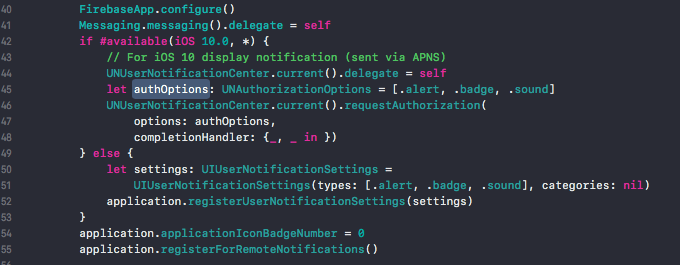
I fixed it. I think I was wrong when I put in the end
FirebaseApp.configure()
Messaging.messaging().delegate = self
And I fixed it as screenshoot below:
 kilirushi
on 28 Nov 2018
kilirushi
on 28 Nov 2018
I fixed it. I think I was wrong when I put in the end
FirebaseApp.configure()
Messaging.messaging().delegate = self
And I fixed it as screenshoot below:
This solved the issue for me. But I can't figure out why this started happening. It was working fine previously.
 shoaibnomani
on 21 Dec 2018
shoaibnomani
on 21 Dec 2018
shoaibnomani, thank you man - you saved my day
 aparandiy
on 4 Jan 2019
aparandiy
on 4 Jan 2019
shoaibnomani, thank you man - you saved my day
It was in fact the solution by @kilirushi if you look above in the thread. It saved me a lot of time as well.
shoaibnomani
on 4 Jan 2019
I fixed it. I think I was wrong when I put in the end
FirebaseApp.configure()
Messaging.messaging().delegate = self
And I fixed it as screenshoot below:
This solved the issue for me. But I can't figure out why this started happening. It was working fine previously.
I think this makes sense you are trying to set up the delegate while firebase engine is not yet ready.
 engasix
on 17 Feb 2019
engasix
on 17 Feb 2019
Firebase need to take some second to connect with server. so i gave 5 second delay.
DispatchQueue.main.asyncAfter(deadline: .now() + .milliseconds(5000)) {
            InstanceID.instanceID().instanceID { (result, error) in
            // Get called
            if let error = error {
                print("Error fetching remote instance ID: \(error)")
            } else if let result = result {

                print("Remote instance ID token: \(result.token)")
                //self.instanceIDTokenMessage.text  = "Remote InstanceID token: \(result.token)"
            }}
        }
 harshad1242
on 3 Oct 2019
harshad1242
on 3 Oct 2019
Related issues
 pot8os
·
4Comments
pot8os
·
4Comments
 kamechan8
·
3Comments
kamechan8
·
3Comments
 aschuch
·
3Comments
aschuch
·
3Comments
 subdan
·
3Comments
subdan
·
3Comments
 jaumard
·
3Comments
jaumard
·
3Comments
Most helpful comment
I was struggling with this issue too. Steps to reproduce from my app:
FirebaseApp.configure()Messaging.messaging().delegate = selfUIApplication.shared.registerForRemoteNotifications()- system alert view should appear; tap acceptMessaging.messaging().apnsToken = dataResult:
InstanceID.instanceID().token()is nil and nothing fromMessagingDelegateis calledHowever, there is simple workaround for this - looks like you have to set the messaging delegate (
Messaging.messaging().delegate = ...) beforeFirebaseApp.configure()