Firebase-ios-sdk: [Firestore] Potential cache issue with Snapshot listener results.
Environment
- Xcode version: 9.3
- Firebase SDK version: 4.11 (also reproduced in 4.4 before updating)
- Firebase Component: Firestore
- Component version: 0.10.4 (also reproduce in 0.8 before update )
Problem
Steps to reproduce:
I have a snapshot listener set up to watch a query. When I delete a record that the query matches.
the listener fires three times. I've confirmed I've only added the listener once. Having the listener fire three times isn't the problem, it's that the results are inconsistent (see output), and it causes the delete record to reappear and then disappear again.
Relevant Code:
Attached listener
// userId, restaurantId, are autogen ids (strings)  checkInTime is a date.
let query =Firestore.firestore().collection("visits").whereField("userId", isEqualTo: userId).whereField("restaurantId", isEqualTo: restaurantId).whereField("checkInTime", isGreaterThanOrEqualTo: startOfDay).order(by: "checkInTime")

let listener = query.addSnapshotListener() { snapshot, error in
                print("LISTENER FIRING!!!!!!!!!")
                print("from cache: \(String(describing: snapshot?.metadata.isFromCache))")
                print("pending writes: \(String(describing: snapshot?.metadata.hasPendingWrites))")
                print("number of records: \(String(describing: snapshot?.documents.count))")
}
Code to delete record from swipe action
func tableView(_ tableView: UITableView, leadingSwipeActionsConfigurationForRowAt indexPath: IndexPath) -> UISwipeActionsConfiguration? {

        let delete = UIContextualAction(style: .destructive, title: "Delete") { (action, view, success:@escaping (Bool) -> Void) in

            let cell = tableView.cellForRow(at: indexPath) as? VisitCell
            guard let visit = cell?.visit else {
                return
            }

            print("going to delete from firebase" )
            Firestore.firestore().collection("visits").document(visit.visitId!).delete(completion: { (error) in
                print("deleted from firebase" )

            })
            success(true)
        }
}
Output of prints()
going to delete from firebase
LISTENER FIRING!!!!!!!!!
from cache: Optional(false)
pending writes: Optional(false)
number of records: Optional(0)

deleted from firebase
LISTENER FIRING!!!!!!!!!
from cache: Optional(true)
pending writes: Optional(false)
number of records: Optional(1)

LISTENER FIRING!!!!!!!!!
from cache: Optional(false)
pending writes: Optional(false)
number of records: Optional(0)
There are 0 records fetched (not from cache) then suddenly 1 record (from cache) then 0 records again the UITableView flickers, the record is removed then shows up again and then disappears right away.
I would expect that the cache should have been updated after the first fetch that wasn't from cache.
 joerozek
All 18 comments
Thanks for the report! I believe this is likely a manifestation of a known issue that we're working on. We'll update here once it's resolved.
@wilhuff I think this will be fixed by b/33446471.
 mikelehen
on 9 Apr 2018
mikelehen
on 9 Apr 2018
Thanks
joerozek
on 9 Apr 2018
I'm having a similar issue where an onSnapshot fires multiple times, the first time with only one of the expected docs, the second time with all of the expected docs. Could this be related?
Note: I'm not writing/deleting any data, this is just when I set up the listener on page load.
 benjaminpwarren
on 18 Apr 2018
benjaminpwarren
on 18 Apr 2018
@benjaminpwarren Hrm. Offhand that doesn't sound like the same issue. The issue this was referring to was specific to deletes. If you could open a separate issue with as much detail (ideally repro code) as you can, that would be great.
mikelehen
on 20 Apr 2018
I am experiencing the exact same issue that @joerozek has reported but on a newer version of the SDK/Firestore. Steps to reproduce are identical.
- Xcode version: 9.3
- Firebase SDK version: 5.0
- Firebase Component: Firestore
- Component version: 0.12.1
 mikegilroy
on 21 May 2018
mikegilroy
on 21 May 2018
@mikegilroy Thanks for the report. This is still a known issue. The root cause is a complicated interaction between the client, the backend, and Firestore Rules. We have a fix planned, but it's a bit involved and we haven't gotten to it yet. For now you can perhaps manage to work around the spurious event by special handling of fromCache=true events (ignore or buffer them or similar). Sorry for the inconvenience!
mikelehen
on 21 May 2018
Is there any known workaround for now other than ignoring fromCache=true events?
 sargunv
on 6 Jun 2018
sargunv
on 6 Jun 2018
@sargunv I used throttling to mask the UI flickering that the multiple responses cause, as I still wanted cached results to come through when the user was offline for example. I set the throttling delay to 0.5 seconds and that seemed to get rid of the flickering in the majority of cases where internet connection was ok. It's not a full-proof solution but it's working as a good mask of the issue until fixed for me. I wrote a blog post on the throttling technique I used if useful too: https://www.craftappco.com/blog/2018/5/30/simple-throttling-in-swift
mikegilroy
on 6 Jun 2018
Same issue here and it's very annoying.
Firestore.firestore().collection("categories").whereField("userId", isEqualTo: currentUser.uid).addSnapshotListener() { (snapshot, error) in
            if let snapshot = snapshot {

                snapshot.documentChanges.forEach({ diff in

                    print(snapshot.metadata.isFromCache, snapshot.metadata.hasPendingWrites)

                    if (diff.type == .added) {
                        print("New: \(diff.document.data())")
                    }

                    if (diff.type == .modified) {
                        print("Modified: \(diff.document.data())")
                    }

                    if (diff.type == .removed) {
                        print("Removed: \(diff.document.data())")
                    }

                })

            }
        }
Result when i delete a category:
false false
Removed: ["description": Test, "name": AAA, "color": #F44336, "userId": XXX, "created": 2018-07-26T18:25:33Z]
true false
New: ["description": Test, "name": AAA, "color": #F44336, "userId": XXX, "created": 2018-07-26T18:25:33Z]
false false
Removed: ["description": Test, "name": AAA, "color": #F44336, "userId": XXX, "created": 2018-07-26T18:25:33Z]
Xcode 10.0 beta 4
Firebase 5.4.1
FirebaseAnalytics 5.0.1
FirebaseAuth 5.0.2
FirebaseCore 5.0.6
FirebaseDatabase 5.0.2
FirebaseFirestore 0.12.6
FirebaseInstanceID 3.1.1
Any idea's?
 sicbb
on 26 Jul 2018
sicbb
on 26 Jul 2018
I believe this issue should be addressed by https://github.com/firebase/firebase-ios-sdk/pull/1622 which has been included in the latest release. I apologize for the long delay. Please holler if you are still seeing issues.
mikelehen
on 7 Aug 2018
@mikelehen Still have an issue. Still it shows recipe even after I deleted it from firestore.
 StackHelp
on 27 Nov 2018
StackHelp
on 27 Nov 2018
@StackHelp Sorry you're running into an issue. If you believe you're seeing a bug in the Firestore iOS SDK, please open a new issue with as much detail as you can including detailed repro instructions. Thanks!
mikelehen
on 27 Nov 2018
Hi, I have the same issue but on Cloud Firestore Plugin for flutter. I am loading through only about a 1000 records and they take up to 30 seconds to a minute sometimes on a 100MBps internet connection to the tablet loading the data
 mayankjanmejay
on 5 Dec 2018
mayankjanmejay
on 5 Dec 2018
I faced the same issue, however it was the problem about indexing😅
The error shows :
UserInfo={NSLocalizedDescription=The query requires an index. You can create it here: https://console.firebase.google.com/project/xxx/database/firestore/indexes?create_index=xxxxxxxxx}
 MasaYanagida
on 8 Feb 2019
MasaYanagida
on 8 Feb 2019
I can confirm seeing these issues as well.
Object {hasPendingWrites: false, fromCache: false}
Object {hasPendingWrites: false, fromCache: true} <-- Faulty.
Object {hasPendingWrites: false, fromCache: false}
 reimertz
on 25 Mar 2019
reimertz
on 25 Mar 2019
@reimertz Please file a new issue with as much information as you can, including what query you're running. We released a fix for the original issue here in August.
When posting the issue it's worth collecting the logs from the SDK, by enabling logging.
 wilhuff
on 26 Mar 2019
wilhuff
on 26 Mar 2019
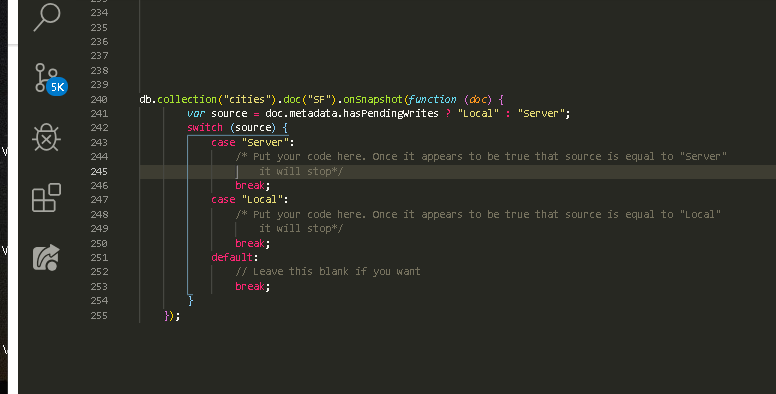
SOLUTION
I just came here simply to check if my solution is correct but I somehow found out the solution:
This work for me 100%. You don't need to detach your listener. You need to break it once local changes is fired.
Why listener appending multiple times or sometime 30x
The problem is because you're trying to listen both LOCAL and SERVER. Put it simply,
listen only to 1 changes
 workpebojot
on 2 Oct 2019
workpebojot
on 2 Oct 2019
Locking responses on this issue since it's gotten mostly off-topic responses. If you're running into a Firestore bug, please file a new issue.
 morganchen12
on 2 Oct 2019
morganchen12
on 2 Oct 2019
Related issues
 skuske
·
3Comments
skuske
·
3Comments
 terryworona
·
4Comments
terryworona
·
4Comments
 aschuch
·
3Comments
aschuch
·
3Comments
 subdan
·
3Comments
subdan
·
3Comments
 josemssilva
·
4Comments
josemssilva
·
4Comments
Most helpful comment
SOLUTION
I just came here simply to check if my solution is correct but I somehow found out the solution:
This work for me 100%. You don't need to detach your listener. You need to break it once local changes is fired.
Why listener appending multiple times or sometime 30x
The problem is because you're trying to listen both LOCAL and SERVER. Put it simply,
listen only to 1 changes