Firebase-ios-sdk: Unable to log in Debug View in Development enviroment
Hi,
I have added firebase analytics in my project. We were able to see logs before but after updating firebase to _pod 'Firebase/Core', '~> 4.0.0'_, I can't see logs in _Debug View_ for my development build. I have enable _-FIRDebugEnabled_ and _-FIRAnalyticsDebugEnabled_

I can see logs in my xcode console as:
[Firebase/Analytics][I-XXXxxxxxx] Debug logging enabled
But in debug View console, I am unable to see the logs as there is no device available.

Please help asap as we have very big event coming in few days.
 priyankamistry09
All 15 comments
Can you post some debug logs that include some events? Thanks
 baolocdo
on 18 Jul 2017
baolocdo
on 18 Jul 2017
Hi I am unable to get any logs in sandbox environment but it is firing in my app store app.

In xcode debug console I am getting this log:
2017-07-20 18:54:58.410 AppName[390]
firebase_screen_id (_si) = 6080386235124801075;
firebase_screen_class (_sc) = AppName.SplashScreenViewController;
firebase_event_origin (_o) = auto;
firebase_realtime (_r) = 1;
firebase_debug (_dbg) = 1;
}
2017-07-20 18:54:58.421557+0530 AppName[390:50717] [Firebase/Analytics][I-ACS023027] Do not schedule an upload task. Task already exists. Will be executed in seconds: -571.0032959580421
priyankamistry09
on 20 Jul 2017
hmm, that's interesting that it is sending in App Store app but not in development. How can the launch arguments get into in store app? Can you show us the Scheme of your app target in development (what kinds of arguments you passed into the app are)?
baolocdo
on 24 Jul 2017
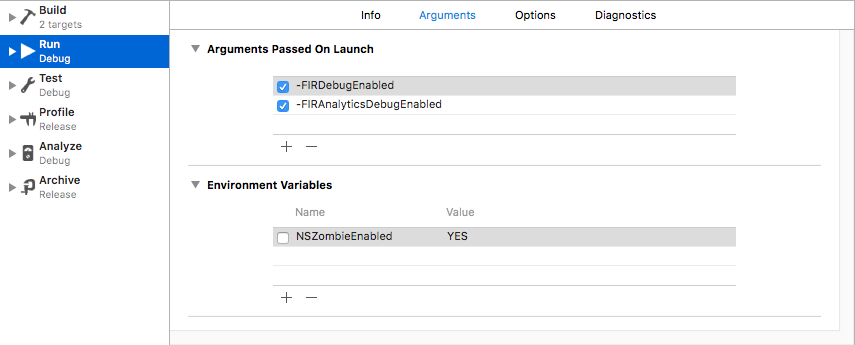
Hi, I am passing two arguments :
"-FIRDebugEnabled" as per this document
"-FIRAnalyticsDebugEnabled" as per log which I am getting in my debug console for enabling firebase debugging.
Here is the screenShot:
priyankamistry09
on 31 Jul 2017
I actually have no idea why it behaves this way. It looks like you are running Debug in Development as shown in your screenshot. Have you tried with a different app like the sample app to see whether they behave similarly?
baolocdo
on 2 Aug 2017
Closing due to lack of activity. Please create another issue if you'd like to continue the conversation.
 paulb777
on 22 Aug 2017
paulb777
on 22 Aug 2017
What solved it for me was setting IS_ANALYTICS_ENABLED to true in the GoogleService-Info.plist file
 ojordann
on 29 Jan 2018
ojordann
on 29 Jan 2018
I am having same issue as @priyankamistry09. I already try @ojordann solutions and does not work. Anyone else with the same problem?
 adrianortuzar
on 11 Jul 2018
adrianortuzar
on 11 Jul 2018
Exact same problem after updating pods... no solution working for me yet
 hIUG
on 11 Jul 2018
hIUG
on 11 Jul 2018
@hIUG @adrianortuzar Can you see the debug log in the console log but not see on the debug view? Also do you have similar issue with having released apps sending events in debug view?
baolocdo
on 11 Jul 2018
@baolocdo @hIUG looks it was a Firebase downtime, also in twitter you can find people complain the same problem. It was a pity loose too many hours in this error. I would like to have some feedback from Firebase when some on the nice tools they have does not work :(
At least now is working fine.
adrianortuzar
on 12 Jul 2018
hi,
I'm facing this same issue. Debug view not showing the events. But in the stream view, I'm seeing the events.
Also in the xcode log, I'm seeing "[Firebase/Analytics][I-ACS031010] Tracking view controller." 2019-07-23 12:34:58.983482+1000 SamFirebaseAnalyticsTest[44855:245373] 6.5.0 - [Firebase/Analytics][I-ACS024000] Debug mode is on
2019-07-23 12:34:59.974433+1000 SamFirebaseAnalyticsTest[44855:245369] 6.5.0 - [Firebase/Analytics][I-ACS023073] Debug mode is enabled. Marking event as debug and real-time. Event name, parameters: first_open (_f), {
So this means my setup is fine? Then why I'm not seeing the device in the Firebase console - > analytics -> DebugView "no devices available".
I tried setting "FIRDebugEnabled" or / and "FIRAnalyticsDebugEnabled" Also made "IS_ANALYTICS_ENABLED" in googleservice plist to YES.
Please help me.
 sampathkumar1988
on 23 Jul 2019
sampathkumar1988
on 23 Jul 2019
Im facing the same problem right now, tried multiple versions for Firebase and can't see my device on DebugView, the logs show me Debug View is enable and sending events Right...
Any solution?
 GraLucena
on 24 Oct 2019
GraLucena
on 24 Oct 2019
@GraLucena Maybe just try with an open network. For me, it not worked in an internal office network and worked when tried with a VPN or open network.
sampathkumar1988
on 25 Oct 2019
Same problem, cannot make it work
 coldmachine
on 3 Nov 2019
coldmachine
on 3 Nov 2019
Related issues
 aschuch
·
3Comments
aschuch
·
3Comments
 mlmcgrath
·
3Comments
mlmcgrath
·
3Comments
 jaschaio
·
3Comments
jaschaio
·
3Comments
 lorenzofiamingo
·
3Comments
lorenzofiamingo
·
3Comments
 henrymoulton
·
3Comments
henrymoulton
·
3Comments
Most helpful comment
What solved it for me was setting
IS_ANALYTICS_ENABLEDto true in theGoogleService-Info.plistfile