Firebase-ios-sdk: Swift unit tests fail to find Firebase module
[REQUIRED] Step 2: Describe your environment
- Xcode version: 8.3
- Firebase SDK version: 4.0
- Library version: 4.0
- Firebase Product: all (auth, database, storage, core, messaging, etc)
[REQUIRED] Step 3: Describe the problem
Steps to reproduce:
Unit tests for Swift projects that import Firebase fail to build
Details in http://stackoverflow.com/questions/38216090/xcode-unit-testing-with-cocoapods/39602648
Reproducible test case at https://github.com/marcelofabri/BrokenFirebase
 paulb777
All 35 comments
It looks like ${PODS_ROOT}/Firebase/Core/Sources is appropriately being added to the regular target's .xcconfig file but not the test .xcconfig file. Trying to figure out if this is on our side, or if I can find issue in Cocoapods.
 ryanwilson
on 26 May 2017
ryanwilson
on 26 May 2017
In the meantime for people seeing this issue, adding ${PODS_ROOT}/Firebase/Core/Sources to the HEADER_SEARCH_PATHS after $(inherited) in your Pods-<ProjectName>Tests.debug.xcconfig should fix the build.
Still investigating.
ryanwilson
on 30 May 2017
Workaround:
- Add
"${PODS_ROOT}/Firebase/Core/Sources"to your Tests target only underBuild Settings -> Header Search Paths
The root cause has to do with our internal build system and I'll track the progress at #58.
ryanwilson
on 2 Jun 2017
As per #58 this issue is resolved with CocoaPods 1.4.0
 JoGoFo-
on 9 Feb 2018
JoGoFo-
on 9 Feb 2018
I've had this problem and I found by running _sudo gem update_ in terminal and then adding _pod 'Firebase'_ to the podfile, I was bale to solve it. Hope this turns out the same for you. Good luck!
 jacobDaurizio
on 15 Nov 2018
jacobDaurizio
on 15 Nov 2018
Actually never mind the problem is back. Are you using Xcode 10?
jacobDaurizio
on 15 Nov 2018
I have the same error.
I fixed using $(SRCROOT)/Pods/Firebase/Core/Sources in the Header Search Path for my test target only.
 flexaddicted
on 19 Nov 2018
flexaddicted
on 19 Nov 2018
How do I do that?
jacobDaurizio
on 20 Nov 2018
Some possible workarounds:
- Use CocoaPods 1.6.0
- Switch to the Xcode Legacy build system
- Add "${PODS_ROOT}/Firebase/CoreOnly/Sources" to the Tests target only under Build Settings -> Header Search Paths
If someone shares a reproducible example, I'll take a deeper look.
paulb777
on 20 Nov 2018
@paulb777 Thanks for the reply.
For some strange reason, using ${PODS_ROOT} does not resolve correctly.
flexaddicted
on 20 Nov 2018
Sorry I’m really new to this. Could you tell me like a step by step like what things to press and where to type in Xcode for the ${PODS_ROOT} things? Your help is greatly appreciated.
jacobDaurizio
on 20 Nov 2018
It's one of the fields in the Build Settings tab of your xcodeproj file.
 morganchen12
on 21 Nov 2018
morganchen12
on 21 Nov 2018
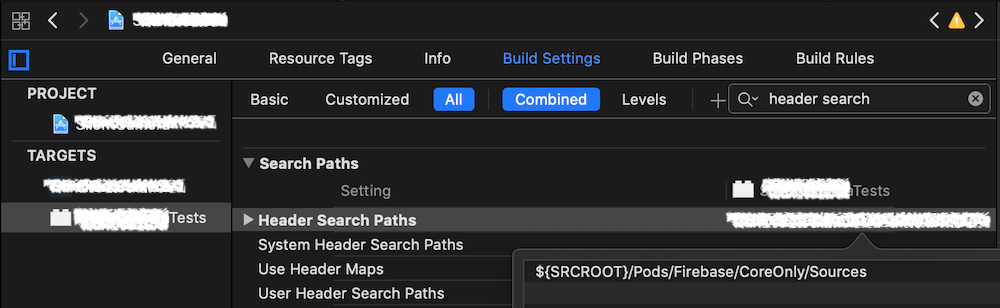
I solved this problem by adding the following settings to the Header Search Path in the test target.
- ${SRCROOT}/Pods/Firebase/CoreOnly/Sources
 shtnkgm
on 24 Dec 2018
shtnkgm
on 24 Dec 2018
This is still happening. Confirmed with CocoaPods 1.6.0. @shtnkgm workaround works. There's a way to set up this search path from the Podfile?
 nebiros
on 12 Feb 2019
nebiros
on 12 Feb 2019
Being the top search result probably makes this the best place to ask, eventhough the issue is closed.
@ryanwilson Issue is still happening. Should we stick to the mentioned workaround?
 andres-cianio
on 8 Mar 2019
andres-cianio
on 8 Mar 2019
Same here, issue still happening on CocoaPods 1.6.0.
Confirming that @shtnkgm workaround was good for me!
 LucaConfa
on 25 Mar 2019
LucaConfa
on 25 Mar 2019
yes we should reopen this issue, still happens
 anonym24
on 31 Mar 2019
anonym24
on 31 Mar 2019
I have

But still I have this issue Missing required module 'Firebase'

anonym24
on 31 Mar 2019
I had to use this temporary solution https://stackoverflow.com/a/40524145/7767664 to fix it
anonym24
on 31 Mar 2019
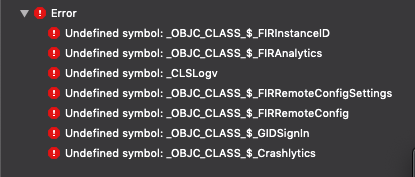
This is still an issue using cocoapods 1.6.2. The above workarounds have not helped me, it complains about the following Undefined Symbols:
 echamussy
on 3 Jun 2019
echamussy
on 3 Jun 2019
@echamussy this is a separate issue from the parent issue. The above issue is resolved with just fixing the header search paths; yours is one where you're missing symbols at link time. Please file a new issue and share a project that reproduces your error.
morganchen12
on 3 Jun 2019
+1
 rashdan
on 19 Jun 2019
rashdan
on 19 Jun 2019
@morganchen12 For me it is still not clear how this could be fixed. Could you please explain how header search paths should be fixed.
I tried several suggestion, but they were not helping.
 ramunasjurgilas
on 8 Jul 2019
ramunasjurgilas
on 8 Jul 2019
@ramunasjurgilas See https://github.com/firebase/firebase-ios-sdk/issues/16#issuecomment-449701843
paulb777
on 8 Jul 2019
I just wanna figure out whose bug it is, firebase? or cocoapods?
 MiZhen007
on 17 Jul 2019
MiZhen007
on 17 Jul 2019
I tested the reproducible test case above with Xcode 10.1 and CocoaPods 1.7.5 and it successfully finds the Firebase module.
We'll need an example that is reproducible with current tools to make more progress.
paulb777
on 23 Jul 2019
Wait so was there a fix? Still happening for me as well.
 ikeller96
on 23 Jul 2019
ikeller96
on 23 Jul 2019
@ikeller96 There was a CocoaPods fix in 1.6.0. If it's still happening for you, we need a repro to investigate.
paulb777
on 23 Jul 2019
@paulb777 I am on CocoaPods version 1.5.3. I'll try updating and see if that works.
ikeller96
on 23 Jul 2019
So @paulb777 I have CocoaPods v 1.6.0 now but I am getting the same error in a different test.
ikeller96
on 25 Jul 2019
Have you tried deleting derived data since installing a new version of CocoaPods?
morganchen12
on 25 Jul 2019
@morganchen12 Yes. Just tried that and I'm still getting the same error.
ikeller96
on 26 Jul 2019
Can you share your project?
morganchen12
on 26 Jul 2019
@morganchen12 This problem was occurring for me during an attempt at a swift 5 migration. Our company has decided to rebuild the app and therefore there will be no more releases so we are no longer going to try the swift 5 migration. Thank you for your help though.
ikeller96
on 30 Jul 2019
Reposting an above reply from anonym24 for the weary traveler:
"I had to use this temporary solution https://stackoverflow.com/a/40524145/7767664 to fix it"
 mikezucc
on 11 Oct 2019
mikezucc
on 11 Oct 2019
Related issues
 aschuch
·
3Comments
aschuch
·
3Comments
 lorenzofiamingo
·
3Comments
lorenzofiamingo
·
3Comments
 henrymoulton
·
3Comments
henrymoulton
·
3Comments
 skuske
·
3Comments
skuske
·
3Comments
 matthieuchappaz
·
3Comments
matthieuchappaz
·
3Comments
Most helpful comment
This is still happening. Confirmed with CocoaPods
1.6.0. @shtnkgm workaround works. There's a way to set up this search path from thePodfile?