Firebase-functions: Authentication bug when trying to send Firebase Cloud Message
Version info
firebase-functions:
0.8.1
firebase-tools:
5.8.1
firebase-admin:
3.17.4
Test case
When trying to send FCM notification, I get unauthorized error.
Steps to reproduce
- clone this repo: https://github.com/dauledk/fcm-functions-bug.git
- change pointer to test firebase repo
- cd functions && npm i
- obtain a registrationToken
- npm run -s build && npm run -s serve
- send request:
curl -X GET \
'http://localhost:5000/eddystone-dev-e4351/us-central1/helloWorld?token=<token-of-reciever-of-notification>' \
Expected behavior
The message will be sent to reciever (token holder).
Actual behavior
An error occurred when trying to authenticate to the FCM servers. Make sure the credential used to authenticate this SDK has the proper permissions. See https://firebase.google.com/docs/admin/setup for setup instructions. Raw server response: "
<HTML>
    <HEAD>
        <TITLE>Unauthorized</TITLE>
    </HEAD>
    <BODY BGCOLOR="#FFFFFF" TEXT="#000000">
        <H1>Unauthorized</H1>
        <H2>Error 401</H2>
    </BODY>
</HTML>
". Status code: 401.
Things done to solve the problem
Since I had issues with authentication before, I tried authentication with json-key-file:
const serviceAccount = require(`${__dirname}/../<path-to-key-file>.json`);
admin.initializeApp({credential: admin.credential.cert(serviceAccount)});
It actually works. Since this is not a good way of authenticating (according to the last issue), I tried running this command export GOOGLE_APPLICATION_CREDENTIALS='./<path-to-file>.json' as recommended by @laurenzlong adn @inlined in the last issue. This does however not solve the problem, I get same error. (I added a npm-scripts command in the functions directory called "bug" where you can see the command).
So now I am lost with authentication once again - hope that you can help me. Please ask for any additional information as needed.
 alexbjorlig
All 7 comments
The suggestion for running export GOOGLE_APPLICATION_CREDENTIALS='./<path-to-file>.json only applies if you have the following code:
admin.initializeApp(functions.config().firebase);
 laurenzlong
on 8 Feb 2018
laurenzlong
on 8 Feb 2018
Thanks for helping :)
Thats why in the repo I am testing this. Plase note that the following combination:
admin.initializeApp(functions.config().firebase);
and
```
export GOOGLE_APPLICATION_CREDENTIALS='./
````
does not work when using FCM (hence the repo).
alexbjorlig
on 8 Feb 2018
Which json file are you pointing to? Where did you download the key file, which service account is it tied to?
laurenzlong
on 8 Feb 2018
In the firebase console: https://console.cloud.google.com/iam-admin/serviceaccounts
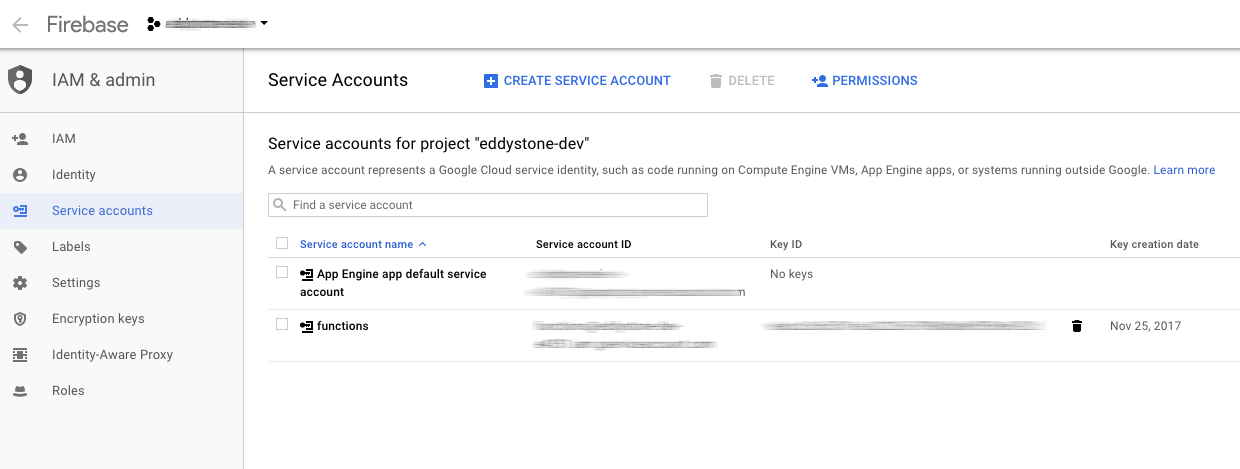
Maybe I should empathise, that when I load the key like this it works
const serviceAccount = require(`${__dirname}/<path-to-key>.json`);
admin.initializeApp({credential: admin.credential.cert(serviceAccount)});
You'll want to download the key from the App Engine app default service account, not the other one that you created.
laurenzlong
on 8 Feb 2018
So I tried exporting the other key - but no success. I then tried to debug the env, to make sure the variable was set. Running printenv GOOGLE_APPLICATION_CREDENTIALS was the magic command showing the real error: the env variable was not set!
I was trying to set this variable with a package.json script, but this did not seem to work?
"key:dev": "export GOOGLE_APPLICATION_CREDENTIALS='./name-of-key.json'",
After runing this with npm npm run -s key:dev, testing with printenv GOOGLE_APPLICATION_CREDENTIALS showed that the variable was not set.
So for now the solution is to run the command (export GOOGLE_APPLICATION_CREDENTIALS='./name-of-key.json') in the terminal and not through npm.
Do you now if it is possible to do this in with npm?
alexbjorlig
on 8 Feb 2018
Sorry, this is a package.json / Node usage question, not a Firebase question. My suggestion was to run it within the terminal.
laurenzlong
on 8 Feb 2018
Related issues
alexbjorlig
·
3Comments
 ArbestNew
·
5Comments
ArbestNew
·
5Comments
 dtruffaut
·
3Comments
dtruffaut
·
3Comments
 adrielwerlich
·
4Comments
adrielwerlich
·
4Comments
 jyosh
·
3Comments
jyosh
·
3Comments