Firebase-functions: Slow execution of (simple) functions
Version info
firebase-functions: 0.8.0
firebase-tools: 3.16.0
firebase-admin: Currently not in use.
Test case
I have just created a simple cloud function:
exports.sayHelloToUser = functions.https.onRequest((req, res) => {
        return res.send("That's a test.");
});
Steps to reproduce
Just create the function - deploy - test.
You can even test my function via the url: https://us-central1-fnx-pbox.cloudfunctions.net/sayHelloToUser
Were you able to successfully deploy your functions?
Yes.
Expected behavior
Due to the fact that the function basically returns a simple string, I expect to get a response within a few milliseconds.
I know that firebase-functions is currently in beta, but I think the execution time, especially of simple functions, shouldn't be that long.
Actual behavior
It depends - sometimes I am getting the response instantly, sometimes I am getting the response after seconds (!!!). Why is there such a high fluctuation?
Log:

 beeirl
All 46 comments
From: https://cloud.google.com/functions/docs/bestpractices/tips
Note: Several of the recommendations in this document center around what is known as a cold start. Functions are stateless, and the execution environment is often initialized from scratch, which is called a cold start. Cold starts are expensive. It is best practice to avoid unnecessary cold starts, and to streamline the cold start process to whatever extent possible (for example, by avoiding unnecessary dependencies).
You can find some context in https://github.com/firebase/firebase-functions/issues/35
 merlinnot
on 4 Jan 2018
merlinnot
on 4 Jan 2018
Thanks for stepping in @merlinnot !
 laurenzlong
on 25 Jan 2018
laurenzlong
on 25 Jan 2018
This answer isn't good enough. If the delay was only due to cold start, then you'd expect to see subsequent calls be performant. That's simply not the case.
Furthermore, the documentation linked by @merlinnot is for GCP Cloud Functions. Since Firebase Functions appear to be a rebranded (and possibly watered-down) version of Cloud Functions, it'd be useful to know what the differences are (especially performance differences).
The Firebase Functions logs lack the debugging tools that developers need to diagnose performance issues on their own. While they can be viewed in the more advanced GCP Logging console, there does not appear to be any detailed Trace capabilities like there are for other GCP offerings.
Edit: Here are some other discussions w/ workarounds which indicate that there are performance improvements that need to be implemented on GCP's end. If developers are spending time on these kinds of hacks and seeing 2-3x performance boosts, it seems like a platform issue.
 erichiggins
on 22 Feb 2018
erichiggins
on 22 Feb 2018
Hey @erichiggins we share the same infrastructure as Google Cloud Functions so the performance characteristics are the same. Everything on that page applies.
We are aware that lack of advanced trace capabilities is a concern, and we are actively working on it.
laurenzlong
on 22 Feb 2018
Thanks @laurenzlong . Great to hear that tracing is being worked on!
Regarding the original issue, is there agreement on your end that more could be done to improve the performance of Firebase Functions from an infrastructure standpoint? If so, is there at least one public ticket open for tracking progress?
erichiggins
on 22 Feb 2018
Here's the public tracker for Google Cloud Functions https://issuetracker.google.com/savedsearches/559729
laurenzlong
on 23 Feb 2018
I'm also encountering a terrible response time from Firebase Functions, the simple "Hello World" example is taking around 2 seconds to respond on average. This makes the platform absolutely unusable in production. Is there any optimizations that we can do to improve it?
The idea behind Firebase Functions looks amazing, we would definitely want to use it in our next project, but performance issue raises very serious concerns right now.
Also, the response time is very unstable. Sometimes it's 2s, sometimes it's 200ms and it fluctuates randomly.
 slavafomin
on 8 Jul 2018
slavafomin
on 8 Jul 2018
Agreed. One use case for an app we're building is accessing a Facebook Graph API edge without a user access token - which means using our app secret in the server environment to handle the API call. Having a long response time for http function triggers means that we'll probably have to look for a solution elsewhere for this sort of API request.
I think the primary use case for HTTP triggers (and the new callable functions thing) is to have a sort of pseudo-api to handle requests you can't handle in-app. These are sorts of situations in which long response times aren't acceptable. For other functions (onCreate triggers, etc) we aren't requesting a response right a way, so the slightly longer wait isn't as big a deal.
 noahtallen
on 12 Jul 2018
noahtallen
on 12 Jul 2018
ugh, I've just implemented a relatively straight-forward function triggered from a realtime db update, and it takes SECONDS, some times many. Unusable.
 pythagoras1357
on 31 Jul 2018
pythagoras1357
on 31 Jul 2018
It looks like multiple instances of a Function are created at run time. Some of them might be in a cold state but some might be already warmed up. So as many requests you have as lower latency will be (less ~2-3sec fluctuations)
 andrew-veresov
on 3 Aug 2018
andrew-veresov
on 3 Aug 2018
My educated guess would be that you're hitting a load balancer, with X (8'ish I'm guessing) nodes behind it, each with their own execution environment and cold starts (after deployment).
 larssn
on 13 Aug 2018
larssn
on 13 Aug 2018
Slow response times happen on every request for me also - its not the "cold start" issue.
I think this issue should be reopened, and only closed when response times are acceptable.
I have a function that sends a few network requests to Firestore, some requests take over 10 seconds.
 enzomd
on 15 Aug 2018
enzomd
on 15 Aug 2018
I can second what @enzomd said. I even wrote a little cron job that pings my function every minute. Despite some 3 seconds wait time, the majority of waiting time for requests still seem very random, averaging at 10-15 seconds. Even the engineering manager for React agrees with us.
I have interacted with a few people at the Firebase team (on SO) and from email support. Based on the replies, I think the team should really face/tackle this issue, instead of just telling us that we need to improve our codebase, or that this is just a trade off.
Firebase is really an amazing platform, and I'm really thankful for the people behind it, so please don't take my comments as criticizing. I simply want the best for Firebase and I really hope the team could eventually solve this issue and make it an even better platform.
 harrisonlo
on 15 Aug 2018
harrisonlo
on 15 Aug 2018
I just updated my function to the node 8 runtime, with 2GB of RAM (even though the GCP web UI says the function only uses 150MB max).
My response times dropped from >10s to around 3 seconds. Still too slow.
enzomd
on 15 Aug 2018
I'm seeing this too. It basically denies the basic promise of the whole platform. We accept certain inconveniences, limitations, costs and risks on the assumption that we'll get performance, scaleability and real time features! And when it doesn't deliver, there is very little we can do except move away.
I have hope this is taken seriously and one day will be given the attention, hardware and bandwidth it deserves.
Why not just throw hardware at it for now!
 buzzware
on 14 Sep 2018
buzzware
on 14 Sep 2018
A few days ago, I implemented a sort of complex cloud function that does a lot of calculation based off of the users "history" in a collection. Kind of an audit sort of thing. On a dry run, it takes about 3 seconds from call to response (it's https callable), which is much better than I thought it would be. So it definitely seems that the feature is getting better, but definitely not in the real-time category yet.
noahtallen
on 14 Sep 2018
Do these tests, if someone serves you. The function returns a simple "hello world" ✌
The first 10 are cold starts.
Make your own conclusions.


 tojacob
on 14 Sep 2018
tojacob
on 14 Sep 2018
I'm in Australia and I also find the Firebase console slow. I'm on Telstra FTTN. Here's a speed check

and here's what I get loading the firebase console database tab in Chrome Canary's network waterfall graph with caching disabled in the browser :

It repeatedly takes about 15 seconds to load everything (not counting the ongoing listening request). 16 of the requests take over 500ms, and 4 of them are over 1s.
Is this normal?
buzzware
on 19 Sep 2018
@buzzware it's better to report a new issue about slow console loading time. This thread is focused on firebase functions/firestore latency issues.
andrew-veresov
on 21 Sep 2018
This is now an issue for my client. I thought I'd try pinging my firebase app server regularly to keep it awake and monitor the response time. Its great to see StackDriver does this (StackDriver is a hidden gem I'm finding).
I created a heartbeat function that simply tries to get a non-existant record from firestore (to wake it up) then returns {success: true} as json.
Attached are the graphs, highlighting different client locations.


Conclusions :
1) When pinging every minute the issue is perhaps more geographic than due to cold starts. You get good results if you are US based, but can still be regularly over 5s for Singapore and Belgium. Perhaps this explains the complaints here that don't seem to be recognised by the dev team - it doesn't happen from where they are.
2) Pinging every 5 minutes gives a worse response (need to investigate further) - probably due to cold starts.
BTW, I regularly see 5 to 10s in occasional use from Western Australia, perhaps including a cold start. We are very close to Singapore, in fact some of our backbone traffic comes from there.
Thought :
Pinging one function in the app doesn't necessarily keep all functions in a project awake. Functions could be deployed on different servers in different datacenters. Perhaps each function could look for a special KeepWarm header that causes it to do nothing. Then I could ping certain critical functions.
buzzware
on 31 Oct 2018
Some early data pinging every 10 minutes

buzzware
on 31 Oct 2018
10 minute intervals

buzzware
on 1 Nov 2018
For comparison, this is loading the index.html every 10 minutes. Where is the CDN ? I was expecting this to be much faster and more consistent.

buzzware
on 2 Nov 2018
Is that last graph firebase Hosting or a cloud function? What's the url
you're hitting?
On Thu, Nov 1, 2018, 6:50 PM Gary McGhee <[email protected] wrote:
For comparison, this is loading the index.html every 10 minutes. Where is
the CDN ? I was expecting this to be much faster and more consistent.
[image: image]
https://user-images.githubusercontent.com/28285/47889371-9dd79200-de84-11e8-93f4-8587f83adf39.png—
You are receiving this because you are subscribed to this thread.
Reply to this email directly, view it on GitHub
https://github.com/firebase/firebase-functions/issues/161#issuecomment-435245283,
or mute the thread
https://github.com/notifications/unsubscribe-auth/AAAD_n53neuAa8GDLQe-caJN2FW24A_Aks5uq6TVgaJpZM4RS4TV
.
 mbleigh
on 2 Nov 2018
mbleigh
on 2 Nov 2018
Yes it is FIrebase hosting. I'm assuming Stackdriver Uptime monitoring only loads the html, not all its references into a browser. The last one is just my domain /index.html. I don't want to specify my domain, but I'll try monitoring the raw google address in case the DNS has anything to do with it. The DNS is Fastly, SF. I think Google should do its own testing from here as I'm not doing anything special and there is clear variability within a geolocation and between geolocations.
The "cold start" response doesn't explain 5 seconds to load a small html file.
"No matter where a user is, content is delivered fast. Files deployed to Firebase Hosting are cached on SSDs at CDN edge servers around the world."
https://firebase.google.com/products/hosting/
buzzware
on 2 Nov 2018
If you're up for sharing more detail privately, my email is my last name at
google.com
On Thu, Nov 1, 2018, 7:10 PM Gary McGhee <[email protected] wrote:
The last one is just my domain /index.html. I don't want to specify my
domain, but I'll try monitoring the raw google address in case the DNS has
anything to do with it.—
You are receiving this because you commented.
Reply to this email directly, view it on GitHub
https://github.com/firebase/firebase-functions/issues/161#issuecomment-435248383,
or mute the thread
https://github.com/notifications/unsubscribe-auth/AAAD_mObbPG6EiTxbtS58BH6yNF3R9neks5uq6l8gaJpZM4RS4TV
.
mbleigh
on 2 Nov 2018
Michael, I appreciate your interest, but I think if any internal person spent an hour creating a firebase project and uptime monitoring in StackDriver, they'd see the same thing. I've spent enough time narrowing it down, and Google needs to take it from here. I want to base my business on Firebase (for 2 present plus future projects), but this issue could be a deal breaker for some things, including one present project. A platform that works for only some projects is annoying. I'm only wanting Firebase to live up to its marketing, which Google obviously has the capability to do. It looks like an oversight (most likely) or a deliberate cost saving (?) strategy.
buzzware
on 2 Nov 2018
I am a Googler, I'm telling you for certain that the latency you're seeing on a static file on Firebase Hosting is unexpectedly high, and I'm asking for more details so that I can help find out what's going on. I'm also doing some of my own analysis, but I can actually go look at specific data to your tests if you give me some more info.
Just trying to help! 👍
mbleigh
on 3 Nov 2018
OK, I'll try and find some time over the weekend to make that test project.
buzzware
on 3 Nov 2018
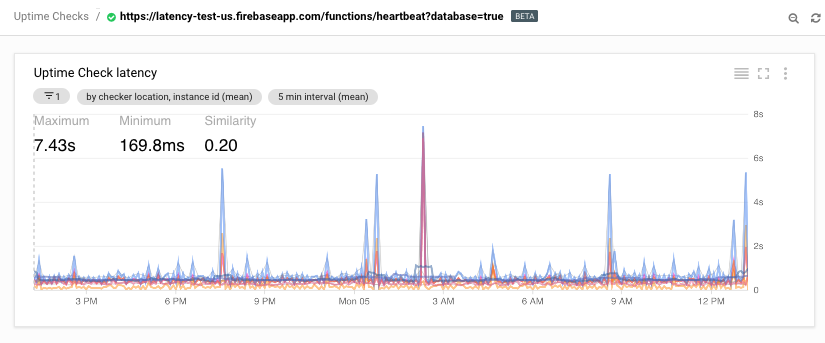
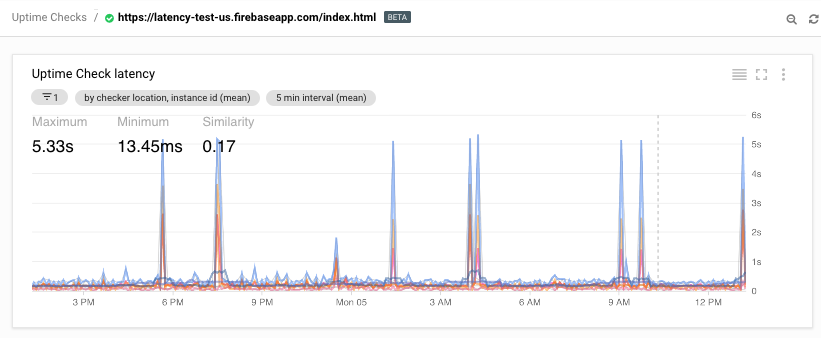
After emails with @mbleigh I've made this test project https://github.com/buzzware/latency-test-us hosted at https://latency-test-us.firebaseapp.com and set up stack driver to monitor index.html (on FB Hosting), heartbeat?database=true and heartbeat?database=false.
I did a quick test with https://www.webpagetest.org eg. https://www.webpagetest.org/result/181104_7X_6f1c3dcd8e83dbdba2dd7c114cb3058e/
and as he says, the latency there is decent (~600ms) including a database request.
The issue may be stackdriver, but I have seen long delays on my projects in Chrome dev tools.
buzzware
on 4 Nov 2018
The domain name/DNS seems to explain the 5+ second peaks.
Firebase domain :

My custom domain, hosted by synergywholesale.com, an Australian registrar with DNS servers in Sydney, Melbourne and CA

These peaks appear on Firebase hosting and functions with my custom domain, but do not appear on a Cloudfront site in Australia, or on any Firebase domain I've tried. This provider's DNS servers give much faster ping times than Google or AWS (except one .co.uk, which is equal) but seems to add these peaks.
I think this means it is not a Google issue.
buzzware
on 5 Nov 2018
Here are the result for that latency-test-us project :

An Australian AWS Cloudfront Site (for comparison) :

buzzware
on 5 Nov 2018
Good sleuthing! Thanks for sharing all of your findings!
On Sun, Nov 4, 2018, 9:17 PM Gary McGhee <[email protected] wrote:
Here are the result for that latency-test-us project :
[image: image]
https://user-images.githubusercontent.com/28285/47979218-cec1fc00-e0fc-11e8-9afc-c912ed3559e5.png[image: image]
https://user-images.githubusercontent.com/28285/47979229-e26d6280-e0fc-11e8-98e9-68f16e38e9ef.png[image: image]
https://user-images.githubusercontent.com/28285/47979243-fd3fd700-e0fc-11e8-9174-75691ffae178.pngAn Australian AWS Cloudfront Site (for comparison) :
[image: image]
https://user-images.githubusercontent.com/28285/47979264-22344a00-e0fd-11e8-8d5b-ccd8193a7c16.png—
You are receiving this because you were mentioned.
Reply to this email directly, view it on GitHub
https://github.com/firebase/firebase-functions/issues/161#issuecomment-435757940,
or mute the thread
https://github.com/notifications/unsubscribe-auth/AAAD_reaS64vM-cvlyDD8kIhNeQxpgrzks5ur8nygaJpZM4RS4TV
.
mbleigh
on 5 Nov 2018
Curious why this issue was closed?
 stevebrush
on 11 Dec 2018
stevebrush
on 11 Dec 2018
@stevebrush It was closed in January. That is a good question, but right now my only issue is the speed with a couple of low traffic sites in development. It seems to perform ok when under load. My issue above turned out to be the DNS.
Can anyone else comment on performance under load? Hopefully I'll have something to report in coming months.
buzzware
on 12 Dec 2018
Hi, I'm based out of Melbourne, Australia. Have hosted my web pages with SiteGround (Singapore) and have linked in with a Firestore database. We're not using Firebase hosting for now. I have a client in Perth, Australia who seems to be having major issues with data loads. The static web pages (hosted in Singapore) load blazingly fast but the data from Firestore takes forever to load - sometimes more than 60 seconds. And there's just 2 documents in the collection that is being queried. Refreshing the page doesn't solve the issue - so we can rule out cold starts.
 anubhavberry
on 31 Jan 2019
anubhavberry
on 31 Jan 2019
Have any of you down in Australia have any experience with performance of the firebase real-time database ( not firestore )?
 emgould
on 21 Feb 2019
emgould
on 21 Feb 2019
I've moved off realtime database. Only using firestore and (slight segway)
have experienced performance issues particularly outside business Melbourne
Sydney business hours. Perth has the worst performance.
On Fri, Feb 22, 2019 at 9:12 AM Eric notifications@github.com wrote:
Have any of you down in Australia have any experience with performance of
the firebase real-time database ( not firestore )?—
You are receiving this because you commented.
Reply to this email directly, view it on GitHub
https://github.com/firebase/firebase-functions/issues/161#issuecomment-466187998,
or mute the thread
https://github.com/notifications/unsubscribe-auth/ABvZ8gJZj9se1rR2VT6GEWlGG02tQ2iTks5vPxm7gaJpZM4RS4TV
.
anubhavberry
on 21 Feb 2019
Thanks for the response. Our use case is ill-suited for firestore. I was just curious how latent/slow it is given it so far from the central us where firebase realtime db is hosted.
emgould
on 21 Feb 2019
When we were using realtime db response was almost comparable to Firestore.
BTW migrating to Firestore is quite easy, it's cheaper, out of beta and is
now available in Australia
On Fri, Feb 22, 2019 at 9:49 AM Eric notifications@github.com wrote:
Thanks for the response. Our use case is ill-suited for firestore. I was
just curious how latent/slow it is given it so far from the central us
where firebase realtime db is hosted.—
You are receiving this because you commented.
Reply to this email directly, view it on GitHub
https://github.com/firebase/firebase-functions/issues/161#issuecomment-466200144,
or mute the thread
https://github.com/notifications/unsubscribe-auth/ABvZ8qoV9vhUlC2jULuKskprE-lltb3Kks5vPyJ-gaJpZM4RS4TV
.
anubhavberry
on 22 Feb 2019
This is still very much an issue. I've been working with firebase / node 8 and simple https callable functions querying small firestore collections for documents containing small paragraphs of text takes between 4 and 10 seconds, with some functions occasionally taking upwards of a minute and timing out. None of these functions implement complex logic or large queries, and my firestore database is quite small.
 couchfault
on 7 Jun 2019
couchfault
on 7 Jun 2019
@couchfault Use express to put all endpoints on one function, then use Stack Driver uptime monitoring and/or Cloud Scheduler to hit an endpoint every minute. I get good consistent times doing this.
buzzware
on 9 Jun 2019
@buzzware Does this cause firebase to cache the function? I'm currently using onCall functions so this would require a refactor. If I can't find a better solution I'll try it. I just finished writing a lazy loader for all my functions to prevent unused functions from being loaded
If I were to refactor everything I might consider going all out and rewriting all the CRUD interfaces in Golang and using Cloud run instead for the performance boost
couchfault
on 10 Jun 2019
The key point they don't tell you is that each exported function in functions/index.js ends up being executed in its own container(s) separate from the others. So waking up one function does not wake up the others, and in development if you don't yet have users and loading your app requires a few firebase functions, there are going to be multiple cold starts.
So putting all endpoints on one function means that when one wakes up, they all wake up.
The functions api is based on express, so its not hard to migrate.
Also, if you set up stackdriver uptime monitoring to hit it every minute, your api will always be awake, you'll have monitoring and you'll still be under the free threshold.
See https://github.com/buzzware/function-split-test
buzzware
on 11 Jun 2019
By combining @buzzware's StackDriver suggestion and writing a lazy loading function, I managed to get most functions to execute in under a second. Thanks! Here's the function I use for anyone who's interested:
const moduleCache = {
    categories: null,
    pages: null,
    stickylinks: null,
    sections: null,
    groups: null,
    calendars: null,
    testimonials: null,
    locations: null,
    guidebios: null,
    maps: null,
    events: null,
    media: null,
    menulinks: null,
    shortlinks: null,
    contact: null,
    images: null,
    cloudinary: null
};

const hotloadFunction = function(functionName, moduleName, moduleFunction) {
    if (!process.env.FUNCTION_NAME || process.env.FUNCTION_NAME === functionName) {
        var module;
        if (moduleCache[moduleName]) {
            module = moduleCache[moduleName];
        } else {
            module = (moduleCache[moduleName] = require('./' + moduleName + '.js'));
        }
        return module[moduleFunction];
    }
    return null;
}
Usage eg:
exports.createCategory = hotloadFunction('createCategory', 'categories', 'create');
It assumes functions are stored in ./$moduleName.js, so tweak accordingly.
couchfault
on 12 Jun 2019
@couchfault really works without side effects?
 kayzenkayzen
on 21 Feb 2020
kayzenkayzen
on 21 Feb 2020
Related issues
 zgosalvez
·
32Comments
zgosalvez
·
32Comments
 m4recek
·
33Comments
m4recek
·
33Comments
 alexbjorlig
·
66Comments
alexbjorlig
·
66Comments
 brianmhunt
·
47Comments
brianmhunt
·
47Comments
 OxyFlax
·
33Comments
OxyFlax
·
33Comments
Most helpful comment
I'm also encountering a terrible response time from Firebase Functions, the simple "Hello World" example is taking around 2 seconds to respond on average. This makes the platform absolutely unusable in production. Is there any optimizations that we can do to improve it?
The idea behind Firebase Functions looks amazing, we would definitely want to use it in our next project, but performance issue raises very serious concerns right now.
Also, the response time is very unstable. Sometimes it's 2s, sometimes it's 200ms and it fluctuates randomly.