Firebase-android-sdk: Firebase Crashlytics: failed for task ':news:uploadCrashlyticsMappingFileRelease'

Hello, our team has been unable to perform local packaging after using Firebase Crashlytics. Every time we start packaging, we will receive a prompt that Firebase failed to upload the mapping file, but our mapping file has not been generated yet, which causes this problem. It’s because FireBase uploads the mapping file too early. What should I do?
 leotyndale
All 17 comments
I couldn't figure out how to label this issue, so I've labeled it for a human to triage. Hang tight.
 google-oss-bot
on 5 Nov 2020
google-oss-bot
on 5 Nov 2020
firebase Crashlytics Plugin Version :'2.1.1',
firebase Crashlytics Version : '17.0.1'
leotyndale
on 5 Nov 2020
Any update on this issue?
FAILURE: Build failed with an exception.
- What went wrong:
Execution failed for task ':APP:uploadCrashlyticsMappingFileRelease'.
> Crashlytics could not find the resource file generated by Google Services. You may need to execute the :processGoogleServices Task. Please check your Firebase project configuration (https://firebase.google.com/docs/android/setup).
 KalaiSelvanG
on 6 Nov 2020
KalaiSelvanG
on 6 Nov 2020
Hello, is there any progress on this question?
leotyndale
on 17 Nov 2020
@leotyndale try add this on app gradle
gradle.taskGraph.whenReady {
tasks.each { task ->
if (task.name.contains("uploadCrashlyticsMappingFile")) {
task.enabled = false
}
}
}
KalaiSelvanG
on 17 Nov 2020
@leotyndale try add this on app gradle
gradle.taskGraph.whenReady {
tasks.each { task ->
if (task.name.contains("uploadCrashlyticsMappingFile")) {
task.enabled = false
}
}
}
@KalaiSelvanG Thank you for your suggestion, but this may cause Firbase Crashlytics to fail to parse out the correct number of code lines and class name.
leotyndale
on 17 Nov 2020
@leotyndale not sure about that will fail or not. As of now this is the one helps to me to assemble the release and I can able to see the reports with appropriate line numbers and class names
KalaiSelvanG
on 17 Nov 2020
@KalaiSelvanG
Thank you, your code is very helpful and can solve my problem.
At the same time, I found another idea from other developers. #2057
I changed a part of the code and plan to try again.
afterEvaluate {
    Task uploadMappingTask = tasks.findByName("uploadCrashlyticsMappingFileRelease")
    if (uploadMappingTask != null) {
        println "find uploadMappingTask"
        Task packageTask = tasks.findByName("packageRelease")
        if (packageTask != null) {
            println "find packageTask"
            uploadMappingTask.mustRunAfter(packageTask)
        }
        Task packageBundleTask = tasks.findByName("packageReleaseBundle")
        if (packageBundleTask != null) {
            println "find packageBundleTask"
            uploadMappingTask.mustRunAfter(packageBundleTask)
        }
    }
}
@leotyndale did that worked?
KalaiSelvanG
on 19 Nov 2020
@leotyndale did that worked?
@KalaiSelvanG Sorry I just saw, It's ok so far.
leotyndale
on 25 Nov 2020
We get the same error since yesterday. Is this related to the Google Outage?
Execution failed for task ':app:uploadCrashlyticsMappingFileDevelopmentRelease'.
> java.io.IOException: Unknown error while sending file, check network [/Users/runner/work/1/s/app/build/crashlytics/DevelopmentRelease/mappings/6793dea943b640f9a460764e5d01ea54.gz; response: 500 HTTP/1.1 500 Internal Server Error]
 harry248
on 15 Dec 2020
harry248
on 15 Dec 2020
It's error may be when in Firebase Crashlytics not enabled for the project yet
 fallGamlet
on 15 Dec 2020
fallGamlet
on 15 Dec 2020
It's error may be when in Firebase Crashlytics not enabled for the project yet
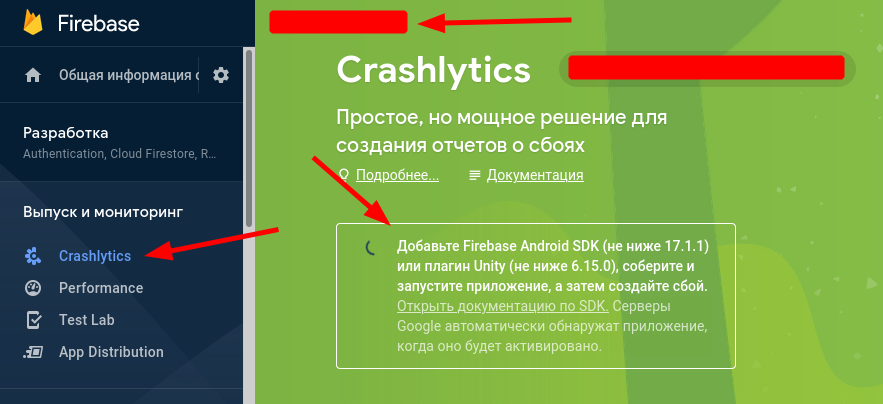
After enable Crashlytics in Firebase project It's error is gone
fallGamlet
on 15 Dec 2020
It's error may be when in Firebase Crashlytics not enabled for the project yet
Nope. We didn't change anything at all and our builds are failing now. Other users are reporting the same issue (see https://github.com/firebase/firebase-android-sdk/issues/2234#issuecomment-745245491)
harry248
on 15 Dec 2020
It's error may be when in Firebase Crashlytics not enabled for the project yet
Nope. We didn't change anything at all and our builds are failing now. Other users are reporting the same issue (see #2234 (comment))
Just check the flag enabled on Crashlytics settings in Firebase project. For my case in my project app has been added long time ago, but Gradle build start throw error only from today
fallGamlet
on 15 Dec 2020
It's error may be when in Firebase Crashlytics not enabled for the project yet
Nope. We didn't change anything at all and our builds are failing now. Other users are reporting the same issue (see #2234 (comment))
Just check the flag enabled on Crashlytics settings in Firebase project. For my case in my project app has been added long time ago, but Gradle build start throw error only from today
You're right - we use flavor specific firebase projects and for that specific project Crashlytics indeed wasn't activated yet. That wasn't a problem until yesterday so maybe they just made it more verbose on their side.
harry248
on 15 Dec 2020
It's error may be when in Firebase Crashlytics not enabled for the project yet
Nope. We didn't change anything at all and our builds are failing now. Other users are reporting the same issue (see #2234 (comment))
Just check the flag enabled on Crashlytics settings in Firebase project. For my case in my project app has been added long time ago, but Gradle build start throw error only from today
You're right - we use flavor specific firebase projects and for that specific project Crashlytics indeed wasn't activated yet. That wasn't a problem until yesterday so maybe they just made it more verbose on their side.
yeah, just checked. Apologies.
 k-farhan
on 15 Dec 2020
k-farhan
on 15 Dec 2020
Related issues
 khammami
·
6Comments
khammami
·
6Comments
 piotrkst
·
5Comments
piotrkst
·
5Comments
 mrsylerpowers
·
3Comments
mrsylerpowers
·
3Comments
 gitton
·
6Comments
gitton
·
6Comments
 miraculix-druids
·
3Comments
miraculix-druids
·
3Comments
Most helpful comment
Nope. We didn't change anything at all and our builds are failing now. Other users are reporting the same issue (see https://github.com/firebase/firebase-android-sdk/issues/2234#issuecomment-745245491)