Firebase-admin-node: ERROR: Request had insufficient authentication scopes for firebase Dynamic link Analytics Rest API
Hi everyone, I get a problem when I call the GET method for firebase dynamic link analytics rest API. Please can anyone help me ? Here is my code my error which get:
const admin = require('firebase-admin');
var request = require("request");const serviceAccount = require('./fserverAccountKey.json');
const credential = admin.credential.cert(serviceAccount);credential.getAccessToken().then((accessTokenInfo) => {
const accessToken = accessTokenInfo.access_token;
const expirationTime = accessTokenInfo.expires_in;
console.log("accessToken " + accessToken );
console.log("expirationTime " +expirationTime);var s = 'Bearer ' + accessToken;
request({
method: 'GET',
headers:{'Authorization': s},
url: 'https://firebasedynamiclinks.googleapis.com/v1/[SHORTLINK]/linkStats',qs: { durationDays: '7' },
}, function(error, response, body) {
console.log(body);
});
});
Here is the error that I get already. and I can't fin the resolve. I search for just 3 days.
accessToken ya29.El_pBGRUPsQIqLbkJ-N3q3NR0ZBCQCT1Gd2spr65eEjjwNpx0NLsz609gG0GlMexW3S1fNjy6aQb_Ef5Nlfu6DkRjJ8gdAzRU6pc-xwY6dKRTIlY6SoHyiox3Cqo0LihFg
expirationTime 3600
{
"error": {
"code": 403,
"message": "Request had insufficient authentication scopes.",
"status": "PERMISSION_DENIED"
}
}
 olzaye
All 25 comments
Hey there! I couldn't figure out what this issue is about, so I've labeled it for a human to triage. Hang tight.
 google-oss-bot
on 19 Oct 2017
google-oss-bot
on 19 Oct 2017
Hmmm this issue does not seem to follow the issue template. Make sure you provide all the required information.
google-oss-bot
on 19 Oct 2017
Hi @olzaye, same issue here.
According to this documentation, I think that this scope https://www.googleapis.com/auth/firebase, must be included in auth/credential.ts for Firebase Dynamic Links API, v1 to work
 chinovader
on 19 Oct 2017
chinovader
on 19 Oct 2017
Hi @chinovader , thank you for your response. I will try it and let you know. I add this scope into serverAccountKey and I still the same error but now what you write make sense. Thank you.
olzaye
on 20 Oct 2017
Hi @olzaye, I have added the scope to the file I mentioned before. You can test it updating the file, <your project folder>/node_modules/firebase-admin/lib/auth/credential.js
This is working for me:
CertCredential.prototype.createAuthJwt_ = function () {
    var claims = {
        scope: [
            'https://www.googleapis.com/auth/firebase', // Add this scope
            'https://www.googleapis.com/auth/firebase.database',
            'https://www.googleapis.com/auth/firebase.messaging',
            'https://www.googleapis.com/auth/identitytoolkit',
            'https://www.googleapis.com/auth/userinfo.email',
        ].join(' '),
    };
Find a copy of the file attached:
credential.js.zip
chinovader
on 20 Oct 2017
Hi @chinovader, I get the same error I put the scope into the credantial.js folder it's not working.
olzaye
on 20 Oct 2017
Hi @olzaye,
Just in case, I have updated my previous comment to make it more clear.
I have tested the possible fix with your code, and it is working well for me (I am using version 5.4.2 of the firebase-admin, by the way).
Have you tried to copy the file attached?
I hope it helps
chinovader
on 20 Oct 2017
Yes, I replace with the current credantial.js or I put to the scope by myself. None of them have fixed my problem. I don't get it I was sure that I missed the scope?
olzaye
on 20 Oct 2017
Here is what I am doing :
1) I open the cmd which is configured.
2) I wrote this to cmd: node C:\Users\olcay.sonmezDesktop\google_access_token.js
3) Before I do this, I already change the credantial.js which you send me.
and after that get the same error.
Shall I change something in google console api or in firebase console ?
olzaye
on 20 Oct 2017
No, no further configuration is needed in google/firebase console.
(Your credentials are correct or else you would see a 401 - UNAUTHENTICATED error)
Can you log the json web token to check if it is correctly generated?
CertCredential.prototype.createAuthJwt_ = function () {
    var claims = {
        scope: [
            'https://www.googleapis.com/auth/firebase',
            'https://www.googleapis.com/auth/firebase.database',
            'https://www.googleapis.com/auth/firebase.messaging',
            'https://www.googleapis.com/auth/identitytoolkit',
            'https://www.googleapis.com/auth/userinfo.email',
        ].join(' '),
    };
    // This method is actually synchronous so we can capture and return the buffer.
    var token =
    jwt.sign(claims, this.certificate_.privateKey, {
        audience: GOOGLE_TOKEN_AUDIENCE,
        expiresIn: ONE_HOUR_IN_SECONDS,
        issuer: this.certificate_.clientEmail,
        algorithm: JWT_ALGORITHM,
    });

    console.log('JWT', token);
    return token;
};
Then, check if the scope is there with https://jwt.io/ for example
It should show something like this:

chinovader
on 20 Oct 2017
I will check it out. But I look what you send me and it looks very different what I get:
My access Token
ya29.El_qBPsgXIYwPnNXsJU0bng_3Dzn4GzERPOsiTgUMyXmF39qli0Q2rSNjjoGEhRjPYb2b0ygZ6jGh476gm5nnYhTT8FCgPYQpo-reBAC912WkgewAnjmymc0aDs13rZIiQ
olzaye
on 20 Oct 2017
That is your access token, that is requested by the lib with a jwt generated previously,
with the proper scope set. What we need to check is the jwt
The credential.getAccessToken() in your code, calls the function createAuthJwt_ in the lib file credential.js. Just copy and paste the code of my previous comment in the proper place of the file credential.js (as you did before to add the scope), and check the output of console.log('JWT', token));
chinovader
on 20 Oct 2017
okay I see, I found the web token right now and there is the scope defined which you said before

olzaye
on 20 Oct 2017
There you have it. I see that the scope https://www.googleapis.com/auth/firebase is still missing.
chinovader
on 20 Oct 2017
But I don't get it, I wrote it. Here

olzaye
on 20 Oct 2017
I don't get it either; it is weird, you have this two scopes
https://www.googleapis.com/auth/firebase
https://www.googleapis.com/auth/firebase.readonly
in the array, but both are missing in the output...
chinovader
on 20 Oct 2017
Can it be on a different path this credential.js file cause I changed inside ProgramFiles/nodejs/...../auth/credential and it's not working? my sample.js is in desktop with the serverAccountKey and this credentail.js is in ProgramFiles folder.
olzaye
on 20 Oct 2017
I am not very used to how does nodejs work in windows platforms. It looks like you have the module installed globally in your system.
Anyway, according to your screenshot, you wrote this line inside the file,
console.log("token " + token);
and your console is displaying the token you show me, right?
token eyJ...
My recommendation is that you always install modules local to your project.
Your project should look like this:
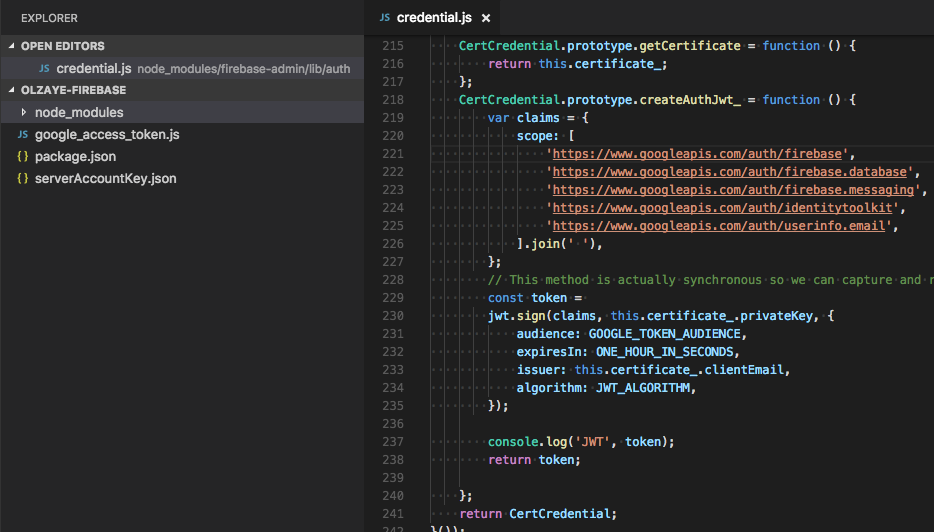
chinovader
on 20 Oct 2017
Yeeeey :) Finally I got my results. I am really glad for your attention. You help a lot. Thank you.
olzaye
on 20 Oct 2017
I am glad to hear that.
Keep in mind that this is a workaround.
Let see what the firebase team says about this issue.
Regards
chinovader
on 20 Oct 2017
We will add the scope to the SDK. But I don't think I can recommend this usage of our Credentials API. It's mainly used by other components in the SDK, and hence have the minimum set of scopes that the SDK requires. Also getAccessToken() is an expensive method when called directly. SDK does some token caching internally, which amortizes this cost. But directly calling it circumvents all that.
 hiranya911
on 20 Oct 2017
hiranya911
on 20 Oct 2017
Also related: https://stackoverflow.com/questions/55232925/google-auth-giving-request-had-insufficient-authentication-scopes-error-while
 katowulf
on 13 Apr 2020
katowulf
on 13 Apr 2020
This is still happening with firebase-amdin 9.2.0, contrary to @hiranya911 statement 'We will add the scope to the SDK'.
Here's what led me here:
- you want to get dynamic link stats for short links generated on the fly (say, user profiles being shared...)
- these don't show up in the FDL dashboard and there's no API call for it in the SDKs, you have to use REST API
- REST API requires an OAuth2 Bearer token
- So, you start coding up a firebase function to wrap the REST API call with all that stuff, knowing you've got admin power...
- You go to use the admin token from functions (
admin.credential.applicationDefault().getAccessToken()) and it gives you this error? It doesn't contain the right scope! - I go to add the scope per comments here (it's in
node_modules/firebase-admin/lib/credential/credential-internal.jsas of this writing by the way) and it works
So, what's the recommended solution here? I mean, I can use patch-package to just hack up the file but that's fragile of course
The REST API document shows you how to mint a brand new token from a specified service account but does not show you how to mint one with the auto-detected service account recommended to use in the cloud functions environment
The cloud functions token generation creates JWTs but not OAuth Bearer-compatible tokens, and doesn't show you how to generate them for custom scopes
:thinking:
 mikehardy
on 27 Sep 2020
mikehardy
on 27 Sep 2020
statement 'We will add the scope to the SDK'.
We decided against adding the scope. Like I said in my last comment, using firebase-admin just for OAuth2 authorization is not a good idea.
So, what's the recommended solution here?
Personally I would recommend https://github.com/googleapis/google-auth-library-nodejs for all OAuth2+REST interactions. But you can also use https://github.com/googleapis/google-api-nodejs-client as shown in the documentation.
The REST API document shows you how to mint a brand new token from a specified service account but does not show you how to mint one with the auto-detected service account recommended to use in the cloud functions environment
There's an example for this at https://github.com/googleapis/google-api-nodejs-client#application-default-credentials
hiranya911
on 28 Sep 2020
@hiranya911 thanks for the reply! Good to hear an authoritative statement, I'll act accordingly
This link (https://github.com/googleapis/google-api-nodejs-client#application-default-credentials) is excellent - I read up quite a bit but did not dive into the API clients as I was thinking this would still be possible with the auto-created Admin token
Seeing the example in that doc and that it supports auto-discovery (so I won't have to twiddle / config which key to use for which environment in my dev/test/stage/prod release train) shows that library is right on target for me, I'll go that way.
Cheers!
Update - implemented + working - here's an implementation, pretty chatty in the log for testing but maybe useful to others:
import * as googleapis from 'googleapis';
import * as rp from 'request-promise-native';

// ...

      let token = '';
      try {
        const auth = new googleapis.Auth.GoogleAuth({
          // Scopes can be specified either as an array or as a single, space-delimited string.
          scopes: ['https://www.googleapis.com/auth/firebase'],
        });
        const maybeToken = await auth.getAccessToken();
        if (!maybeToken) {
          throw new Error('Unable to get token');
        }
        token = maybeToken;

        console.log('got a token: ' + token);
      } catch (error) {
        console.log('Error creating custom token:', error);
      }

      const encodedShortLink = encodeURIComponent(link);
      const options = {
        method: 'GET',
        uri: `https://firebasedynamiclinks.googleapis.com/v1/${encodedShortLink}/linkStats?durationDays=${duration}`,
        gzip: true,
        json: true,
        headers: { Authorization: `Bearer ${token}` },
      };
      let body;
      try {
        body = await rp(options);
      } catch (e) {
        console.log('getProfileLinkStats error: ' + JSON.stringify(e));
        return sendError(res, e.error.error);
      }
      console.log('got link response: ' + JSON.stringify(body, null, 2));
Related issues
 ryanccn
·
21Comments
ryanccn
·
21Comments
 adamduren
·
17Comments
adamduren
·
17Comments
 zgosalvez
·
18Comments
zgosalvez
·
18Comments
 inlined
·
62Comments
inlined
·
62Comments
 umarhussain15
·
22Comments
umarhussain15
·
22Comments
Most helpful comment
We will add the scope to the SDK. But I don't think I can recommend this usage of our Credentials API. It's mainly used by other components in the SDK, and hence have the minimum set of scopes that the SDK requires. Also
getAccessToken()is an expensive method when called directly. SDK does some token caching internally, which amortizes this cost. But directly calling it circumvents all that.