Fiona: Can not install fiona in windows (trying for a days)
building 'fiona._transform' extension
creating build\temp.win32-2.7
creating build\temp.win32-2.7\Release
creating build\temp.win32-2.7\Release\fiona
C:\Users\Progectolab\AppData\Local\Programs\Common\Microsoft\Visual C++ for Python\9.0\VC\Bin\cl.exe /c /nologo /Ox /MD /W3 /GS- /DNDEBUG -Ic:\python27\include -Ic:\python27\PC /Tpfiona/_transform.cpp /Fobuild\temp.win32-2.7\Release\fiona/_transform.obj
_transform.cpp
fiona/_transform.cpp(473) : fatal error C1083: Cannot open include file: 'cpl_conv.h': No such file or directory
error: command 'C:\\Users\\Progectolab\\AppData\\Local\\Programs\\Common\\Microsoft\\Visual C++ for Python\\9.0\\VC\\Bin\\cl.exe' failed with exit status 2
Command "c:python27python.exe -u -c "import setuptools, tokenize;__file__='c:\users\progec~1\appdata\local\temp\pip-5decej-build\setup.py';f=getattr(tokenize, 'open', open)(__file__);code=f.read().replace('\r\n', '\n');f.close();exec(compile(code, _file_, 'exec'))" install --record c:\usersprogec~1\appdata\local\temppip-9qjrbd-record\install-record.txt --single-version-externally-managed --compile" failed with error code 1 in c:\usersprogec~1\appdata\local\temppip-5decej-build\
 sharifulgeo
All 8 comments
Here are the Windows install instructions: https://github.com/Toblerity/Fiona#windows. You won't be able to run pip install fiona on Windows without having the GDAL library installed. I recommend using Gohlke's wheels or getting Fiona with Anaconda and conda-forge.
 sgillies
on 26 May 2017
sgillies
on 26 May 2017
Here are the Windows install instructions: https://github.com/Toblerity/Fiona#windows. You won't be able to run
pip install fionaon Windows without having the GDAL library installed. I recommend using Gohlke's wheels or getting Fiona with Anaconda and conda-forge.
I have GDAL installed it still doesnt work... ^^^^^
 FarFromBoston
on 17 Nov 2018
FarFromBoston
on 17 Nov 2018
@FarFromBoston Directly installing Fiona from sources on Windows requires advanced knowledge. As @sgillies advised, it is strongly recommended! to use prebuilt packages such as https://www.lfd.uci.edu/~gohlke/pythonlibs/
If you insist on doing it yourself, you can look at the windows CI config file: https://github.com/Toblerity/Fiona/blob/master/appveyor.yml
 rbuffat
on 17 Nov 2018
rbuffat
on 17 Nov 2018
@FarFromBoston Directly installing Fiona from sources on Windows requires advanced knowledge. As @sgillies advised, it is strongly recommended! to use prebuilt packages such as https://www.lfd.uci.edu/~gohlke/pythonlibs/
If you insist on doing it yourself, you can look at our windows CI config file: https://github.com/Toblerity/Fiona/blob/master/appveyor.yml
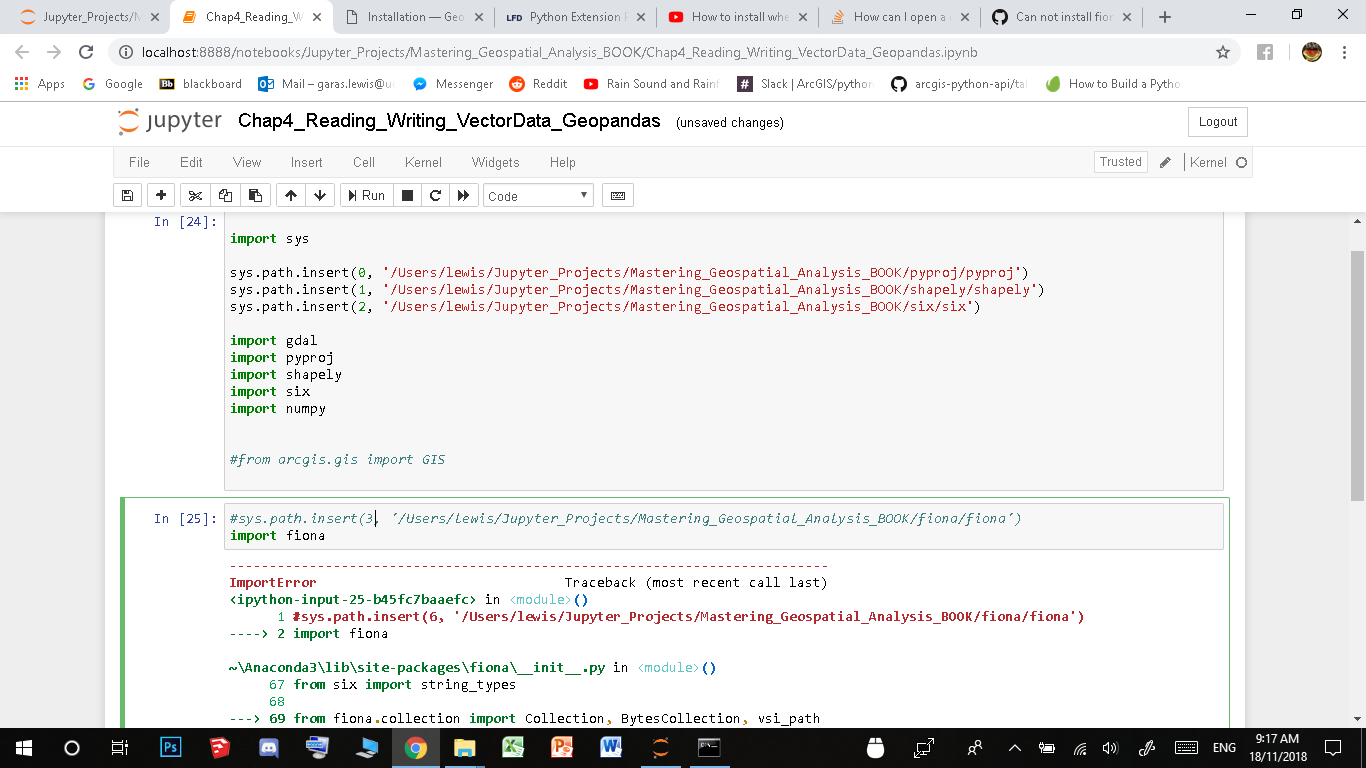
yeh i installed fiona and gdal through "https://www.lfd.uci.edu/~gohlke/pythonlibs/#gdal: successfully in my directory but Fiona still doesnt run.
"
----> 9 from fiona.ogrext import Iterator, ItemsIterator, KeysIterator
10 from fiona.ogrext import Session, WritingSession
11 from fiona.ogrext import (
ImportError: DLL load failed: The specified module could not be found.
"
gdal runs just fine when i import it...
FarFromBoston
on 18 Nov 2018
Oh wait maybe because FIONA needs 3.4 and im using 3.6... Maybe thats it.
"
http://toblerity.org/fiona/README.html#installation
Fiona requires Python 2.6, 2.7, 3.3, or 3.4 and GDAL/OGR 1.8+
"
hmm after installing python34 I cant for some reason install the 34 wheel...
"
c:\Jupyter_Projects\Mastering_Geospatial_Analysis_BOOK>py -3.4 -m pip install Fiona-1.7.13-cp34-cp34m-win_amd64.whl
Fiona-1.7.13-cp34-cp34m-win_amd64.whl is not a supported wheel on this platform.
Storing debug log for failure in C:\Users\lewispippip.log
"
Thats not right.
FarFromBoston
on 18 Nov 2018
Fiona should run fine with Python versions greater 3.4. The Anaconda3 directory indicates that you use Anaconda. Do not mix Gohlke's and Anaconda binary files.
rbuffat
on 18 Nov 2018
Fiona should run fine with Python versions greater 3.4. The Anaconda3 directory indicates that you use Anaconda. Do not mix Gohlke's and Anaconda binary files.
OH! Its looking for FIONA in my Anaconda file directory right....Ok well thats where i need to install the whl files then...
Ok fiona installed correctly and i can import it now.
but now i cant import GEOPANDAS... UGHHHHHHH XD
"
No module named 'fiona.crs'
"

FarFromBoston
on 18 Nov 2018
I don't use Windows or Anaconda, therefore I can be wrong. But if you are using the anaconda python distribution, stick to the binaries provided / made for anaconda., as packages from other sources, e.g. Gohlke, might not be compatible.
Uninstall all packages you installed from Gohlke and use anaconda packages.
rbuffat
on 18 Nov 2018
Related issues
 epifanio
·
4Comments
sgillies
·
4Comments
epifanio
·
4Comments
sgillies
·
4Comments
 mmngreco
·
4Comments
mmngreco
·
4Comments
 mdklatt
·
6Comments
sgillies
·
4Comments
mdklatt
·
6Comments
sgillies
·
4Comments