Filesaver.js: Save As dialog on Chrome won't launch if another FileSaver "Save As..." dialog is pending
Not sure if this is a bug in Chrome or FileSaver. The issue occurs on Chrome when it is configured to ask the user where to save downloaded files to. If you have two simultaneous FileSaver web workers running and one goes to save a file, the "Save As..." dialog correctly appears. While that dialog is pending (no location chosen yet), if the 2nd thread goes to save a file the dialog does not (and will never) appear. Chrome shows the download pending with 100% progress but there is no way to save the file.
You can reproduce this on the demo page by adding code that triggers the click() event on all of the "Save" buttons at the same time. Any thoughts on how to fix?
 bholyfield
All 6 comments
I am having the same issue! It does not seem to be an issue in Chrome on WIN as all the Save dialogues are stacked on top of each other. But in Chrome (49.0.2623.112 -64-bit) on Mac (Mac OS 10.10) the save dialogue is not opened until you close the first - the files are downloaded but as stated by @bholyfield the files are not accessible.
 henninghov
on 20 Apr 2016
henninghov
on 20 Apr 2016
What i did on my app was to zip all the things that needed to be downloaded first with JSZip then i saved that. Perhaps not what you are looking for, but removes the hassle of showing multiple "Save as... window"
 jimmywarting
on 26 May 2016
jimmywarting
on 26 May 2016
@bholyfield is this still an issue or has Google fixed it?
 Ruffio
on 29 Jul 2017
Ruffio
on 29 Jul 2017
@Ruffio from what I experienced today, Chrome comes up with a warning:
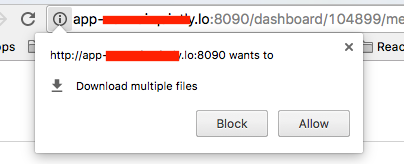
Still wondering if it is usable in production cause I don't know if the users are able to chose the right decision here. If they pick wrong they might wonder why a download does not get triggered under certain circumstances.
Also once they clicked blocked, all following automatic downloads are being suppressed
 larrydahooster
on 6 Sep 2017
larrydahooster
on 6 Sep 2017
Is this still an issue? When reading the aboe, it looks like this is the implementation/restriction of Chrome that can't be circumvented. As suggested above, consider to save the files into a zip file in order to avoid this issue.
Ruffio
on 23 Jan 2018
For me it was a showstopper for this reasons:
You can't access the permissions in chrome (or other browsers). If a user blocked it, you can't offer fallbacks. Telling a client that he needs to access his browser permissions in order to get his downloads does not work well for me.
The mentioned 'zip-file' fallback does not work for me as we allow multiple asynchronous file generations at the same time (data gets generated on server-side). Even making them synchronous in a queue style does not work, cause you have no control over the file-download-dialogue. So you don't get the correct callbacks that you would need to start the next job in queue after one file finished it's interaction with the download-dialogue.
After some evaluation we changed the backend to generate the files on the server and we just return a url to that file. Much easier to auto-download these files by opening a new tab.
I think filesaver might work out for cases where the file download is not connected with async server requests, but for us it didn't work out. Thus I appreciate the effort of this library, I think you will have to face stricter browser restrictions over time. Cause they want to prevent this automatic downloads for a security reason I fully understand.
larrydahooster
on 23 Jan 2018
Related issues
 danielbronder
·
6Comments
danielbronder
·
6Comments
 rhyous
·
6Comments
rhyous
·
6Comments
 MFEKN
·
5Comments
MFEKN
·
5Comments
 Toterbiber
·
5Comments
Toterbiber
·
5Comments
 josepoma
·
4Comments
josepoma
·
4Comments
Most helpful comment
I am having the same issue! It does not seem to be an issue in Chrome on WIN as all the Save dialogues are stacked on top of each other. But in Chrome (49.0.2623.112 -64-bit) on Mac (Mac OS 10.10) the save dialogue is not opened until you close the first - the files are downloaded but as stated by @bholyfield the files are not accessible.